Real CKA Question 3 of 17: Check Node Resources and Calculate Fair Pod Allocation
Blindly assigning CPU and memory is sloppy engineering. Kubernetes nodes already expose their allocatable resources. The correct approach…
Real CKA Question 3 of 17: Check Node Resources and Calculate Fair Pod Allocation
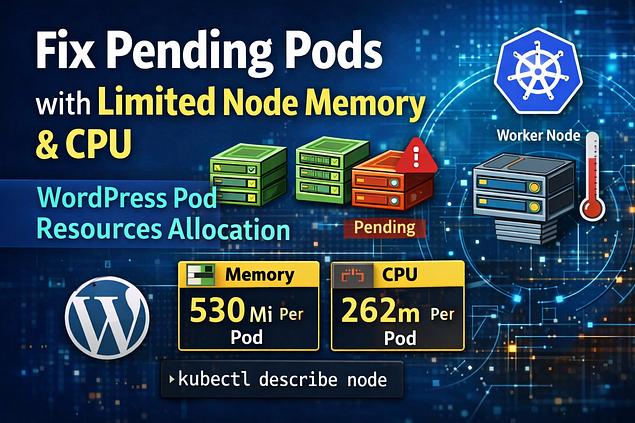
Blindly assigning CPU and memory is sloppy engineering. Kubernetes nodes already expose their allocatable resources. The correct approach is inspect the node → calculate safe overhead → divide remaining resources across pods.
This walkthrough shows the complete flow from checking node capacity to applying calculated resources to the WordPress deployment.
Press enter or click to view image in full size
Previous Questions in the CKA Series
👉 Question 1 of 17 — Create a Horizontal Pod Autoscaler (HPA) Read the full article here
👉 Question 2 of 17 — Install ArgoCD Using Helm Without Installing CRDs Read the full article here
You can watch the complete implementation video below
[embed]
Step 1: Verify Deployment Status
Check the deployment.
kubectl get deploy wordpressExample output:
NAME        READY   UP-TO-DATE   AVAILABLE   AGE
wordpress   2/3     3            2           10m
This shows:
- Desired replicas: 3
- Running pods: 2
The third pod cannot be scheduled due to insufficient resources.
Step 2: Confirm Pod Status
Check pods in the cluster.
kubectl get podsExample output:
NAME                         READY   STATUS    RESTARTS   AGE
wordpress-7c9f6b9c7f-kp2dl   1/1     Running   0          5m
wordpress-7c9f6b9c7f-l9p4n   1/1     Running   0          5m
wordpress-7c9f6b9c7f-q7zsj   0/1     Pending   0          5m
The third pod is Pending.
Step 3: Identify the Scheduling Problem
Describe the pending pod.
kubectl describe pod wordpress-7c9f6b9c7f-q7zsjExample event:
0/1 nodes are available: insufficient cpu, insufficient memoryThis confirms the node cannot schedule the third pod, so we must redistribute resources.
Step 4: Check Node Resources
First inspect the node capacity and allocatable resources.
kubectl describe node | grep -A5 AllocatableExample output:
Allocatable:
  cpu:                1000m
  memory:             1912960Ki
You can also view node capacity quickly with:
kubectl top nodeor
kubectl describe node <node-name>Step 5: Scale Down the WordPress Deployment
Stop all running pods before editing resources.
kubectl scale deployment wordpress --replicas=0Step 6: Convert Node Memory
Node memory is shown in Ki (Kibibytes). Convert it to Mi (Megabytes).
expr 1912960 / 1024Result:
1868 MiStep 7: Subtract System Usage
Reserve memory already used by the system.
expr 1868 - 100Result:
1768 MiStep 8: Reserve 10% Safety Overhead
Nodes should never run at 100% capacity.
expr "1768 * 0.10" | bcResult:
176 MiStep 9: Calculate Allocatable Memory
expr 1768 - 176Result:
1592 MiStep 10: Divide Memory Across 3 Pods
expr 1592 / 3Result:
530 Mi per podStep 11: Calculate CPU Allocation
Node CPU:
1000mSubtract system usage:
expr 1000 - 125Result:
875mStep 12: Reserve 10% CPU Overhead
expr "875 * 0.10" | bcResult:
87mStep 13: Calculate Allocatable CPU
expr 875 - 87Result:
788mStep 14: Divide CPU Across 3 Pods
expr 788 / 3Result:
262m CPU per podFinal Resource Allocation Per Pod
Resource Value: CPU262m Memory530Mi
Step 15: Edit the Deployment
Open the deployment configuration.
kubectl edit deployment wordpressSet identical resources for both init containers and main containers.
resources:
  requests:
    cpu: "262m"
    memory: "530Mi"
  limits:
    cpu: "262m"
    memory: "530Mi"
Ensure the same configuration exists under:
initContainerscontainers
Step 16: Scale Deployment Back to 3 Pods
kubectl scale deployment wordpress --replicas=3Step 17: Verify All Pods Run Successfully
kubectl get podsExpected output:
wordpress-xxxxx   1/1   Running
wordpress-xxxxx   1/1   Running
wordpress-xxxxx   1/1   Running
All 3 pods should now schedule successfully because resources were calculated correctly.
Final Commands Summary
kubectl describe node
kubectl scale deploy wordpress --replicas=0
kubectl edit deploy wordpress
kubectl scale deploy wordpress --replicas=3
kubectl get pods
A small reality check most people ignore: Kubernetes doesn’t magically protect your node from bad resource math. If you assign pods more resources than a node can safely provide, the scheduler still tries, and the node eventually collapses under pressure. The real skill isn’t memorizing commands — it’s understanding the resource economics of a cluster.
메타데이터
- post_id
- a92eb3ef0427
- slug
- real-cka-question-3-of-17-check-node-resources-and-calculate-fair-pod-allocation-a92eb3ef0427
- url
- https://medium.com/@tradingcontentdrive/real-cka-question-3-of-17-check-node-resources-and-calculate-fair-pod-allocation-a92eb3ef0427
- canonical_url
- https://medium.com/@tradingcontentdrive/real-cka-question-3-of-17-check-node-resources-and-calculate-fair-pod-allocation-a92eb3ef0427
- author_url
- https://medium.com/@tradingcontentdrive
- status
- ok
- fetched_at
- 2026-06-10 15:53:41