Stop Using AI in a Browser Tab: Claude’s Native Creative App Integration is Here.
Let’s be brutally honest for a second: generating a finished image in an isolated browser tab is a neat party trick, but it is not how real…
Stop Using AI in a Browser Tab: Claude’s Native Creative App Integration is Here.
Let’s be brutally honest for a second: generating a finished image in an isolated browser tab is a neat party trick, but it is not how real production pipelines operate. Real creative work happens in the trenches of dense, complex software suites with incredibly steep learning curves.
For the past year, AI tools have felt entirely disconnected from that reality. You prompt on a website, download an asset, and drag it into your local environment. It is fragmented.
Anthropic just fundamentally changed that dynamic.
With the quiet rollout of their new native connectors, Claude is officially stepping out of the browser and plugging directly into the UI and API of your heaviest applications — specifically Adobe Creative Cloud, Blender, and Ableton Live.
Powered by the Model Context Protocol (MCP), Claude no longer functions just as a conversational chatbot. It is now an active assistant that physically drives your software.
Targeting Friction, Not Direction
The misconception is that these tools are built to generate art from scratch and replace the human element. In practice, they are hardcore workflow accelerators designed to kill manual toil.
If you are a seasoned professional, you know the pain of losing hours to batch processing, script debugging, or digging through routing menus. Now, imagine dropping a folder of fifty raw corporate headshots into a side panel and typing: “Apply a balanced lighting adjustment, a slight background blur, auto-straighten, and a 4x5 crop to all of these.”
Claude reaches directly into Photoshop, sequentially triggering Subject Select, Lens Blur, and the Camera Raw filter to execute that exact workflow across the batch in real-time.
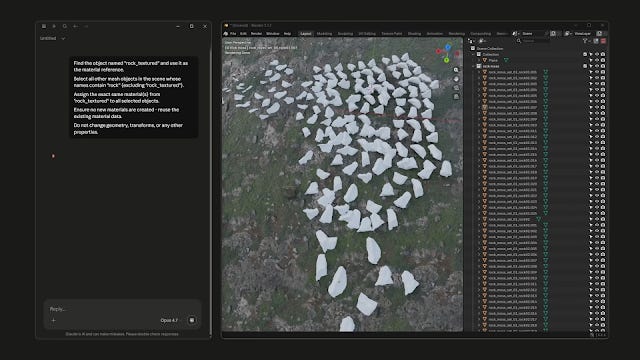
In Blender, it gets even more intense. Claude hooks directly into Blender’s Python API. You can command it to build a foundational environment — like a specific lighting node setup with a procedural material — and watch it write and execute the scripts to generate those objects live in your viewport. You still adjust the composition and art direction, but the tedious technical assembly happens instantly.
Even in Ableton, it acts as an interactive, hyper-accurate troubleshooting manual. If a sidechain routing fails, Claude pulls the exact fix from the official documentation to keep you in a flow state, rather than forcing you to dig through Reddit forums.
The Enterprise Catch
If you are managing high-volume production pipelines, the immediate question is data security. Creative agencies cannot afford to have proprietary project files scraped to train a foundational model.
Anthropic knows this, which is why the way they have structured the data privacy protocols around these local connections is the actual deciding factor on why this matters.
I’ve put together a comprehensive, deep-dive analysis on exactly how this integration functions in practice, the granular security permissions for team admins, and how you can set up these plugins right now at no extra cost.
Read the full breakdown and workflow guide here:
https://techbird365.blogspot.com/2026/04/claude-ai-integration-photoshop-blender-ableton.html
메타데이터
- post_id
- a9abc2f0367a
- slug
- stop-using-ai-in-a-browser-tab-claudes-native-creative-app-integration-is-here-a9abc2f0367a
- url
- https://medium.com/@techbirdofficial/stop-using-ai-in-a-browser-tab-claudes-native-creative-app-integration-is-here-a9abc2f0367a
- canonical_url
- https://medium.com/@techbirdofficial/stop-using-ai-in-a-browser-tab-claudes-native-creative-app-integration-is-here-a9abc2f0367a
- author_url
- https://medium.com/@techbirdofficial
- status
- ok
- fetched_at
- 2026-06-09 14:34:10