Does 10GB file become 3GB when zipped
Have you ever tried to zip a large file hoping it would shrink down to a smaller size? Maybe you had a 10 GB file and thought, “If I zip…
Does 10GB file become 3GB when zipped
Have you ever tried to zip a large file hoping it would shrink down to a smaller size? Maybe you had a 10 GB file and thought, “If I zip this, it should become 3 GB, right?”
Well, the answer is not that simple. It totally depends on what kind of file you are dealing with.
Let me break it down for you in simple terms.
How Does Compression Actually Work?
Before we go deeper, let’s understand what happens when you zip a file.
Think of a file like a big book. If the book has the same sentence repeated hundreds of times, you don’t need to write it again and again. You can just write it once and put a note saying “repeat this 100 times.” That is exactly what zip does.
Compression works by finding repeating patterns in a file and replacing them with short references.
For example, if a file has this:ABC ABC ABC ABC ABC
The zip tool will store it like:ABC (repeat 5 times)
This takes much less space.
But if a file has no repeating patterns like random data or already compressed content ,there is nothing to replace. So the file size stays almost the same.
When It Actually Works
If your file is full of text or data, zipping works like magic.
Files like:
- Large Excel sheets or CSV files
- Database backups (SQL files)
- Simple text files (TXT, LOG)
- Source code from developers
These types of files have a lot of repeating patterns and empty spaces. Compression tools like Zip eat that up and make the file much smaller.
So yes, if you have a 10 GB database backup, it can easily go down to 3 GB or even less.
When It Does Nothing
Now here is where most people get disappointed.
If your file is already compressed, zipping it again will not help. In fact, the file size might barely change.
This includes:
- Videos (MP4, MKV, AVI)
- Music files (MP3)
- Images (JPG, PNG)
- Any file that is already a zip or rar
These formats are already optimized for size. There are no repeating patterns left to compress. So a 10 GB movie will stay close to 10 GB even after zipping.
Why Videos and Images Don’t Compress
You might wonder videos and images also have patterns, right? Why don’t they compress?
Because they are already compressed using special methods.
A video file like MP4 uses something called a codec (like H.264 or H.265). It already removes unnecessary data, keeps only what your eyes need to see, and compresses the rest. By the time you get the file, there is almost nothing left for zip to work on.
Same with JPG images. They are already compressed using a smart method that removes details your eyes barely notice.
So when you try to zip them, zip finds almost no repeating patterns to simplify. That is why the size stays the same.
One More Thing -> The Tool Matters
The standard Zip format is okay, but not the best.
If you really want better compression, try using 7-Zip with the LZMA2 method. It uses a smarter algorithm that looks for patterns in a more advanced way. It can sometimes shrink files more than the normal zip. But still, it won’t work miracles on videos or images.
Final Take
Here is the simple rule:
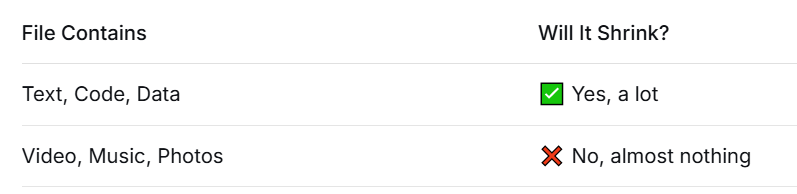
So before you zip a 10 GB file, check what is inside it. If it is a folder full of documents, go ahead and zip it. You might end up with a nice small 3 GB file.
But if it is a collection of movies or songs, save your time. Zipping will not help much.
메타데이터
- post_id
- a9e02dbfab93
- slug
- does-10gb-file-become-3gb-when-zipped-a9e02dbfab93
- url
- https://medium.com/@kashafabdullah01/does-10gb-file-become-3gb-when-zipped-a9e02dbfab93
- canonical_url
- https://medium.com/@kashafabdullah01/does-10gb-file-become-3gb-when-zipped-a9e02dbfab93
- author_url
- https://medium.com/@kashafabdullah01
- status
- ok
- fetched_at
- 2026-07-06 23:41:08



