Building a Faster GCP Kill Switch: Leveraging Cloud Monitoring Instead of Billing Data
Introduction
Building a Faster GCP Kill Switch: Leveraging Cloud Monitoring Instead of Billing Data
Introduction
In 10 years in IT and tech, I’ve had the opportunity to see what it’s like to work both with and without the cloud and let’s just say, I would never go back.
That said, people are still debating why GCP, and other providers, don’t offer a native kill switch. This has been a recurring topic for years. A quick look at the top posts on r/googlecloud shows that many of them focus on unexpected costs and money lost due to uncontrolled resource usage.

Top r/googlecloud submissions as of February 2026
This article focuses on billing-oriented protection. By no means am I suggesting that this alone is sufficient to fully secure your project. The Cloud is a completely different paradigm compared to on-premise environments and it’s important to understand those differences.
In this article, I’ll explain how GCP billing works, why budget alerts are helpful but not sufficient, and how to overcome their limitations by leveraging Cloud Metrics.
This is primarily aimed at people who are learning about the Cloud. I assume, and hope, that experienced Cloud Engineers are already securing their projects with the appropriate services and best practices.
Limit of GCP Budget Alert
It has been years since Google published an official guide on disabling billing through notifications. The mechanism itself is relatively simple, and many people have done a great job simplifying its deployment.
What concerns me is that this approach is often presented as the right and sometimes the only way to protect yourself from a “Denial of Wallet” (Billing Bomb).
That assumption is not only incorrect, it’s dangerous.
I’m not sure everyone promoting this method fully realizes that Google clearly states throughout the documentation that Cloud Billing data and Budget Alerts are subject to delays.
Just take a look at these lines from the official GCP documentation:

Known limitation of Disabling Billing with Budget Alert
Here’s a very exaggerated graphic for you to understand:

A very exaggerated view of billing delay
From my experience, it’s rare but it does happen to have a significant delays before billing data is fully up to date. As stated in the documentation about Missing Cloud Billing transactions or documents:

Note about GCP billing delay
In a secure environment, budget alerts are a valuable addition, but experienced cloud engineers would not rely on them alone. Don’t get me wrong, they are mandatory, just not sufficient.
Here’s some example where Budget Alert were not sufficient:

Unfortunately, there are far more than just two examples.
My point here is to demonstrate that budget alerts are inherently limited due to reporting delays. In many cases, people simply don’t react quickly enough and/or they fail to protect their projects with the appropriate tools and safeguards.
Basing a Kill Switch on budget alerts is a smart approach as it can effectively stop spending when usage increases steadily and eventually reaches your defined budget. However, it won’t protect you against sudden, uncontrolled bursts of consumption.
Firestore Document Writes Use Case
From there, let’s imagine we’re working on a group project.
Suppose we have a Firestore database connected to our mobile application.
We’re a group of enthusiastic but not very security-conscious students, and we haven’t paid enough attention to properly securing our app.
By using App Check, we’re assuming that we’re safe.
Unfortunately, we’re not.
A malicious individual decided to target us, seemingly with nothing better to do. They automated our application to send thousands of requests per second, all of which were validated by App Check.
In total, 500 million write requests were executed.
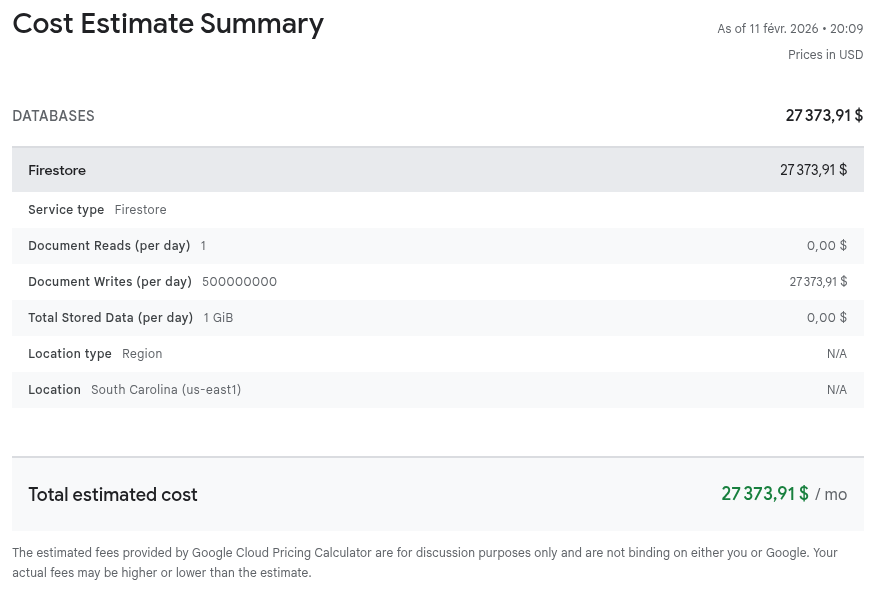
500 million write requests to Firestore estimated cost according to the Cloud Pricing Calculator
Around $27,000 in charges were incurred for our project. A Kill Switch based on budget alerts might have mitigated the cost slightly, but when a burst is this sudden and severe, the damage is done before any alert can react.
Once again, securing your application before exposing it to the public is absolutely critical.
Dealing with the delay
As we saw, Budget Alert are great for linear and controlled consumption. So a Kill Switch based on Budget Alert only may suffer the same problem linked to this delay. So, what to do with such delay ?
Here comes Cloud Metrics.
To me, this is something terribly overlooked, especially by neophytes.
Metrics (Alerts) are just as important, if not more so, than Budget Alerts.
Why would you monitor your project’s expenses but not its activities?
That has always struck me as odd. Metrics represent the activities on your project, the very things driving costs. A surge in activity always leads to a surge in expenses.
What’s even more frustrating is that most metrics take only 5 minutes to update.
So really, what’s more important, knowing that your project has already hit its budget, or preventing abnormal consumption that could make your budget explode?
The answer is simple: both are essential.
Monitoring expenses alone is not enough, monitoring activities is just as mandatory.
The downside is that Cloud Metrics aren’t as general as Budget Alerts. With a Budget Alert, you just set your budget and let it run. With Metrics, you need to dig into the details and specify exactly what you want to track.
The purpose of a “Kill Switch” is to stop your project’s spending immediately once the budget is reached, without considering the underlying cause. I think this is at the heart of the ongoing debate about GCP not having a kill switch.
It’s a grey area. Many people want the cloud to be responsive and flexible but should you really use such a powerful tool without understanding what’s happening under the hood?
As I said earlier, I won’t dwell too long on this debate, it’s not the focus here. Instead, let’s explore how you can fortify your billing strategy beyond the standard Budget Alert.
Cloud Metrics as Prevention
Let’s see what would have happened if we had used Cloud Metrics in addition to the Budget Alert. For this test, we expect around 1,000 documents to be written per day, with any higher number considered potentially suspicious.
Based on Firestore Metrics:

Firestore Document Write Metrics
You can see that this metric is updated every 240s (5 minutes).
Let’s create an Alert Policy:
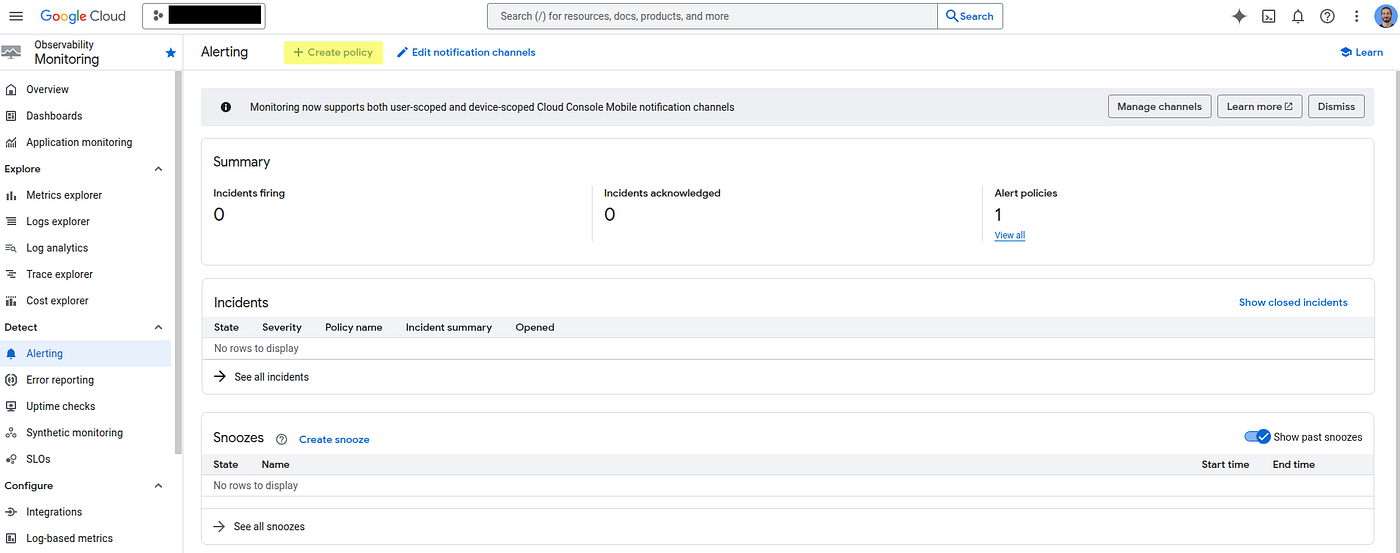
Let’s set the metric to Firestore Instance — Document Writes.
Set the Rolling Window to 1 day and the Rolling Window Function to sum, since any day with more than 1,000 requests will be considered suspicious.

Then we set the limit under “Any time series violates the above threshold” with a threshold value of 1,000. This means that if any time series exceeds 1,000 requests within a 1 day rolling window, the alarm will be triggered.

You will be asked to use a Notification Channel. I strongly recommend setting one up beforehand, as you won’t be able to know if anything happens without it. Also, note that you can choose multiple notification channels for the same policy (email, SMS, Slack, etc.).
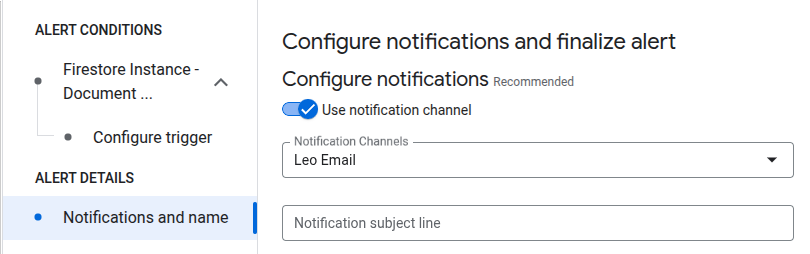
And there it is, our custom monitoring metric for Firestore Document Writes!
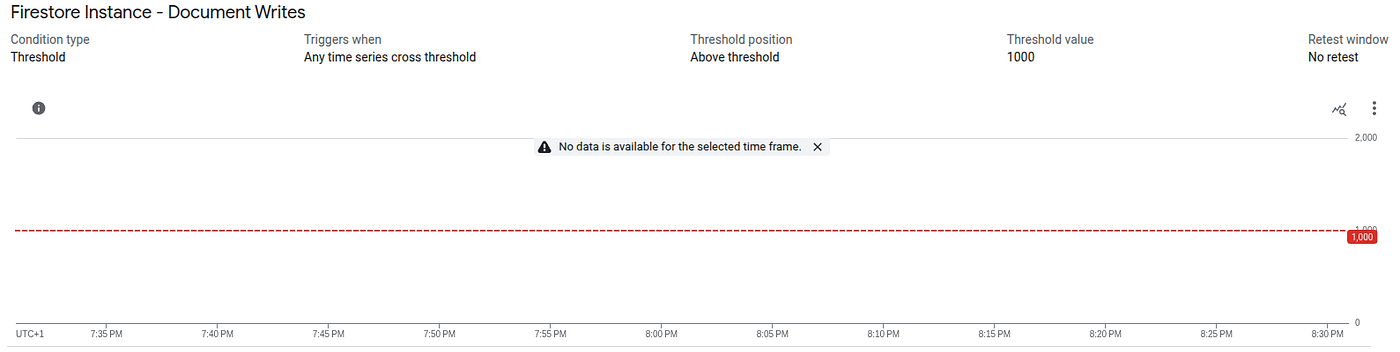
Let’s generate some activity using a Bash script to send 1,000 write requests. The script is scheduled to run at 8:05 PM:
GCP_PROJECT_ID=YOUR_PROJECT_ID
FIRESTORE_TEST_DB=YOUR_FIRESTORE_DB
CLOUD_TOKEN=$(gcloud auth print-access-token)
TOTAL_DOCS=1000

echo "Step 1/3: Creating $TOTAL_DOCS documents..."
for i in $(seq 1 $TOTAL_DOCS); do
  curl -sS -X POST -H "Authorization: Bearer $CLOUD_TOKEN" \
       -H "Content-Type: application/json" \
       --data "{\"fields\": {\"val\": {\"integerValue\": \"$i\"}}}" \
       "https://firestore.googleapis.com/v1/projects/${GCP_PROJECT_ID}/databases/${FIRESTORE_TEST_DB}/documents/${FIRESTORE_TEST_DB}?documentId=doc_$i" \
       -o /dev/null &
  if [[ $((i % BATCH_SIZE)) -eq 0 ]]; then
    wait
    percent=$(( i * 100 / TOTAL_DOCS ))
    printf "\r[CREATE] Progress: [%-20s] %d%% (%d/%d)" "$(printf '#%.0s' $(seq 1 $((i/50))))" "$percent" "$i" "$TOTAL_DOCS"
  fi
done
wait
echo "\nCreation completed.\n"
Script Result (ignore the color)
At 8:10pm, the Alert Policy looks like this:
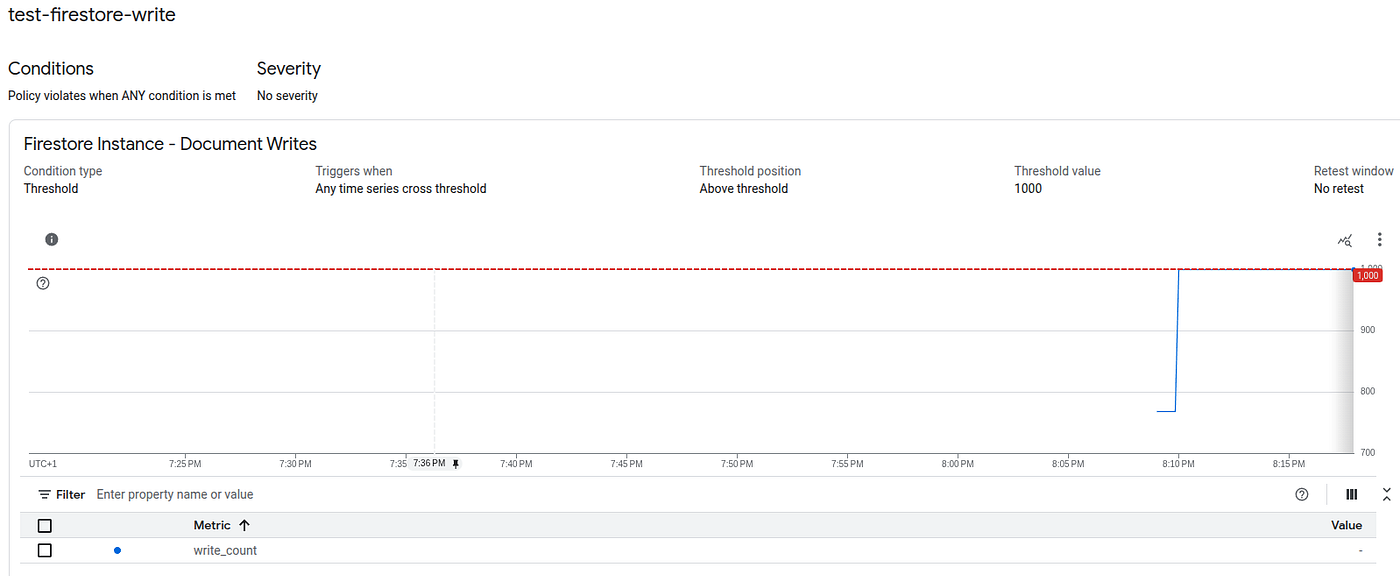
Cloud Monitoring Result after 5 minutes
It only took 5 minutes for the metric to appear in Cloud Metrics.
Since the alert only triggers when the threshold is exceeded, I added more documents writes at 8:33 PM. Here’s what I observed 5 minutes later:
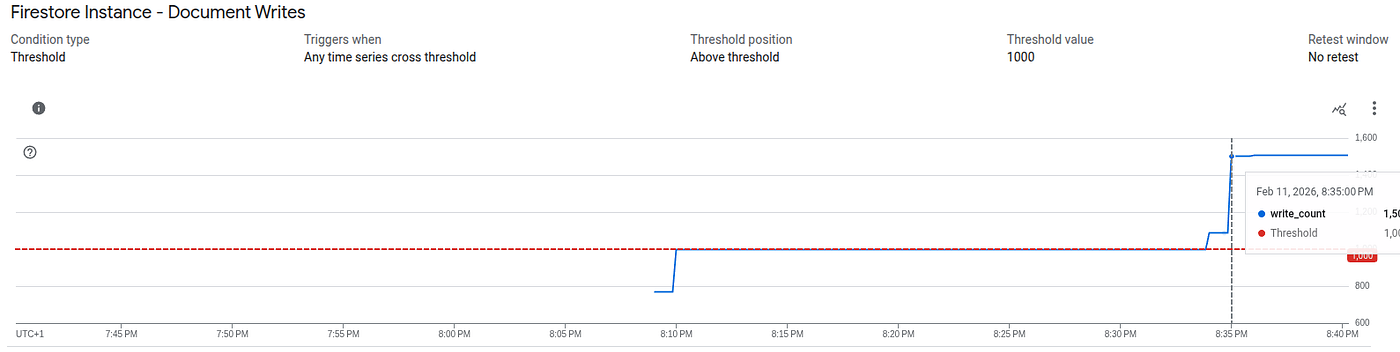
Quickly, my email, set up in the Notification Channel, alerted me that my Firestore write activity had exceeded expectations.

Here, we see that Cloud Metrics are much faster than Budget Alert / Billing API but there are some downsides to this approach:
- It’s not general-purpose, you need to decide in advance what to monitor.
- Relying solely on metrics to trigger a Kill Switch can be too drastic.
- If your project is compromised in an area that isn’t being monitored, it will go unnoticed.
That said, being non-generalist may not be a real downside. You might have different projects for different purposes, so you’re not managing a massive number of services simultaneously. Segregation is key.
Regarding the second and third points, is that really an issue? I understand the appeal of a generalist approach, but it’s not rigorous to rely solely on that.
You wouldn’t expect to have a bike accident only because of a frontal collision. The road can split, conditions can change, and you stay cautious about every potential risk you’re exposed to. It’s pretty much the same here.
Cloud Metrics based Kill Switch
We will reuse the Budget Alert implementation pattern, adapting it to trigger based on Cloud Monitoring metrics instead of budget thresholds.
Architecture overview: Alert Policy → Pub/Sub → Eventarc → Cloud Run (Kill Switch)
We will proceed with the following steps:
- Create a Pub/Sub topic named
alert-policy-topic - Grant the default Notification Channel service account the Pub/Sub Publisher role on this topic
Below is an environment-agnostic script that gathers all required information and provisions the necessary resources automatically:
# Get the project info
PROJECT_NUMBER=$(gcloud projects describe $(gcloud config get-value project) --format='value(projectNumber)')
PROJECT_ID=$(gcloud config get-value project)
TOPIC_NAME="alert-policy-topic"

# Enable required APIs
gcloud services enable monitoring.googleapis.com
gcloud services enable pubsub.googleapis.com

# Create the topic
gcloud pubsub topics create ${TOPIC_NAME}

# Add IAM policy binding
gcloud pubsub topics add-iam-policy-binding ${TOPIC_NAME} \
    --member="serviceAccount:service-${PROJECT_NUMBER}@gcp-sa-monitoring-notification.iam.gserviceaccount.com" \
    --role="roles/pubsub.publisher"

# Create monitoring channel
gcloud alpha monitoring channels create \
    --display-name="Alert Policy Channel" \
    --type=pubsub \
    --channel-labels=topic=projects/${PROJECT_ID}/topics/${TOPIC_NAME}
We will need Eventarc and all the required Cloud Run and Cloud Functions components to enable communication across the entire architecture.
First, we need to enable a couple more APIs:
gcloud services enable artifactregistry.googleapis.com
gcloud services enable cloudbuild.googleapis.com
gcloud services enable run.googleapis.com
gcloud services enable cloudfunctions.googleapis.com
Next, we will start by creating a mock Kill Switch Cloud Function. This function will allow us to inspect the payload received in the POST request triggered by Eventarc from Pub/Sub.
Create main.py
import functions_framework
from flask import Request
import base64
import json

@functions_framework.http
def show_post_body(request: Request):
    """A simple HTTP Cloud Function that prints the request body and headers."""
    try:
        body_json = request.get_json(silent=True)
        if body_json and "message" in body_json:
            encoded_data = body_json["message"].get("data")
            if encoded_data:
                decoded_data = base64.b64decode(encoded_data).decode('utf-8')
                incident_json = json.loads(decoded_data)
                print(f"Decoded Incident: {json.dumps(incident_json, indent=2)}")
    except Exception as e:
        print(f"Error decoding base64: {e}")

    return "OK", 200
Create requierements.txt
functions-framework==3.10.0
Flask==3.1.2
Then run:
gcloud functions deploy kill-switch \
    --gen2 \
    --runtime python314 \
    --region us-central1 \
    --trigger-http \
    --no-allow-unauthenticated \
    --entry-point show_post_body \
    --source .
From there, the architecture is almost completed
Alert Policy → Pub/Sub → xxx → Cloud Run (Kill Switch)
Where xxx is EventArc missing. Let’s add it:
# Project Info
PROJECT_NUMBER=$(gcloud projects describe $(gcloud config get-value project) --format='value(projectNumber)')
PROJECT_ID=$(gcloud config get-value project)

# Enable required APIs
gcloud services enable eventarc.googleapis.com

# Add Pub/Sub default SA Token Creatore
gcloud projects add-iam-policy-binding ${PROJECT_ID} \
    --member="serviceAccount:@service-${PROJECT_NUMBER}@gcp-sa-pubsub.iam.gserviceaccount.com" \
    --role="roles/iam.serviceAccountTokenCreator"

# Dedicated Serivce Account for Eventarc to Cloud Run
gcloud iam service-accounts create function-invoker \
    --display-name="Eventarc to Cloud Run Invoker"

# role Invoker
gcloud functions add-invoker-policy-binding kill-switch \
    --member="serviceAccount:function-invoker@${PROJECT_ID}.iam.gserviceaccount.com" \
    --project=${PROJECT_ID}

# EventArc (PubSub => Event Arc => Cloud Function)
gcloud eventarc triggers create pubsub-to-function \
    --service-account="function-invoker@${PROJECT_ID}.iam.gserviceaccount.com" \
    --location=us-central1 \
    --transport-topic="projects/${PROJECT_ID}/topics/${TOPIC_NAME}" \
    --destination-run-service=kill-switch \
    --destination-run-region=us-central1 \
    --event-filters="type=google.cloud.pubsub.topic.v1.messagePublished"
Now, any messages published to the Pub/Sub topic configured for the Alert Policies will be forwarded to our Cloud Function.
As shown earlier in this article, I will create and trigger an Alert Policy based on the Firestore Document Writes metric. I’m running the script at 4:55pm.
As planned, the policy is violated 5 minutes later.
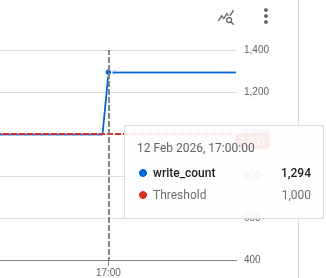
The Alert Policy takes a brief moment to register a violation before sending the message to Pub/Sub, which is subsequently forwarded to our Cloud Function via EventArc.
Here’s a decoded body of what the Cloud Function receives:
Decoded Incident: {
  "incident": {
    "condition": {
      "conditionThreshold": {
        "aggregations": [
          {
            "alignmentPeriod": "86400s",
            "perSeriesAligner": "ALIGN_SUM"
          }
        ],
        "comparison": "COMPARISON_GT",
        "duration": "0s",
        "filter": "resource.type = \"firestore_instance\" AND metric.type = \"firestore.googleapis.com/document/write_count\"",
        "thresholdValue": 1000,
        "trigger": {
          "count": 1
        }
      },
      "displayName": "Firestore Instance - Document Writes",
      "name": "projects/test-notification-487215/alertPolicies/11229261735614898435/conditions/15534646543678555502"
    },
    "condition_name": "Firestore Instance - Document Writes",
    "documentation": {
      "content": "",
      "mime_type": "",
      "subject": "[ALERT - No severity] Test"
    },
    "ended_at": null,
    "incident_id": "0.o4712c97khg3",
    "metadata": {
      "system_labels": {},
      "user_labels": {}
    },
    "metric": {
      "displayName": "Document Writes",
      "labels": {
        "op": "CREATE"
      },
      "type": "firestore.googleapis.com/document/write_count"
    },
    "observed_value": "3314.000",
    "policy_name": "Firestore write alert policy",
    "resource": {
      "labels": {
        "project_id": "test-notification-487215"
      },
      "type": "firestore_instance"
    },
    "resource_id": "",
    "resource_name": "test-notification-487215 Firestore Instance labels {project_id=test-notification-487215}",
    "resource_type_display_name": "Firestore Instance",
    "scoping_project_id": "test-notification-487215",
    "scoping_project_number": 191841326616,
    "severity": "No severity",
    "started_at": 1770912035,
    "state": "open",
    "summary": "Document Writes for test-notification-487215 Firestore Instance labels {project_id=test-notification-487215} with metric labels {op=CREATE} is above the threshold of 1000.000 with a value of 3314.000.",
    "threshold_value": "1000",
    "url": "https://console.cloud.google.com/monitoring/alerting/alerts/0.o4712c97khg3?channelType=cloud-pubsub&project=test-notification-487215"
  },
  "version": "1.2"
}
Let’s rewrite the Cloud Function to automatically terminate the project whenever any Alert Policy connected to our Notification Channel hits its threshold.
First, here’s the adapted requierements.txt
functions-framework==3.10.0
google-cloud-billing==1.18.0
Flask==3.1.2
The new main.py including the Kill Switch (disable billing):
"""Cloud Function to disable billing for a GCP project."""

import base64
import json
import logging
import os

import functions_framework
from flask import Request
from google.cloud import billing_v1
from google.api_core import exceptions

# Constants
PROJECT_ID = os.getenv("PROJECT_ID")
if PROJECT_ID is None:
    raise ValueError("PROJECT_ID environment variable is not set.")

APP_LOGGER = logging.getLogger(__name__)

@functions_framework.http
def kill_switch(request: Request) -> tuple[str, int]:
    """A simple HTTP Cloud Function that processes incident data and triggers billing disable."""
    try:
        body_json = request.get_json(silent=True)
        if body_json and "message" in body_json:
            encoded_data = body_json["message"].get("data")
            if encoded_data:
                decoded_data = base64.b64decode(encoded_data).decode("utf-8")
                incident_json = json.loads(decoded_data)
                APP_LOGGER.debug(
                    "Decoded Incident: %s", json.dumps(incident_json, indent=2)
                )

                # Validate that it's a proper incident structure
                if "incident" in incident_json and incident_json.get("version"):
                    incident = incident_json["incident"]
                    APP_LOGGER.info(
                        "Valid incident received: %s", incident.get("incident_id")
                    )

                    # Trigger kill switch
                    billing_manager = BillingManager()
                    billing_manager.disable_billing_for_the_project()

                    return "Billing disabled", 200
                else:
                    APP_LOGGER.warning("Invalid incident structure received")
                    return "Invalid incident format", 400
    except Exception as e:
        APP_LOGGER.error("Error processing request: %s", str(e))
        return "Error", 500

    return "No incident data", 400

class BillingManager:
    """Manages billing operations for GCP projects."""

    def __init__(self) -> None:
        """Initialize the BillingManager."""
        self.billing_client = billing_v1.CloudBillingClient()

    def disable_billing_for_the_project(self) -> None:
        """Disable billing for a project by removing its billing account.

        Based on: https://docs.cloud.google.com/billing/docs/how-to/disable-billing-with-notifications#create-cloud-run-function
        """
        resource_name = f"projects/{PROJECT_ID}"

        project_billing_info = billing_v1.ProjectBillingInfo(
            billing_account_name=""  # No Billing Account
        )

        APP_LOGGER.debug("Project Billing Info to update: %s", project_billing_info)

        request = billing_v1.UpdateProjectBillingInfoRequest(
            name=resource_name, project_billing_info=project_billing_info
        )

        try:
            response = self.billing_client.update_project_billing_info(request=request)
            APP_LOGGER.info("Disable billing response: %s", response)
            APP_LOGGER.critical("Billing disabled for project %s.", PROJECT_ID)
        except exceptions.PermissionDenied:
            APP_LOGGER.error("Failed to disable billing, check permissions.")
Then run these commands:
PROJECT_ID=$(gcloud config get-value project)

# Add Billing Permissions
gcloud projects add-iam-policy-binding "${PROJECT_ID}" \
    --member "serviceAccount:function-invoker@${PROJECT_ID}.iam.gserviceaccount.com" \
    --role "roles/billing.projectManager" \
    --project=${PROJECT_ID}

# Deploy main.py as Google Cloud Function
gcloud functions deploy kill-switch \
    --gen2 \
    --runtime python314 \
    --region us-central1 \
    --trigger-http \
    --no-allow-unauthenticated \
    --entry-point kill_switch \
    --source . \
    --set-env-vars "PROJECT_ID=${PROJECT_ID}" \
    --service-account "function-invoker@${PROJECT_ID}.iam.gserviceaccount.com"

# Ensure role Invoker
gcloud functions add-invoker-policy-binding kill-switch \
    --member="serviceAccount:function-invoker@${PROJECT_ID}.iam.gserviceaccount.com" \
    --project=${PROJECT_ID}
Be careful now! Every Alert Policy you create and link to the Pub/Sub Notification Channel will trigger as soon as the threshold is reached, causing the Pub/Sub to immediately invoke EventArc and activate the KillSwitch!
Running another test with a Firestore document write around 7:55 PM, the Kill Switch was triggered in just 5 minutes.

That’s all folks!
The complete process and all related files are available in this repository.
Which you can clone on your computer using:
git clone https://github.com/leo-kling/gcp-metrics-based-kill-switch.gitConclusion
- Budget Alerts are great but not enough on their own.
- Alert Policies are useful but also not sufficient.
- Together, these two mechanisms cover a lot, yet they still don’t solve everything.
- Remember: Activities = Expenses.
- It’s your responsibility to use the Cloud Billing Calculator to plan for your activities and expenses.
- A Kill Switch isn’t the ultimate solution but that’s perfectly fine in a non-production environment. After all, you have to start somewhere.
- Know your project: Monitor as much a possible.
- Use Notification Channels, they’re inexpensive and powerful!
A final, personal note:
What I like about this approach (using Budgets + Alert Policies) is that, when properly set up, it adds multiple layers of protection against unpleasant surprises.
If your application already has basic security measures in place, you should be in good shape. That said, no competent cloud engineer would ever claim that security exempts you from monitoring, or vice versa.
In the absence of a native kill switch in GCP, the cloud can be inherently risky without adequate training. Perhaps it isn’t offered because Google expects users to start with a proper learning journey in the Cloud? I don’t know.
Until then, you should always rely on the most robust Kill Switch possible until you fully understand how to secure your application.
Better to end up with a 404 Not Found than with a Costly Sorry.
메타데이터
- post_id
- a9e2eab2099b
- slug
- building-a-faster-gcp-kill-switch-leveraging-cloud-monitoring-instead-of-billing-data-a9e2eab2099b
- url
- https://medium.com/google-cloud/building-a-faster-gcp-kill-switch-leveraging-cloud-monitoring-instead-of-billing-data-a9e2eab2099b
- canonical_url
- https://medium.com/google-cloud/building-a-faster-gcp-kill-switch-leveraging-cloud-monitoring-instead-of-billing-data-a9e2eab2099b
- author_url
- https://medium.com/@leokling
- status
- ok
- fetched_at
- 2026-06-22 17:31:34