How does the browser work?
Have you ever wondered what happens when you enter the URL? There are a lot of steps that take place between entering the URL and the page…
How does the browser work?
Have you ever wondered what happens when you enter the URL? There are a lot of steps that take place between entering the URL and the page gets rendered.
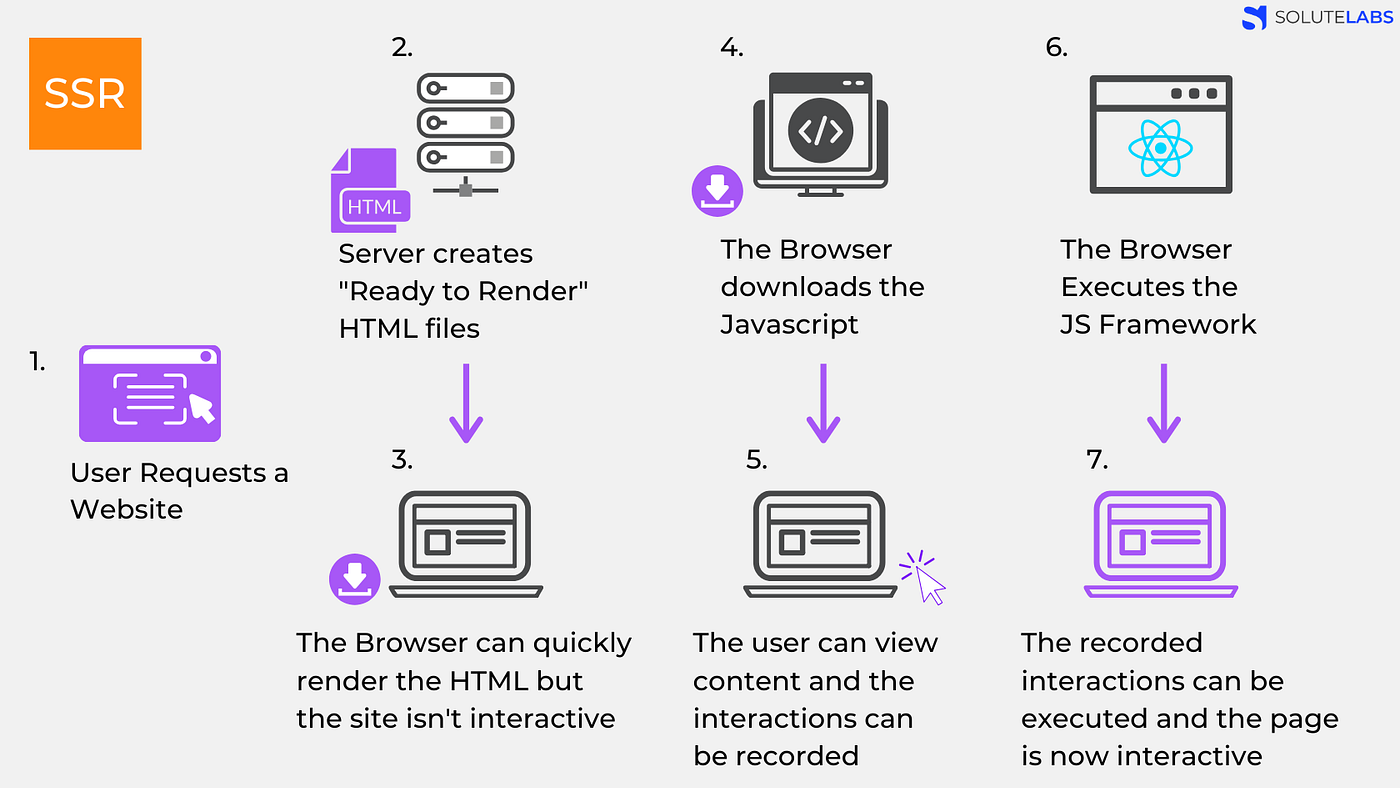

The first step is Navigation: It occurs when a user enters an URL, clicks a link or submits a form. It is basically telling the browser what I want. Giving the browser the info about the user’s needs.
Then the browser finds the DNS lookup, it's basically finding where the assets for the web page are located. If the user has never been to that server, the DNS lookup will happen, and it will return with the IP address, after this initial request, the IP address would be cached for a while.
The next step is TCP Handshake, which is designed so that web browsers and web servers can communicate with each other and set the parameters of the network TCP socket connection before transmitting data
The next step is TLS Negotiation, which is designed to determine what cypher will be used to encrypt the communication and verifies the server and actual transfer of data.
Once we have an established connection to a web server, the browser sends an initial HTTP GET request on behalf of the user, which for websites is most often an HTML file. Once the server receives the request, it will reply with relevant response headers and the contents of the HTML.
So now the thing, how does the browser download the document or other assessts. At the first time browser downloads only 14KB, then doubles it gradually until it reaches a threshold or encounters a congestion. It is done so network’s maximum bandwidth can be determined. TCP slow start gradually builds up transmission speeds appropriate for the network’s capabilities to avoid congestion.
Once the browser receives the first chunk of data, it can begin parsing the information received. Parsing is the step the browser takes to turn the data it receives over the network into the DOM and CSSOM, which is used by the renderer to paint a page to the screen.
DOM — The DOM is the internal representation of the markup for the browser. The DOM is also exposed, and can be manipulated through various APIs in JavaScript.
CSSOM — The CSS Object Model (CSSOM) is a set of APIs for reading and modifying a document’s style-related (CSS) information. In other words, similar to the way in which the DOM enables a document’s structure and content to be read and modified from JavaScript, the CSSOM allows the document’s styling to be read and modified from JavaScript.
IMPORTANT:
Even if the request page’s HTML is larger than the initial 14KB packet, the browser will begin parsing and attempting to render an experience based on the data it has. This is why it’s important for web performance optimization to include everything the browser needs to start rendering a page, or at least a template of the page — the CSS and HTML needed for the first render — in the first 14 kilobytes. But before anything is rendered to the screen, the HTML, CSS, and JavaScript have to be parsed.
So now browser has the information :
Browser processing the HTML markup and building the DOM tree. Parser starts with HTML tag, and go on with nodes. The greater the number of DOM nodes, the longer it takes to construct the DOM tree.
When the parser finds non-blocking resources, such as an image, the browser will request those resources and continue parsing. Parsing can continue when a CSS file is encountered, but <script> tags — particularly those without an async or defer attribute — block rendering, and pause the parsing of HTML. Though the browser’s preload scanner hastens this process, excessive scripts can still be a significant bottleneck.
Meanwhile the browser is downloading the scripts and other assets that are needed by browser. After DOM tree, CSSOM tree gets build, so for all the elements CSS gets applied.
Meanwhile other processes like JavaScript is interpreted, compiled, parsed and executed. The scripts are parsed into abstract syntax trees. The browser also built accessibilty tree, which is basically the semantic version of the DOM. This tree can be parsed by assistive devices and interpret by them. Until this tree is built, it is not accessible by the screen readers.
Once the DOM and CSSOM tree is built,construction starts with root node then the traversing the node.Each visible node has its CSSOM rules applied to it.
The fourth step in the critical rendering path is running layout on the render tree to compute the geometry of each node. Layout is the process by which the width, height, and location of all the nodes in the render tree are determined, plus the determination of the size and position of each object on the page. Reflow is any subsequent size and position determination of any part of the page or the entire document. Once the render tree is built, layout commences. The render tree identified which nodes are displayed (even if invisible) along with their computed styles, but not the dimensions or location of each node. To determine the exact size and location of each object, the browser starts at the root of the render tree and traverses it.
The first time the size and position of nodes are determined is called layout. Subsequent recalculations of node size and locations are called reflows. In our example, suppose the initial layout occurs before the image is returned. Since we didn’t declare the size of our image, there will be a reflow once the image size is known.
The last step in the critical rendering path is painting the individual nodes to the screen, the first occurrence of which is called the first meaningful paint. In the painting or rasterization phase, the browser converts each box calculated in the layout phase to actual pixels on the screen. Painting involves drawing every visual part of an element to the screen, including text, colors, borders, shadows, and replaced elements like buttons and images. The browser needs to do this super quickly.
When sections of the document are drawn in different layers, overlapping each other, compositing is necessary to ensure they are drawn to the screen in the right order and the content is rendered correctly.
After all the painting are done, deferred javascript are executed. At this time web page are not interactive, because main thread might be busy.

After all the script has been executed, now we can say that page has been rendered.
메타데이터
- post_id
- aa13d11939cd
- slug
- how-does-the-browser-work-aa13d11939cd
- url
- https://medium.com/@adhyaya/how-does-the-browser-work-aa13d11939cd
- canonical_url
- https://medium.com/@adhyaya/how-does-the-browser-work-aa13d11939cd
- author_url
- https://medium.com/@adhyaya
- status
- ok
- fetched_at
- 2026-06-29 22:44:20






