How Nmap Actually Knows What’s Running on a Port (And Why It’s Sometimes Wrong)
Most people trust the service name Nmap gives them. Experienced testers treat it as a hypothesis.
How Nmap Actually Knows What’s Running on a Port (And Why It’s Sometimes Wrong)
Most people trust the service name Nmap gives them. Experienced testers treat it as a hypothesis.
The Afternoon That Changed How I Read Scan Results
It was mid-afternoon on the second day of an external assessment. Medium-sized infrastructure with a few dozen public-facing hosts, the usual mix of web applications, VPNs, and management interfaces. Nothing exotic on the surface.
Port 8443 on one host came back clean:
8443/tcp open https Apache TomcatTomcat. Noted. We moved on.
A few hours later, during manual application testing, something felt off. The response headers weren’t quite right. Error pages looked nothing like Tomcat’s default formatting. Session handling was unusual. The HTTP response codes for intentionally malformed requests weren’t what Tomcat would produce.
We dug deeper. What we found was a custom reverse proxy, deliberately configured to return Tomcat-like banners — presumably to mislead automated scanning tools and slow down anyone who got this far. The actual backend was something entirely different.
Nmap had said Tomcat. It wasn’t Tomcat.
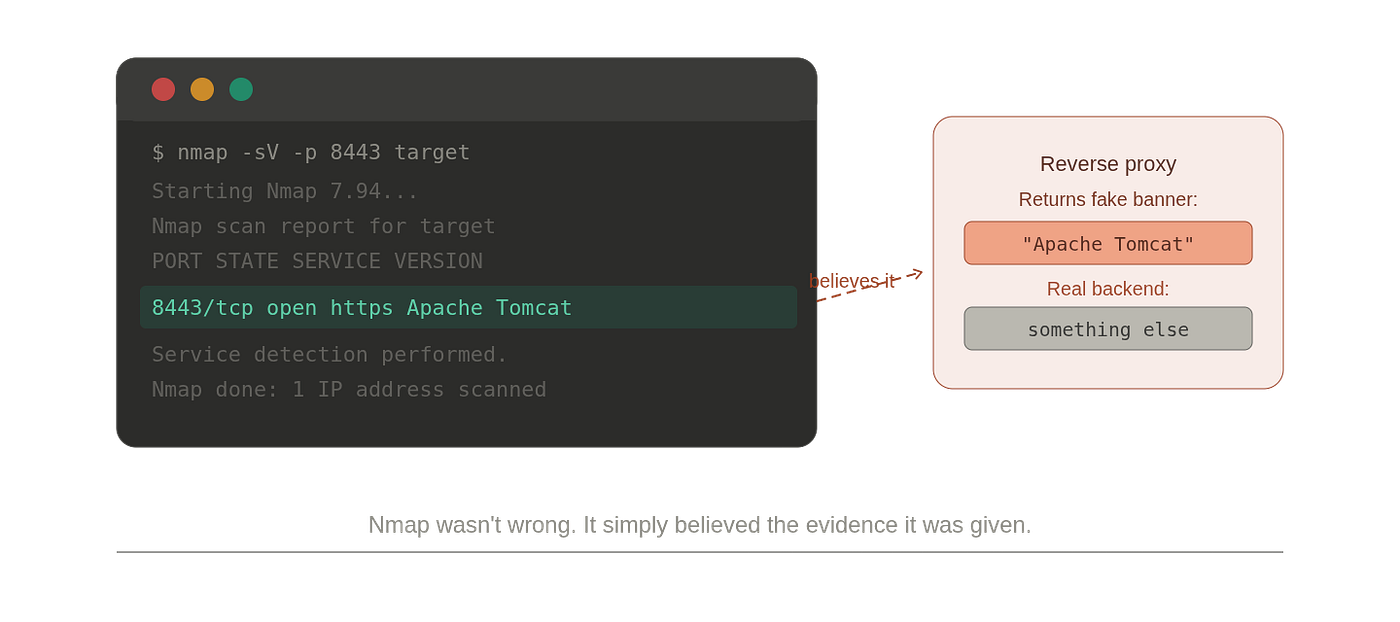
The natural reaction especially early in a career is frustration. Nmap was wrong. But that framing misses the real lesson. Nmap wasn’t wrong. It was doing exactly what it was designed to do. It collected evidence. It matched that evidence against known patterns. It reported a conclusion with confidence.
The problem wasn’t Nmap. The problem was that we had treated a hypothesis as a fact.
What Nmap Actually Sees
Here’s the thing most people don’t sit with long enough: when Nmap tells you a port is running Apache HTTP Server 2.4.51, it has not read a configuration file. It has not inspected a process. It has no access to ground truth whatsoever.
It has received bytes. Network traffic. Responses to specific inputs. Nothing more.
This is the fundamental constraint of all network-based reconnaissance. The moment you’re outside a system looking at it through a network connection, you are working with traces, not truth. You’re in the same position as a forensic investigator who arrives at a scene after the fact — reconstructing events from what was left behind, not from what actually happened.
The evidence Nmap works with falls into four categories:
Banners: text strings services send when a connection is established. The most direct evidence Nmap has, and the easiest to fabricate. A banner is just text. Any service can send any text.
Protocol behaviour : different services respond differently to the same inputs. Send a malformed HTTP request to Apache and to nginx and you’ll get different things back. Nmap exploits these behavioural differences systematically.
Error handling and timing: how a service responds to unexpected input, with what codes, in what format, how quickly. All of it forms part of the fingerprint.
TLS certificate details: when present, certificates contain fields that suggest server software, organisational context, and deployment patterns.

None of these pieces is definitive. Together they form a profile. The profile is compared against known profiles. A match is made. Confidence is assigned. That is the entire mechanism — evidence collection and pattern matching.
The Database Behind the Curtain
When you finally go looking for how Nmap actually makes decisions, you find nmap-service-probes a text file sitting alongside the Nmap installation that most people have never opened. It's one of the most interesting documents in open source security tooling.

The file is the result of more than two decades of community observation. The structure reflects the mechanism exactly:
- Probes — specific byte sequences Nmap sends to services
- Match rules — regex patterns describing what a response should look like for a specific service
- Version extraction rules — patterns that pull version strings from matched responses
- Softmatch rules — for partial matches where certainty is low
Every entry in that database represents real work: someone ran the service, sent probes, captured responses, identified distinguishing patterns, wrote the regex, tested it across versions, and contributed it back. Every signature is an empirical data point.

This is why the database matters — not because it’s comprehensive (it isn’t) but because it’s accumulated empirical evidence about how services actually behave.
And this is why detection quality varies so dramatically between mainstream and niche software. Apache is in the database exhaustively because countless researchers have scanned Apache servers over decades. A custom internal application written in 2019 is not in the database. It never will be. Nmap has no reference point for it. Whatever it returns, Nmap will match against the closest thing it knows.
What Confidence Actually Means
When Nmap sends a probe and receives a response, it doesn’t ask “does this match something?” It asks “how well does this match, and how uniquely?”
A response might match Apache HTTP Server 2.4. It might also partially match lighttpd. It might have characteristics consistent with several other HTTP servers. The matching process navigates this ambiguity and produces a conclusion with a confidence score.
That score is not decoration. A confidence of 10 is very different from a confidence of 3. But even a 10 does not mean certain. It means the evidence fits the known pattern very well.
There’s a concept in forensic science worth borrowing here — the hierarchy of propositions:
- Level 1: This response matches the signature for Apache Tomcat — direct evidence
- Level 2: Therefore Apache Tomcat is running — one inference up
- Level 3: Therefore the system is vulnerable to Tomcat-specific exploits — another inference up

Each step introduces the possibility of error. Nmap operates at Level 1. The inferences above it are yours. Experienced practitioners know that every step away from direct evidence requires justification — the scan result is the starting point, not the conclusion.
Why Nmap Gets It Wrong (And Why the Wrong Answer Usually Makes Sense)
Nmap rarely makes random mistakes. When it misidentifies a service, there’s almost always a logical reason. Understanding the mechanism makes the errors predictable.
Reverse proxies are the most common culprit. Nmap is talking to the proxy, not the backend. If the proxy is configured to return Tomcat-like banners and behaviours — as in the Port 8443 story — Nmap believes the story. Neither the proxy nor Nmap is doing anything wrong. The deception is in the architecture.
Load balancers introduce inconsistency. Send the same probe twice and you might be talking to different backend servers. Different versions, different software, different responses. This looks like Nmap behaving unreliably. The actual issue is that the target isn’t a single consistent entity.
Banner manipulation is often deliberate. Administrators sometimes configure services to return misleading banners — an Apache server returning IIS-like headers, an nginx instance claiming to be something else. The theory: an attacker who believes they’re attacking one product will use the wrong exploits. This absolutely fools automated scanning tools, and it should.
Custom applications are a quiet, underappreciated source of errors. An in-house application that exposes an HTTP interface might produce responses that superficially resemble a known product — similar error handling, similarly named headers. Nmap matches the closest thing in its library. The identification is wrong, but it’s the best possible answer given what the database contains.
WAFs and security appliances intercept traffic and return synthetic responses designed to obscure what’s actually running. The response Nmap receives tells an interesting story that has nothing to do with the actual service behind it.

Nmap wasn’t wrong. It simply believed the evidence it was given.

What Experienced Testers Do Differently
Experience in offensive security mostly shows up in what you question, not what you find.
A junior tester sees Apache Tomcat and starts researching Tomcat vulnerabilities. An experienced tester sees Apache Tomcat and asks: how confident am I that this is actually Tomcat? What would I expect to see if it were? What would I expect to see if it weren't?
The question experienced practitioners carry isn’t what is running here? It’s what is the evidence for what I believe is running here?
That reframing changes everything:
- You look for corroboration. Does the application behave the way this service should? Do error messages match what this software produces? Are secondary indicators — certificate details, default paths, behavioural quirks — consistent with the identification?
- You consider alternative explanations. If this identification were wrong, what else could produce this evidence? Is there a proxy architecture that explains the response? Any reason the operators might want to present a misleading surface?
- You treat inconsistencies as findings. A service that identifies as one thing but behaves like another isn’t just a scan error — it’s often the most interesting thing on the assessment. The gap between claimed identity and actual behaviour is where deliberate deception lives.
None of this requires more tools. It requires better questions.
The mistake isn’t trusting Nmap. The mistake is treating a hypothesis like a fact.

This Applies to Every Tool You Use
Nmap is a useful vehicle for this lesson because it’s specific and familiar. But the lesson isn’t about Nmap.
Vulnerability scanners collect evidence, match against known signatures, produce findings. Those findings inherit every uncertainty from the underlying identification. Wrong service ID → wrong vulnerability conclusions.
EDR products compare observed behaviours against known malicious patterns. A novel piece of malware that doesn’t match any pattern doesn’t get flagged — not because it isn’t malicious, but because the pattern library has no reference point for it.
Attack surface management platforms enumerate exposure and correlate with vulnerabilities. The correlation is only valid if the identification was accurate.
Every tool follows the same architecture: collect evidence → apply logic → generate conclusion. And in every tool, that conclusion carries uncertainty that the output sometimes makes invisible.
Understanding this changes what you trust, when you trust it, and how much validation you do before you act. The real skill in offensive security isn’t knowing more tools. It’s understanding how tools reach their conclusions — and knowing when to question them.
Back to Port 8443
In retrospect, the signals were there earlier. The error page formatting was subtly wrong. One response header was slightly off. The session behaviour didn’t quite match expected Tomcat patterns.
We missed them because the scan result was already sitting in the back of our minds, shaping what we were looking for. We were looking for Tomcat vulnerabilities. We weren’t looking for evidence against the Tomcat hypothesis. The anchor had been set.
The important question was never: what service is running?
The important question was: what evidence led us to believe that service is running?
Those questions look similar. In practice, they lead to completely different ways of working. The first has a scan result as its answer. The second has an investigation.
Service detection is not magic. It is evidence gathering and probabilistic matching. The tool is doing exactly what it was designed to do. The question is whether you understand what it’s designed to do well enough to know when to trust it.
This publication exists for one reason: to go one layer deeper. Not “how to run Nmap” — but how Nmap’s service detection actually works and what it means when the output is wrong. Not commands. Reasoning.
The next piece goes deeper into Nmap itself — not the output, but the mechanism underneath. Every scan type you’ve heard of (SYN, ACK, UDP, FIN, NULL, Xmas, Idle) exists because someone needed to ask a question that existing techniques couldn’t answer. There are also scan types most people have never thought about — like the ACK scan, which has nothing to do with finding open ports, or the Idle scan, which lets you scan a target without your IP ever appearing in its logs.
Each one is a different question dressed up as a flag. The next article explains what question each scan is actually asking, what happens at the packet level when it runs, and why understanding that changes how you work — not just with Nmap, but with any tool that probes a network.
That is what this series is about. Tools change. The reasoning underneath them doesn’t.
메타데이터
- post_id
- aa7c43d8b3c2
- slug
- how-nmap-actually-knows-whats-running-on-a-port-and-why-it-s-sometimes-wrong-aa7c43d8b3c2
- url
- https://meetcyber.net/how-nmap-actually-knows-whats-running-on-a-port-and-why-it-s-sometimes-wrong-aa7c43d8b3c2
- canonical_url
- https://meetcyber.net/how-nmap-actually-knows-whats-running-on-a-port-and-why-it-s-sometimes-wrong-aa7c43d8b3c2
- author_url
- https://medium.com/@msksec
- status
- ok
- fetched_at
- 2026-06-10 15:53:41