Curiosity Made Me Install WordPress the Hard Way
Most of you probably notice web hosting companies such as GoDaddy, Bluehost and Hostinger offer “WordPress Hosting”. They tell you “you…
Curiosity Made Me Install WordPress the Hard Way
Most of you probably notice web hosting companies such as GoDaddy, Bluehost and Hostinger offer “WordPress Hosting”. They tell you “you will have your website running within minutes — just install and launch!”. Initially, my biggest thought was “they sell WordPress?’.
I’m kind of amazed after realizing this myself.
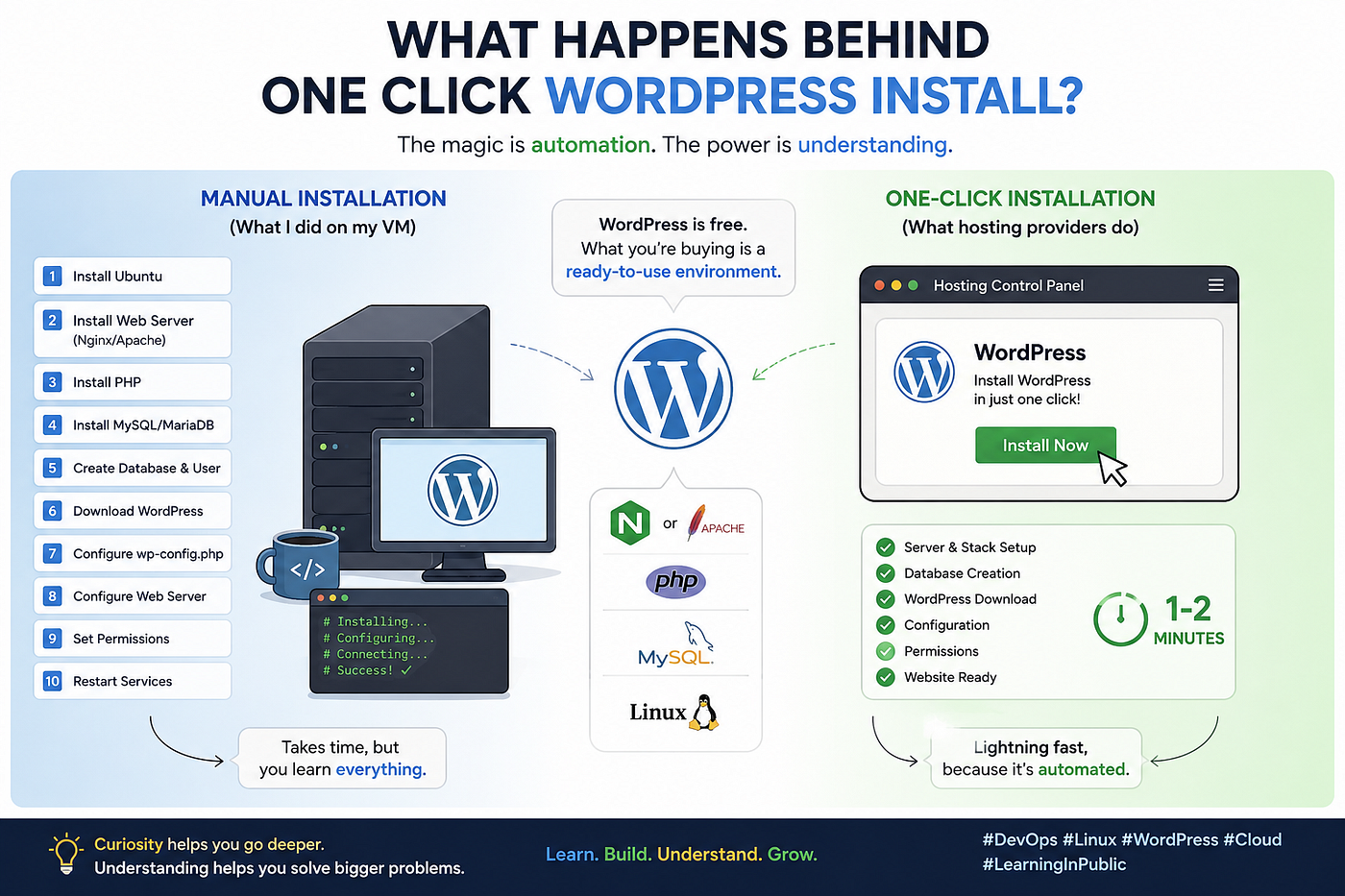
WordPress — along with any add ons/plugins etc etc — is FREE and open-source. When these providers offer “WordPress Hosting”, they are actually offering a hosting account which comes with WordPress installed automatically in there. Most users who simply want a website are going to go ahead, click on a button “Install WordPress”, and start building their website. But since I was in the process of learning Linux, Cloud & DevOps, that little button was bugging me!
I wondered ‘What’s going on behind that button?’
I took on the challenge, installing WordPress on an Ubuntu VM from the scratch and I pretty much did almost everything from the scratch and set it up as required without using any tools/automation: Configured and installed the web server on Ubuntu (I used both Apache and Nginx over several instances, now have a preference towards Nginx) Configured and installed the database server, and set up the database with the appropriate users and permissions Downloaded and configured the WordPressfiles The WordPress configuration file ( wp-config.php ) connects WordPress to yourdatabase Configured the web server to serve the WordPress site That was the moment it hit me that this little automation done by web hosting companies simply combines these steps. Basically, a script automates the installation process by setting up and configuring the entire environment for WordPress-including installing the LAMP or LEMP stack, creating the database and user, downloading WordPress files, updating configuration, setting correct file permissions, and more-all in just one or two minutes. It’s a helpful learning note: When you see automation, yes, the convenience it brings is a great benefit but Understanding what’s happening behind the scenes also brings a level of confidence & it’s more beneficial and empowering.
Installing WordPress manually taught me way more than simply how to host a website! It enabled me to gain an understanding about how web servers, database, php and Linux work together to provide such thing as a ‘web application’. Sometimes the easiest way to get there is to understand what’s behind every step you click on (especially not with the ‘Next’ button)!
Excited to continue exploring the layers of Linux, Cloud and DevOps.
메타데이터
- post_id
- ab9fb751c077
- slug
- curiosity-made-me-install-wordpress-the-hard-way-ab9fb751c077
- url
- https://medium.com/@gamjt97/curiosity-made-me-install-wordpress-the-hard-way-ab9fb751c077
- canonical_url
- https://medium.com/@gamjt97/curiosity-made-me-install-wordpress-the-hard-way-ab9fb751c077
- author_url
- https://medium.com/@gamjt97
- status
- ok
- fetched_at
- 2026-08-20 08:15:51