LetsDefend — ICS FuelStation — Network Analysis
Scenario: Scenario: Demonstrate your threat hunting and network traffic analysis skills by uncovering a C2 communications–related incident…
LetsDefend — ICS FuelStation — Network Analysis
Scenario: Scenario: Demonstrate your threat hunting and network traffic analysis skills by uncovering a C2 communications–related incident. On one of the organization’s critical endpoints, a suspicious file with an unusual extension was flagged by security tooling. Analyze the provided network traffic to trace the attacker’s activity and identify the threat.
What happened?
→ At a critical Endpoint → Suspicious file detected
→ File Extension → Unusual
→ Security Tools → Flagged it
And what we do?
→ We → Analysis the network traffic and find C2 communication.
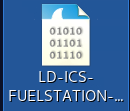
We have an pcap file on the desktop.
Q1: The Attacker started off by scanning the subnet. When did port scanning activity start?
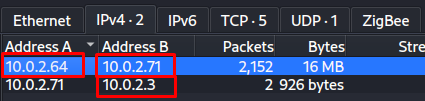
To find network scanning i look at the Statistic → Conversation.

I can say this attacker scanned on the local network. To be sure i filtered by tcp and source ip 10.10.32.130. And i sorted the dates from oldest to recent.

The first packets show the first network connection attempt.
We obtained this information from here.
Source IP Address: 10.10.32.130 (Attacker)
Destination IP Address: 10.10.32.128 (Target System)
Q2: When did the port scanning activity stop?
Now we already know network scan How does it happen? Attacker probably used an a tool to port scanning.
Tools generally work as follow;
Network Scanner Tool Send [SYN] packet over TCP to target port.
Destination sees this packet and sends a [SYN-ACK]
Network Scanner Tool send [RST-ACK]
IF THE DESTİNATİON PORT CLOSED.
Network Scanner Tool Send [SYN]
Destination Checked this port and return [RST-ACK]
We know SYN packet is always sent to port scanning. Therefore i filter by SYN packets and source ip.
ip.src == 10.10.32.130 and tcp.flags.syn == 1 and tcp.flags.ack ==00And then i looked at the last packets.

We know that network scans are performed by scanning thousands of ports in seconds. Network Scanning started at 07:27:31 and end it at 07:27:34. Attack happened in 4 seconds. After the network scanning established http, https connection after 1.30 minutes.
Q3: Please identify the IP Address of the internal asset used by the threat actor?
We already determined the Attacker and Victim ip address. We saw in the previous question on the network connection or in the first question in the part where we looked at the Statistics section.
Q4: Which port other than the tank gauge system was open on the system?
It says that a port address 10.10.32.128, is open. We already did talk about this, If the service is close return [RST-ACK] but if service is open return [SYN-ACK] packet.
Therefore i need to filter returned [SYN-ACK] packets. This shows open ports on the victim machine.
tcp.flags.syn == 1 and tcp.flags.ack == 1
10001, 21.
Port 21 is FTP data transfer protocol. Attacker was find 21 Port. Maybe attacker try to exploit this protocol.
Now we had this informations:
Attacker IP Address: 10.10.32.130
Victim IP Address: 10.10.32.128
Attacker Find this Protocol: 21 FTP
Q5: Which port was being used by the ICS system?
In the previous question we saw that requests sent to the victim machine open ports sent [SYN-ACK] packets. In these returned [SYN-ACK] packets we know its in a packet sent for port 10001.
tcp.flags.syn == 1 and tcp.flags.ack == 1
Q6: Can you confirm the Vendor of the Automated tank gauge system being used on the field?
We had information about ICS system used port 10001 on the previous question. Now i need to look at the tcp 10001 communication. Therefore i was filter by tcp.port == 10001
tcp.port == 10001
And i follow the TCP Stream to see what data sents it or takes it.


Q7: What is the Name of the petroleum pump that was being attacked?
The attacker is accessing the Automated Tank Gauge System’s data by sending commands via the protocol used by ATG systems. With these commands the attacker directly accesses the systems data withour system authentication.
We already saw and confirmed this in the previous question.

Q8: What is the function code used by the attacker for unauthorized access of data for delivery reports?
Again we need to look at the same page on the previous questions. Attacker was listed System information from sent command.
I need to determine which request sent to list data.

I saw the Delivery Report on the TCP History, system responsed with report the after I20200 command sent.
Q9: At what time was a leak detected from one of the tanks?
I first thought understand leak mean CyberSecuirty leak:). Bu this leak mean real tank leak. How can we determine this information? Absolutely look to attacker sent it command results.

I looked at the commands and results I saw an a line about LEAK. ATG System was detected leak at 03:14 AM.
Q10: What was the status of the 1s product in the inventory?
Im continue to investigate same TCP Stream. Therefore i looked at the repsonsed from atg system.

1s Product is GASOLINE. Status is FILLING-IN-PROGRESS
Q11: The Attacker got access to the Delivery reports for the station. When was the time for the last delivery?
We need to examine the commands the attacjer sent to print the Delivery Reports and the report the system returned.

Start: 08/27/2025 02:14 End: 08/27/2025 02:24
Q12: When did the attacker gain access to the site’s shift reports?

Q13: What was the temperature of the 2nd Gasoline product at the time of the incident?

Q14: What is the name of the product in the Fourth tank?

Q15: What was the hostname of the machine running the tank gauge software?
To find hostname we could filter by DHCP requests. DHCP is Dynamic Host Configuration Protocol, when an device connects a wifi, DHCP protocol is works after the connection. DHCP Configurate the give the local IP address, subnet mask, default gateway, DNS Server.

Q16: The Attacker manipulated the tank gauge values and changed the product names to deliver a message to the organization and staff, demanding a ransom payment. What was the ransom amount demanded by the attacker?
Again we back turn to TCP Flow.

Q17: What was the email address associated with the attacker?

Summary:
What attacker did?
- Start network scanning
- Found 10001 PORT
- Start request to 10001
- The ransom was demanded
Efe Ozel — SOC Analyst
메타데이터
- post_id
- aba219029c69
- slug
- letsdefend-ics-fuelstation-network-analysis-aba219029c69
- url
- https://medium.com/@efeqozel/letsdefend-ics-fuelstation-network-analysis-aba219029c69
- canonical_url
- https://medium.com/@efeqozel/letsdefend-ics-fuelstation-network-analysis-aba219029c69
- author_url
- https://medium.com/@efeqozel
- status
- ok
- fetched_at
- 2026-07-14 07:27:29