Operational Transform (OT): A Comprehensive Guide Using React
“Ever wondered how multiple users can edit the same Google Doc at the same time without conflicts? The magic behind this seamless…
Operational Transform (OT): A Comprehensive Guide Using React

“Ever wondered how multiple users can edit the same Google Doc at the same time without conflicts? The magic behind this seamless collaboration is called Operational Transform. Let’s dive into how it works!”
What is Operational Transform?
Operational Transform (OT) is a technology used to support collaboration between multiple users working on the same document or data simultaneously. Imagine you’re editing a document with someone else. If you both make changes at the same time, OT ensures that these changes are applied correctly, so the final document reflects both your contributions.
Basic Concept of OT (Layman’s Explanation)
Think of OT as a smart mediator between you and your friend when you’re both writing a story together. If you both try to write on the same line, OT steps in and rearranges things so that both of your inputs are included without clashing. For example, if you add a sentence at the start of a paragraph and your friend adds one at the end, OT ensures that both sentences make it to the final version in the right order.
Why OT is Important
In real-time collaborative applications like Google Docs, OT ensures that all users see a consistent view of the document. It helps in merging changes made by multiple users in such a way that no one’s work is lost or overwritten.
How OT Works: The Basic Principle
At its core, OT involves two key operations:
- Insert: Adding new content.
- Delete: Removing content.
When two or more users make changes, these operations need to be transformed relative to each other to maintain a consistent document state.
Lets Understand the complete concept using some examples
Operational Transform Process Overview
Imagine two users, A and B, are editing a text document.
- Initial Document: “Hello World”
- A’s Action: Insert “coding “ at position 6 (between “Hello” and “World”).
- B’s Action: Delete “World” (starting from position 6).
If A’s action is applied first, the document becomes “Hello Coding World”. If Bob’s action is then applied, Bob’s deletion will remove “Coding” instead of “World”. This is where OT comes in.
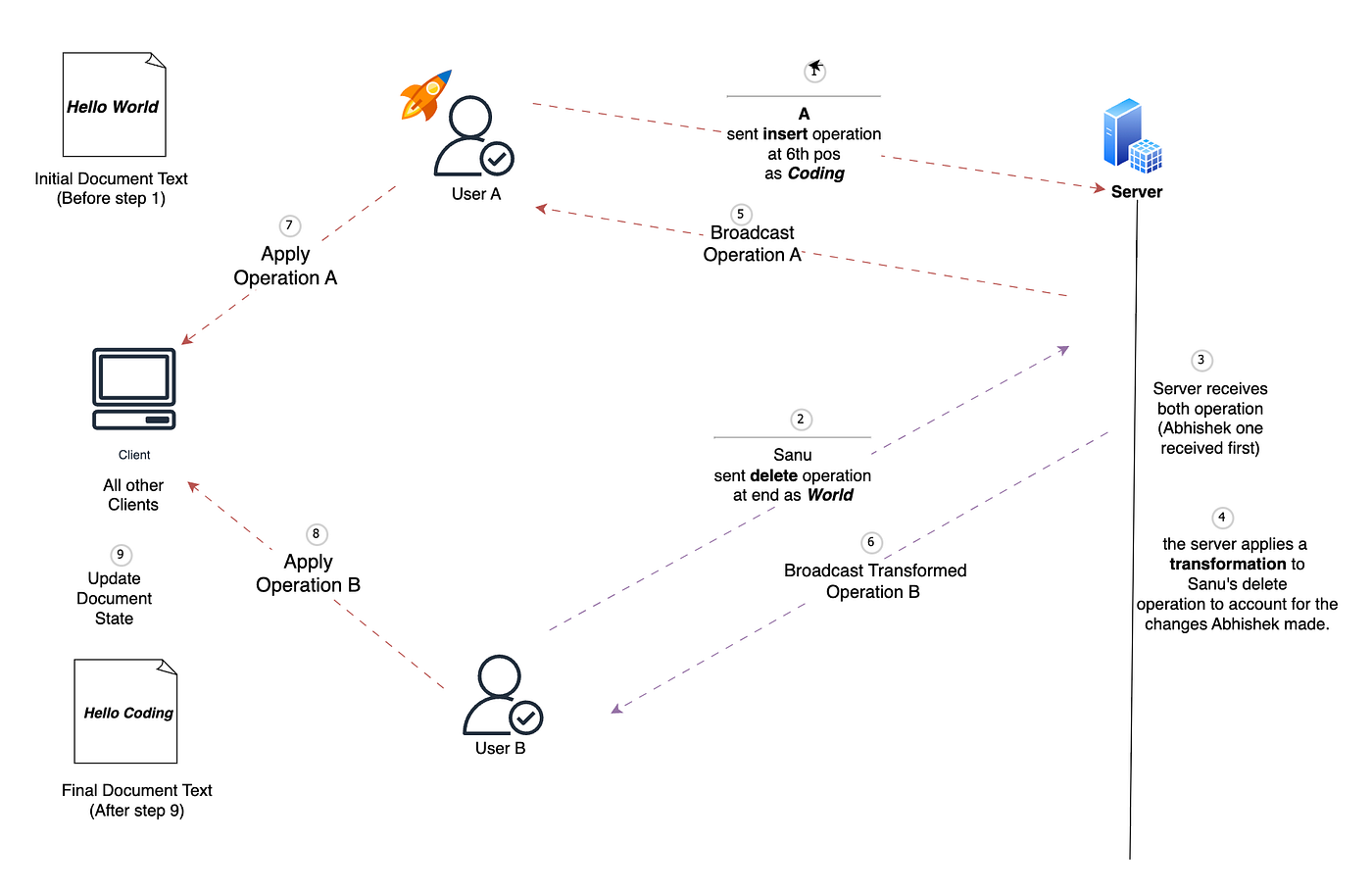
Detailed Explanation
User Actions (A and B):
- A performs an insert operation, adding the word “Coding “ at position 6 in the document.
- B performs a delete operation, intending to remove the word “World” starting from position 6.
Sending Operations to the Server:
- Both A and B operations are sent to a central server that handles collaboration. This server acts as a mediator to ensure that all operations are applied in a consistent and correct order across all clients.
Server-Side Transformation:
- The server receives both operations. Since A’s operation arrived first, the server applies a transformation to B delete operation to account for the changes A made.
- Without this transformation, B operation would incorrectly delete a portion of the newly inserted text (“Coding “) instead of the intended “World”.
Broadcasting Operations:
- The server broadcasts A’ s original operation to all clients, including B.
- The server then broadcasts the transformed version of B’s delete operation to all clients. This ensures that each client receives operations in a consistent order, even if they were performed concurrently.
Applying Operations on Clients:
- Each client (including A’s and B’s instances) applies the received operations to their local copy of the document.
- A’ s operation is applied as-is, and B’ s operation is applied in its transformed state.
Updating Document State:
- After all operations are applied, the document state is updated uniformly across all clients. This ensures that all users see the same document, preserving the consistency and integrity of the collaborative editing process.
Implementation
Creating a complete coding example in React that covers advanced concepts of Operational Transform (OT) is a challenging task, as OT is usually implemented as part of a larger collaborative system. However, I can walk you through creating a simplified version in React that demonstrates key OT principles, including managing concurrent operations, transforming operations, and ensuring consistency.
Basic App Structure
In the src folder, modify App.js to set up a basic document editor.
import React, { useState } from 'react';
import './App.css';

function App() {
  const [document, setDocument] = useState("Hello World");
  const [operations, setOperations] = useState([]);

  // Function to handle insert operation
  const handleInsert = (text, position) => {
    const newDoc = document.slice(0, position) + text + document.slice(position);
    setDocument(newDoc);

    // Record the operation
    setOperations([...operations, { type: 'insert', text, position }]);
  };

  // Function to handle delete operation
  const handleDelete = (position, length) => {
    const newDoc = document.slice(0, position) + document.slice(position + length);
    setDocument(newDoc);

    // Record the operation
    setOperations([...operations, { type: 'delete', position, length }]);
  };

  return (
    <div className="App">
      <h2>Collaborative Document Editor</h2>
      <textarea value={document} readOnly rows={5} cols={40} />
      <div>
        <button onClick={() => handleInsert("Coding ", 6)}>A Insert</button>
        <button onClick={() => handleDelete(6, 5)}>B Delete</button>
      </div>
    </div>
  );
}

export default App;
Implementing OT Logic
Next, we’ll add the OT logic to handle the transformation of operations when they conflict.
Transforming Operations
Add a utility function to transform operations:
// Utility function to transform an insert operation against another insert
function transformInsertAgainstInsert(op1, op2) {
  if (op1.position <= op2.position) {
    return op1;
  } else {
    return { ...op1, position: op1.position + op2.text.length };
  }
}

// Utility function to transform an insert operation against a delete
function transformInsertAgainstDelete(insertOp, deleteOp) {
  if (insertOp.position <= deleteOp.position) {
    return insertOp;
  } else {
    return { ...insertOp, position: insertOp.position - deleteOp.length };
  }
}

// Utility function to transform a delete operation against another delete
function transformDeleteAgainstDelete(op1, op2) {
  if (op1.position >= op2.position + op2.length) {
    return { ...op1, position: op1.position - op2.length };
  } else if (op1.position + op1.length <= op2.position) {
    return op1;
  } else {
    // Overlapping case: adjust the length of the deletion
    const overlapStart = Math.max(op1.position, op2.position);
    const overlapEnd = Math.min(op1.position + op1.length, op2.position + op2.length);
    const newLength = op1.length - (overlapEnd - overlapStart);

    return { ...op1, length: newLength };
  }
}

// Utility function to transform a delete operation against an insert
function transformDeleteAgainstInsert(deleteOp, insertOp) {
  if (deleteOp.position >= insertOp.position) {
    return { ...deleteOp, position: deleteOp.position + insertOp.text.length };
  } else {
    return deleteOp;
  }
}
Applying and Transforming Operations
Now, let’s update the App.js to apply and transform operations:
function App() {
  const [document, setDocument] = useState("Hello World");
  const [operations, setOperations] = useState([]);

  const applyOperation = (op) => {
    switch (op.type) {
      case 'insert':
        setDocument((prevDoc) =>
          prevDoc.slice(0, op.position) + op.text + prevDoc.slice(op.position)
        );
        break;
      case 'delete':
        setDocument((prevDoc) =>
          prevDoc.slice(0, op.position) + prevDoc.slice(op.position + op.length)
        );
        break;
      default:
        break;
    }
  };

  const handleOperation = (newOp) => {
    let transformedOp = newOp;

    operations.forEach((op) => {
      if (op.type === 'insert' && transformedOp.type === 'insert') {
        transformedOp = transformInsertAgainstInsert(transformedOp, op);
      } else if (op.type === 'delete' && transformedOp.type === 'insert') {
        transformedOp = transformInsertAgainstDelete(transformedOp, op);
      } else if (op.type === 'delete' && transformedOp.type === 'delete') {
        transformedOp = transformDeleteAgainstDelete(transformedOp, op);
      } else if (op.type === 'insert' && transformedOp.type === 'delete') {
        transformedOp = transformDeleteAgainstInsert(transformedOp, op);
      }
    });

    // Apply the transformed operation
    applyOperation(transformedOp);

    // Record the operation
    setOperations([...operations, transformedOp]);
  };

  return (
    <div className="App">
      <h2>Collaborative Document Editor with OT</h2>
      <textarea value={document} readOnly rows={5} cols={40} />
      <div>
        <button onClick={() => handleOperation({ type: 'insert', text: "Coding ", position: 6 })}>
          A Insert
        </button>
        <button onClick={() => handleOperation({ type: 'delete', position: 6, length: 5 })}>
          B Delete
        </button>
      </div>
    </div>
  );
}

export default App;
Explanation of the Code
- Handling Concurrent Operations: The
handleOperationfunction transforms incoming operations based on the history of previous operations. This ensures that when multiple users make changes simultaneously, their edits are applied correctly and in a consistent order. - Operation Transformation: The transformation functions adjust the position and length of operations based on other operations that have already been applied. This is crucial for maintaining consistency in a collaborative environment.
- Application of Operations: After transformation, the operation is applied to the document using the
applyOperationfunction. This modifies the document state in React.
Advanced Concepts in OT
a. Concurrency Control
OT handles concurrent operations from multiple users. It ensures that the sequence of operations is consistent, no matter the order in which they arrive.
b. Transformation Functions
These functions adjust operations based on other operations that have already been applied. For example, transforming an insert operation relative to a delete operation or vice versa.
c. Server vs. Client
OT can be implemented on both the client and server sides. The server often plays a role in finalizing the order of operations to ensure all clients have a consistent view.
Challenges and Limitations
- Complexity: Implementing OT requires careful management of operation order and state.
- Edge Cases: Complex documents or operations can introduce challenging edge cases that need to be handled, such as overlapping inserts or deletes.
Applications of OT
- Google Docs: OT ensures that multiple users can edit a document simultaneously without conflicts.
- Code Collaboration Tools: Tools like VS Code Live Share use OT for real-time code collaboration.
Conclusion
Operational Transform is a powerful technique that makes real-time collaboration possible in many modern applications. By understanding the basic principles and implementing OT correctly, you can ensure that changes made by multiple users are seamlessly integrated, maintaining consistency and usability across the board.
Stackademic 🎓
Thank you for reading until the end. Before you go:
- Please consider clapping and following the writer! 👏
- Follow us **X | [LinkedIn](https://www.linkedin.com/company/stackademic) | [YouTube](https://www.youtube.com/c/stackademic) | [Discord](https://discord.gg/in-plain-english-709094664682340443)**
- Visit our other platforms: **In Plain English | [CoFeed](https://cofeed.app/) | [Differ](https://differ.blog/)**
- More content at **Stackademic.com**
메타데이터
- post_id
- aba3789f0676
- slug
- operational-transform-ot-a-comprehensive-guide-using-react-aba3789f0676
- url
- https://blog.stackademic.com/operational-transform-ot-a-comprehensive-guide-using-react-aba3789f0676
- canonical_url
- https://blog.stackademic.com/operational-transform-ot-a-comprehensive-guide-using-react-aba3789f0676
- author_url
- https://medium.com/@cu.16bcs5007
- status
- ok
- fetched_at
- 2026-07-28 21:27:59