Recipe Contracts: Making Data Product Workflows Repeatable, Reviewable, and Agent-Ready
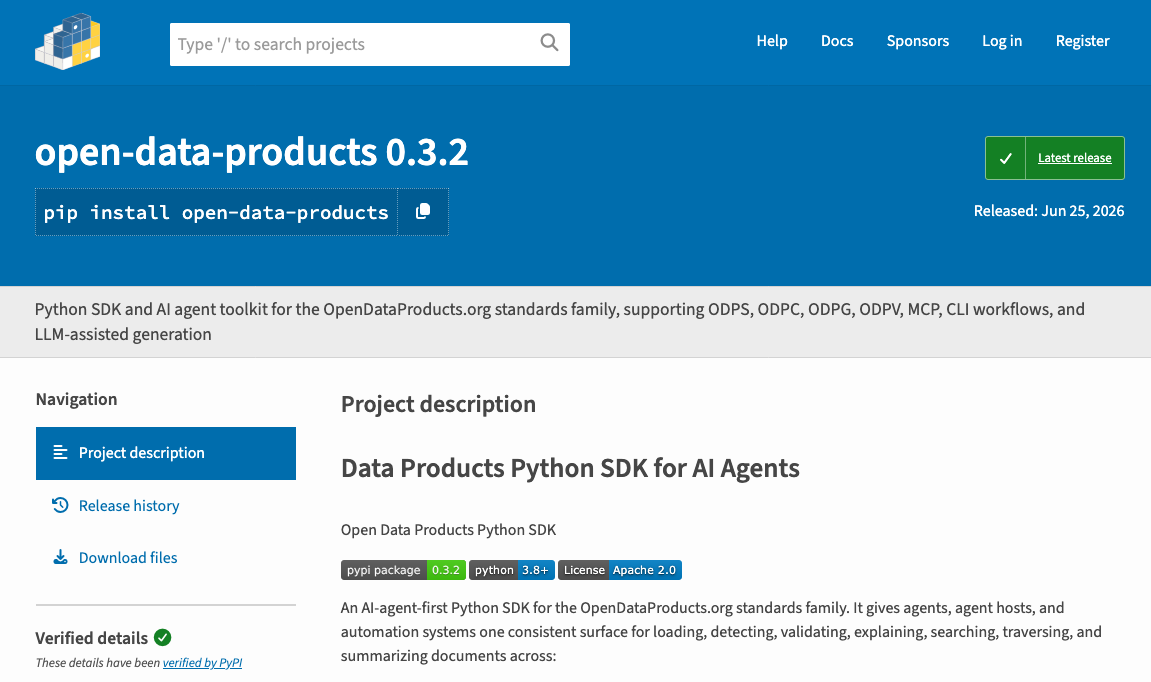
Data Product SDK Version 0.3.2. has been released to Pypi
Recipe Contracts: Making Data Product Workflows Repeatable, Reviewable, and Agent-Ready
Data Product SDK Version 0.3.2. has been released to Pypi
The Data Products SDK is moving beyond individual commands. With Open Data Product Recipes based Recipe Quick Starts, the SDK now supports a workflow layer where repeatable tasks become named, inspectable, and executable recipes. This matters because data product work rarely stays inside one developer’s terminal. It moves into teams, CI pipelines, release reviews, portfolio publishing, and increasingly, AI-agent-assisted development.
At that point, a workflow should not depend on memory, scattered notes, or a fragile chain of commands. It needs a contract. That is the role of ODPR recipes.
A recipe captures how a workflow should run, what it expects, what it plans to read, what it plans to write, which approvals it requires, and whether LLM-backed steps are involved. It turns operational know-how into a structured runbook that both humans and agents can inspect before anything state-changing happens.
Why Recipe Contracts Matter
Data Product projects often start with simple SDK commands.
- A user validates a product definition.
- A developer generates fragments.
- A team builds a catalog.
- Someone renders a portfolio or creates graph context for agents.
At small scale, this works. At team scale, the same work needs more structure.
The same workflow should run the same way every time.
- Planned writes should be visible before execution.
- Provider calls should not happen by accident.
- LLM-backed steps should require explicit permission.
- Review requirements should be part of the workflow itself.
This is where recipe contracts become valuable.
A recipe does not only say what to run. It defines the expected operating model around the workflow. It supports planning before execution. It separates discovery from runtime state. It makes approval visible. It gives AI agents a safer surface to inspect and plan against. That is important for any SDK that wants to support both human developers and automated agents.
From Commands to Workflow Contracts
The SDK now ships 6 starter recipes through an ODPR RecipeCatalog. A user can start from a clear intent instead of a blank workspace.
For example:
open-data-products recipe init build-data-product-portfolioThis creates a local recipe workspace in the user’s project:
recipes/build-data-product-portfolio/
  README.md
  AGENTS.md
  recipe.yaml
  inputs/
  outputs/
This layout matters. The packaged starters belong to the SDK. The initialized workspace belongs to the user’s project.
That separation keeps SDK internals clean while giving teams a practical place to adapt workflows, add inputs, review plans, and store generated outputs.
A Simpler Recipe Flow
The recipe CLI now follows a more natural path.
Before a local recipe workspace exists, recipe list shows packaged starters:
open-data-products recipe listAfter a recipe has been initialized, the user can enter the workspace and run the common commands without repeating long paths:
open-data-products recipe explain recipe.yaml
open-data-products recipe plan
open-data-products recipe run --allow-llm --approve-review
The explicit path-based commands still work. The improvement is that the quick-start path now matches how people work: list, initialize, inspect, plan, run.
Plan Before Run
Planning is the safety layer. A recipe plan shows what would happen before execution. It does not write workflow outputs. It does not call providers. It gives the user or agent a structured view of the workflow.
For example:
open-data-products recipe plan --jsonA plan can include planned reads, planned writes, provider readiness, required environment variables, gates, review requirements, blocking reasons, and whether the recipe can run.
This is useful for developers, but it is even more important for agentic workflows.
A human can read the plan before approving execution. An AI agent can parse the JSON and decide whether it is allowed to continue. CI pipelines can use the same plan output to block unsafe or incomplete runs.
The recipe becomes more than a convenience wrapper. It becomes a reviewable execution contract.
Guarded Execution
Execution stays explicit. LLM-backed steps require a clear flag:
--allow-llmReview-needed steps require another clear flag:
--approve-reviewFor example:
open-data-products recipe run --allow-llm --approve-reviewThese flags are separate by design. Review approval does not automatically permit provider calls. Provider readiness does not remove the need for review. LLM execution permission does not bypass workflow gates. This separation keeps important decisions visible.
For deterministic recipes that do not call a provider, review approval may be enough:
open-data-products recipe run --approve-reviewFor planning mode, the user can force a dry run:
open-data-products recipe run --dry-run --jsonThis model supports a simple principle: inspect first, approve deliberately, execute only when the workflow is ready.
RecipeCatalog as Discovery
The SDK uses ODPR RecipeCatalog as a metadata-only discovery layer. A catalog entry describes the available recipes. It can include recipe id, name, description, tags, group reference, command names, review requirement, and the path to the full recipe file.
It does not store runtime inputs. It does not store generated outputs. It does not store secrets, approval records, or provider responses.
Discovery should stay lightweight and safe. The catalog tells users and agents what recipes exist. The full recipe workspace contains the executable workflow. Runtime results stay in the runtime workspace. This keeps the catalog useful without turning it into an execution log or secret store.
The 5 packaged starter recipes are:
build-data-product-portfolioBuilds a full static portfolio workspace from source lanes.source-to-product-fragmentsGenerates ODPC product reference fragments from source documents.fragments-to-odpc-catalogAssembles existing ODPC fragments into an ODPC catalog artifact.fragments-to-odpg-graphGenerates an ODPG graph from catalog fragments.generate-agent-contextRenders compact graph context for agent workflows from an existing graph.
Three Layers of Workflow Change
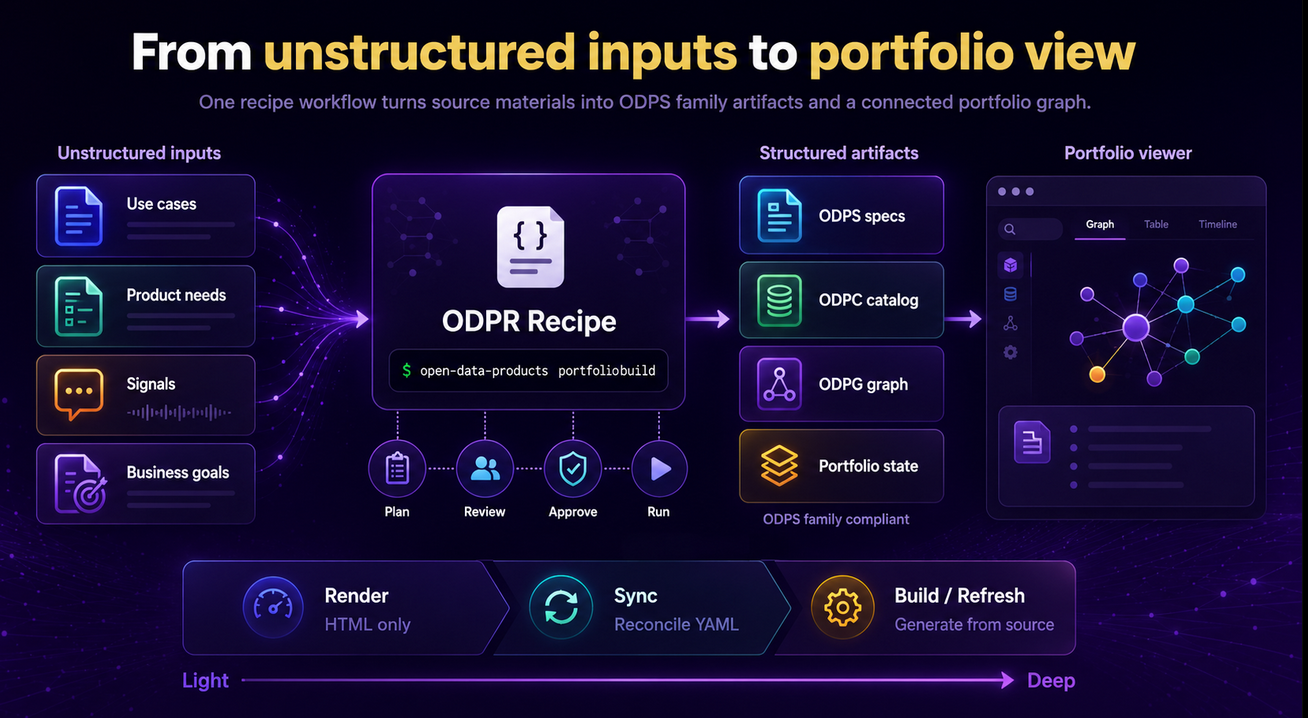
Recipe contracts also help clarify how deep a workflow goes when it runs. Not every command changes the workspace in the same way. Some commands only rebuild presentation output. Some reconcile existing YAML artifacts. Others generate or refresh new structures from source material, including model-assisted relationships.
A useful way to see this is through three layers.
Layer 1: Render
Render is the shallowest layer. It rebuilds the HTML view from the current workspace artifacts. It loads the files as they already exist, such as odpc/catalog.yaml, odpg/graph.yaml, odps/products/*.yaml, portfolio.yaml, portfolio-i18n.yaml, and version files. Then it rebuilds index.html.
Render does not rebuild catalog.yaml. It does not update portfolio-state.yaml. It does not normalize product YAML. It does not inspect odpc/fragments/*.yaml as the source of truth. It does not create a version snapshot.
For graphs, render does not change graph edges. It reads the current odpg/graph.yaml and displays what is already there in the HTML output.
Use render when the data is already correct and only the HTML needs rebuilding.
Layer 2: Sync
Sync goes deeper. It treats edited YAML fragments and product specs as source material. It rebuilds odpc/catalog.yaml from odpc/fragments/*.yaml. It loads odps/products/*.yaml and normalizes product spec files. It syncs product reference details from ODPS product specs back into ODPC product references. It updates the portfolio-state.yaml identity registry from the synced catalog. Then it calls render to rebuild index.html.
If an existing index.html is present, sync also creates a version snapshot.
Sync may change graph-related workspace state, but within an important limit. It does not infer new graph edges from source text. It does not call the LLM model. It is deterministic YAML reconciliation, not model-based graph inference.
Use sync when you edited YAML artifacts and need the workspace model reconciled before rebuilding the HTML.
Layer 3: Build, Refresh, and Graph Generation
Build and refresh workflows go deeper again. This is where the SDK can generate or refresh new relationships, product references, catalog structures, or graph context from source material. For example, relationship generation such as “use case A uses product reference B” belongs to portfolio build, portfolio refresh, or odpg.build, not render.
This distinction matters for human review and agent automation.
A user should know whether a workflow only changes HTML, reconciles existing YAML, or generates new structures. An agent should know the same before it acts. A CI pipeline should also be able to block or approve different workflow layers based on the depth of change.
That is why recipe contracts are useful. They make the intended depth of change visible before execution.
Agent-Ready Workspaces
Each initialized starter includes an AGENTS.md file. This file gives AI coding agents local operating instructions. It explains what the agent can edit, what must be planned first, what requires approval, and where runtime outputs belong.
A typical agent-ready flow looks like this:
open-data-products recipe list --json
open-data-products recipe init build-data-product-portfolio --json
cd recipes/build-data-product-portfolio
open-data-products recipe explain recipe.yaml --json
open-data-products recipe plan --json
open-data-products recipe run --allow-llm --approve-review --json
This flow gives agents a safer way to work with Open Data Product projects. They can discover recipes, explain them, validate them, and plan them before execution.
Starter initialization is still state-changing because it creates files on disk. That distinction matters. Even safe-looking automation needs clear boundaries.
Examples for Real Projects
The SDK also includes realistic example workspaces separate from the packaged starters. These examples show what complete recipe-based projects can look like. They cover workflows such as building a portfolio from product inputs, generating fragments from source documents, using hosted and local LLMs, assembling an ODPC catalog, building an ODPG graph, and rendering graph context for agents.
Each example includes a README, AGENTS.md, recipe.yaml, inputs, and outputs-example folder.
These examples are not starter templates. They are reference workspaces. Their purpose is to show how recipe-based projects work when inputs, outputs, and operating instructions come together.
Advanced Parameterized Mode
The default quick start keeps the recipe workspace simple. For teams that need more reuse, the SDK also supports parameterized initialization:
open-data-products recipe init build-data-product-portfolio --parameterizedThis creates:
recipe.values.yaml
values.schema.yaml
This mode separates reusable settings from the main recipe contract. It is useful for teams that want the same recipe structure to support different environments or project variants.
It is intentionally advanced. The current runner still executes recipe.yaml, so values files should be applied deliberately. They should not contain secrets or runtime results.
The Practical Value
ODPR Recipe Quick Starts turn the SDK into more than a collection of commands.
They give humans a clearer starting point. They give teams repeatable runbooks. They give agents safe discovery and planning surfaces. They give CI and release workflows structured manifests, blocking reasons, and review-aware execution. Most of all, they reduce the cost of starting.
Instead of asking a user to understand every command, every output path, every provider requirement, and every approval decision upfront, the SDK now supports a practical entry point:
open-data-products recipe init build-data-product-portfolioThat is a small command with a larger purpose. It moves Open Data Product workflows from informal command chains to structured recipe contracts. That makes the work easier to start, easier to review, and safer to automate.
From One Command to a Connected Portfolio
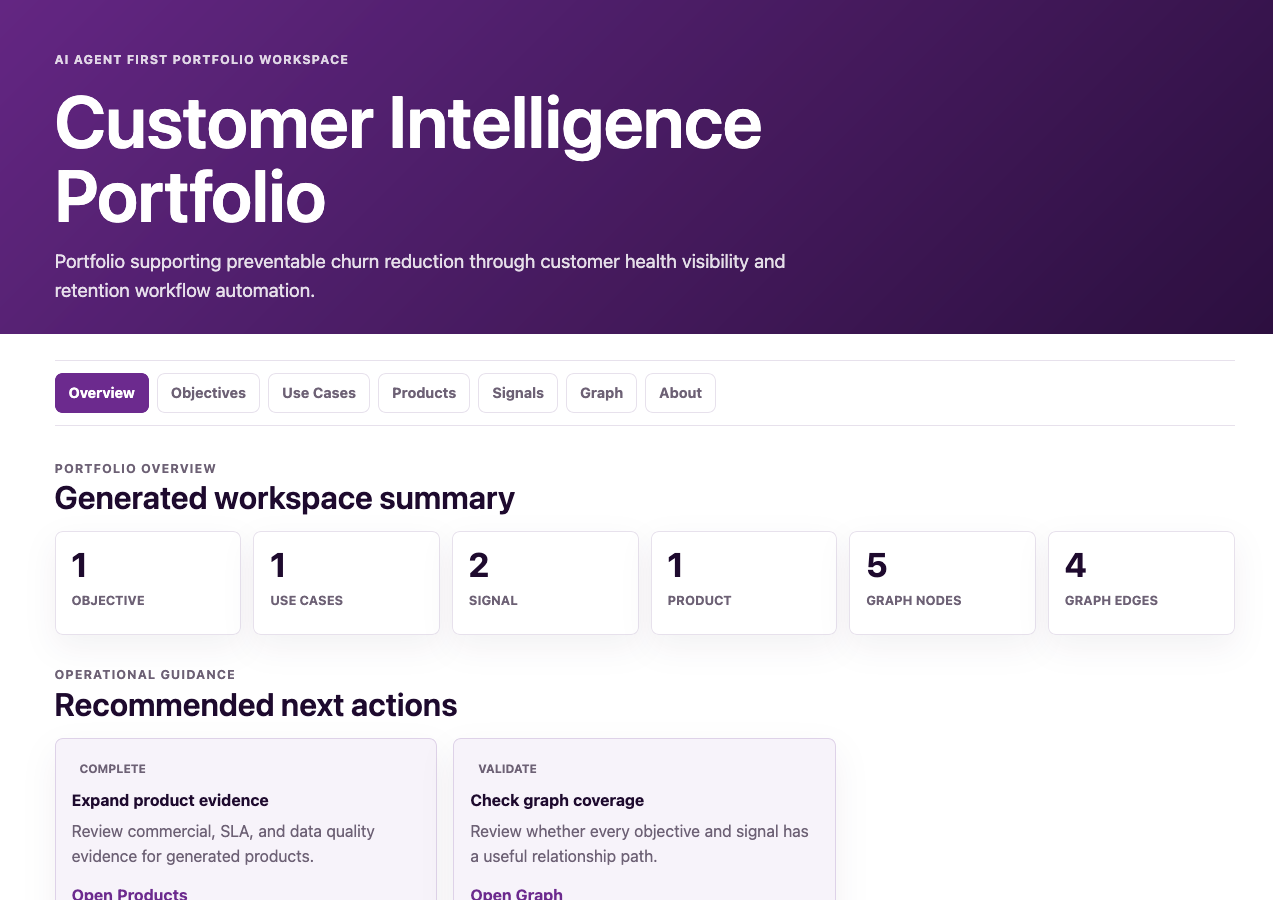
What makes this workflow capability powerful is not only that it builds a catalog of products. It goes further and assembles a fuller view of the data product ecosystem around them. With a single workflow command, teams can turn scattered source material into a connected portfolio that brings together products, use cases, signals, and business objectives as standards-compliant ODPS family artifacts.
The result is more than structured files on disk. It is a portfolio workspace with a graph explorer that helps users and agents understand how the different elements relate to one another. Instead of seeing isolated product definitions, you see the broader operating context: why the products matter, which use cases they support, what signals shape them, and how they connect to business intent.
That is the real value of recipe-driven workflows. One command does not just generate artifacts. It creates a navigable, reviewable, and connected portfolio view of the data product landscape.
메타데이터
- post_id
- abdd436ba152
- slug
- recipe-contracts-making-data-product-workflows-repeatable-reviewable-and-agent-ready-abdd436ba152
- url
- https://blog.opendataproducts.org/recipe-contracts-making-data-product-workflows-repeatable-reviewable-and-agent-ready-abdd436ba152
- canonical_url
- https://blog.opendataproducts.org/recipe-contracts-making-data-product-workflows-repeatable-reviewable-and-agent-ready-abdd436ba152
- author_url
- https://medium.com/@dr.jarkko.moilanen
- status
- ok
- fetched_at
- 2026-07-09 20:10:33