How to Build a VoIP Stack with OpenSIPS, Asterisk, and MariaDB on Ubuntu
Building a production-ready VoIP infrastructure requires a clear separation between signaling and media. While containerization is popular…
How to Build a VoIP Stack with OpenSIPS, Asterisk, and MariaDB on Ubuntu
Building a production-ready VoIP infrastructure requires a clear separation between signaling and media. While containerization is popular, a bare-metal deployment on AWS EC2 provides the direct hardware access and networking control necessary for low-latency real-time communication. This guide outlines how to deploy a stack using OpenSIPS 3.5.9 as the SIP proxy and Asterisk 20.6.0 as the media engine (B2BUA).
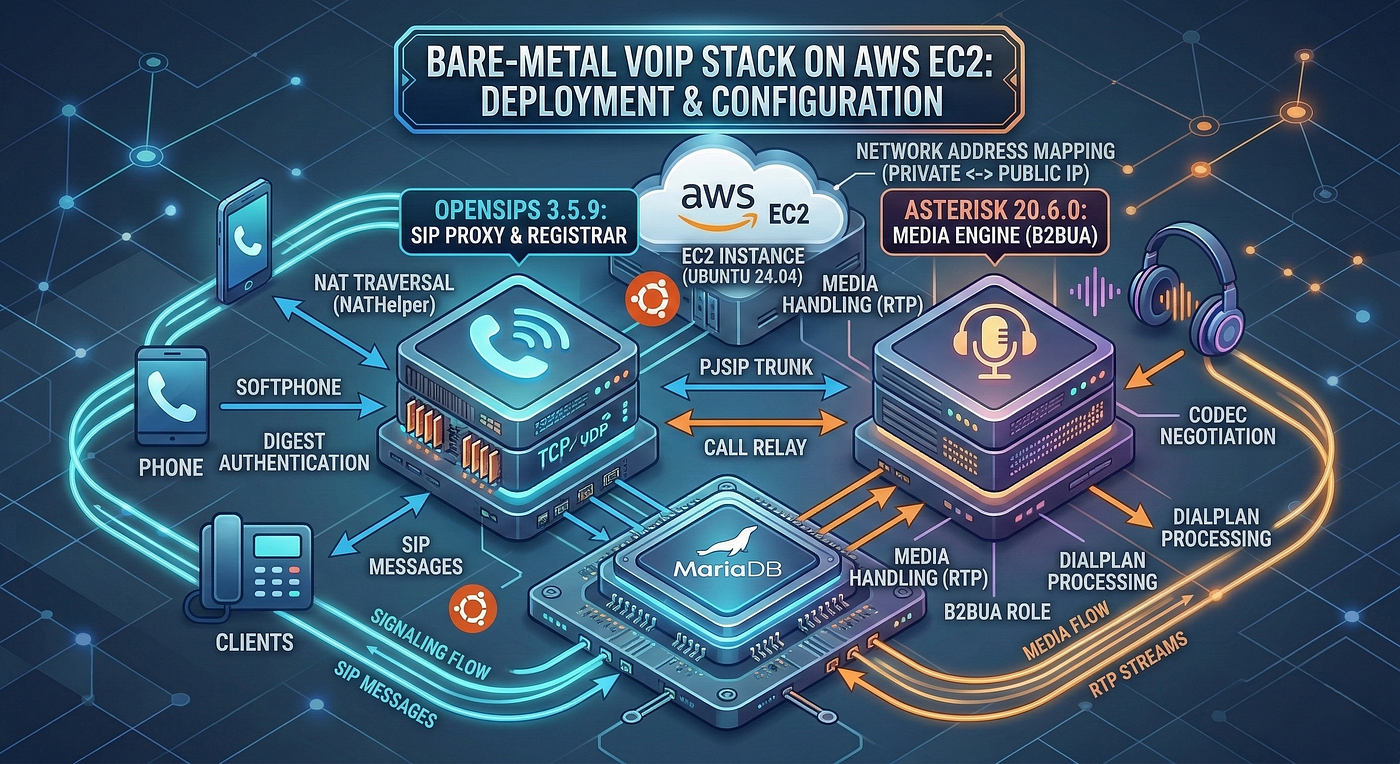
VoIP Setup
The Architecture
- Signaling Proxy (OpenSIPS 3.5.9): Acts as the entry point on port 5060 (UDP/TCP). It manages SIP registrations, digest authentication via MariaDB, and NAT detection.
- Media Engine (Asterisk 20.6.0): Functions as a Back-to-Back User Agent (B2BUA) on port 5080. It handles the dialplan, codec negotiation, and RTP relay.
- Database Backend (MariaDB 10.11.14): A centralized
voipdbstores subscriber credentials and real-time location data. - Network Strategy: Uses SDP rewriting to map internal private IPs to the AWS Public IP, ensuring seamless audio flow through the EC2 NAT.
Step 1: MariaDB Configuration & Schema
First, establish the database layer to manage users and locations.
-- 1. Create the database and dedicated users
CREATE DATABASE voipdb;
GRANT ALL PRIVILEGES ON voipdb.* TO 'opensips'@'localhost' IDENTIFIED BY 'opensipsrw';
GRANT ALL PRIVILEGES ON voipdb.* TO 'asterisk'@'localhost' IDENTIFIED BY 'asteriskrw';
FLUSH PRIVILEGES;

USE voipdb;

-- 2. Subscriber Table: Stores SIP credentials and Auth Hashes
CREATE TABLE subscriber (
    id INT(10) UNSIGNED AUTO_INCREMENT PRIMARY KEY,
    username VARCHAR(64) DEFAULT '',
    domain VARCHAR(64) DEFAULT '',
    password VARCHAR(64) DEFAULT '',
    ha1 VARCHAR(64) DEFAULT '',
    UNIQUE KEY account_idx (username, domain)
);

-- 3. Location Table: Manages active SIP registrations (Memory + DB)
CREATE TABLE location (
    id INT(10) UNSIGNED AUTO_INCREMENT PRIMARY KEY,
    username VARCHAR(64) DEFAULT '',
    domain VARCHAR(64) DEFAULT '',
    contact VARCHAR(512) DEFAULT '',
    received VARCHAR(512) DEFAULT NULL,
    path VARCHAR(512) DEFAULT NULL,
    expires DATETIME DEFAULT NULL,
    q FLOAT(10,2) DEFAULT 1.0,
    callid VARCHAR(255) DEFAULT '',
    cseq INT(11) DEFAULT 0,
    last_modified TIMESTAMP DEFAULT CURRENT_TIMESTAMP,
    flags INT(11) DEFAULT 0,
    cflags INT(11) DEFAULT 0,
    user_agent VARCHAR(255) DEFAULT '',
    socket VARCHAR(64) DEFAULT '',
    methods INT(11) DEFAULT NULL,
    instance VARCHAR(255) DEFAULT NULL,
    kv_store TEXT DEFAULT NULL
);

-- 4. Domain Table: Defines the local domains served by the proxy
CREATE TABLE domain (
    id INT(10) UNSIGNED AUTO_INCREMENT PRIMARY KEY,
    domain VARCHAR(64) DEFAULT '',
    last_modified TIMESTAMP DEFAULT CURRENT_TIMESTAMP,
    UNIQUE KEY domain_idx (domain)
);

-- 5. Add a test user (Extension 1001 / Password: password123)
-- Note: 'ha1' is md5(username:domain:password)
INSERT INTO subscriber (username, domain, password, ha1)
VALUES ('1001', 'YOUR_PUBLIC_IP', 'password123', MD5('1001:YOUR_PUBLIC_IP:password123'));
Step 2: OpenSIPS Configuration (opensips.cfg)
OpenSIPS is configured to listen on both UDP and TCP. It handles the “heavy lifting” of NAT and relays calls to Asterisk for media processing.
####### Global Parameters #######
log_level=3
log_stderror=no
log_facility=LOG_LOCAL0

children=4

/* Bind to Private IP but advertise Public IP for SIP headers */
listen=udp:172.31.10.208:5060 as 52.43.226.78:5060
listen=tcp:172.31.10.208:5060 as 52.43.226.78:5060

####### Modules Section #######
mpath="/usr/lib/x86_64-linux-gnu/opensips/modules/"

loadmodule "db_mysql.so"
loadmodule "signaling.so"
loadmodule "sl.so"
loadmodule "tm.so"
loadmodule "rr.so"
loadmodule "maxfwd.so"
loadmodule "usrloc.so"
loadmodule "registrar.so"
loadmodule "auth.so"
loadmodule "auth_db.so"
loadmodule "nathelper.so"
loadmodule "proto_udp.so"
loadmodule "proto_tcp.so"

# ---- database params ----
modparam("usrloc", "db_url", "mysql://opensips:opensipsrw@localhost/voipdb")
modparam("usrloc", "db_mode", 2) # Write-Back mode for performance

modparam("auth_db", "db_url", "mysql://opensips:opensipsrw@localhost/voipdb")
modparam("auth_db", "calculate_ha1", 0) # Uses pre-calculated HA1 from DB

# ---- nathelper params ----
modparam("nathelper", "natping_interval", 30)
modparam("registrar", "tcp_persistent_flag", "TCP_PERSIST_FLAG")

####### Routing Logic #######
route {
    if (!mf_process_maxfwd_header("10")) {
        sl_send_reply("483","Too Many Hops");
        exit;
    }

    if (has_totag()) {
        # Sequential request handling
        if (loose_route()) {
            route(relay);
        } else {
            if ( is_method("ACK") ) {
                if ( t_check_trans() ) {
                    route(relay);
                    exit;
                } else {
                    exit;
                }
            }
            sl_send_reply("404","Not Found");
        }
        exit;
    }

    # Handle CANCEL
    if (is_method("CANCEL")) {
        if (t_check_trans())
            t_relay();
        exit;
    }

    # Record Routing for signaling continuity
    record_route();

    # --- Registration Logic ---
    if (is_method("REGISTER")) {
        if (!www_authorize("", "subscriber")) {
            www_challenge("", "0");
            exit;
        }
        if (!save("location")) {
            sl_reply_error();
        }
        exit;
    }

    # --- Inbound Invite Logic ---
    if (is_method("INVITE")) {
        # If it's not coming from our local Asterisk, authenticate it
        if ($si != "127.0.0.1") {
            if (!www_authorize("", "subscriber")) {
                www_challenge("", "0");
                exit;
            }
        }

        # Route to Asterisk for B2BUA/Media Handling
        # Asterisk listens on 5080
        if ($si != "127.0.0.1") {
            sethostport("127.0.0.1:5080");
        } else {
            # If coming BACK from Asterisk, look up the destination
            if (!lookup("location")) {
                sl_send_reply("404", "Not Found");
                exit;
            }
        }
        route(relay);
    }
}

route[relay] {
    if (!t_relay()) {
        sl_reply_error();
    }
    exit;
}
Step 3: Asterisk Configuration
Asterisk must be set to port 5080 to avoid conflicts and configured with PJSIP.
- Disable Legacy Drivers (
modules.conf):
[modules]
autoload=yes
; Disable the old SIP stack to avoid port conflicts
noload => chan_sip.so- PJSIP Trunk and Extensions (
pjsip.conf):
[transport-udp]
type=transport
protocol=udp
bind=0.0.0.0:5080
; Crucial for AWS: Rewrite SDP to use Public IP
external_media_address=52.43.226.78
external_signaling_address=52.43.226.78

[transport-tcp]
type=transport
protocol=tcp
bind=0.0.0.0:5080
external_media_address=52.43.226.78
external_signaling_address=52.43.226.78

; --- OpenSIPS Trunk ---
; This allows Asterisk to receive calls from and send calls back to OpenSIPS
[opensips-trunk]
type=endpoint
context=from-opensips
disallow=all
allow=ulaw,alaw
rtp_symmetric=yes
force_rport=yes
rewrite_contact=yes
direct_media=no
identify_by=ip

[opensips-identify]
type=identify
endpoint=opensips-trunk
match=127.0.0.1

[opensips-aor]
type=aor
contact=sip:127.0.0.1:5060- Dialplan (
extensions.conf):
[general]
static=yes
writeprotect=no

[from-opensips]
; --- Testing Extensions ---

; Echo Test (Dial 9999)
exten => 9999,1,NoOp(Starting Echo Test for ${CALLERID(all)})
 same => n,Answer()
 same => n,Playback(demo-echotest)
 same => n,Echo()
 same => n,Playback(demo-echodone)
 same => n,Hangup()

; Music on Hold Test (Dial 1234)
exten => 1234,1,NoOp(Starting Music on Hold for ${CALLERID(all)})
 same => n,Answer()
 same => n,MusicOnHold()
 same => n,Hangup()

; --- Routing Extensions ---

; Route all 4-digit extensions (1001, 1002, etc.) back to OpenSIPS
exten => _XXXX,1,NoOp(Routing call to Extension ${EXTEN} via OpenSIPS)
 same => n,Dial(PJSIP/${EXTEN}@opensips-trunk)
 same => n,Hangup()
Step 4: Final Deployment & Testing
- Security Groups: Ensure AWS allows 5060 (UDP/TCP), 5080 (UDP/TCP), and 10000–20000 (UDP).
2. Service Restart:
systemctl restart mysqlopensips -c(check syntax) thensystemctl restart opensipsasterisk -rx "core reload"
3. Verification:
- Register two extensions (e.g., 1001 and 1002) using a softphone like Linphone.
- Dial
9999to verify two-way audio (Echo Test). - Dial extension to extension to verify the B2BUA path.
- OpenSIPS performs a
lookup("location")and delivers the call to Phone B.
메타데이터
- post_id
- abe91a1dab4a
- slug
- how-to-build-a-voip-stack-with-opensips-asterisk-and-mariadb-on-ubuntu-abe91a1dab4a
- url
- https://medium.com/@rehmand110/how-to-build-a-voip-stack-with-opensips-asterisk-and-mariadb-on-ubuntu-abe91a1dab4a
- canonical_url
- https://medium.com/@rehmand110/how-to-build-a-voip-stack-with-opensips-asterisk-and-mariadb-on-ubuntu-abe91a1dab4a
- author_url
- https://medium.com/@rehmand110
- status
- ok
- fetched_at
- 2026-07-10 05:19:05

