AWS Bedrock Tokenomics: Cost Attribution and Monitoring with CUR and Cost Explorer
Our internal AWS sandbox account recently taught us a painful lesson: if you don’t have good attribution, Amazon Bedrock and Claude usage…
AWS Bedrock Tokenomics: Cost Attribution and Monitoring with CUR and Cost Explorer
Our internal AWS sandbox account recently taught us a painful lesson: if you don’t have good attribution, Amazon Bedrock and Claude usage can quietly dominate your bill.
Over the past few months, it felt like every team in the organisation discovered Claude at once. Hack days, prototypes, internal tools, “just one more prompt” experiments — everything started running through Bedrock, and our sandbox account became the playground for all of it. The monthly invoice, however, stopped looking like a playground and started looking like a problem.
Suddenly, leadership wanted to know: Which teams are driving this spend? Which projects justify it? What’s the actual ROI of all this Claude adoption and POC’s ?
We already had some observability from Bedrock model invocation logging and application inference profiles, which I documented in an earlier post. That setup works, but it introduces overhead: every new app needs a profile, dashboards rely on complex log queries, and per‑user attribution from local SSO sessions is still awkward — especially when half the organisation is hitting Bedrock from their laptops.
In this post I’ll show how we’ve moved to a simpler, more robust approach using:
- IAM principal‑based cost allocation for Bedrock, and
- Session tags from Azure AD → AWS IAM Identity Center (SSO)
Together, these give us per‑role and per‑user Bedrock cost visibility in CUR 2.0 and Athena, with much less operational friction.
The original approach: application inference profiles and logs
When Bedrock launched, the main way to get fine‑grained cost attribution was:
- Application inference profiles: route calls through profile IDs to represent apps, environments, or tenants.
- Model invocation logging: ship detailed per‑request logs to CloudWatch Logs and query them with CloudWatch or Athena.
In my earlier article, I showed how to:
- Create application inference profiles for each app.
- Enable model invocation logging and parse token counts.
- Use Cloudwatch Insight queries to compute per‑profile spend and usage.
This works well when:
- You control all apps behind a gateway, and
- You’re okay maintaining profiles and log queries.
But it doesn’t solve a key problem in a sandbox:
How do you see which human engineer is hammering Claude or other Bedrock models from their laptop via AWS SSO or IAM Role used by application hosted on services like lambda, ec2, eks etc.. ?
You only see the AWS SSO role ARN in logs and CUR; you don’t see the individual user identity.
New capability: IAM principal‑based cost allocation for Bedrock
AWS recently added IAM principal‑based cost allocation for Bedrock and other services.
High‑level:
- Every Bedrock API call is attributed to an IAM principal: IAM user, IAM role, or assumed role session.
- CUR 2.0 can now include “caller identity (IAM principal) allocation data”, including the principal ARN and its tags.
- You can activate IAM principal tags as cost allocation tags in Billing and then group Bedrock costs by those tags in Cost Explorer and Athena.
This gives you:
- Per‑role and per‑user cost attribution for server‑side apps (EC2, ECS, Lambda, EKS etc) once you tag those roles.
- A clean path to per‑user attribution from SSO, if you can attach session tags that identify the human user behind the SSO session.
Step 1 — Tag your IAM roles and enable IAM principal cost allocation
For the server‑side part of the story (apps in EC2/ECS/Lambda/EKS):
- Tag IAM roles with organizational metadata
- Add tags like
team,project,environment, andcostCenterto the roles used by your Bedrock apps.
2. Enable CUR 2.0 with IAM principal data
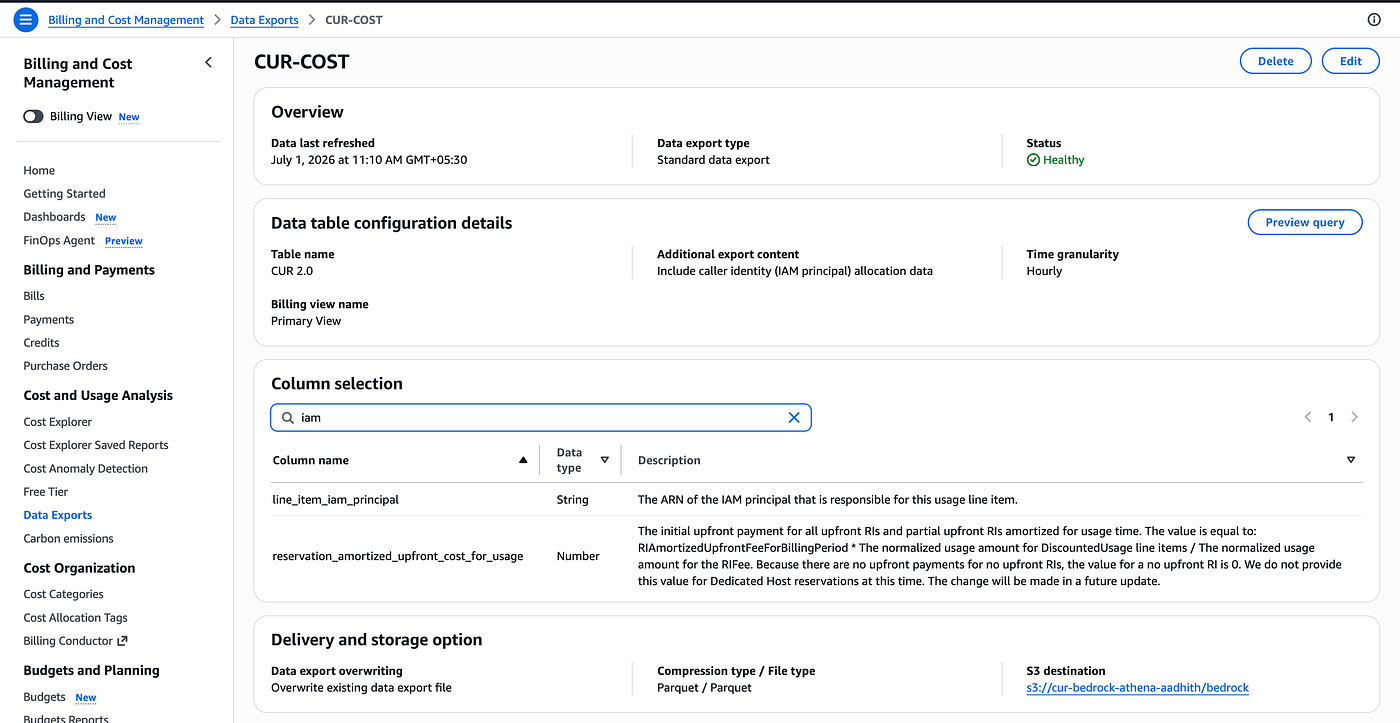
- In Billing → Data Exports, create a Standard data export (CUR 2.0).
- Under Additional export content, enable Include caller identity (IAM principal) allocation data.
3. Activate IAM principal cost allocation tags
- In Billing → Cost allocation tags, filter for IAM principal type.
- After the roles have made at least one Bedrock call, their tag keys show up here.
- Activate the tags you care about (
team,project, etc.).

Now CUR includes:
line_item_iam_principal– the caller’s ARN.- IAM principal tag columns — your role tags, which you can group on in Athena or Cost Explorer.

This alone gives you good attribution for deployed workloads, but local SSO usage from engineers was still opaque.
Step 2 — The gap: local SSO Bedrock usage by human user
In our sandbox, engineers use AWS SSO session tokens (IAM Identity Center) with Azure AD as the IdP:
- Engineers log in via the Identity Center portal or
aws sso login. - They assume SSO permission sets that grant them Bedrock access.
- They invoke Bedrock from CLI and SDK using short‑lived SSO credentials.
CUR now sees:
- The SSO role ARN as
line_item_iam_principal. - Static tags on that SSO role (e.g.,
environment=sandbox).
But we still couldn’t see which individual user was making the calls, because everyone shares the same SSO role. That’s where session tags and Azure AD SAML claims come in.
Step 3 — Use session tags with IAM Identity Center and Azure AD
AWS has two key building blocks for this:
- Session tags — key:value tags applied when assuming a role (via STS or SAML), referenced in IAM as
aws:PrincipalTag/<Key>. - IAM Identity Center session tags & ABAC — Identity Center can consume SAML attributes from IdPs like Azure AD, treat them as “Access Control Attributes”, and emit them as session tags on SSO sessions.
Our goal:
Attach a per‑user identifier (UPN/email) as a session tag to every SSO‑based Bedrock call.
We use Microsoft Entra ID (Azure AD) as the IdP, so we configured:
3.1 — Add SAML claims in Azure AD
In the AWS IAM Identity Center enterprise application in Entra AD:
- Under Single sign‑on → SAML → Attributes & Claims, we added:
https://aws.amazon.com/SAML/Attributes/AccessControl:userUpn→user.userprincipalnamehttps://aws.amazon.com/SAML/Attributes/RoleSessionName*→user.mail(so CloudTrail shows role sessions as emails)https://aws.amazon.com/SAML/Attributes/Role*→user.department(optional ABAC / session tags by department)

3.2 — Register Access Control Attributes in IAM Identity Center
On the AWS side, in IAM Identity Center → Settings → Attributes for access control:aws.amazon+1
- We added the key:
[https://aws.amazon.com/SAML/Attributes/AccessControl:userUpn](https://aws.amazon.com/SAML/Attributes/AccessControl:userUpn)- And mapped it to a friendly value/short key (e.g.,
userUpn).
IAM Identity Center now treats userUpn as an Access Control Attribute and emits it as a session tag on the SSO role session.

3.3 — Verify session tags in CloudTrail
We then tested SSO logins and Bedrock invocations. In the AssumeRoleWithSAML CloudTrail events, we see:
"requestParameters": {
  "roleSessionName": "aadhith.b@aivar.tech",
  "principalTags": {
    "userUpn": "aadhith.b@aivar.tech",
    "https://aws.amazon.com/SAML/Attributes/AccessControl:userUpn": "aadhith.b@aivar.tech"
  },
  ...
}
This confirms:
- Azure AD is sending
userUpnwith the user principal name. - IAM Identity Center is mapping it to a short session tag
userUpn.
Every Bedrock call made with those SSO credentials now carries that principal tag for CUR to use.
Step 4 — Activate session tags as IAM principal cost allocation tags
Session tags don’t automatically show up in cost reports; you still need to activate them.
We did:
- Wait for tagged Bedrock calls
- Once engineers invoked Bedrock with the new SSO setup, the session tags (
userUpn) began appearing in IAM principal allocation data behind the scenes.
2. Activate IAM principal tags in Billing
- In Billing → Cost allocation tags, filter for IAM principal type tags.
- We saw
userUpnlisted after the first tagged calls. - Selected
userUpnand clicked Activate.

3. Confirm in CUR 2.0 export
- Our CUR 2.0 export (S3 + Athena) now includes IAM principal tag columns for Bedrock, including
userUpn.
At this point, CUR contains enough information to answer:
“How much Bedrock spend did each SSO user generate?”


Step 5 — Query per‑user Bedrock costs and tokens in Athena
After enabling CUR 2.0 with IAM principal attribution and crawling it with Glue, our Athena table includes:
line_item_product_code– withAmazonBedrockfor Bedrock usage.line_item_iam_principal– the caller identity (IAM user, IAM role, or assumed‑role ARN, including SSO sessions).tags– a map containing cost allocation tags (in our case, currently only the cost category keycostCategory/aws:invoice:invoiceUnitNamefor Bedrock rows).
In our environment, IAM principal session tags like userUpn are activated in Billing but don’t yet appear in the CUR export. Because of that, we use line_item_iam_principal directly as the identity dimension for cost analysis.
A simple Athena query for monthly Bedrock usage per IAM principal looks like this:
SELECT
  line_item_iam_principal       AS iam_principal,
  SUM(line_item_unblended_cost) AS bedrock_unblended_cost_usd,
  SUM(line_item_usage_amount)   AS bedrock_usage_amount
FROM athenadataexports_cur_cost.data
WHERE
  line_item_product_code = 'AmazonBedrock'
  AND date(line_item_usage_start_date)
      BETWEEN DATE '2026-06-01' AND DATE '2026-06-30'
GROUP BY
  line_item_iam_principal
ORDER BY
  bedrock_unblended_cost_usd DESC;
This query gives us:
- Bedrock unblended cost per IAM principal — including:
- SSO‑based assumed‑role sessions, where the role session name embeds the engineer’s email or UPN (for example
.../aadhith.b@aivar.tech). - Execution roles used by server‑side workloads such as Lambda functions, Bedrock Knowledge Bases, and other applications.
- Total usage per principal, based on the Bedrock usage amount in CUR (tokens or requests, depending on the metering dimension).

Why this pattern works well for FinOps and platform teams
This setup combines the best of both worlds:
- Server‑side attribution via IAM role tags:
- Tag execution roles with
team,project,environment, etc. - Use CUR 2.0 to track Bedrock and other AWS costs by those tags.
- Human user attribution via SSO session tags:
- Use Azure AD attributes (UPN, department) and Identity Center Access Control Attributes to emit session tags.
- Activate those tags as IAM principal cost allocation tags for Bedrock.
We can now:
- Answer “which engineer burned 100k tokens yesterday?” directly from CUR.
- Charge back sandbox usage per team, per project, or per user.
- Spot cost anomalies like one developer accidentally hammering Claude with a misconfigured tool.
And because this is all built on standard AWS billing features (CUR 2.0, cost allocation tags, IAM principal attribution), we’re not maintaining custom gateways or complex logging pipelines for attribution alone.
Closing thoughts
If you’re already using Bedrock heavily and your costs are rising, don’t stop at application‑level logging. Take advantage of IAM principal cost allocation and session tags:
- Tag IAM roles for all your Bedrock workloads.
- Enable CUR 2.0 with IAM principal data.
- Integrate your IdP (Azure AD, Okta, etc.) with IAM Identity Center session tags.
- Activate IAM principal tags as cost allocation tags and use CUR/Athena to slice costs by teams and individual users.
It’s a small amount of upfront work, but the visibility you gain into Bedrock usage — and the ability to keep sandbox costs under control — is well worth it.
Thanks for reading — Happy Building ! ✨
References:
https://aws.amazon.com/blogs/aws/new-attributes-based-access-control-with-aws-single-sign-on/ https://aws.amazon.com/blogs/security/access-control-with-iam-identity-center-session-tags/ https://docs.aws.amazon.com/awsaccountbilling/latest/aboutv2/iam-principal-cost-allocation.html
메타데이터
- post_id
- ac2db3035bdd
- slug
- aws-bedrock-tokenomics-cost-attribution-and-monitoring-with-cur-and-cost-explorer-ac2db3035bdd
- url
- https://medium.com/@aadhith/aws-bedrock-tokenomics-cost-attribution-and-monitoring-with-cur-and-cost-explorer-ac2db3035bdd
- canonical_url
- https://medium.com/@aadhith/aws-bedrock-tokenomics-cost-attribution-and-monitoring-with-cur-and-cost-explorer-ac2db3035bdd
- author_url
- https://medium.com/@aadhith
- status
- ok
- fetched_at
- 2026-07-09 08:27:28