My method to add Tosts in React
This is a super easy personal guide on how to use toasts in React if you want to learn it follow along.
My method to add Tosts in React
This is a super easy personal guide on how to use toasts in React if you want to learn it follow along.
Step 1: Go to npm.js and search for react-toastify

I am linking the package here
Step 2: Install the package in your project
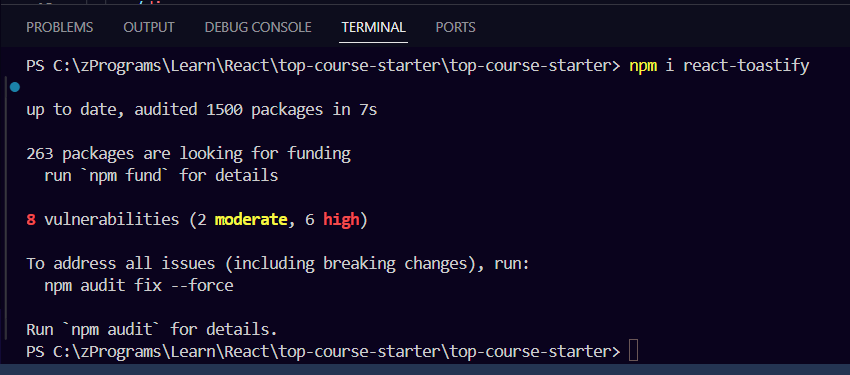
Open the terminal in your project press [ ctrl + ` ] this will open the terminal (most likely at the bottom) and then type this command
npm i react-toastifythe result will be something like this…
Step 3: Configure the files to use React toasts
First of all, you have to open the index.js file, you can find this file inside the src folder of your project. Once inside import { ToastContainer } module and ReactToastify.css file
import { ToastContainer } from "react-toastify";
import "react-toastify/dist/ReactToastify.css";
Secondly, you have use <ToastContainer /> after <App /> component
The end result will look something like this

If your code looks like this then your configuration is done.
Step 4: How to use React toasts
To use the toasts in your functions you have firstly import the toast module from the react-toastify package at the top and then you can use the toasts like this
import { toast } from "react-toastify";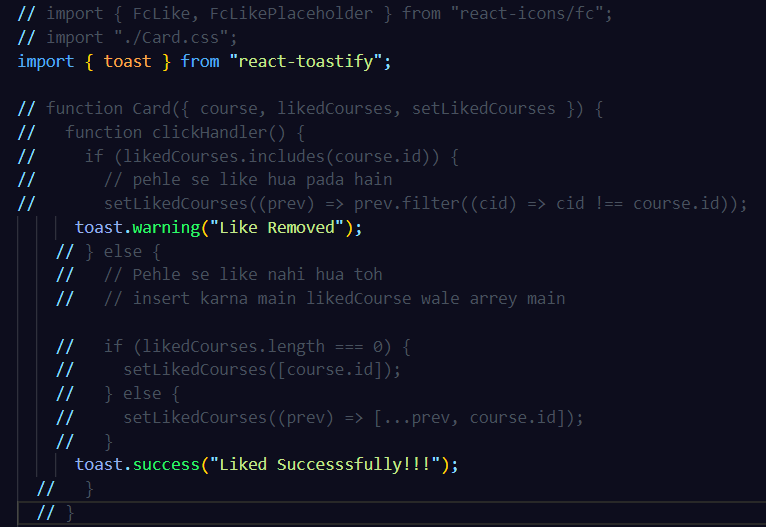
With react-toastify, you can use several other methods to display different types of notifications:
toast.success(message, options): Display a success notification.toast.error(message, options): Display an error notification.toast.info(message, options): Display an information notification.toast.warn(message, options): Display a warning notification.toast.dark(message, options): Display a dark-themed notification.toast.clear(): Clear all notifications.
These methods allow you to show notifications with different styles and themes depending on the type of message you want to convey to the user.
For more understanding the documentation is here
메타데이터
- post_id
- ac3dea33c91c
- slug
- my-method-to-add-tosts-in-react-ac3dea33c91c
- url
- https://medium.com/@pandeytanishk/my-method-to-add-tosts-in-react-ac3dea33c91c
- canonical_url
- https://medium.com/@pandeytanishk/my-method-to-add-tosts-in-react-ac3dea33c91c
- author_url
- https://medium.com/@pandeytanishk
- status
- ok
- fetched_at
- 2026-07-22 18:57:33




