Build your AI agent in Slack using Slash Command
A practical guide to running a slash-command bot that summarizes channels, answers questions from recent threads, and searches internal…
Build your AI agent in Slack using Slash Command
A practical guide to running a slash-command bot that summarizes channels, answers questions from recent threads, and searches internal documentation.
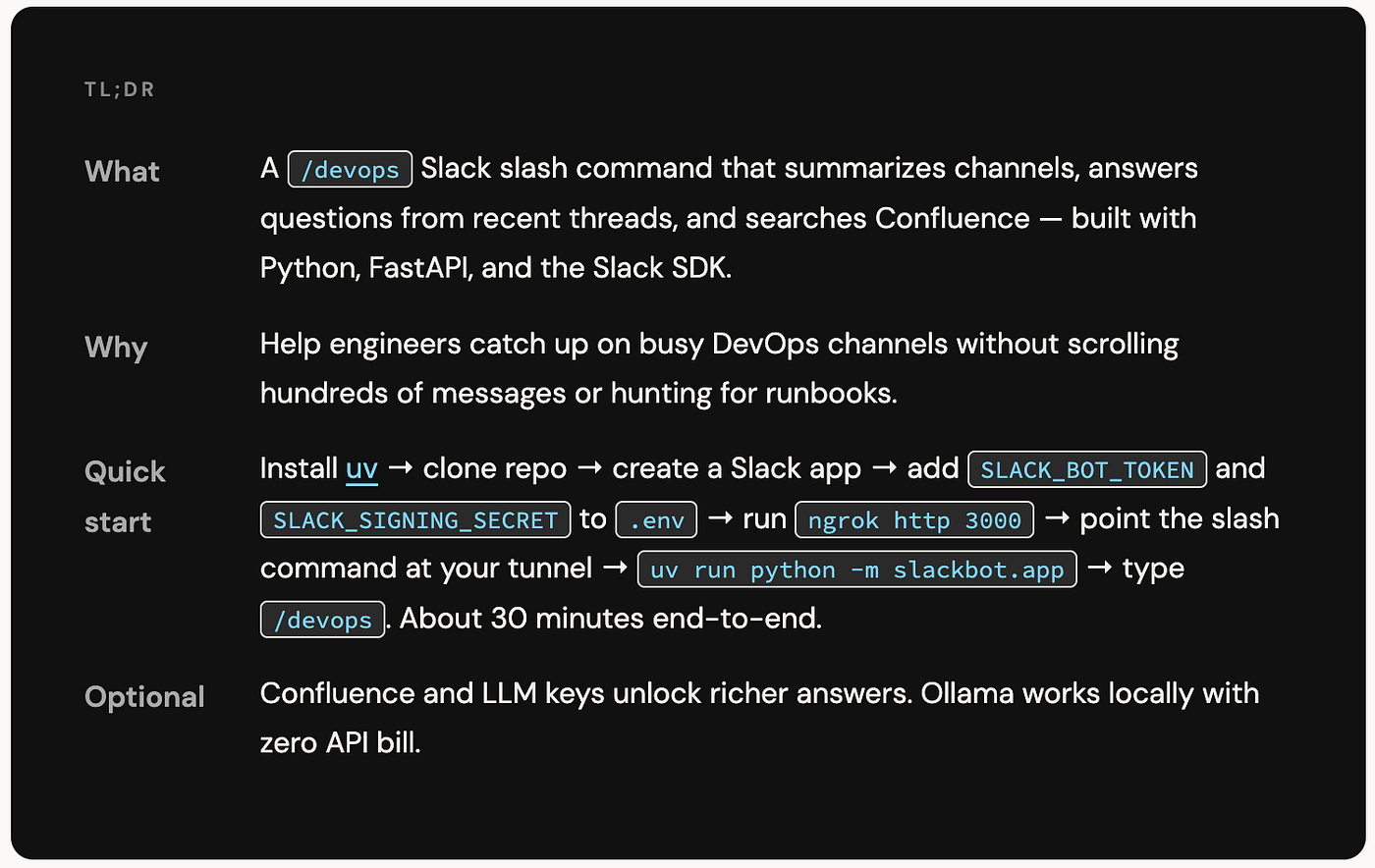
Why does this exist?
Engineering teams live in Slack. Important decisions, incident threads, and links to runbooks scroll by faster than anyone can track. A channel that was quiet on Monday can hold fifty threads by Friday — and the person who most needs context is often the one joining late.
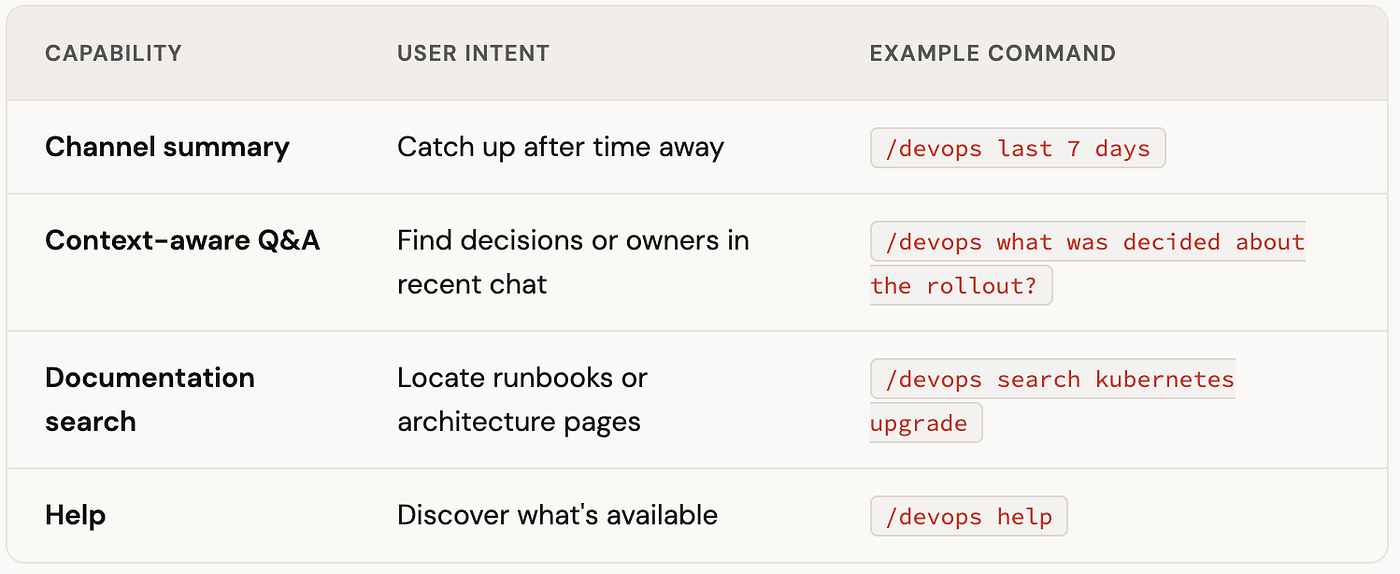
The /devops bot solves this with a single slash command that gives teammates three capabilities without leaving the conversation:
- Channel summaries — catch up on any time range without scrolling
- Contextual Q&A — ask questions grounded in recent channel history (and optionally your wiki)
- Documentation search — find runbooks and architecture pages via Confluence
The stack is intentionally boring: Python 3.12, FastAPI, and the Slack SDK. The entire development loop runs on your laptop with a .env file and an ngrok tunnel — no corporate secret store, no Kubernetes, no cloud deploy needed for a first run.
What the bot can do
Design decisions that shaped the architecture
A few constraints drove the design before a line of code was written:
- Slack’s 3-second rule. Slash commands must receive an HTTP 200 quickly or Slack shows an error. All heavy work — fetching hundreds of messages, calling an LLM, querying Confluence — runs in a background task after an immediate acknowledgment is sent.
- Channel safety. An optional allowlist restricts where
/devopsruns, so a test bot can't accidentally summarize production incident channels. - Intelligence is optional. Summaries and keyword-based Q&A work without any LLM. Richer analysis activates only when you supply API keys or run Ollama locally.
- Verifiable requests. Every inbound POST is validated with Slack’s signing secret so random internet traffic can’t drive the bot.
How a request flows
When someone types /devops followed by optional text, this is what happens:
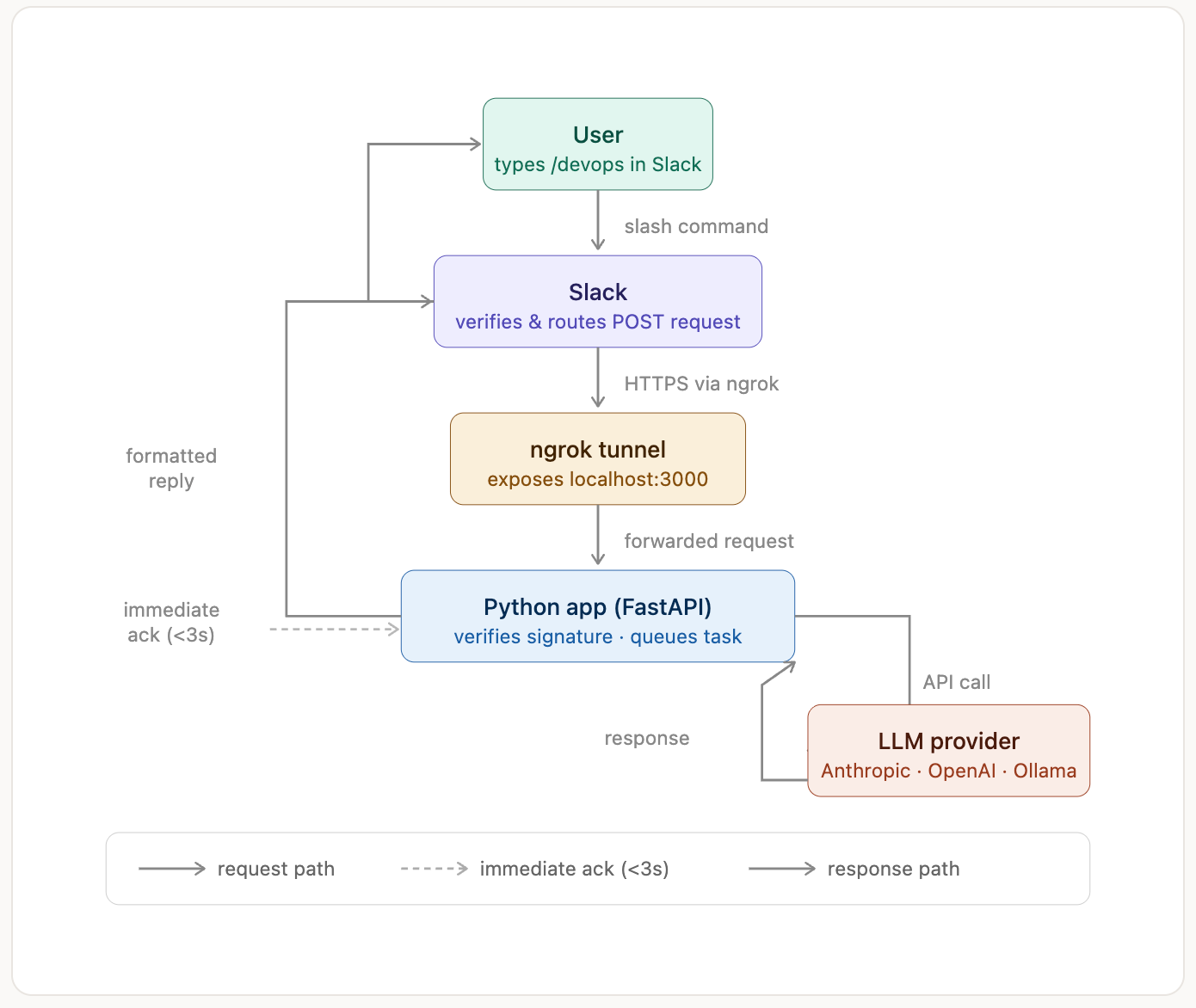
The default behavior — /devops with no arguments — summarizes the last 24 hours of the channel where the command was run.
This two-phase architecture is also why local debugging can feel “async”: if ngrok goes down, the sync phase fails visibly; if something goes wrong during message fetching or the LLM call, only the terminal shows the error, not Slack.
Before you start
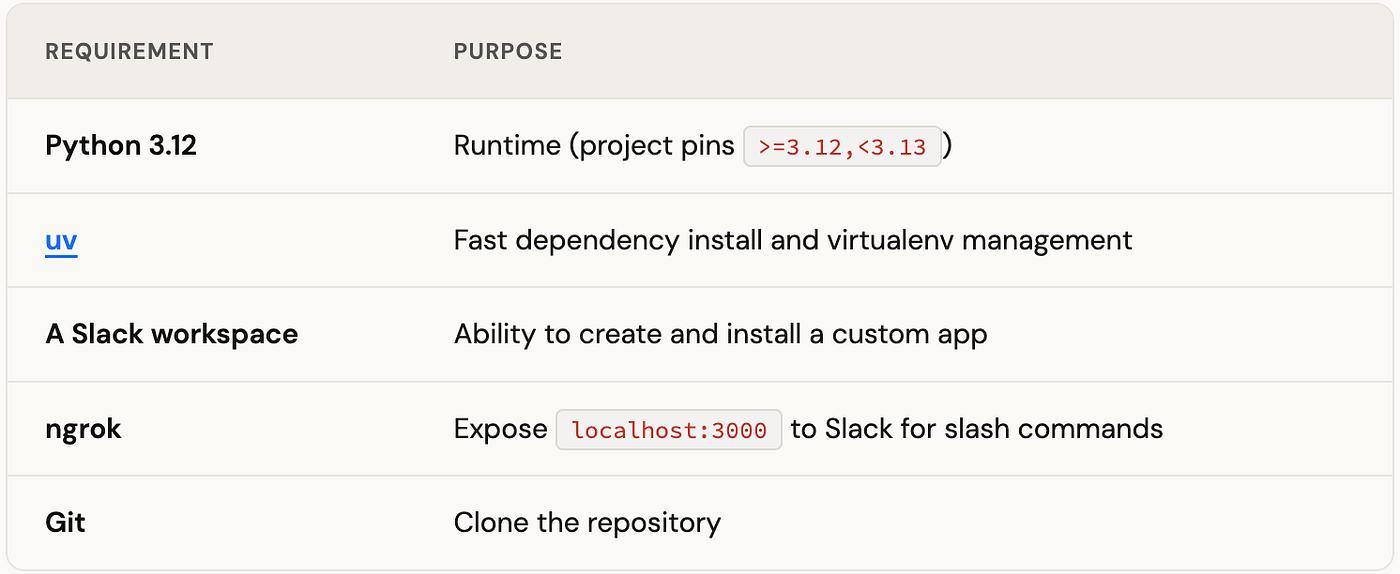
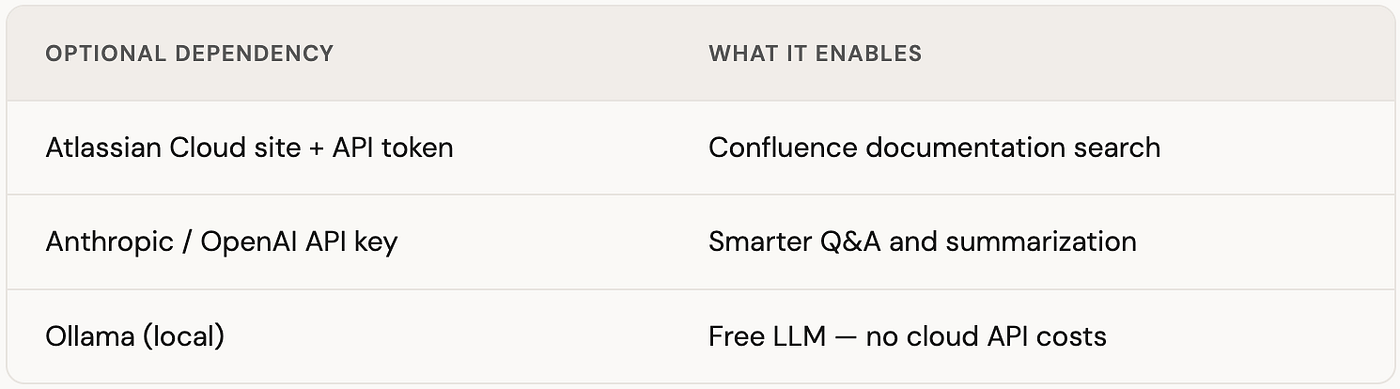
You do not need Docker, Kubernetes, or a paid hosting provider to complete a full local trial. The following are purely optional and unlock extra features:
Project layout
slackbot/
├── src/slackbot/app.py           # FastAPI app, slash command, routing
├── src/slackbot/vault_loader.py  # Production secret loading (skip locally)
├── cli.py                        # Test commands in terminal without Slack
├── pyproject.toml / uv.lock      # Dependencies
├── .env.example                  # Template — copy to .env, never commit
├── Dockerfile                    # Container image for deployment
├── tests/                        # pytest suite
└── docs/                         # Deeper guides (LLM, Confluence, architecture)
Local setup, step by step
1. Clone and install dependencies
git clone <your-repository-url>
cd slackbot
# Install into .venv/ — add --native-tls if behind a corporate TLS proxy
uv syncThen copy the environment template:
cp .env.example .envAdd .env to your .gitignore immediately if it isn't there already. This file will hold real secrets — it stays on your machine only.
Here’s the core of app.py so you can see how everything wires together before diving into configuration:
"""
Slack Bot for DevOps Channel Summaries
Responds to /devops slash command with channel analytics,
optional Confluence search, and LLM-powered summarization.
"""

import os
import re
import json
import logging
import requests
from datetime import datetime, timedelta

from fastapi import BackgroundTasks, FastAPI, Request
from fastapi.responses import JSONResponse
from slack_sdk import WebClient
from slack_sdk.errors import SlackApiError
from slack_sdk.signature import SignatureVerifier
from dotenv import load_dotenv

# Load .env for local dev — must run before the token reads below
load_dotenv()

logging.basicConfig(
    level=logging.INFO,
    format='%(asctime)s - %(name)s - %(levelname)s - %(message)s'
)
logger = logging.getLogger(__name__)

# Optional LLM imports — app runs without them
try:
    from openai import OpenAI
    OPENAI_AVAILABLE = True
except ImportError:
    OPENAI_AVAILABLE = False

try:
    from anthropic import Anthropic
    ANTHROPIC_AVAILABLE = True
except ImportError:
    ANTHROPIC_AVAILABLE = False

app = FastAPI(
    title='Slack DevOps Bot',
    description='Responds to /devops slash command with channel analytics.',
    version='0.1.0',
)

# ── Slack credentials (strip to avoid newline issues in some secret stores) ──
SLACK_BOT_TOKEN      = (os.environ.get('SLACK_BOT_TOKEN') or '').strip()
SLACK_SIGNING_SECRET = (os.environ.get('SLACK_SIGNING_SECRET') or '').strip()
ALLOWED_CHANNELS     = os.environ.get('ALLOWED_CHANNELS', '')
SOURCE_CHANNEL       = os.environ.get('SOURCE_CHANNEL', '')

# ── Search tuning ──
SEARCH_LOOKBACK_DAYS = int(os.environ.get('SEARCH_LOOKBACK_DAYS', '30'))
SEARCH_MESSAGE_LIMIT = int(os.environ.get('SEARCH_MESSAGE_LIMIT', '200'))

# ── LLM configuration ──
LLM_PROVIDER    = os.environ.get('LLM_PROVIDER', 'none')  # openai | anthropic | ollama | none
LLM_MODEL       = os.environ.get('LLM_MODEL', 'claude-sonnet-4-6')
OPENAI_API_KEY  = os.environ.get('OPENAI_API_KEY', '')
ANTHROPIC_API_KEY = os.environ.get('ANTHROPIC_API_KEY', '')
OLLAMA_BASE_URL = os.environ.get('OLLAMA_BASE_URL', 'http://localhost:11434')
OLLAMA_MODEL    = os.environ.get('OLLAMA_MODEL', 'llama3.2')

# ── Initialise the LLM client that matches LLM_PROVIDER ──
llm_client = None
if LLM_PROVIDER == 'openai' and OPENAI_API_KEY and OPENAI_AVAILABLE:
    llm_client = OpenAI(api_key=OPENAI_API_KEY)
elif LLM_PROVIDER == 'anthropic' and ANTHROPIC_API_KEY and ANTHROPIC_AVAILABLE:
    llm_client = Anthropic(api_key=ANTHROPIC_API_KEY)
elif LLM_PROVIDER == 'ollama':
    llm_client = 'ollama'  # flag; Ollama is called via its HTTP API
    logger.info(f"Ollama enabled ({OLLAMA_MODEL}) — run 'ollama serve' before starting")
else:
    logger.info("LLM disabled: using keyword-based summarization")

# Require the two essential Slack credentials — fail fast rather than silently
if not SLACK_BOT_TOKEN or not SLACK_SIGNING_SECRET:
    raise ValueError("SLACK_BOT_TOKEN and SLACK_SIGNING_SECRET must be set in .env")

slack_client       = WebClient(token=SLACK_BOT_TOKEN, timeout=60)
signature_verifier = SignatureVerifier(SLACK_SIGNING_SECRET)

# ── Slash command endpoint ──
@app.post('/slack/commands/devops')
async def devops_command(request: Request, background_tasks: BackgroundTasks):
    """Verify Slack signature, ack within 3 s, process in background."""
    body = await request.body()
    if not signature_verifier.is_valid_request(body, dict(request.headers)):
        return JSONResponse({'error': 'Invalid request signature'}, status_code=403)

    form         = await request.form()
    channel_id   = form.get('channel_id')
    user_id      = form.get('user_id')
    command_text = (form.get('text') or '').strip()
    response_url = form.get('response_url')

    background_tasks.add_task(
        process_devops_slash_command,
        channel_id, user_id, command_text, response_url,
    )
    return {'response_type': 'ephemeral', 'text': 'Working on it — watch this channel for updates.'}

if __name__ == '__main__':
    import uvicorn
    port = int(os.environ.get('PORT', 3000))
    uvicorn.run('slackbot.app:app', host='0.0.0.0', port=port, log_level='info')
The full
app.pyin the repo also contains the background processing logic, Confluence integration, and production health-probe middleware — stripped here to keep the local-setup story focused. The snippet above is the complete skeleton you need to understand how requests flow.
2. Create a Slack app
- Open api.slack.com/apps.
- Click Create New App → From scratch.
- Name it (e.g. DevOps Bot) and pick your workspace.
- Save — you’ll configure OAuth scopes and a slash command next.
3. Set OAuth scopes and install
Under OAuth & Permissions → Bot Token Scopes, add at minimum:
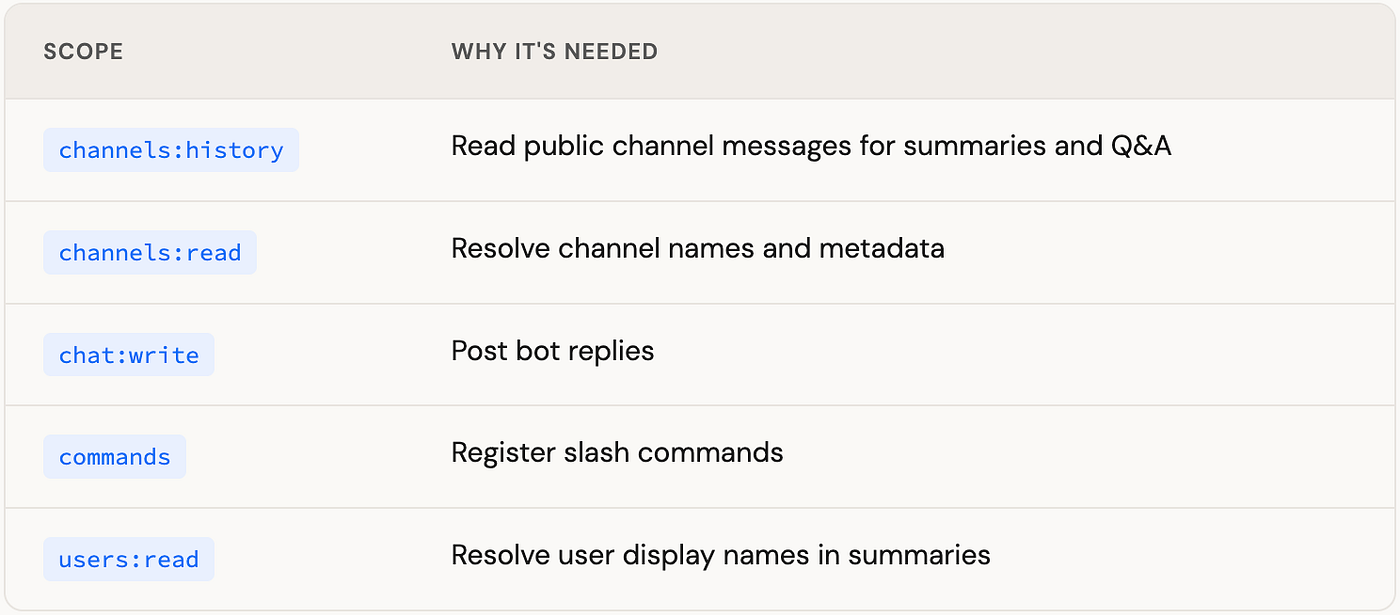
If you need private channels, also add groups:history and groups:read, then reinstall the app. Click Install to Workspace, authorize, and copy the Bot User OAuth Token (format: xoxb-…).
4. Copy your signing secret
Under Basic Information → App Credentials, copy the Signing Secret. The app uses this to verify that every POST genuinely comes from Slack.
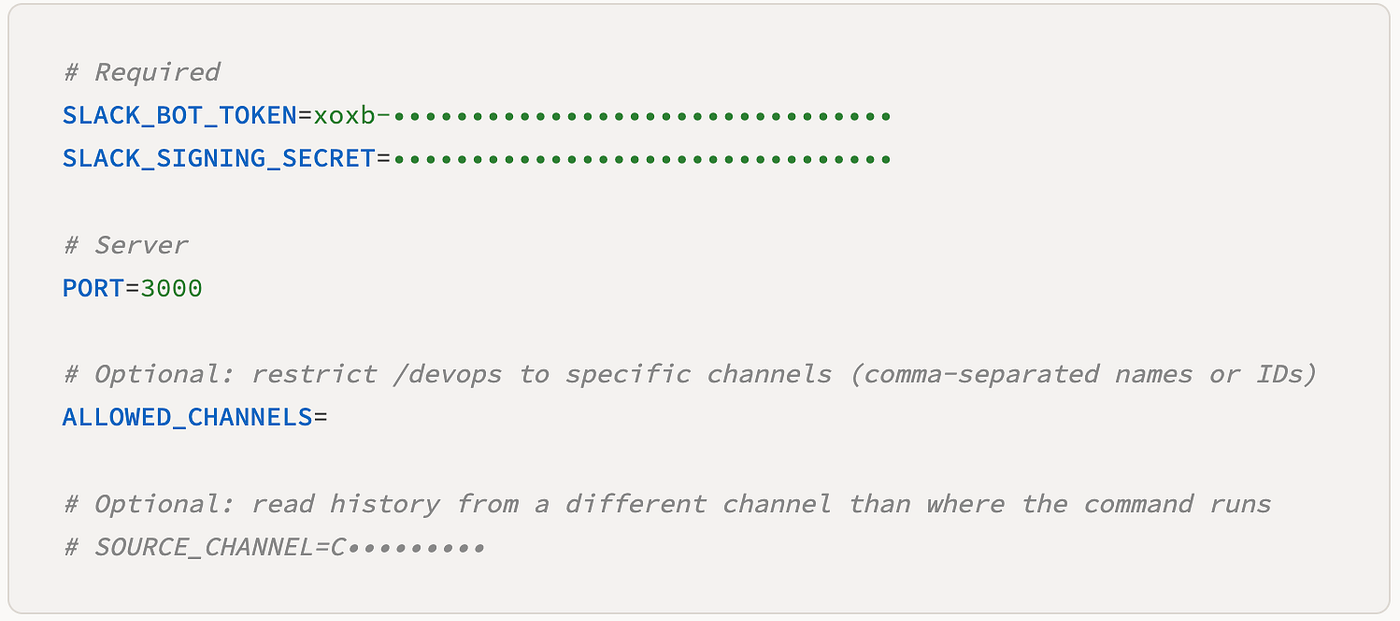
5. Configure .env
6. Expose your machine with ngrok
Slack must reach your app over HTTPS. In a separate terminal, run:
ngrok http 3000Note the forwarding URL, e.g. https://abcd1234.ngrok-free.app. On the free tier this changes every session, so you'll need to update the Request URL in Slack whenever you restart ngrok.
7. Register the slash command
In your Slack app → Slash Commands → Create New Command:
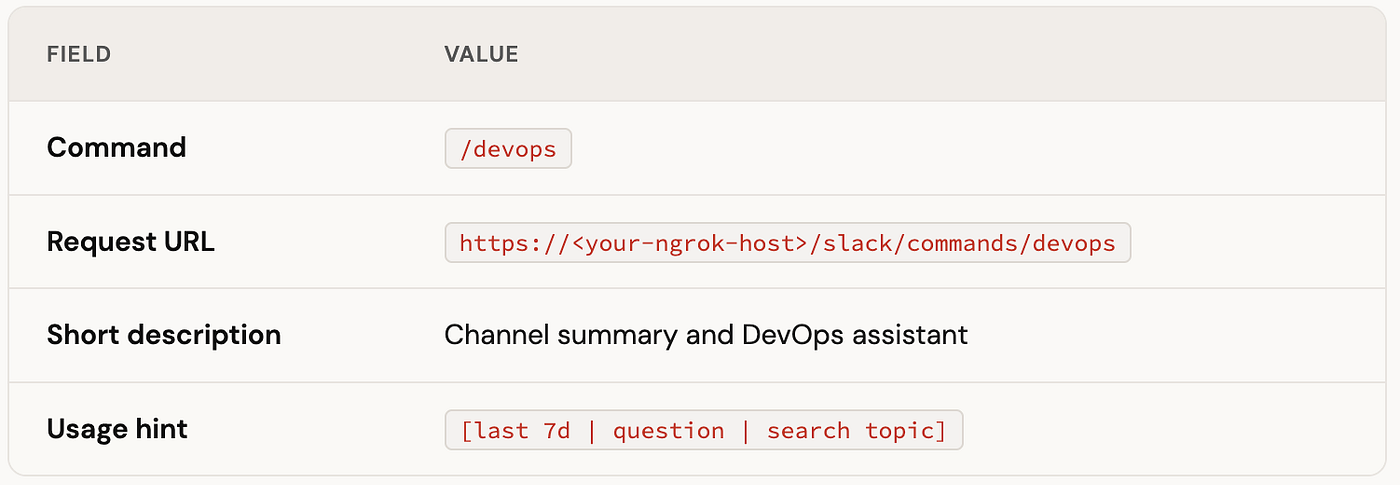
Save, then reinstall the app to the workspace if Slack prompts you.
8. Start the application
uv run python -m slackbot.appYou should see logs confirming the server is listening on port 3000. To sanity-check your setup without touching Slack:
# Uses .env; prints what would be posted to Slack
uv run python cli.py "help"
uv run python cli.py "last 24h"
Set
CLI_CHANNELto a channel ID the bot can read ifALLOWED_CHANNELSis restrictive.
9. Invite the bot and test
- In a public channel (or private if you added
groups:*scopes), run:/invite @your-bot-name - Type:
/devops - You should see a brief ephemeral acknowledgment, then a channel message with a summary.
Once that works, try the full range of commands:
/devops last 7 days
/devops help
/devops what topics came up about deployments?
/devops search onboarding runbook
Optional configuration
Restrict to specific channels
ALLOWED_CHANNELS=devops,platform-team
# or by channel ID: ALLOWED_CHANNELS=C01234567,C98765432
Users in other channels receive a clear “command not available here” message rather than silence.
Read history from another channel
Useful when testers run /devops in a sandbox but want data from a staging channel:
SOURCE_CHANNEL=C01234567890Summaries and Q&A fetch from SOURCE_CHANNEL; replies still post wherever the command was invoked.
Confluence
CONFLUENCE_URL=https://your-org.atlassian.net
CONFLUENCE_EMAIL=bot@your-company.example
CONFLUENCE_API_TOKEN=••••••••••••••••••••
Create the API token under Atlassian account settings → Security → API tokens. Use a dedicated bot user in production.
LLM providers
No LLM: keyword-based thread ranking still powers Q&A; summaries use structured stats and excerpts. A perfectly viable starting point.
Ollama (local, free):
LLM_PROVIDER=ollama
OLLAMA_BASE_URL=http://localhost:11434
OLLAMA_MODEL=llama3.2
Run ollama pull llama3.2 and ollama serve before testing.
OpenAI:
LLM_PROVIDER=openai
OPENAI_API_KEY=sk-••••••••
LLM_MODEL=gpt-4o-mini
Anthropic (strong Q&A with tool use over Slack + Confluence):
LLM_PROVIDER=anthropic
ANTHROPIC_API_KEY=sk-ant-••••••••
LLM_MODEL=claude-sonnet-4-6
Restart the app after changing .env.
Tune search depth
SEARCH_LOOKBACK_DAYS=30
SEARCH_MESSAGE_LIMIT=200
Lower limits speed up local tests on busy channels.
Command reference
Summaries
/devops
/devops last 48h
/devops last 2 weeks
/devops yesterday
/devops jan 15 to jan 22
Questions
/devops who is handling the database migration?
/devops how do we roll back the service?
/devops what is the deployment strategy?
Answer quality improves significantly with ANTHROPIC_API_KEY set (enables tool use over channel history and Confluence).
Documentation search
/devops search incident response
/devops find terraform standards
/devops doc api authentication
Requires the CONFLUENCE_* variables to be configured.
Troubleshooting
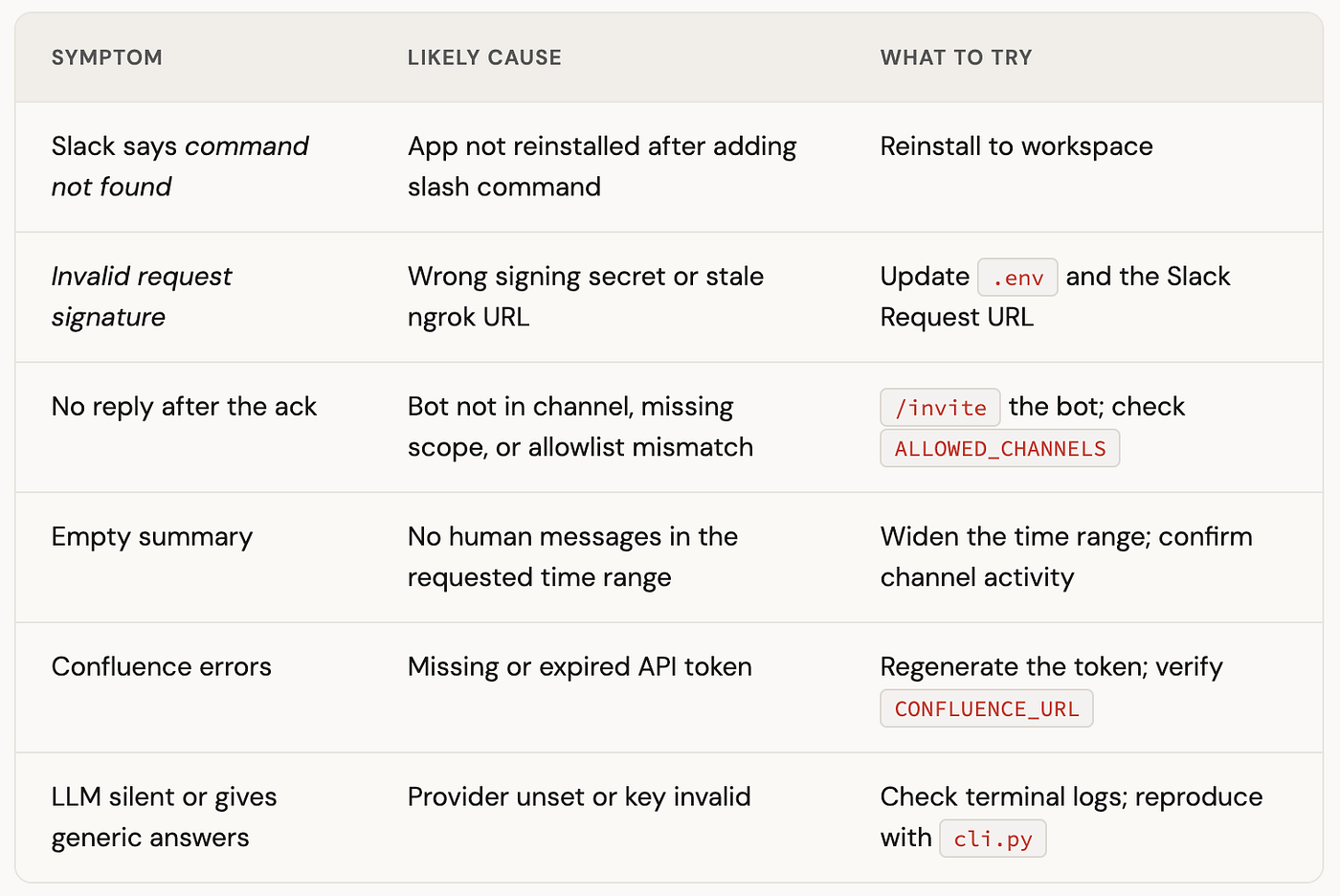
Always inspect the terminal where uv run python -m slackbot.app is running. Errors from the async phase appear there, not in the Slack UI.
Testing without Slack
cli.py routes through the same process_devops_slash_command logic but prints Block Kit output to your terminal instead of calling chat_postMessage. This is the fastest way to iterate on prompts, Confluence queries, or allowlist rules without burning ngrok sessions or waiting for Slack's round-trip.
export CLI_CHANNEL=C01234567890   # channel the bot can read
uv run python cli.py "last 7d"
uv run python cli.py "search deployment checklist"
Deploying beyond your laptop
Local development uses .env and ngrok. When you're ready for a permanent deployment, the included Dockerfile packages the app into a container image. Production setups typically:
- Run behind HTTPS with a stable Request URL (no more per-session ngrok URLs)
- Inject secrets via environment variables or your organization’s secret manager
- Add TLS termination, network policy, secret rotation, and audit logging
This guide intentionally skips enterprise secret-store integration to keep the local path simple. Treat any hosted deployment as a separate hardening exercise.
Wrapping up
The goal was always low friction: one slash command, useful results in seconds, no new tool to learn.
Getting to a working /devops summary requires cloning the repo, configuring a Slack app, filling .env, tunneling with ngrok, and running uv run python -m slackbot.app. Optional Confluence and LLM keys unlock richer answers, but they're not required for a first successful run.
From there, what to improve is mostly product judgment: tighter allowlists, scheduled digests, multi-channel reports, or export formats. Gather feedback from teammates on signal-to-noise in summaries and whether Q&A citations feel trustworthy enough for incident and release decisions.
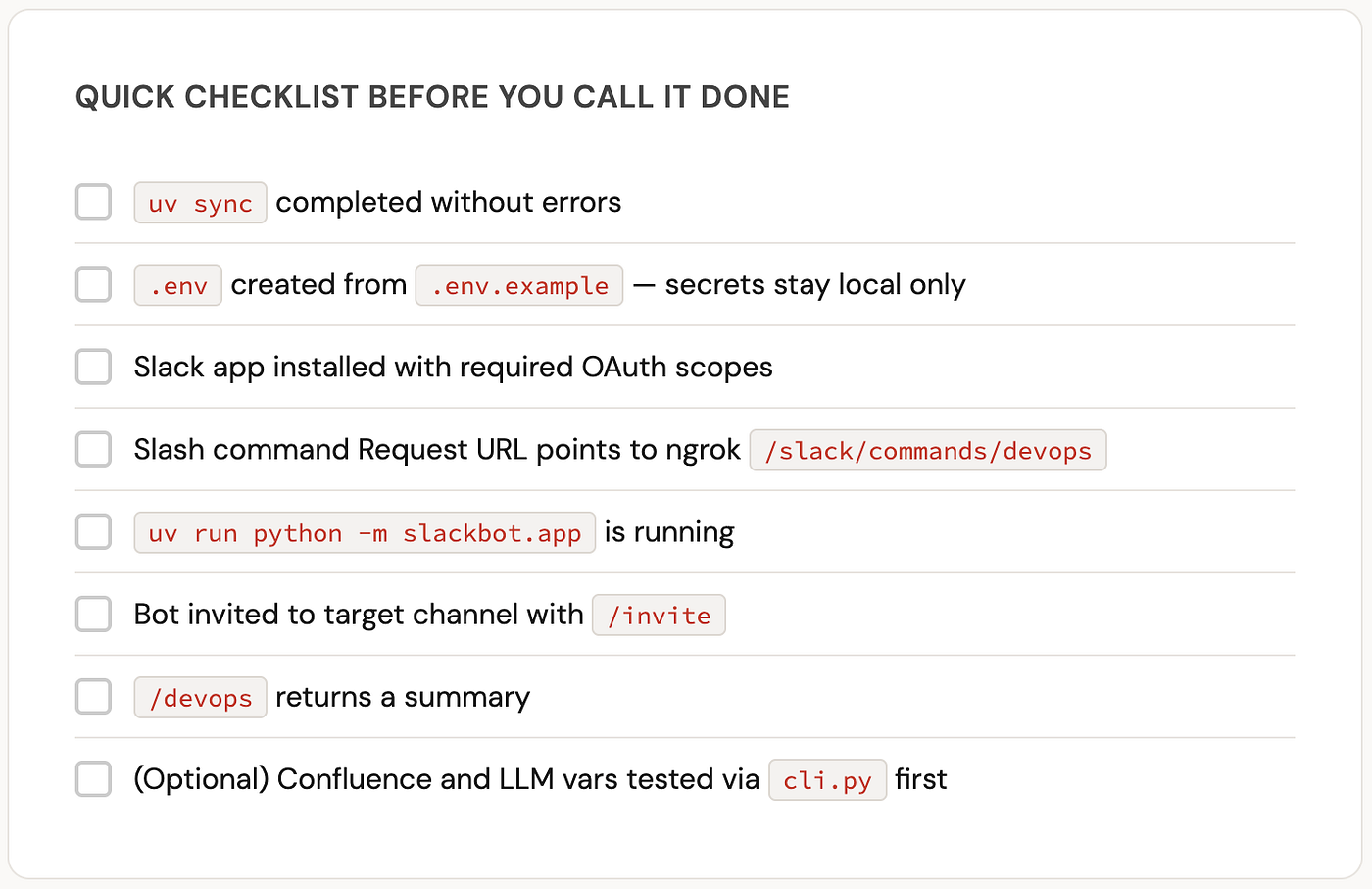
Quick checklist before you call it done
메타데이터
- post_id
- acbc02b0f4e9
- slug
- build-your-ai-agent-in-slack-using-slash-command-acbc02b0f4e9
- url
- https://medium.com/@vjsablok/build-your-ai-agent-in-slack-using-slash-command-acbc02b0f4e9
- canonical_url
- https://medium.com/@vjsablok/build-your-ai-agent-in-slack-using-slash-command-acbc02b0f4e9
- author_url
- https://medium.com/@vjsablok
- status
- ok
- fetched_at
- 2026-08-11 06:41:55



