🚀 Flutter’s Secret Sauce: Understanding the 3 Trees & How Flutter Works on Every Platform
A beginner-friendly deep dive into Widgets, Elements, RenderObjects, and Flutter’s cross-platform magic 🌍
🚀 Flutter’s Secret Sauce: Understanding the 3 Trees & How Flutter Works on Every Platform
A beginner-friendly deep dive into Widgets, Elements, RenderObjects, and Flutter’s cross-platform magic 🌍
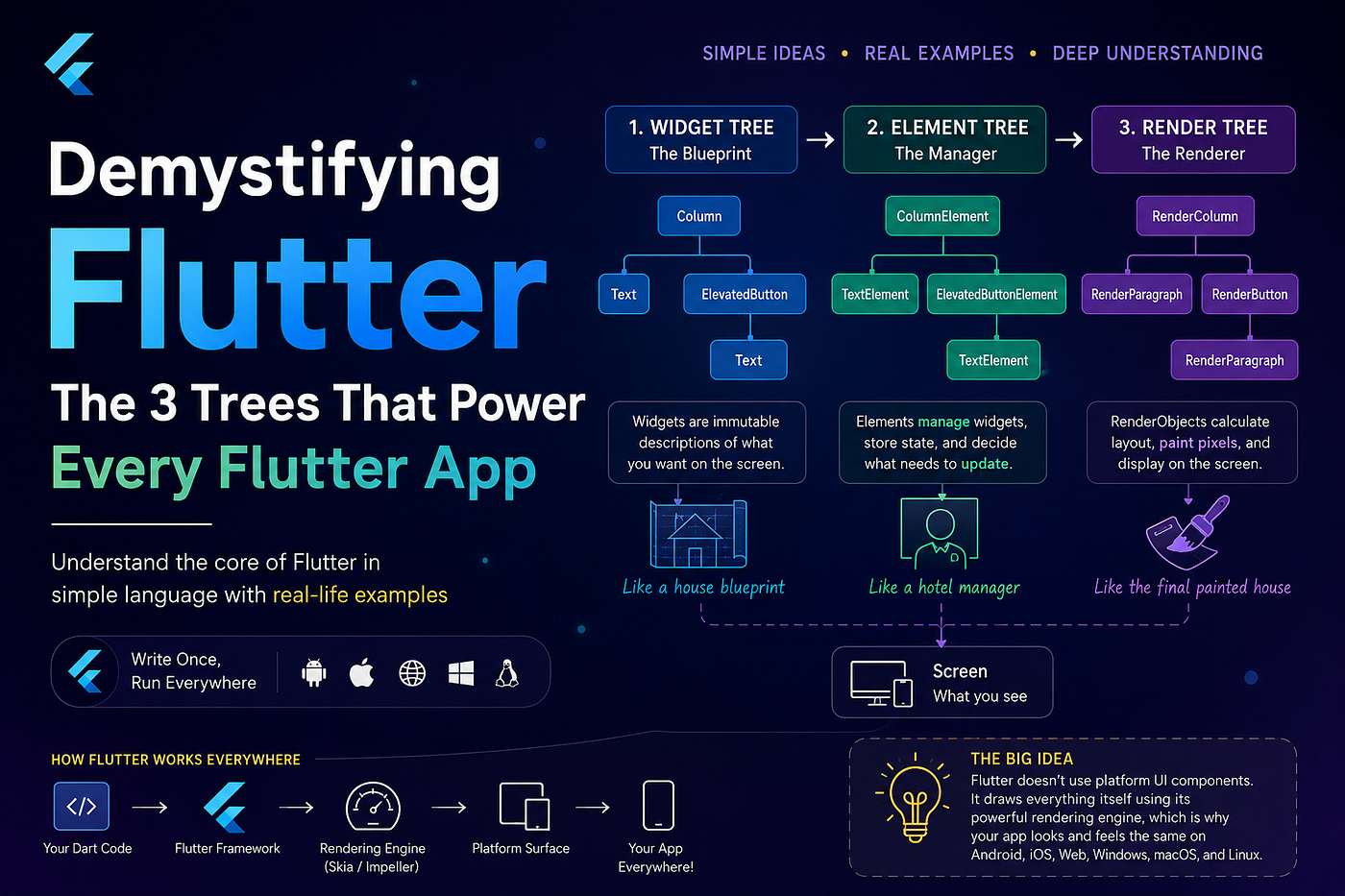
When developers first start learning Flutter, everything feels magical ✨
You write code once and suddenly:
- It works on Android 📱
- It works on iPhone 🍎
- It works on Web 🌐
- It works on Desktop 💻
- Animations feel buttery smooth ⚡
- UI updates instantly 🚀
And then you hear this famous line:
“Everything in Flutter is a Widget.”
But after some time, confusion starts creeping in 😅
- What actually happens inside
setState()? - Why are widgets rebuilt so often?
- What are Elements?
- What are RenderObjects?
- How does Flutter render the same UI on every platform?
- Does Flutter use native Android/iOS views?
If you’ve had these questions, don’t worry.
Flutter’s architecture is actually very simple once you understand one powerful concept:
🌳 Flutter Works Using 3 Trees
And once you understand these 3 trees, Flutter suddenly becomes much easier to understand.
🎭 First, Imagine Flutter Like a Theatre Play
Think of a theatre.
A theatre has:
- A script 📄
- Actors performing 🎭
- A final visual stage 🎨
Flutter works almost exactly the same way.
FlutterReal LifeWidget TreeScriptElement TreeActors & ManagersRender TreeFinal Stage Visual
These three layers work together continuously behind the scenes.
🌳 Tree 1 — Widget Tree
Widgets Are NOT the Actual UI 😮
This is the biggest misunderstanding beginners have.
A widget is NOT the actual button or text on the screen.
A widget is only:
- A description
- A configuration
- A blueprint of UI
Example:
Text("Hello")This does NOT directly draw text on the screen.
It simply tells Flutter:
“Hey Flutter, I want some text here.”
That’s it.
🏠 Real-Life Example: House Blueprint
Imagine building a house.
A blueprint says:
- Put the door here 🚪
- Window there 🪟
- Kitchen on the left 🍳
But nobody actually lives inside the blueprint.
Similarly:
Widgets only describe the UI.
They are NOT the real UI objects.
🌲 Example Widget Tree
Column(
  children: [
    Text("Hello"),
    ElevatedButton(
      onPressed: () {},
      child: Text("Click"),
    ),
  ],
)
Flutter internally sees something like this:
Column
 ├── Text
 └── ElevatedButton
      └── Text
This structure is called:
🌳 Widget Tree
🌳 Tree 2 — Element Tree
This is the MOST IMPORTANT layer in Flutter 🔥
Most developers skip learning this.
But this is where Flutter’s real power exists.
The Element Tree:
- Connects widgets to actual screen objects
- Stores lifecycle
- Stores state
- Decides what should update
- Reuses UI efficiently
🧑💼 Real-Life Example: Hotel Manager
Imagine a hotel.
FlutterReal LifeWidgetRoom DesignElementHotel ManagerRenderObjectActual Room
The room design may change frequently.
But the manager stays and organizes everything.
Similarly:
Widgets are temporary.
Elements survive longer.
⚡ Why Flutter Is Fast
Many beginners panic after hearing this:
“Widgets rebuild all the time.”
Especially after seeing:
setState(() {});People think:
“Wait… Flutter rebuilds everything?? Isn’t that slow?”
Actually… no 😄
Because widgets are lightweight descriptions.
Flutter compares widgets intelligently using Elements.
🔍 What Elements Actually Do
Elements compare:
Old Widget vs New WidgetIf Flutter sees:
✅ Same widget type ✅ Same position
Then Flutter reuses the existing Element and RenderObject.
That’s why rebuilding is extremely cheap.
📦 Example
Before rebuild:
Text("Hello")After rebuild:
Text("Hello")Flutter checks:
- Same widget type?
- Same position?
✅ Yes.
So Flutter simply reuses existing objects instead of recreating everything.
Very efficient 🚀
🌳 Tree 3 — Render Tree
This is the actual visual layer 🎨
RenderObjects are responsible for:
- Layout calculation 📐
- Size calculation 📏
- Positioning 📍
- Painting pixels 🎨
- Hit testing 👆
This is what finally appears on screen.
🎨 Real-Life Example
Widget says:
Draw a blue buttonElement says:
Manage this buttonRenderObject says:
Actually paint blue pixels on screen🔄 Complete Flutter Flow
Here’s the complete pipeline:
Widget Tree
     ↓
Element Tree
     ↓
Render Tree
     ↓
Screen
This is Flutter’s core architecture.
⚡ What Happens Inside setState()
Example:
setState(() {
  counter++;
});
Flutter does NOT redraw the entire app blindly ❌
Instead:
Step 1 — Rebuild Widgets
Flutter recreates widgets.
Text("$counter")Maybe earlier it was:
Text("4")Now:
Text("5")Step 2 — Element Comparison
Flutter compares:
Old Widget vs New WidgetSame type?
✅ Yes.
Reuse existing objects.
Step 3 — Render Update
Only the text rendering changes.
Not the whole screen.
That’s why Flutter feels incredibly smooth ✨
🌍 How Flutter Works on Every Platform
This is another huge confusion for developers.
Many think:
Flutter converts widgets into native Android/iOS views.
Actually… Flutter usually draws everything itself 😮
🎮 Think of Flutter Like a Game Engine
Game engines like Unity don’t ask Android:
“Please create a native button.”
Instead:
Unity draws the button itself.
Flutter works similarly.
🏗 Flutter Architecture
Your Dart Code
      ↓
Flutter Framework
      ↓
Rendering Engine (Skia / Impeller)
      ↓
Platform Surface
      ↓
Screen
🎯 Why Flutter UI Looks Consistent Everywhere
Because Flutter paints its own pixels.
That’s why you get:
- Same animations ✨
- Same shadows 🌑
- Same spacing 📏
- Same rendering 🎨
Across:
- Android
- iOS
- Web
- Windows
- macOS
- Linux
📡 Then How Does Flutter Access Native Features?
Good question 👀
Flutter uses:
Platform Channels
Example:
Flutter Dart Code
        ↓
Native Android/iOS Code
        ↓
Camera / GPS / Bluetooth
When you use something like:
ImagePicker()Flutter internally communicates with:
- Kotlin/Java on Android
- Swift/Objective-C on iOS
And returns the result back to Dart.
🧱 Why “Everything Is a Widget”
Flutter uses composition heavily.
Example:
Container(
  padding: EdgeInsets.all(10),
  color: Colors.blue,
  child: Text("Hello"),
)
Even these are widgets:
- Padding
- Alignment
- Theme
- Gesture handling
- Styling
This makes Flutter incredibly flexible.
📸 StatelessWidget vs StatefulWidget
StatelessWidget
Like a printed photo 🖼
Never changes.
Example:
Text("Welcome")StatefulWidget
Like a TV screen 📺
Content changes dynamically.
Examples:
- Counter
- Chat messages
- Loading indicators
- Live updates
⚠ Important Truth About StatefulWidget
The actual mutable state lives inside:
StateNOT inside StatefulWidget itself.
🚗 Super Simple Analogy
Imagine ordering a car.
Widget
Car design/configuration:
Red Tesla with black wheelsElement
Factory manager:
Track existing car productionRenderObject
Actual physical car 🚘
🔑 Why Keys Matter in Flutter
Keys help Flutter identify widgets correctly during rebuilds.
Without keys:
Flutter matches widgets using:
- Position
- Type
With keys:
Flutter preserves the correct state.
📦 Example
Without keys:
[A, B, C]Reordered:
[C, A, B]Flutter may confuse state between items.
Keys solve this problem 🔥
🧠 Biggest Mindset Shift in Flutter
Don’t think:
“Widgets are UI objects.”
Think:
“Widgets are immutable UI descriptions.”
This single mindset changes everything.
🎯 Final Simplified Flow
You write Widgets
        ↓
Flutter creates Elements
        ↓
RenderObjects paint pixels
        ↓
Engine displays on screen
And that’s the core magic of Flutter ✨
📚 Recommended Resources
- Flutter Official Website
- Flutter Architectural Overview
- Inside Flutter Rendering Pipeline
- Flutter GitHub Repository
💙 Final Thoughts
Once you understand:
- Widget Tree 🌳
- Element Tree 🌳
- Render Tree 🌳
Flutter stops feeling “magical” and starts feeling logical.
And honestly…
That’s when you truly begin mastering Flutter 🚀
메타데이터
- post_id
- acec31a89e57
- slug
- flutters-secret-sauce-understanding-the-3-trees-how-flutter-works-on-every-platform-acec31a89e57
- url
- https://medium.com/@kishanrvajani/flutters-secret-sauce-understanding-the-3-trees-how-flutter-works-on-every-platform-acec31a89e57
- canonical_url
- https://medium.com/@kishanrvajani/flutters-secret-sauce-understanding-the-3-trees-how-flutter-works-on-every-platform-acec31a89e57
- author_url
- https://medium.com/@kishanrvajani
- status
- ok
- fetched_at
- 2026-06-22 12:55:45





