Kya dekhte ho…🫣?
Snort tumhara…..👀
Kya dekhte ho…🫣?
Snort tumhara…..👀
Snort: The Network dog You Didn’t Know You Needed to pet(But Probably Do!)
Ever find yourself pondering the silent sentinels that guard your digital borders? The unseen protectors of your network? Let me introduce you to Snort: an open-source network intrusion detection system (NIDS) and intrusion prevention system (IPS). Think of it as a hyper-vigilant watchdog, constantly sniffing, analyzing, and occasionally biting at the heels of suspicious internet traffic. With millions of downloads and hundreds of thousands of users, Snort isn’t just a tool; it’s a force in the cybersecurity landscape.
The Power of Open Source
- Top-tier Security, Zero Cost: Free, open-source, and incredibly powerful, sniffing out digital nasties like malware, port scans, and buffer overflows.
- Unmatched Customizability: Craft your own rules to catch specific traffic, tailored to your unique needs.
- Vibrant Community & Pro Intelligence: Benefits from a lively community ruleset and the professional-grade threat intelligence of Cisco Talos.
Released in 2021, Snort 3 is faster, more modular, and boasts a completely revamped architecture.
- Multi-threading: Harnesses modern CPUs for significantly faster detection speeds.
- New Rule Syntax & Plug-and-Play: More flexible and easier to manage.
- Flow-based Detection: Understands entire conversations, leading to more sophisticated threat detection.
- Snort now proactively identifies new, unseen exploits (SQL Injection, XSS, Command Injection, and more).
Snort Setup “Note: I have used Ubuntu to setup snort”
1st and ofc the foremost
sudo apt update && sudo apt upgrade -y2nd Install necessary packages
sudo apt install -y build-essential libpcap-dev libpcre3-dev

sudo apt install libdumbnet-dev bison flex zlib1g-dev liblzma-dev openssl

sudo apt install libssl-dev ethtool
Install Snort
sudo apt install -y snortMake necessary directories and set permissions
sudo mkdir -p /etc/snort/rules
sudo mkdir -p /var/log/snort
sudo touch /etc/snort/rules/local.rules
sudo chmod -R 5775 /etc/snort
sudo chmod -R 5775 /var/log/snort
sudo chown -R snort:snort /etc/snort
sudo chown -R snort:snort /var/log/snort
Snort rules explained:
1. Rule header
action protocol src_ip src_port direction dst_ip dst_portAction: What to do when rule triggers (alert, log, pass, drop, reject, etc.)
Protocol: IP protocol (tcp, udp, icmp, ip)
Src IP/ Src Port: Source address and port (can be ANY or specific)
Direction: → or ↔ (one-way or bidirectional traffic)
Dst IP/ Dst Port: Destination address and port
2. Rule option
(option1; option2; option3;)Match criteria: content, pcre, flow, http_uri, etc.
Metadata for alerts: msg, classtype, sid, rev
Packet check modifiers: offset, depth, nocase
3. Example
alert tcp any any -> 192.168.1.10 80 \
(msg:"Web Attack - XSS attempt"; \
content:"<script>"; \
nocase; \
classtype:web-application-attack; \
sid:100001; \
rev:1;)
Snort rules and working
sudo nano /etc/snort/rules/local.rulesalert icmp any any -> any any (msg:"ICMP test rule triggered"; sid:1000001; rev:1;)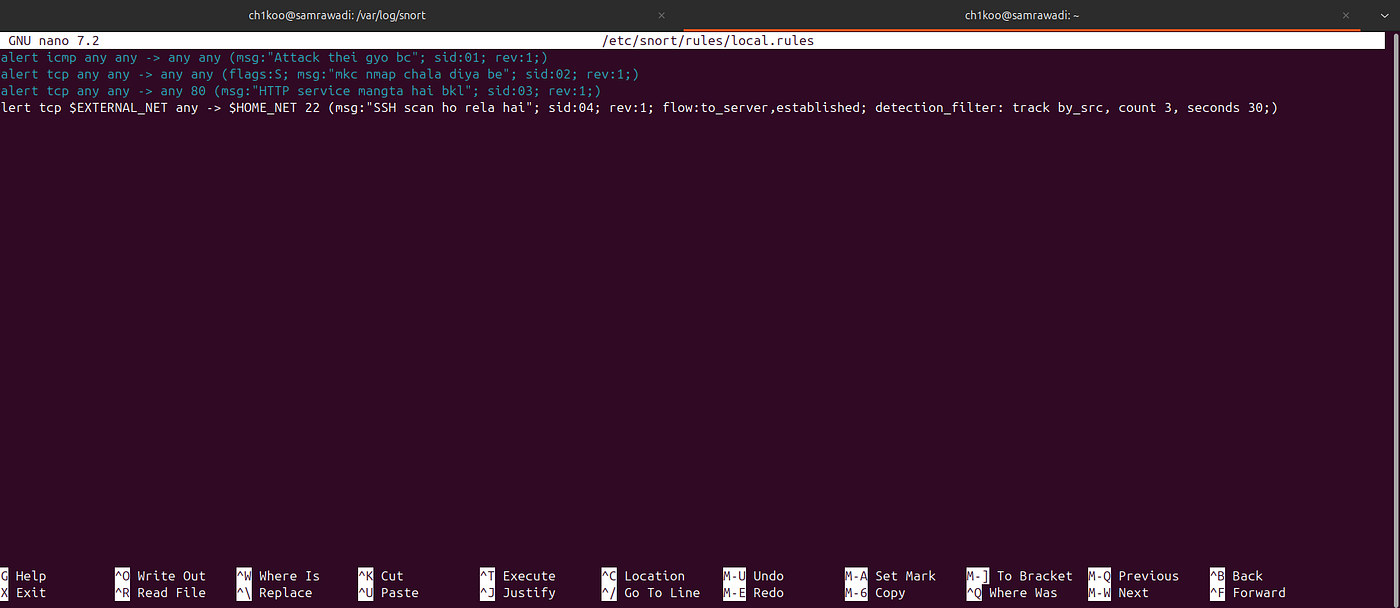
Figure 1: snort rules for ICMP scan alert, nmap SYN Scan alert, HTTP traffic alert, and SSH Bruteforce alert
sudo snort -A console -q -c /etc/snort/snort.conf -i <interface>
Figure 2: Snort alert on SSH bruteforce based on rules
Navigating the Challenges
- Configuration: Prepare for command-line adventures; GUIs are rare, demanding technical commitment.
- Constant Vigilance: Keeping rules updated and fine-tuned is a never-ending battle against evolving threats and false alarms.
- Resource Intensive: On high-traffic networks, it can become a resource hog, demanding significant CPU and memory.
- Intense Competition: Tools like Suricata are constantly challenging Snort, fueling debates among network defenders.
In the coming days, we will setup a Snort 🫱🏻🫲🏻 ELK lab, so stay tuned and write rules.
snort #setup #hacker4help #loganalysis #ids
메타데이터
- post_id
- acf5613bf82b
- slug
- kya-dekhte-ho-acf5613bf82b
- url
- https://medium.com/@ch1koo/kya-dekhte-ho-acf5613bf82b
- canonical_url
- https://medium.com/@ch1koo/kya-dekhte-ho-acf5613bf82b
- author_url
- https://medium.com/@ch1koo
- status
- ok
- fetched_at
- 2026-07-14 15:40:45