AMSI Basics In Details
What is AMSI?
AMSI Basics In Details
What is AMSI?
Before AMSI, antivirus (AV) software primarily relied on scanning files as they were written to disk or executed from disk. If a malicious script was heavily obfuscated (e.g., encrypted or base64 encoded), the AV scanner looking at the file on disk might not recognize it as malicious because the recognizable patterns (signatures) were hidden.
The Anti-Malware Scan Interface (AMSI) is a Microsoft standard introduced in Windows 10. It acts as a bridge or API between applications (like PowerShell) and whatever antivirus software is installed on the system (Windows Defender or third-party AVs).
How AMSI Works
AMSI allows “AMSI-aware” applications to request a scan of content before it is executed.
Here is the general flow of how it works seamlessly in the background, specifically using PowerShell as an example:
- Code Ingestion: You run a PowerShell script or type a command. The PowerShell engine receives this code.
- Processing & Deobfuscation: If the script contains encoded or obfuscated strings (e.g.,
[Convert]::FromBase64String("...")), the PowerShell engine processes these functions. - The AMSI Check: Right before the PowerShell engine attempts to actually execute the underlying instructions, it pauses. It takes the plain-text, deobfuscated code it is about to run and passes it to the
amsi.dll(which is loaded into the PowerShell process). - The Handoff: The
amsi.dlltakes this buffer of code and passes it to the registered Anti-Virus provider via remote procedure calls (RPC). - The Verdict: The AV engine analyzes the plain-text code using its signatures, heuristics, and machine learning models. It returns a result to
amsi.dll(e.g.,AMSI_RESULT_CLEANorAMSI_RESULT_DETECTED). - Action: If the result is clean, the PowerShell engine executes the code. If it is detected as malicious, execution is immediately halted, and an error is thrown.
Why is AMSI Effective?
AMSI solved two massive problems for security defenders:
- Combating “Fileless” Malware: Attackers often use techniques to load scripts directly into memory from the internet without ever saving a
.ps1or.exefile to the hard drive. Because disk-based AV had nothing to scan, fileless malware could run freely. AMSI intercepts the code in memory, solving this blind spot. - Defeating Static Obfuscation: This is AMSI’s most powerful feature. An attacker might base64-encode their script 10 times. When executed, PowerShell has to decode it 10 times to figure out what to do. AMSI hooks into the script execution pipeline dynamically. Regardless of how heavily the initial script is obfuscated, at the exact moment the payload is finally decoded and ready to run, AMSI captures the fully assembled, plain-text payload and scans it.
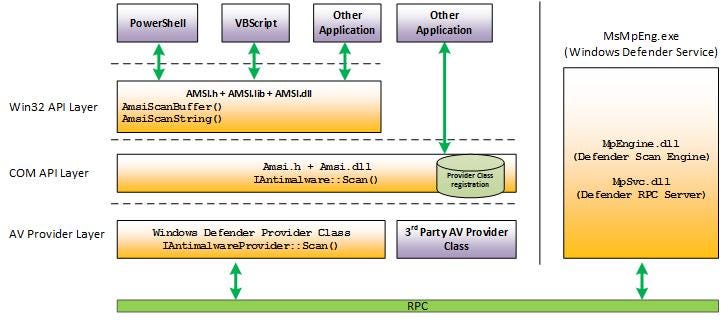
This image provides an excellent architectural overview of how the Anti-Malware Scan Interface (AMSI) is structured in Windows. It shows the flow of information from an application down to the actual Antivirus (AV) engine.
Let’s break the diagram down layer by layer, starting from the top.
1. Application Layer (Top)
At the very top, you have the applications that consume AMSI — the “AMSI-aware” applications.
- Examples shown:
PowerShell,VBScript, and genericOther Applicationboxes. - What happens here: Before these applications execute a script or dynamic code, they take the plain-text, un-obfuscated content they are about to run and prepare to send it for scanning.
2. The AMSI Interface Layers (Middle Left)
This is the bridge that applications use to request a scan. It’s divided into two ways an application can interact:
- Win32 API Layer: Applications like PowerShell use standard C/C++ style function calls exported by
Amsi.dll. The diagram specifically lists: AmsiScanBuffer(): Sends a chunk of memory (a buffer) containing the script to be scanned.AmsiScanString(): Sends a specific string to be scanned.- Note on Bypasses: When the previous text mentioned “memory patching,” attackers often target this specific layer — they try to overwrite the instructions of
AmsiScanBuffer()inside the PowerShell process's memory space so that it never actually sends the buffer for scanning. - COM API Layer: Other applications, or developers writing their own applications in languages like C# or C++, might prefer to interact with AMSI using the Component Object Model (COM). They use the
IAntimalware::Scan()method provided byAmsi.dll. The "Provider Class registration" database ensures the system knows which AV product should handle these requests.
3. AV Provider Layer (Bottom Left)
Once the AMSI API receives a scan request from an application, it needs to hand it off to the actual Antivirus software installed on the computer. AMSI itself doesn’t scan anything; it just routes the traffic.
- Windows Defender Provider Class: If Windows Defender is the active AV, AMSI passes the data to Defender’s provider interface (
IAntimalwareProvider::Scan()). - 3rd Party AV Provider Class: Because AMSI is vendor-agnostic, if you install a third-party AV (like CrowdStrike, SentinelOne, McAfee, etc.), it registers its own provider class here to receive scan requests instead of Defender.
4. RPC and the AV Engine (Bottom and Right Side)
The actual heavy lifting of scanning the code doesn’t happen inside the application’s process (like powershell.exe). This is for security and stability reasons. The "Provider Class" needs to send the data to the dedicated Antivirus service running safely in the background.
- RPC (Remote Procedure Call): The green bar at the bottom represents the communication protocol used to securely send the script content from the application process across the operating system boundary to the AV service process.
**MsMpEng.exe(Windows Defender Service):** This large box on the right is the actual Windows service running in the background.**MpSvc.dll(Defender RPC Server):** This component listens for incoming scan requests sent over RPC from the AMSI Provider Layer.**MpEngine.dll(Defender Scan Engine):** This is the core "brain" of Windows Defender. It takes the plain-text script, analyzes it against its signatures, heuristics, and machine learning models, and determines if it is malicious.
Putting it all together (The Flow)
- PowerShell wants to run a script. It calls
AmsiScanBuffer()in the Win32 API Layer, passing the script's contents. Amsi.dlllooks up the registered AV provider and passes the request down to the AV Provider Layer (e.g., the Windows Defender Provider).- The Provider takes the script and sends it over RPC out of the PowerShell process and into the
MsMpEng.exetarget process. - The Defender RPC Server receives the script and hands it to the Defender Scan Engine.
- The Scan Engine analyzes it. If it spots a signature (like the
('System.dll')string mentioned in the Cobalt Strike text), it flags it as malicious. - The result (
AMSI_RESULT_DETECTEDorAMSI_RESULT_CLEAN) travels back up the chain over RPC, through the Provider, back toAmsi.dll, and finally to PowerShell. - If detected, PowerShell throws the familiar red error message and aborts execution
메타데이터
- post_id
- acfd6befb00d
- slug
- amsi-basics-in-details-acfd6befb00d
- url
- https://medium.com/@rohit.sumbrui/amsi-basics-in-details-acfd6befb00d
- canonical_url
- https://medium.com/@rohit.sumbrui/amsi-basics-in-details-acfd6befb00d
- author_url
- https://medium.com/@rohit.sumbrui
- status
- ok
- fetched_at
- 2026-06-16 19:09:56