The Anatomy of a Lovable App
And its boundaries in enterprise software
The Anatomy of a Lovable App
And its boundaries in enterprise software
Lovable lets you go from idea to working application in minutes. You describe what you want, and it generates a complete frontend, wires up a backend in Supabase, and hands you a shareable link.
But when the dust settles, what did Lovable actually build?
This blog post is Part 1 of a two-part technical series and focuses on the anatomy of Lovable apps: what Lovable generates, how those pieces fit together, and architectural trade-offs that start to surface once you move beyond experimentation.
In Part 2, we will build on this understanding and migrate the same Lovable app to cloud-native infrastructure (Azure/GCP/AWS). I’ll also share tips on settipg up your project with migration in mind from Day 1 — so you don’t end up hating yourself later.
Throughout both posts, we’ll use a simple application called Plant Pal as a running example. The full code, containing both the original Lovable version and the migrated version, will be open-sourced.
“Plant Pal?”.. Let’s dive in.
1. The Lovable experience
At ML6, we love our offices. We have everything a trendy scale-up needs: a ping pong table, meeting rooms named after James Bond movies, a robot, and of course… plants. Lots of them.
However, our green friends are high-maintenance, and it is surprisingly hard to gauge their health just by looking at them (RIP to the plants that didn’t survive my student days).
So I do what every sensible dev in 2026 would do: open *Lovable.*
I start from our ML6 branding template, and after a couple of back-and-forths, I end up with Plant Pal: a tiny app that lets you upload a photo of a plant and generates an AI-powered health check. You can view plant history, but that’s it.
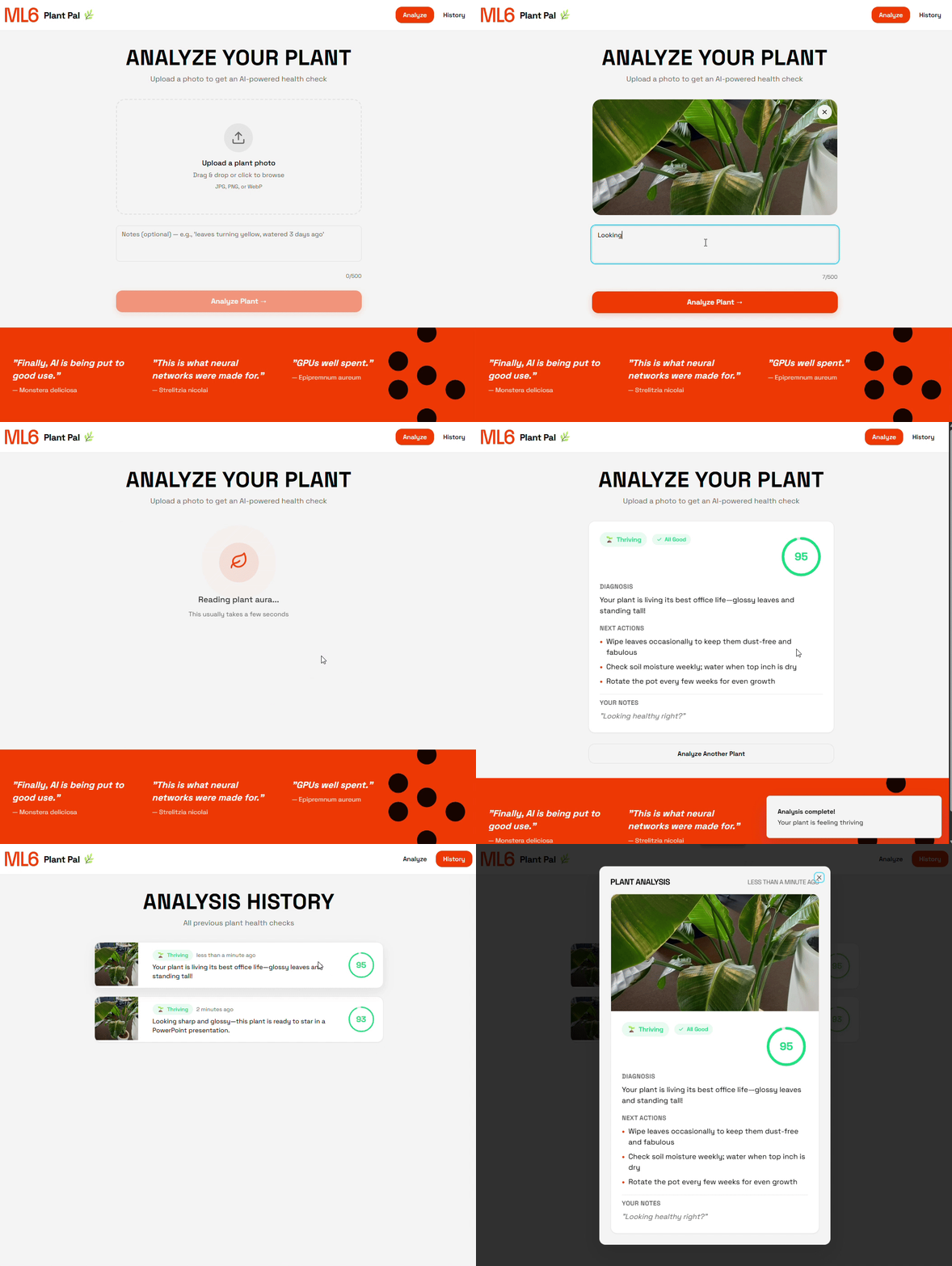
Plant Pal
Let’s pause here for a second. In 15 minutes we went from vague idea to a shareable prototype that you can click through and use. It’s the kind of post-transformer bliss that would be hard to explain to any developer before 2022.
However, much of the impact happens outside the engineering team.
At ML6, Lovable gives our project managers superpowers and allows them to validate ideas with a client fast. Instead of spending days on static mockups, we can now co-create live with our clients. And since the cost of prototyping is near zero, there is little sunk cost when things don’t work out.
“This is what neural networks were made for“ — Strelitzia Nicolai
2. Anatomy of a Lovable App
Now that we have a functional app, let’s take off the rose-tinted glasses and look at what Lovable actually created for us.
The Shared DNA
Every Lovable app is built on the same foundations. While each app may have different features, the underlying skeleton is very rigid. This is actually a feature, not a bug. This standardization is what makes Lovable so effective.
The frontend consists of standard React running on Vite and TypeScript. UI components are built with shadcn/ui, a collection of customizable components that are copied into the codebase for easy manipulation by the Lovable builder.
For the backend, Lovable uses Supabase, a Backend-as-a-Service platform built for speed. Supabase provides four core primitives that Lovable relies on heavily: Storage, Database, Edge Functions and Auth. It also supports real-time subscriptions via WebSockets, enabling live updates without polling.
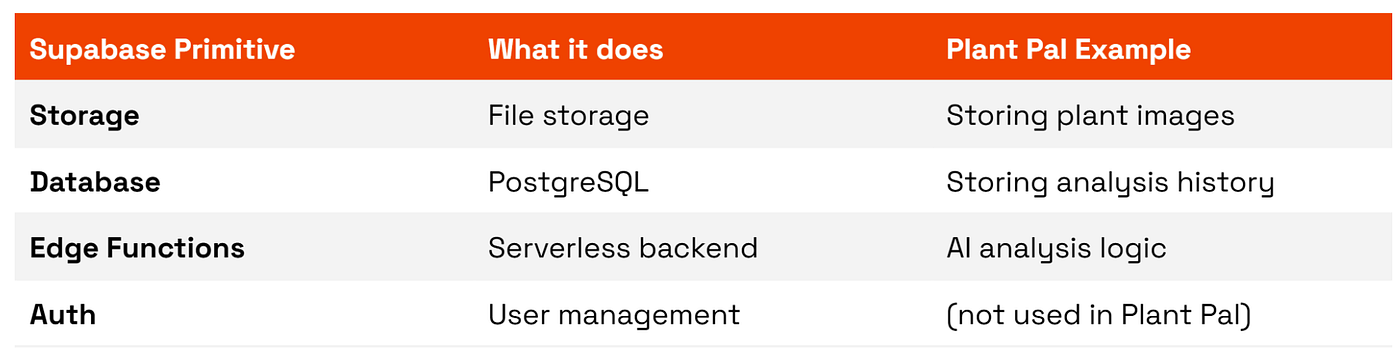
Four Supabase primitives: Storage, Database, Edge functions and Auth
For AI, Lovable exposes LLM functionality through a centralized AI Gateway, making it straightforward to add AI features to your apps.
Understanding the role of these primitives will be crucial for part 2, where each component will be mapped onto its cloud alternative for Azure, AWS and GCP.
Project Structure
At a high level, every Lovable generated codebase follows the same structure:
any-lovable-app/
├── src/                          #   React frontend
│   ├── components/               #   UI components
│   ├── pages/                    #   Route pages
│   ├── services/                 #   Client side API wrappers
│   └── integrations/supabase/    #   Supabase client + types
│
├── supabase/                     #   Backend (runs on Supabase infrastructure)
│   ├── functions/<name>/         #   Edge Functions
│   └── migrations/               #   DB schema + RLS policies
│
└── [vite/tailwind/ts configs]    #   Build tooling
The key insight is the split in execution context:
- Everything in
src/is bundled and executed in the user's browser - Everything in the
supabase/functionsruns on Supabase’s servers
The frontend is shipped as a static SPA served via CDN hosting, and all Supabase primitives are accessed over public HTTPS endpoints.
Let’s see how these components show up in the Plant Pal codebase:
plant-pal/
│
├── src/
│   ├── components/
│   ├── pages/
│   │   ├── AnalyzePage.tsx            #   Image upload page
│   │   └── HistoryPage.tsx            #   Plant history page
│   │
│   ├── services/
│   │   └── plantService.ts            #  Three functions, three primitives
│   │       ├── uploadPlantImage()     #   -> Calls Storage
│   │       ├── analyzePlant()         #   -> Calls Edge function(s)
│   │       └── getPlantHistory()      #   -> Calls Database
│   │
│   └── integrations/supabase/         # Supabase client
│
├── supabase/
│   ├── functions/analyze-plant/       # AI Gateway call + DB write
│   └── migrations/
│       └── 20251222...sql             # Table defs + RLS + storage policies
│
└── .env                               # Publishable key
The frontend communicates directly to the Supabase primitives through a single shared client, defined in integrations/supabase. The service layer, plantService.ts , wraps this client and exposes clean functions to the frontend. In our case, each function maps cleanly to exactly one Supabase primitive:
// .uploadPlantImage() -> Storage
supabase.storage
  .from("plant-images")
  .upload(path, file)

// .getPlantHistory() -> Database
supabase
  .from("plant_checks")
  .select("*")
  .order("created_at", ...)

// .analyzePlant() -> Edge Function
supabase.functions.invoke("analyze-plant", { body: {...} })
Now let’s talk about the architectural pattern at play, because it differs from the pattern you typically see in enterprise software.
2-tier vs 3-tier architecture
In a classic 3-tier architecture, requests flow like this:
Browser → Application server (API) → Database
The Application Server (Node.js, Python, ...), acts as a gatekeeper: it validates inputs, implements business logic, and strictly controls which database operations are allowed. This separation of concerns makes components easier to secure and scale independently, but it comes at the cost of more code, more infrastructure, and more decisions to maintain.
In a classic 2-tier model, the browser talks directly to the database with no custom application server in between.
Browser → Database
This is simpler to build, but it pushes responsibility for authorization and data access control into the database itself.
So where does Lovable + Supabase land?
Well, somewhere in between..
Technically, there is a middle layer: Supabase exposes the database through PostgREST (a web server that turns PostgreSQL into a REST API), along with managed endpoints for auth, storage, and functions. However, this layer is very thin and fully Supabase-managed, so you don’t write or control this code yourself.
So where does the business logic live?
- For simple CRUD operations, the frontend handles UI state and user flow orchestration, and talks directly to the database and storage. Authorization is enforced at the database level using RLS policies (more on those in a minute).
- For more complex logic, such as calling external APIs or handling secrets, Lovable will provision Edge Functions that act as mini backends.
This hybrid model is a big advantage for the Lovable AI builder. You get the simplicity of direct database access for basic operations, and edge functions for server-side logic when needed. The result is fewer moving parts and fewer architectural choices, making the codebase easier to generate and evolve.
Architecture Overview
The diagram below shows the complete architecture of Plant Pal.
The diagram is organized around a useful abstraction: Security Zones. Notice the two colored regions: blue (public client context) and red (secure server context). This distinction is the key to understanding how Lovable apps handles security.
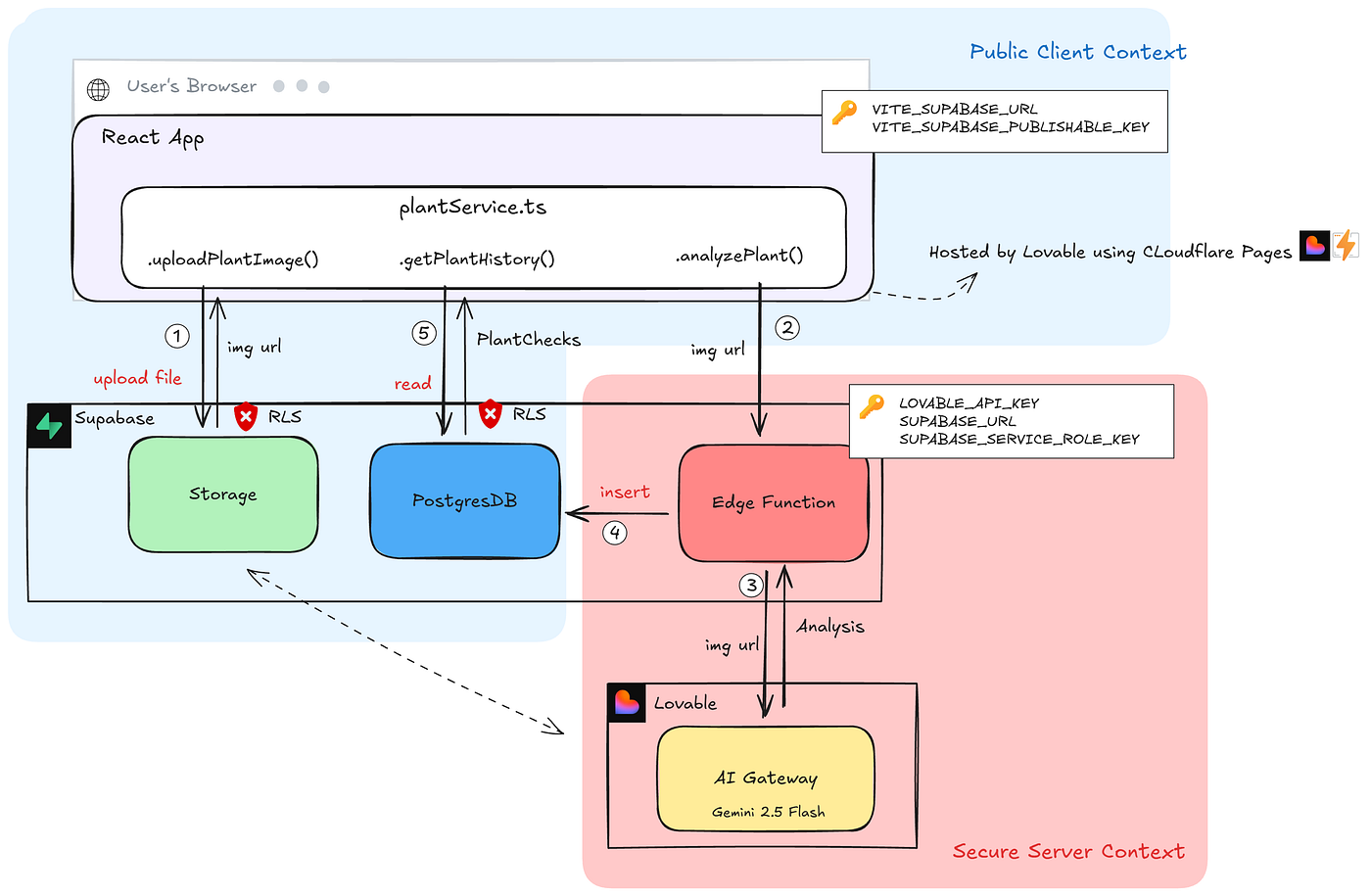
Architecture of Plant Pal. Client-side code runs in the user’s browser and communicates to services using publishable keys (blue), protected by RLS policies,. Sensitive operations and secrets are isolated in Supabase Edge Functions (red)
Blue Zone
The blue zone represents everything the client (browser) can access directly using Supabase’s publishable key. This key is bundled into the JavaScript at build time, which means it is public and inspectable by anyone using your application.
I know what you’re thinking:
Keys? Publicly available??
This is not a bug. The publishable key is designed to be public. Its access is constrained by Row Level Security (RLS) and storage policies. RLS rules control which rows a user can read or write, e.g. users can only see rows where user_id matches their own. Storage policies work similarly, controlling who can upload or download files.
Note that these policies are generated by Lovable itself. So be aware that you are trusting an LLM to write your security rules. Get any of these wrong, and you risk exposing sensitive data.
Misconfigured RLS policies are a common source of data leaks and even have their own CVE vulnerability class. Lovable tries to address this with their security review feature, but in the end the responsibility falls on the developer.
A small note on Auth: When authentication is enabled, users log in via Supabase Auth and receive a JWT containing their user_id. This token is automatically attached to every request, and RLS policies can check it via auth.uid(), ensuring users can only access their own data
Red Zone
In contrast to the blue zone, the red zone is your safe haven.
Everything in the Red Zone runs on Supabase Edge Functions. Users can invoke them, but they cannot see the code inside them. This is where your secret keys live, like the Lovable AI API key for interacting with AI models, and the Supabase Secret Key which bypasses RLS policies entirely.
Runtime Flow
Now that we understand the security boundaries, we can trace how data moves through the system:
- The browser uploads an image directly to Storage using the publishable key. The storage policy allows this.
- The browser invokes the
*analyze-plant* Edge Function - The Edge Function calls the Lovable AI Gateway using the
*LOVABLE_API_KEY. *This secret never leaves the server. - The resulting analysis is written to the Database using the secret key.
- To display the results to the user, the browser reads the plant history directly from the Database
The Proof: Finding the Publishable Key
If you don’t believe all of the above, you don’t have to take my word for it. Let’s prove it.
Let’s open DevTools tab on Plant Pal and inspect what happens when we navigate to the history page. We see a call to Supabase REST endpoint:
[*https://<project-id>.supabase.co/rest/v1/plant_checks?select=*&order=created_at.desc](https://whrfuizhvamstuxvv.supabase.co/rest/v1/plant_checks?selecht=*&order=created_at.desc)*
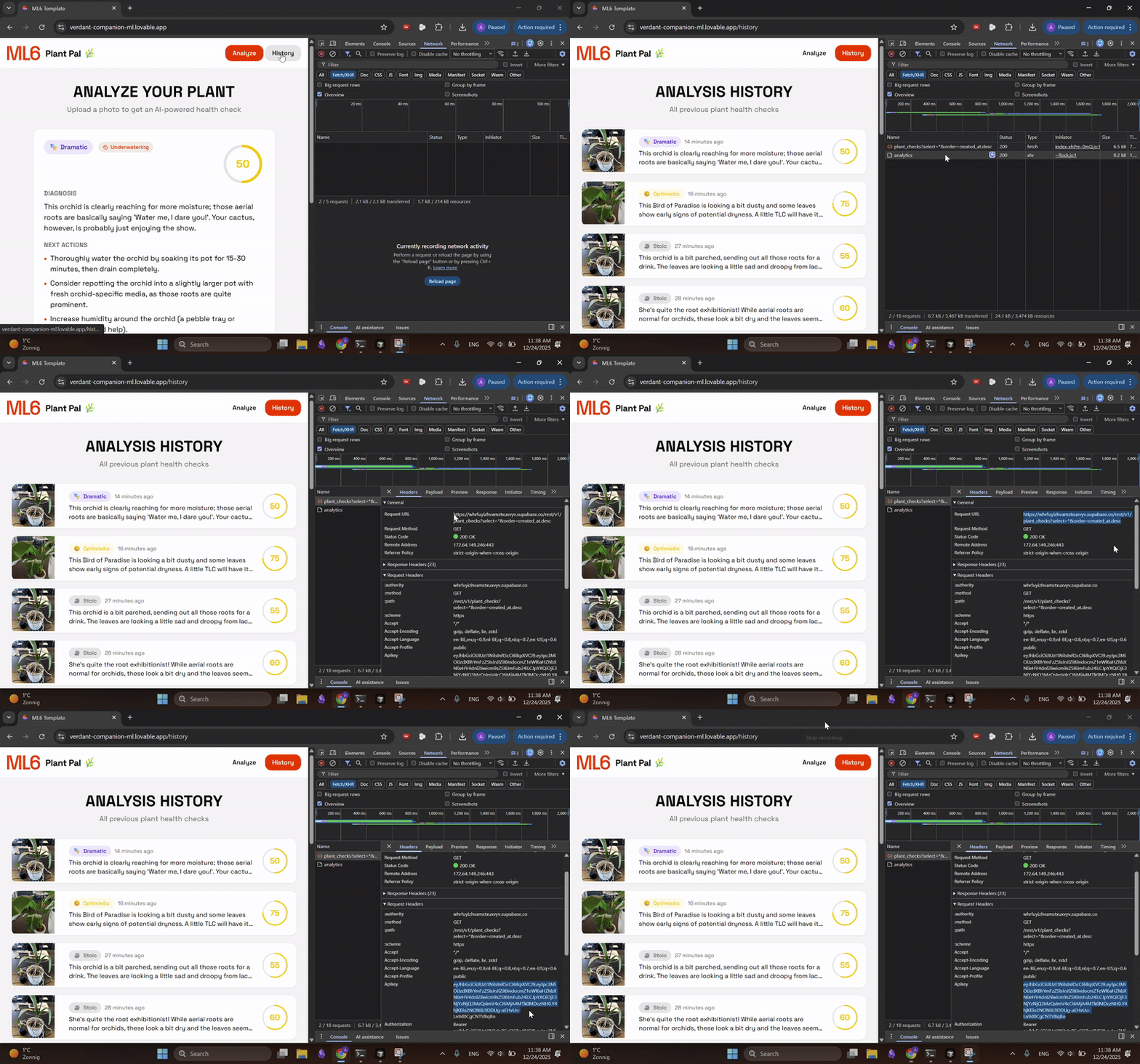
Open DevTools > Networking to find your publishable key
Now inspect the request headers. As suspected, the publishable key is there in plain sight!
Although I configured the RLS policies to only allow reads, let me quickly delete the project before this gets published 😉
Up to this point, we mostly looked at how Lovable works. In the next section we will talk about where Lovable fits in an enterprise context.
3. Enterprise Constraints
Before diving in, I need to make one important clarification: Lovable is not positioning itself as a full-fledged enterprise application platform (at least not yet). So none of the points below make Lovable “bad”. Instead, they are natural consequences of an architecture optimized for speed and LLM-based iteration.
Enterprise software, on the other hand, is optimized for control over change and risk. This means that controlled deployments, testing, stability, compliance, and long term maintainability become much more important than for a prototype.
This section explores where those two goals diverge, and as a result, where Lovable fits well, and where it doesn’t.
Code Quality and Maintainability
While writing this post, I happened to be reading A Philosophy of Software Design by John Ousterhout, and the parallels were hard to ignore. Mr Ousterhout describes how complexity rarely comes from a single bad decision, but from the accumulation of many small, reasonable shortcuts taken to move fast. Each change works in isolation, but over time the system becomes harder to understand and modify.
A similar dynamic can be observed when using Lovable.
Lovable evolves applications through a series of user requests, each resulting in incremental changes to the codebase. Each change is optimized for the immediate request, rather than holistic planning or long-term maintainability.
Combined with the limited context window of current LLMs (context rot), and the fact that users typically don’t inspect or refactor the underlying codebase, adding a new feature often means adding another layer on top of increasingly shaky foundations.
Over time, this often leads to a patchwork codebase where changes require disproportionate effort and often introduce unwanted side effects. Eventually you hit a complexity ceiling. hmm, why did this completely unrelated part of the code break 🤔
In conclusion, Lovable excels at implementing functional requirements: the visible capabilities of an app e.g. upload a document or display results. However, enterprise software is defined just as much by its non-functional requirements: maintainability, reliability, security, scalability and observability.
Network Isolation
Many enterprises require applications to operate entirely within private networks (VPC/VNet), with strict ingress/egress controls.
By default, all Supabase services are publicly addressable over HTTPS. While Row Level Security controls who can access data, it does not control where that data can be accessed from.
For organizations that require network-level isolation, this is often a hard blocker.
CI/CD and Environments
Enterprise software follows a “build once, deploy many” model, with clearly separated dev, acc, and prod environments.
Lovable has no native concept of environments. Each prompt results in a commit that is immediately reflected in the running application.
Lovable does offer GitHub sync, so you could build a proper pipeline around the exported code. However, this is not the default workflow, and teams can quickly end up managing a hybrid state between Lovable-driven development and local development.
Observability and Cost Transparency
Supabase provides logs and basic database metrics through its dashboard, but there is no unified view across the entire stack. The limited visibility, both into development cost (credit based system) and the runtime costs, makes it harder to track and manage expenses.
The list of constraints above is not exhaustive. Other considerations such as avoiding vendor lock-in, long-term ownership, and regulatory compliance may further influence whether Lovable is an appropriate fit.
Conclusion
In this blog post, we dissected the anatomy of a Lovable app: a standard skeleton using React on the frontend and Supabase primitives on the backend. We explored how the the 2-tier like architecture enables rapid development, but pushes security responsibilities to RLS policies that must be carefully reviewed.
We also looked at some enterprise constraints like code quality degradation, lack of network isolation and risk of vendor lock in.
In Part 2, we will take Plant Pal and migrate it to Azure Cloud (with guidance for AWS and GCP as well) and share tips on setting up your Lovable project from Day 1 to make future migrations easier.
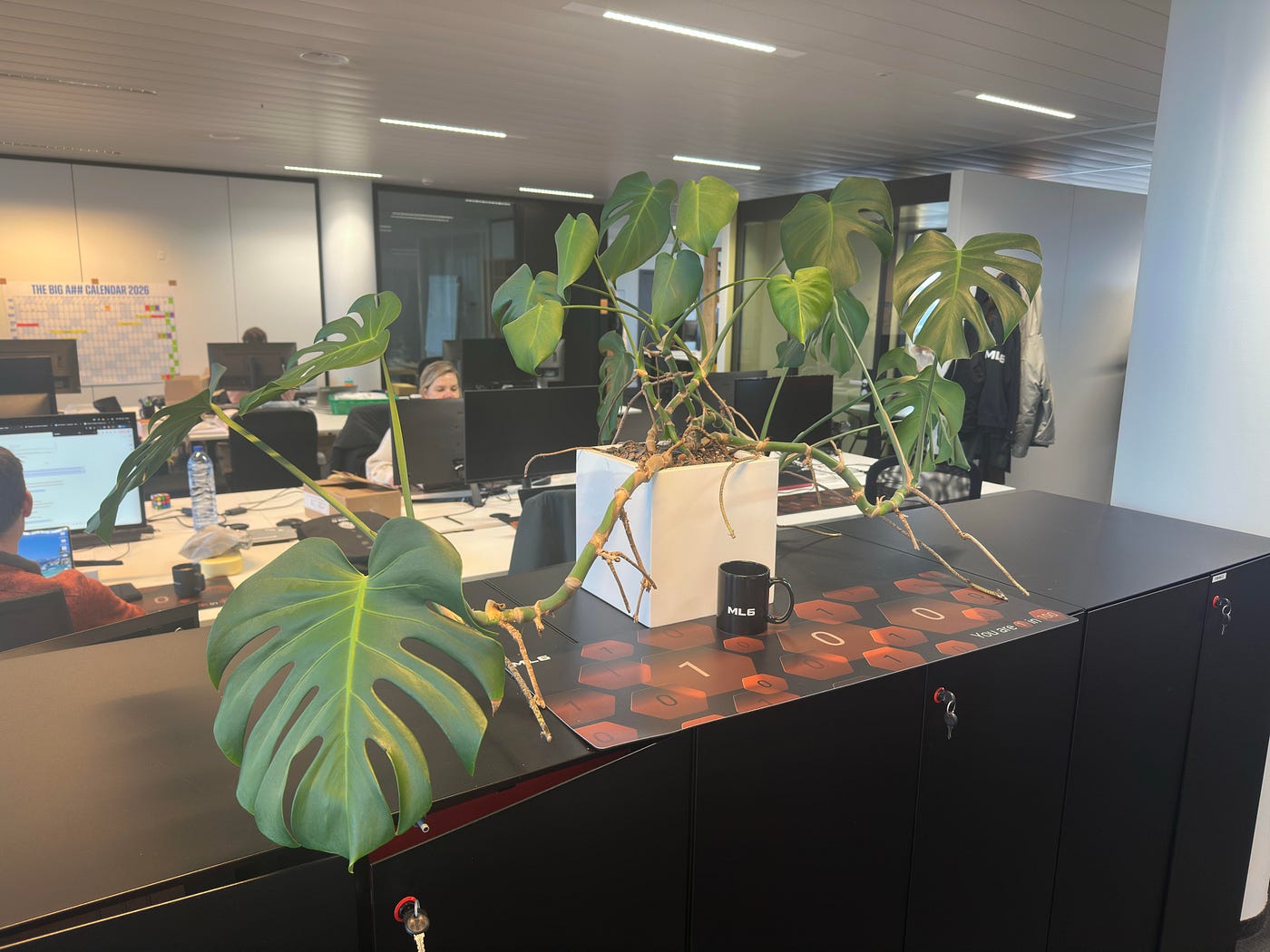
“GPU well spent“ — Monstera deliciosa
Addendum
From “A Philosophy of Software Design” by John Ousterhout:
While writing this post, I found myself reading A Philosophy of Software Design by John Ousterhout. Two passages in particular felt uncomfortably relevant.
On Tactical programming (opposed to strategic programming):
“…planning for the future isn’t a priority. You don’t spend much time looking for the best design; you just want to get something working soon … complexity is incremental. It’s not one particular thing that makes a system complicated, but the accumulation of dozens or hundreds of small things. If you program tactically, each programming task will contribute a few of these complexities. Each of them probably seems like a reasonable compromise in order to finish the current task quickly. However, the complexities accumulate rapidly…Refactoring may help out in the long run, but it will definitely slow down the current task. So, you look for quick patches to work around any problems you encounter. This just creates more complexity, which then requires more patches. Pretty soon the code is a mess, but by this point things are so bad that it would take months of work to clean it up.
Lovable/LLMs as the perfect tactical tornado?
Almost every software development organization has at least one developer who takes tactical programming to the extreme: a tactical tornado. The tactical tornado is a prolific programmer who pumps out code far faster than others but works in a totally tactical fashion. When it comes to implementing a quick feature, nobody gets it done faster than the tactical tornado. In some organizations, management treats tactical tornadoes as heroes. However, tactical tornadoes leave behind a wake of destruction. They are rarely considered heroes by the engineers who must work with their code in the future. Typically, other engineers must clean up the messes left behind by the tactical tornado, which makes it appear that those engineers (who are the real heroes) are making slower progress than the tactical tornado.
Note that I don’t think programming with LLMs is inherently tactical or irresponsible. However, the risk to falling prone to tactical programming is dramatically higher: the speed, ease, and low friction of producing “working code” make it easier than ever to accumulate small, seemingly reasonable compromises.
Open Lovable, start prompting without any upfront design, and see for yourself ;)
메타데이터
- post_id
- ad66df8a4971
- slug
- the-anatomy-of-a-lovable-app-ad66df8a4971
- url
- https://blog.ml6.eu/the-anatomy-of-a-lovable-app-ad66df8a4971
- canonical_url
- https://blog.ml6.eu/the-anatomy-of-a-lovable-app-ad66df8a4971
- author_url
- https://medium.com/@arne.pannemans_92687
- status
- ok
- fetched_at
- 2026-06-10 08:17:25