Problem: Docker eats disk space — no surprise. But how much, exactly? A HowTo to clean it up safely
Images, Containers, Local Volumes, Build Cache — byte per byte. Clear the decks without blowing anything up.
Problem: Docker eats disk space — no surprise. But how much, exactly? A HowTo to clean it up safely!
Images, Containers, Local Volumes, Build Cache — byte per byte. Clear the decks without blowing anything up.

AI generated picture showing the issues of the article: Docker and a bursting hard disk
Another article I never meant to write, working on something completely different… But the findings are too interesting not to share:
The original “conversation” with the LLM was about updating a Claude Code container — I run a separate container for each project, each based on a specific local image. My passing thought: another image, the drive is nearly full… and the old images are still running in other projects, I’d have to update every composer.yml and restart the containers.
Without going into too much detail: out of nowhere came the suggestion:
docker system dfNever seen it. Or at least never consciously noticed it.
One of those genuine serendipity moments — finding something surprising and useful while looking for something else entirely.
OOr, as I’d say:
the old Indian scout showing up again!
(I introduced that concept in [LINK] to an article about deep KV-Cache insights).
The docker system df is exactly the command you need — before you start blindly deleting images and volumes.
What docker system df actually shows
Four lines. That’s all it takes:

TYPE            TOTAL     ACTIVE    SIZE      RECLAIMABLE
Images          51        21        52.31GB   18.05GB (34%)
Containers      27        21        5.051GB   4.105GB (81%)
Local Volumes   144       3         7.421GB   7.373GB (99%)
Build Cache     257       0         35.88GB   13.55GB
What exists, what’s currently running, how much space is being used — and how much of that could theoretically be freed. With -v it gets even more granular: every image and volume listed individually, with size. Once you've seen this, you'll never blindly run docker image prune again.
144 Volumes — Yikes? Or actually fine…
144 Volumes, only 3 active. 99% reclaimable. Sounds like a serious problem — and the first instinct is docker volume prune. Then the letdown: practically 0 bytes freed.
What happened? A look at docker volume ls tells the story:
local     d06fe4a2108a5152cc31892d5d4ffa8296e98637b70137e1c1b8d9285cb1a2c9
local     dc6e28ab60035fdeabe565aeeb68e49c4181732452d001eac0425995fbdf24a5
local     ddev-DDEV-snapshots
local     ddev-global-cache
local     claude-code-project-brain_pb-data
The long hashes — those are Anonymous Volumes. No persistent user data, just temporary runtime information that tools like DDEV create fresh on every container start and simply leave behind when stopped. After three years of DDEV usage, you end up with an impressive list — that barely occupies any actual storage. Named Volumes, on the other hand — recognizable by meaningful names like ddev-global-cache or claude-code-project-brain_pb-data — contain real data. Handle with care.
Docker has four volume types, and the difference matters:
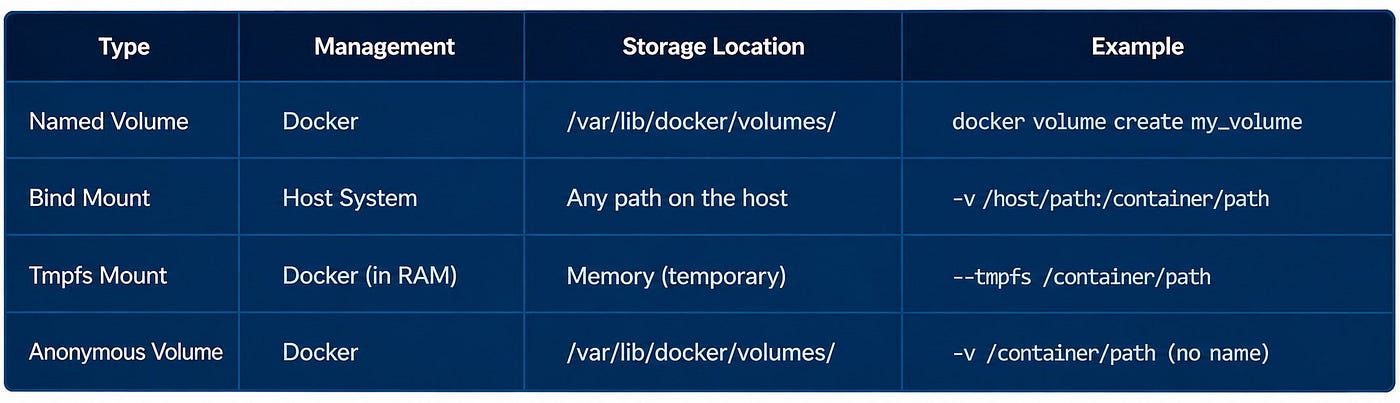
A long volume list isn’t a storage problem — as long as you know what’s in it. For targeted cleanup by name pattern:
docker volume ls --format '{{.Name}}' | grep '^ddev' | xargs docker volume rmImportant! An image is not a file — it’s a notebook!
Seems obvious if you’ve been in IT for decades: an image is a snapshot — a snapshot of an entire hard drive. You “pull an image”. That mental model runs deep.
With Docker, it’s completely different. So different that even experienced developers never correct this fundamental misconception — despite talking at length and knowledgeably about layers.
A Docker image is a notebook listing the layers it’s made of. It’s only a reference. The layers themselves live somewhere else entirely.
I published an article concerning this matter some weeks ago:
Aside:
Unlike the serendipity moment above, the LLM — even when asked directly — never delivered the correct mental model of images and layers. The core insight that “image ≠ disk space” was completely ignored. I had to write this section by hand. Apparently the image misconception is as underrepresented in training data as it is among Docker users in general. Which, when you think about it, makes perfect sense.
What this means in practice
You can delete images until you’re blue in the face — as long as other images reference the same layers, the actual space savings are marginal. Certainly nowhere near as large as you’d expect.
The “18 GB reclaimable” figure from docker system df should therefore be taken with a grain of salt. That's the theoretical maximum — in practice, with many images sharing layers, what actually gets freed is often far less.
Cleaning up images: deliberately, not with a sledgehammer
52 GB of images, 18 GB potentially reclaimable — but as just explained: only potentially.
No blind docker image prune, then — first, a look at the Docker Desktop frontend. The GUI shows when each image was last used, and that's the decisive filter: inactive for more than a year goes, a few months depends on the project, anything active stays untouched. Especially tricky: self-built images with a date tag — claude-code-debian:2026-03-30, 2026-05-27 and so on. The base layers are shared, sure — but older tags hold their own references and quietly block cleanup in ways you don't notice until you look.
Build Cache: Low risk — but 35 GB
35 GB of build cache, 257 entries, none active. This is the lowest-risk cleanup you can do — the cache holds intermediate results from docker build runs, speeds up future builds, but can be recreated from scratch at any time. Deleting it costs a bit of extra build time on the next run, nothing else:
docker builder pruneStopped containers: Still water — but shallow
27 containers, 21 stopped — and 81% of container storage is reclaimable. Stopped containers no longer occupy RAM, but their filesystem layer is still sitting on disk. Anyone who regularly uses docker run instead of docker run --rm builds up these ghosts quickly. Safe to remove:
docker container pruneThe janitor submenu
docker system is the most overlooked submenu in Docker — and yet it has everything you need for a proper overview:
docker system df               # Storage overview
docker system df -v            # Details per image and volume
docker system prune            # Dangling images, stopped containers, unused networks
docker system prune -a         # All images without a running container
docker system prune --volumes  # Volumes too — use with care
prune --volumes should only be touched once you've read docker system df -v and actually understand what's sitting there.
Summary at a glance:
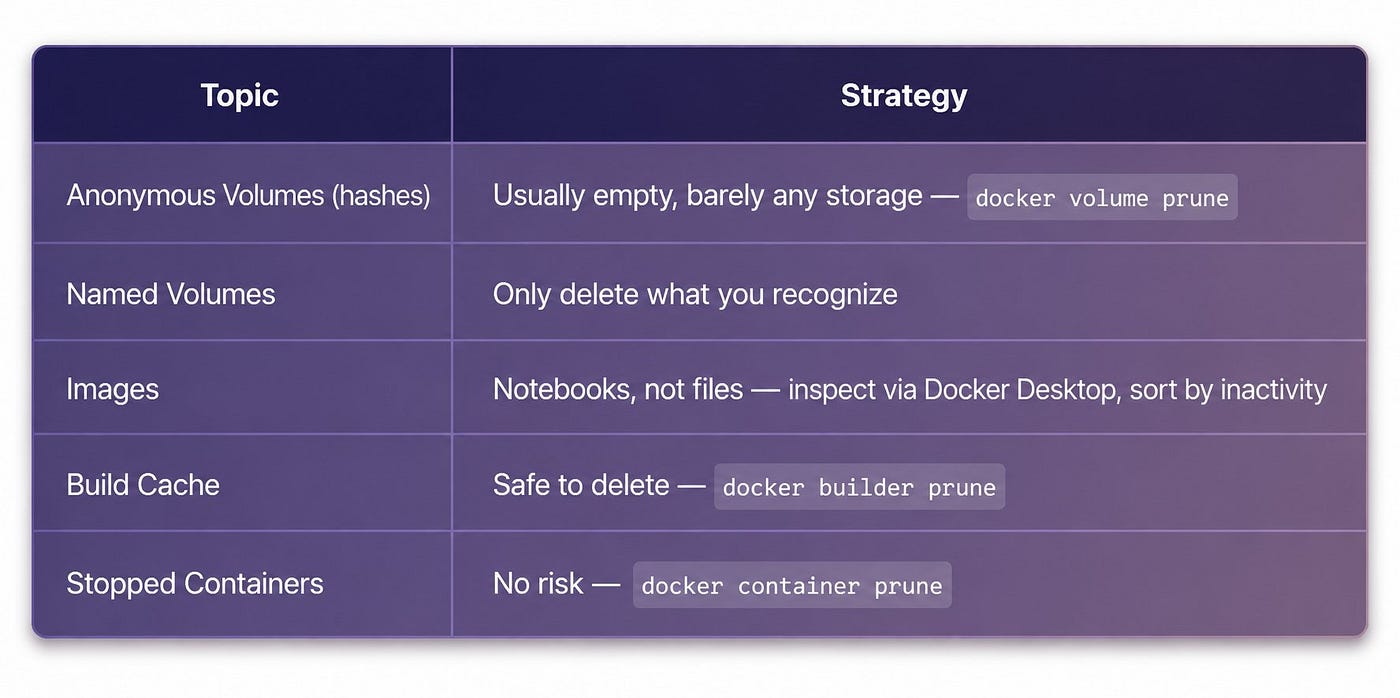
Summary of the whole text, displayed as a single table
Disclaimer
This text was written by hand in the beginning, it then was developed and created — and may have been revised — partially with the help of tools such as Claude, Claude Code, ChatGPT or Gemini (among other GenAI tools), based on a current project.
After all the original German version was translated to English by Claude
메타데이터
- post_id
- ad91cad444e8
- slug
- problem-docker-eats-disk-space-no-surprise-but-how-much-exactly-a-howto-to-clean-it-up-safely-ad91cad444e8
- url
- https://medium.com/rigel-computer-com/problem-docker-eats-disk-space-no-surprise-but-how-much-exactly-a-howto-to-clean-it-up-safely-ad91cad444e8
- canonical_url
- https://medium.com/rigel-computer-com/problem-docker-eats-disk-space-no-surprise-but-how-much-exactly-a-howto-to-clean-it-up-safely-ad91cad444e8
- author_url
- https://medium.com/@rigel-computer
- status
- ok
- fetched_at
- 2026-06-14 11:28:49