How Microsoft Agent 365 Makes Any AI Agent Enterprise-Ready
Learn how Microsoft Agent 365 gives any AI agent an Entra identity, live observability, and governance with Purview and Defender throughout…
How Microsoft Agent 365 Makes Any AI Agent Enterprise-Ready
Learn how Microsoft Agent 365 gives any AI agent an Entra identity, live observability, and governance with Purview and Defender throughout its lifecycle.

How Microsoft Agent 365 Makes Any AI Agent Enterprise-Ready
In this article, I walk through how Microsoft Agent 365 works under the hood and what it changes for anyone shipping AI agents into production. I cover the control-plane model, the Agent 365 SDK, Microsoft Entra Agent ID, the blueprint and identity constructs, the admin registry, and how Microsoft Purview and Microsoft Defender extend to agents.
By the end, you will understand exactly how a custom agent built on a framework like LangChain gets an enterprise identity, live telemetry, governed tool access, and policy-based guardrails, which onboarding path fits your situation, and where to go in the docs to start. No prior Agent 365 experience is assumed.
Reference here.
The problem: agents scale faster than governance
Ask any engineering or security team today whether they can name every AI agent running in their tenant, who owns each one, what data it can reach, and whether it is behaving as intended, and the answer is usually no.
Agents are easy to build and easy to deploy, and that is precisely why they multiply past the point where traditional IT governance can track them. Industry analysts put the trajectory at more than a billion agents inside organizations by 2028, and the pattern is already visible.
Agents show up in three shapes that each escape control in a different way. SaaS agents arrive prebuilt inside applications you already licensed. Endpoint agents run locally, spawned from a CLI or a local client. Cloud agents are the ones your own teams build on assorted clouds, frameworks, and runtimes.

The failure mode is identical across all three: no single inventory, no consistent identity, no shared policy. Developers end up reassembling identity, logging, threat protection, and compliance from scratch, in isolation, for every agent. That duplication is the real cost, and it is what Agent 365 is built to remove.
What “enterprise-ready” actually requires
An enterprise-ready agent needs five concrete things. It needs a registry and observability so it can be discovered and watched. It needs an identity so every action is attributable to a specific agent. It needs threat protection against the new class of generative-AI risks such as prompt injection, intent breaking, and tool misuse. It needs data security so it does not leak or overshare. And it needs governance and compliance so it can be audited.
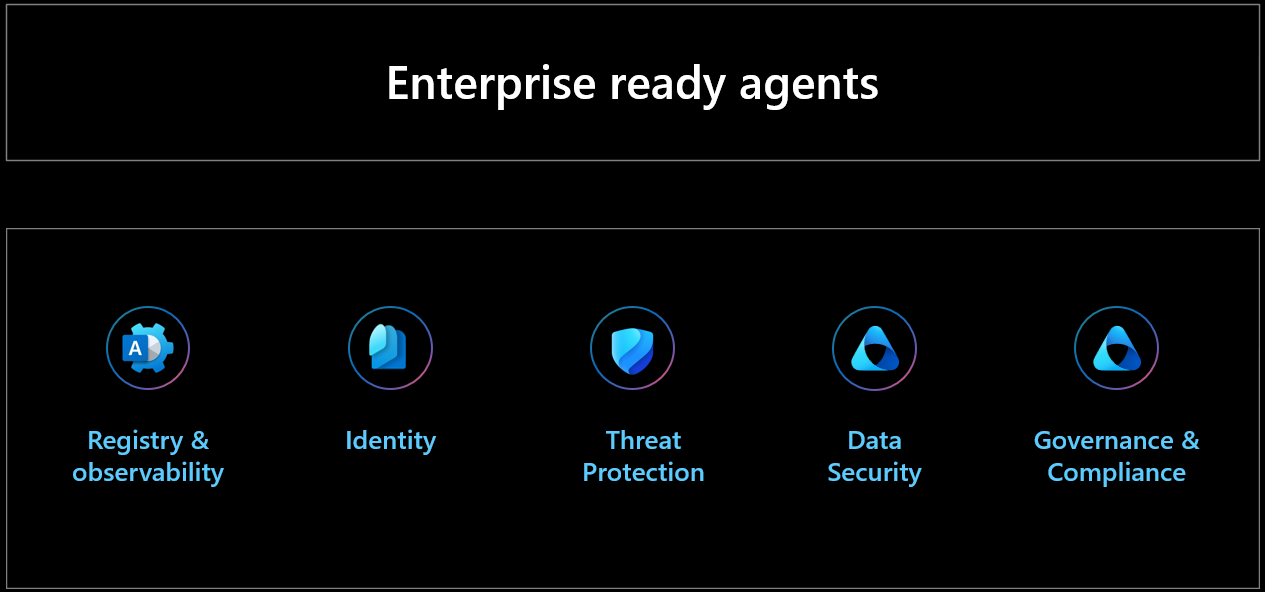
None of these are optional, and none of them are new inventions. They are the same controls you already apply to human employees. The core idea behind Agent 365 is that you should not stand up a parallel security stack for agents. You extend the one you already run.
Agent 365: a control plane, not another agent builder
Microsoft Agent 365 is a control plane for agents, organized around three verbs: Observe (monitor and manage agents in real time), Govern (manage agents across their lifecycle), and Secure (protect agents comprehensively).
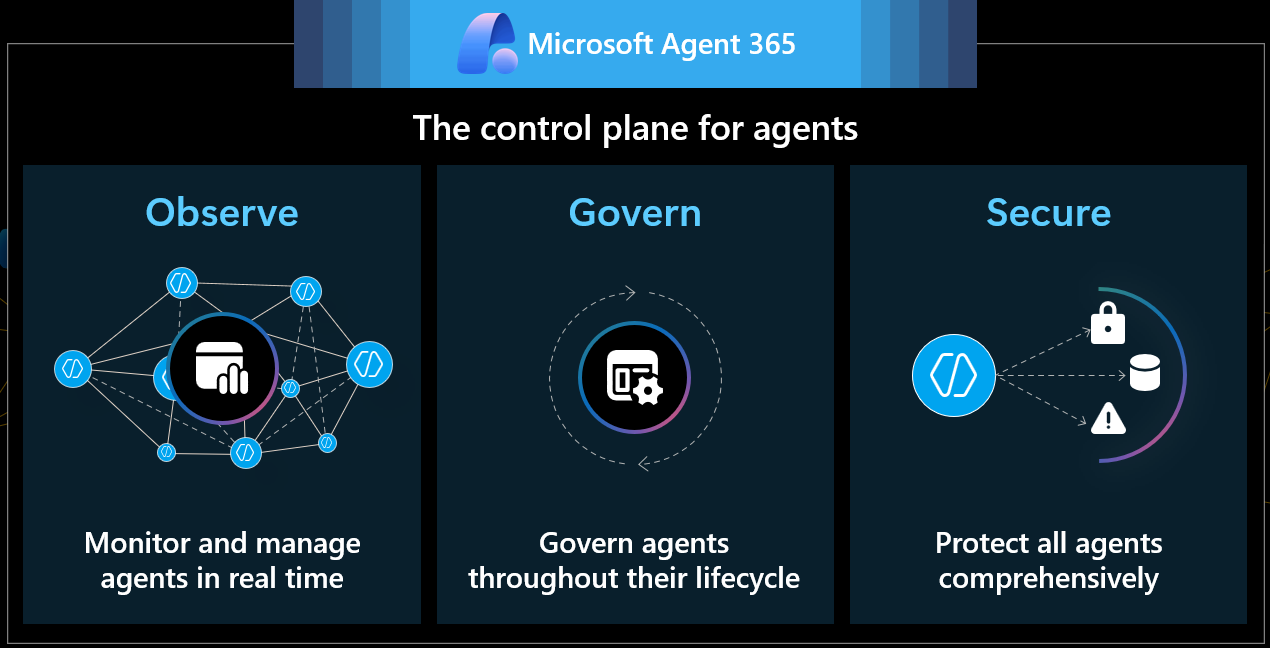
Agent 365 delivers these capabilities not only for Microsoft-built agents, but for third-party, custom, and external agents as well.
Two facts help with planning. First, Agent 365 reached general availability on May 1, 2026, licensed per user at USD 15 per user per month, or bundled inside the Microsoft 365 E7 suite, with Microsoft E5 as a recommended prerequisite.
The human is the unit of licensing, and the agents acting on that person’s behalf are covered under their license. Second, and this is where teams most often get the architecture wrong: Agent 365 does not build agents and it does not host agents. It sits above your building and hosting platforms and governs whatever they produce.
You keep Copilot Studio, Microsoft Foundry, LangChain, CrewAI, and your own runtime. Agent 365 makes all of it visible, identity-bound, and policy-controlled.
The architecture: a control plane on four security pillars
The mental model is a platform sitting on four load-bearing pillars. The platform layer is the end-to-end governance surface.
The four pillars are the enterprise security products you already operate: Microsoft Entra for identity, Microsoft Defender for threat detection and runtime protection, Microsoft Purview for data governance, and Microsoft Intune for shadow-AI detection on endpoints.

Those four onboarding paths at the top are the single most important thing to understand as a developer, because they decide how much work you have to do:
- Native, out of the box. Agents built on a Microsoft platform (Agent Builder, Copilot Studio, Azure Foundry, Copilot Cowork, Researcher) appear in Agent 365 automatically, in draft or in production, with observability, policy templates, and admin actions available at no extra effort.
- Partner-integrated. Vendors are extending the SDK into their products, so their agents carry an agent ID and observability out of the box.
- Developer-integrated. This is the custom-agent path (for example a LangChain agent) and it runs through the Agent 365 SDK.
- Registry Sync. Configured per platform, this ingests agents from connected clouds such as AWS Bedrock and Google Vertex AI for visibility and basic lifecycle governance.
The Agent 365 SDK, layer by layer
The SDK is the on-ramp for any agent not born inside Microsoft, and its purpose is narrow and worth stating precisely: it is not an agent-building SDK and it will not host your agent. It is a wrapper. You point it at an existing agent and it makes that agent discoverable, identity-bound, observable, and policy-governed inside Agent 365.
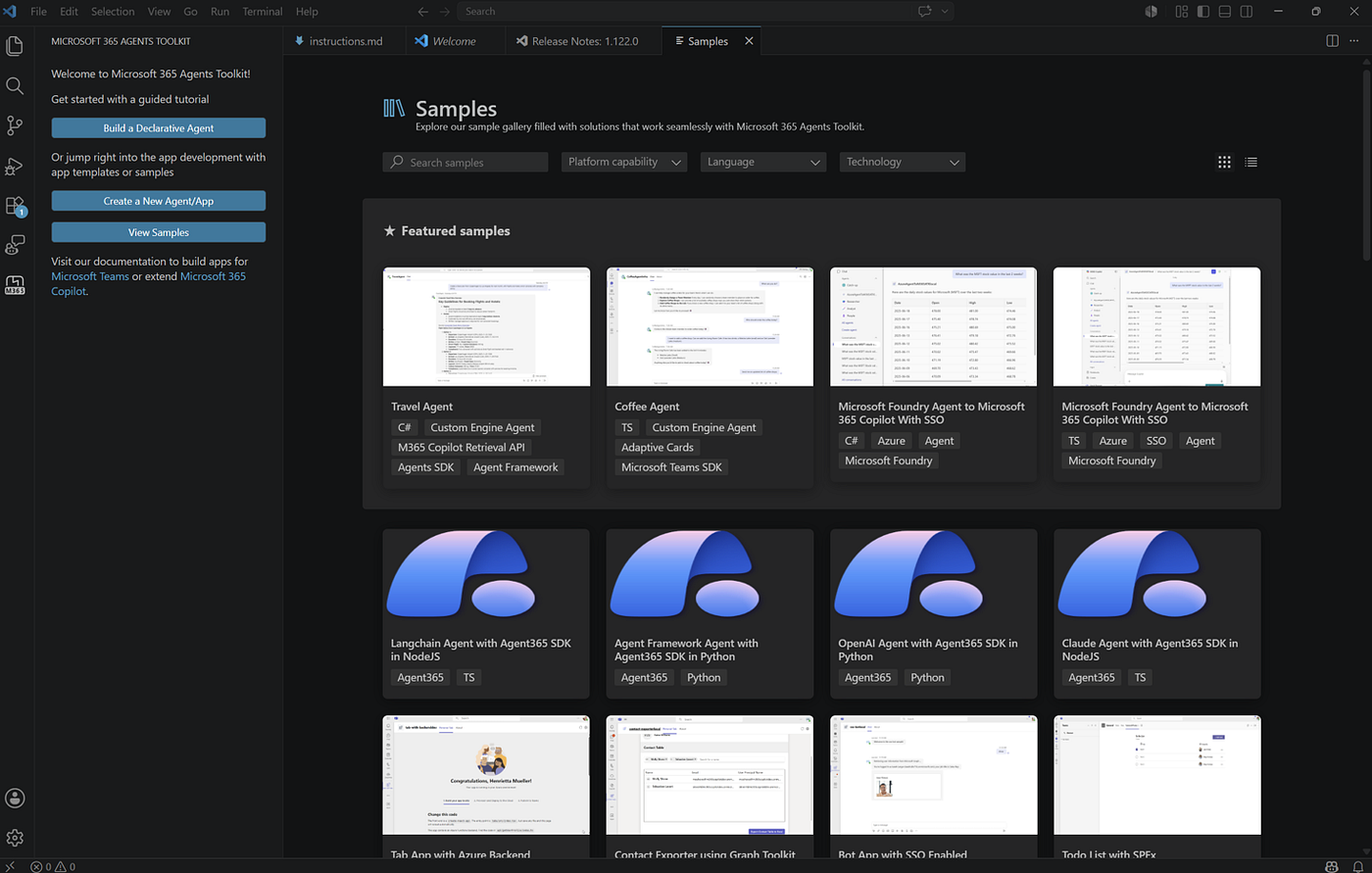
The frameworks it is designed to wrap include the Microsoft 365 Agent SDK, Microsoft Agent Framework, the OpenAI Agents SDK, LangChain, CrewAI, LlamaIndex, and the Claude Code SDK. On top of whatever it wraps, the SDK layers seven capabilities:
- Identity, an Entra-backed agent identity so every action is attributable.
- Observability, OpenTelemetry-based tracing of interactions, inference events, and tool usage.
- Tools, governed access to Microsoft 365 workloads through Model Context Protocol (MCP) servers.
- Messaging, so the agent can receive and respond to notifications from Teams, Outlook, and Word comments.
- Threat protection, so registered tool calls are protected by Defender runtime blocking.
- Governance, so each agent instance inherits its blueprint’s compliance and lifecycle rules.
- Data security, delivered through the Microsoft Purview API or SDK.
The naming near this SDK is confusingly close, so here is the clean separation. The Microsoft 365 Agents SDK builds and hosts agents (activity protocol, state, channels). The Agent 365 SDK complements it by layering identity, governance, compliance, and lifecycle on top. One builds, the other governs. The SDK ships as language packages you can pull today, namespaced under @microsoft/agents-a365 for Node, with parallel Python and .NET distributions.
Two concepts you must internalize: blueprint and identity
Everything downstream depends on two constructs, and it is worth slowing down on both.
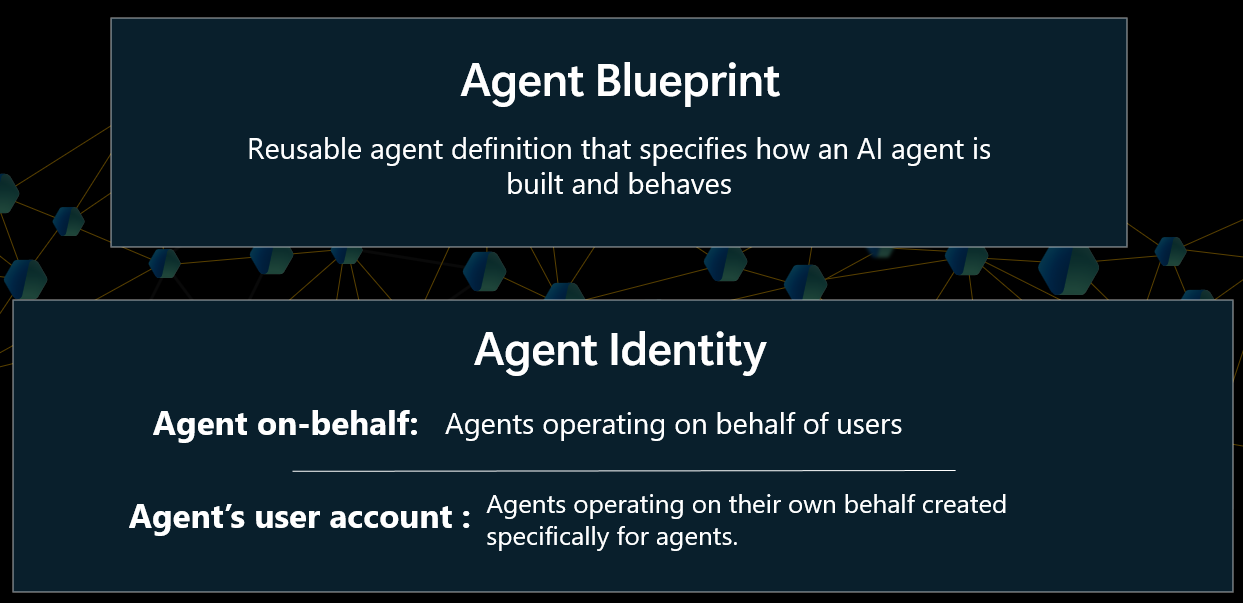
An agent blueprint is a reusable definition of how an agent is built and behaves. Think of it as a recipe, or, in the way the identity docs describe it, as more than a drawing: like an architectural blueprint that captures plumbing, electrical, and structural detail, an agent blueprint captures authentication, permitted tools, permitted data, guardrails, audit requirements, lifecycle metadata, and any linked policy templates such as DLP or logging rules. Every agent instance is created from a blueprint and inherits its rules. This is the mechanism that prevents shadow agents: if an instance came from an approved blueprint, its governance is guaranteed by construction.
An agent identity is the second construct. Agents are built like apps but they function like users, so Agent 365 uplevels the identity from a plain service principal to something closer to a user identity, powered by Microsoft Entra Agent ID. The blueprint is a special Entra object whose one job is to provision and deprovision agent identities, and it does so using federated identity credentials (FIC). The agent identity itself holds no credentials of its own; it relies on the blueprint to acquire tokens on its behalf. That design is what lets an agent get its own mailbox, its own OneDrive, its own principal name (for example agent@yourtenant.onmicrosoft.com), and the ability to be @mentioned in Teams and Word like a colleague.
There are exactly two authentication flows, and choosing between them is a real design decision:

- On behalf of a user (delegated). When a user invokes the agent, the agent assumes that user’s credentials and permissions, exchanges the delegated token, and acts as if the user performed the action. Best for information retrieval and task completion scoped to a specific person.
- Its own identity (autonomous). The agent authenticates with its own blueprint-derived credentials and operates independently with its own assigned permissions. Best for scheduled tasks, monitoring, sending mail from the agent’s own mailbox, and background processing with no user in the loop.
The developer flow: from a plain agent to an Agent 365 agent

Here is the path a custom agent takes, using a travel-planning agent built on LangChain and Node.js as the example. You start in your editor with a working agent that already returns useful results. Rather than hand-stitching identity, observability, and MCP wiring, you invoke a set of Agent 365 skills from a coding agent (GitHub Copilot, Claude Code, or any coding agent works the same way).
The “make” skill inspects your agent folder, detects the stack (Node.js, LangChain, TypeScript), checks prerequisites, pulls the latest Agent 365 CLI, targets your logged-in Azure tenant, and then executes a plan: install packages, add a validated build, add observability, add Work IQ, register, publish, and deploy. The run takes roughly ten minutes and produces a fully extended agent. Along the way it creates the blueprint, wires OpenTelemetry for observability, configures the MCP servers you chose (for example Word and OneDrive), and writes the manifest.
One detail carries real architectural meaning: the actual agent identity is not created at build time. It is created when an admin activates the agent in the Microsoft 365 admin center. That split is the governance boundary made concrete. Developers prepare the agent; admins decide when it becomes a live identity in the tenant and who it is shared with.
Runtime: the agent behaves like a colleague

Once published and activated, a user creates their own instance from the Teams app list, and that instance reports up to them. You can invoke it from Teams, which is familiar.
The new behavior is that you can @mention the instance inside a Word comment, ask it a follow-up question, and it responds in the document itself rather than forcing you back to a chat window. That works because onboarding stands up a messaging endpoint, so the agent receives notifications from Teams, Outlook, and Word comments and replies in context.
Hosting is beside the point. The LangChain agent in this example can run in Azure, GCP, AWS, or any cloud, and none of that changes how Agent 365 governs it. The identity, observability, and policy travel with the agent, not with the host.
Observability serves three audiences
Observability here is not one feature for one persona. Developers want to know what their agents are doing and who is using them. End users want to see their own interaction history, including failures, because the instance is their hired helper and they want proof it did the job.
IT admins need the full picture across every instance created from a blueprint, plus the ability to drill into any single one. It is the same telemetry viewed through three lenses, which is what makes it useful across the organization instead of only to the team that built the agent.
The admin experience: where governance becomes operational
Inside the Microsoft 365 admin center, the control plane becomes a working dashboard. Here is what matters, grouped by surface.
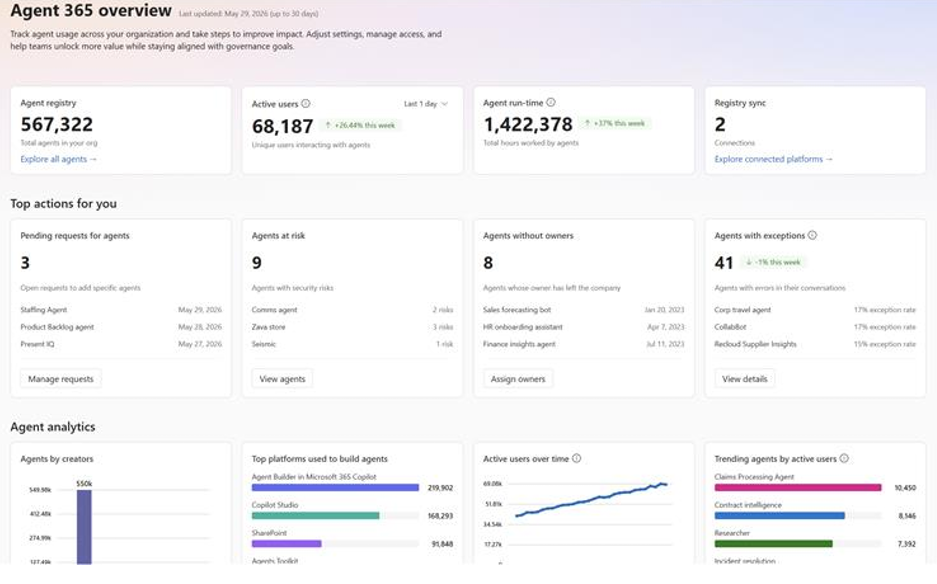
The overview dashboard reports high-level analytics (total agents, total human users as distinct from agentic users, total runtime hours) and, more usefully, a set of calls to action: pending agent requests awaiting approval, agents where risks were detected, agents without owners (a key signal for controlling sprawl), and agents with exceptions (runtime errors surfaced as first-class events). Further breakdowns show agents built by your org versus third parties versus Microsoft, top platforms in use, adoption over time, and trending agents.
The agent registry is the unified inventory across every platform, including non-Microsoft entries, filterable so you can manage large fleets.
The agent detail view exposes the metadata that makes governance possible: what the agent does, publish and update dates, publisher, owner, the agent ID, and the plain-language agent instructions. It shows the full identity history (bot ID, blueprint ID, and Entra agent ID), every user the agent is shared with, the security policies applied during onboarding (with drill-through into Purview or Entra), the agent’s permissions, and a unified activity view covering users, sessions, exceptions, runtime hours, and successful sessions.
The Agent Map renders how agents work with other agents, aggregated by platform, including multi-agent solutions that span platforms. It exists to answer one question before you enforce anything: if I block this agent, what else breaks? That blast-radius view is the difference between confident enforcement and fear-driven paralysis.
Risks, owners, rules, and templates are the operational core. From the registry you can filter to agents with risks, jump to the source of a high-severity risk aggregated across Entra, Defender, and Purview, and block the agent while your SecOps team investigates with full Purview logs down to the document or data-source layer that triggered the incident. Reassigning owners is manual by default, which is what Rules automate: lifecycle actions such as bulk-reassigning a departing owner’s agents to their manager, or automatically blocking an agent when risk is identified. Templates aggregate custom policies from Entra, Defender, Purview, and even SharePoint into one reusable bundle (access packages, conditional access, DLP, lifecycle protections) that is applied during publish and approval. Baseline protections apply by default because every agent should start secure, and a custom template layers on top.
Registry Sync and Shadow AI close the loop on non-Microsoft and unmanaged agents. Registry Sync ingests agents from AWS Bedrock and Google Vertex AI using your configured credentials, giving you inventory awareness and whatever governance your platform permissions allow, though not the full observability you get from SDK onboarding. Shadow-AI discovery uses Defender and Intune to identify local agents running on Windows devices (starting with OpenClaw and expanding to tools like GitHub Copilot CLI and Claude Code) and to block common execution paths for unapproved ones.
The security stack, pillar by pillar
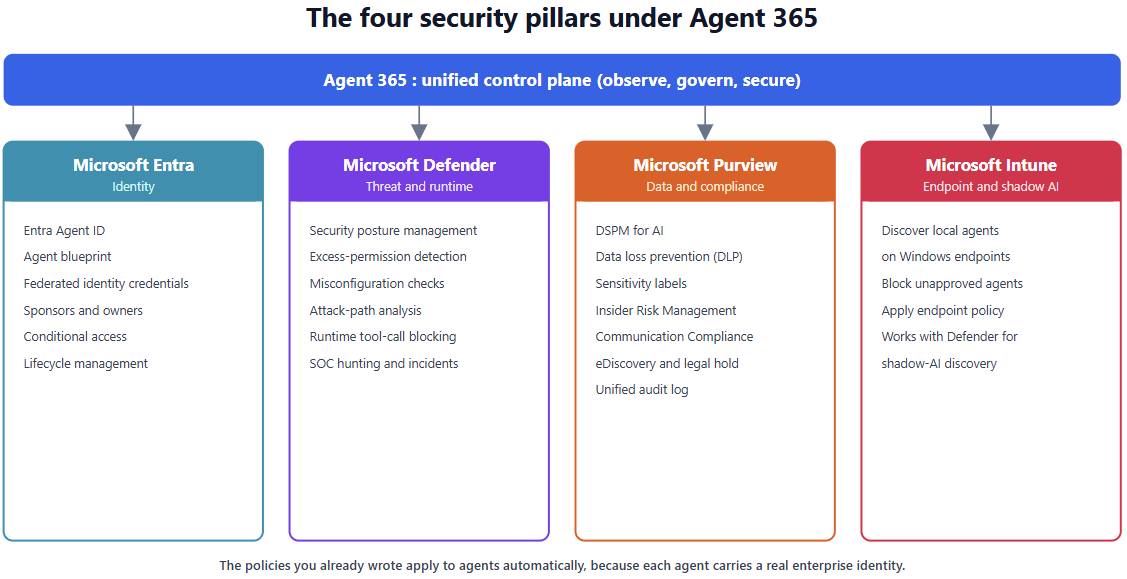
Microsoft Entra (identity). Entra Agent ID is the foundation: the blueprint, the agent identity as a specialized service principal, federated identity credentials, sponsors and owners for accountability, conditional access applied to the blueprint (and therefore to every instance), and lifecycle management that mirrors how you manage users.
Microsoft Defender (threat protection and runtime defense). Defender extends security posture management and real-time detection to agents. It assesses the posture of Foundry and Copilot Studio agents, flags excessive permissions and misconfigurations, and provides attack-path analysis. At runtime, when tools are registered with Agent 365, Defender can block high-risk tool calls before they execute and raise alerts with incident context. Agent activity flows into the same hunting tables and incident pipeline the SOC already uses.
Microsoft Purview (data security and compliance). This is the deepest pillar. DSPM for AI gives you visibility into how every agent, Microsoft and non-Microsoft, accesses and exposes sensitive data, mapping interactions to your existing sensitivity labels. DLP, sensitivity labels, and Insider Risk Management extend to agent-mediated activity. Communication Compliance can police human-to-agent and agent-to-human interactions. eDiscovery and legal hold treat agent interactions with the same rigor as human communications, and everything lands in the Microsoft 365 unified audit log. The payoff is that the policies you already wrote apply to agents automatically, because the agent carries a real enterprise identity.
Microsoft Intune (shadow AI). Intune is the endpoint pillar, used with Defender to discover and control local agents on Windows devices and to apply policies that block unapproved local agents from running.
A partner integration pattern
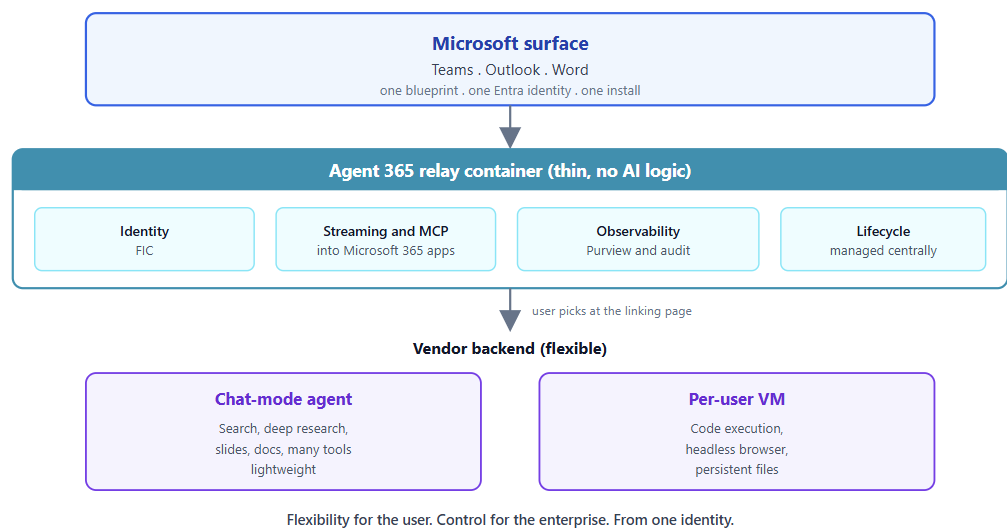
One of the most instructive things about Agent 365 is what a well-designed third-party integration looks like, because it shows how far the “extend, do not rebuild” idea goes.
Consider a unified AI workspace that connects to Agent 365. Different employees need different shapes of AI: a lightweight, chat-based tool for drafting and summarizing, and a dedicated virtual machine for heavy compute such as fitting a model over a large CSV. A single governance plane has to accommodate both.
The pattern that makes this work is a thin relay container that holds no AI logic of its own. It sits between the Microsoft surface and the vendor’s backends, integrates the Agent 365 SDK, and inherits identity through FIC, streaming and MCP into Microsoft 365 apps, plus observability, Purview, audit, and lifecycle.
The vendor’s backend is chosen by the user at a linking page: a chat-mode agent for lightweight work, or a per-user VM for code execution, a headless browser, and persistent files.
Three integration details make the value tangible. Identity: the relay reauthenticates every message from Teams, not just the first one, so if someone in a group chat @mentions the agent asking for another user’s private data, the request is refused, with no custom auth layer to build.
Tools: because Agent 365 already provides governed MCP connectors to PowerPoint, Outlook, and Word, the vendor generates a deck or document on the fly and writes it straight back to the user’s OneDrive, with no storage layer of their own.
Governance and observability: every invocation, inference, and activity is logged into Microsoft’s pipeline, so tenant admins monitor these agents in the same dashboard, with the same queries, as every other agent, and Purview policies apply automatically.
A sensitivity label on a document blocks the agent from leaking it, with zero security code written by the vendor. Flexibility for the user, control for the enterprise, from the same identity.
Final Thoughts
Agent365 takes the identity, data, and threat model you already run, and it extends that model to a new kind of actor, one that behaves like a user but multiplies like software. That restraint is the strength, not a shortcoming, because it means most of what you need to operate agents is knowledge you already have.
For developers, the practical takeaway is that governance stopped being a tax on your time. A coding agent wires identity, observability, and tool access in about ten minutes, and your agent still runs wherever you want to host it. For the people accountable for risk, the registry, templates, rules, and map turn “we are not sure what is running” into a dashboard you can act on. And the fact that a third-party workspace can inherit all of it through a thin relay tells you the model is not limited to Microsoft’s own frameworks.
If your agents are stuck in the gap between “works in a demo” and “approved for production,” this is a clear, practical bridge. The best next step is small: onboard one real agent, watch it appear in the registry with its own identity and telemetry, and apply a single template. Once you see one agent become a governed enterprise identity, the path for the rest of your fleet becomes much easier to picture.
Resources and references
- Agent 365 product page: https://www.microsoft.com/en-us/microsoft-agent-365
- Agent 365 overview (Microsoft Learn): https://learn.microsoft.com/en-us/microsoft-agent-365/overview?WT.mc_id=AZ-MVP-5000671
- Why an enterprise needs Agent 365: https://learn.microsoft.com/en-us/microsoft-agent-365/leadership/why-agent-365-for-enterprise?WT.mc_id=AZ-MVP-5000671
- Get started shortlink: https://aka.ms/A365SDK-Start
- SDK blog shortlink: https://aka.ms/A365SDK-Blog
Developer: SDK, CLI, identity, lifecycle
- Agent 365 SDK and CLI (developer hub): https://learn.microsoft.com/en-us/microsoft-agent-365/developer/?WT.mc_id=AZ-MVP-5000671
- Get started with Agent 365 development: https://learn.microsoft.com/en-us/microsoft-agent-365/developer/get-started?WT.mc_id=AZ-MVP-5000671
- Agent 365 development lifecycle: https://learn.microsoft.com/en-us/microsoft-agent-365/developer/a365-dev-lifecycle?WT.mc_id=AZ-MVP-5000671
- Agent 365 Identity (developer): https://learn.microsoft.com/en-us/microsoft-agent-365/developer/identity?WT.mc_id=AZ-MVP-5000671
- Set up the agent blueprint and register: https://learn.microsoft.com/en-us/microsoft-agent-365/developer/registration?WT.mc_id=AZ-MVP-5000671
- Custom client app registration for the CLI: https://learn.microsoft.com/en-us/microsoft-agent-365/developer/custom-client-app-registration?WT.mc_id=AZ-MVP-5000671
- SDK samples and prompts: https://learn.microsoft.com/en-us/microsoft-agent-365/developer/samples?WT.mc_id=AZ-MVP-5000671
- Connect existing agents to Agent 365: https://learn.microsoft.com/en-us/microsoft-agent-365/connect-existing-agents?WT.mc_id=AZ-MVP-5000671
Identity: Microsoft Entra Agent ID
- Overview of agent identities: https://learn.microsoft.com/en-us/entra/agent-id/agent-identities?WT.mc_id=AZ-MVP-5000671
- Agent identity blueprints: https://learn.microsoft.com/en-us/entra/agent-id/agent-blueprint?WT.mc_id=AZ-MVP-5000671
- Create an agent identity blueprint: https://learn.microsoft.com/en-us/entra/agent-id/create-blueprint?WT.mc_id=AZ-MVP-5000671
Security and data governance
- Use Microsoft Purview to manage data security and compliance: https://learn.microsoft.com/en-us/purview/ai-agent-365?WT.mc_id=AZ-MVP-5000671
- Protect your agents in real-time during runtime (Defender): https://learn.microsoft.com/en-us/defender-cloud-apps/real-time-agent-protection-during-runtime?WT.mc_id=AZ-MVP-5000671
Admin: registry, map, lifecycle
- Agent overview in the Microsoft 365 admin center: https://learn.microsoft.com/en-us/microsoft-365/admin/manage/agent-365-overview?WT.mc_id=AZ-MVP-5000671
- Agent registry in the Microsoft 365 admin center: https://learn.microsoft.com/en-us/microsoft-365/admin/manage/agent-registry?WT.mc_id=AZ-MVP-5000671
- Registry sync in the Agent 365 registry: https://learn.microsoft.com/en-us/microsoft-agent-365/admin/agent-registry?WT.mc_id=AZ-MVP-5000671
- Agent Map: https://learn.microsoft.com/en-us/microsoft-365/admin/manage/agent-map?WT.mc_id=AZ-MVP-5000671
- Use third-party agents in Agent 365: https://learn.microsoft.com/en-us/microsoft-agent-365/third-party-agents?WT.mc_id=AZ-MVP-5000671
GitHub: the SDK and samples
- Agent 365 samples (all languages): https://github.com/microsoft/Agent365-Samples
- Agent 365 SDK for Node.js: https://github.com/microsoft/Agent365-nodejs
- Agent 365 SDK for Python: https://github.com/microsoft/Agent365-python
- Agent 365 SDK for .NET: https://github.com/microsoft/Agent365-dotnet
- Microsoft 365 Agents SDK (build and host): https://github.com/microsoft/agents
Announcements and deep-dive blogs
- General availability announcement: https://www.microsoft.com/en-us/security/blog/2026/05/01/microsoft-agent-365-now-generally-available-expands-capabilities-and-integrations/
- Make any agent enterprise-ready with the Agent 365 SDK: https://techcommunity.microsoft.com/blog/agent-365-blog/make-any-agent-enterprise-ready-with-the-agent-365-sdk/4524575
- What’s new in Agent 365, May 2026: https://techcommunity.microsoft.com/blog/agent-365-blog/what%E2%80%99s-new-in-agent-365-may-2026/4516340
If this breakdown helped, follow for more technical guides to Microsoft’s agent platform, and drop a comment with your feedback and agents you are bringing under Agent 365.
메타데이터
- post_id
- add83ff84b3b
- slug
- how-microsoft-agent-365-makes-any-ai-agent-enterprise-ready-add83ff84b3b
- url
- https://itnext.io/how-microsoft-agent-365-makes-any-ai-agent-enterprise-ready-add83ff84b3b
- canonical_url
- https://itnext.io/how-microsoft-agent-365-makes-any-ai-agent-enterprise-ready-add83ff84b3b
- author_url
- https://medium.com/@daverendon
- status
- ok
- fetched_at
- 2026-07-10 12:09:34