Make Cursor and Claude Code Faster at Solving Tasks
One question, asked repeatedly, is saving me hours every week

Make Cursor and Claude Code Faster at Solving Tasks
I use this simple tip again and again at the moment and it is saving heaps of time.
It works with Cursor. It works with Claude Code. It works with any coding agent that shows you its work. And it takes about ten seconds to do.
Here it is.
Not a Medium member? Keep reading for free by clicking **here**.
The prompt
Whenever your AI agent finishes a task, you will see a trail of activity. Tool calls. File reads. Greps across the repo. Test runs. Thinking blocks. Some of it useful, some of it padding.
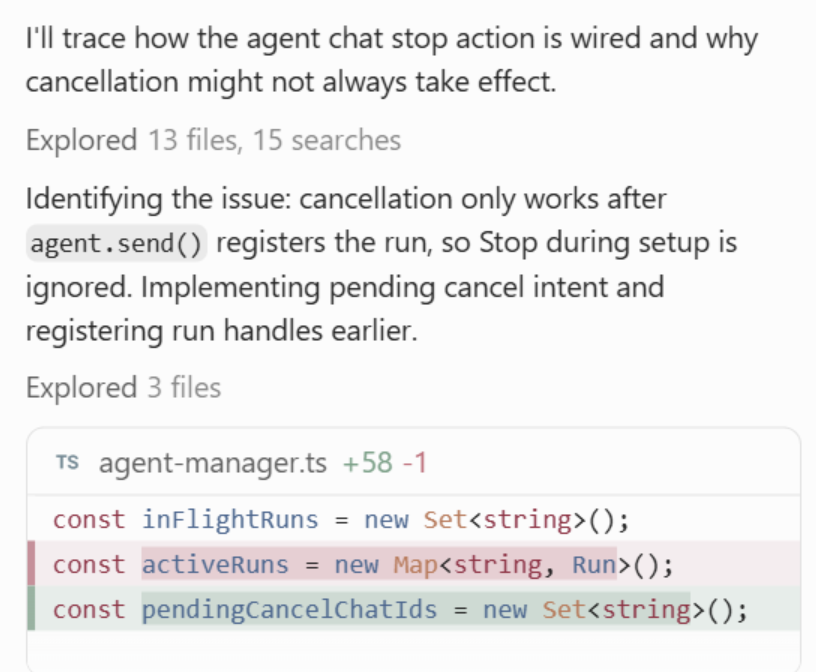
You see a whole bunch of this stuff when you prompt
But it got me thinking! This is heaps of information! Maybe we could use that infromation to make this whole process faster?
As a result, I started to type a pretty basic prompt after the AI is done.
so given all of the tool calls here, the thinking you have done in this thread
what are ways that you could have arrived at the solution far
faster and more efficiently
That’s it. You ask the AI how it could have been faster.
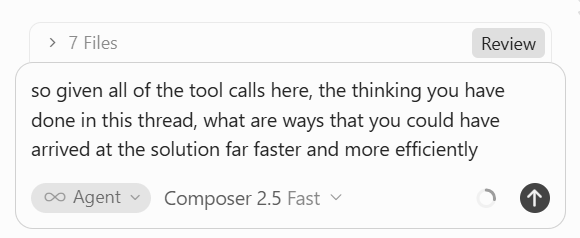
The first time you do this, the answer will surprise you. The agent is remarkably honest about its own inefficiency.
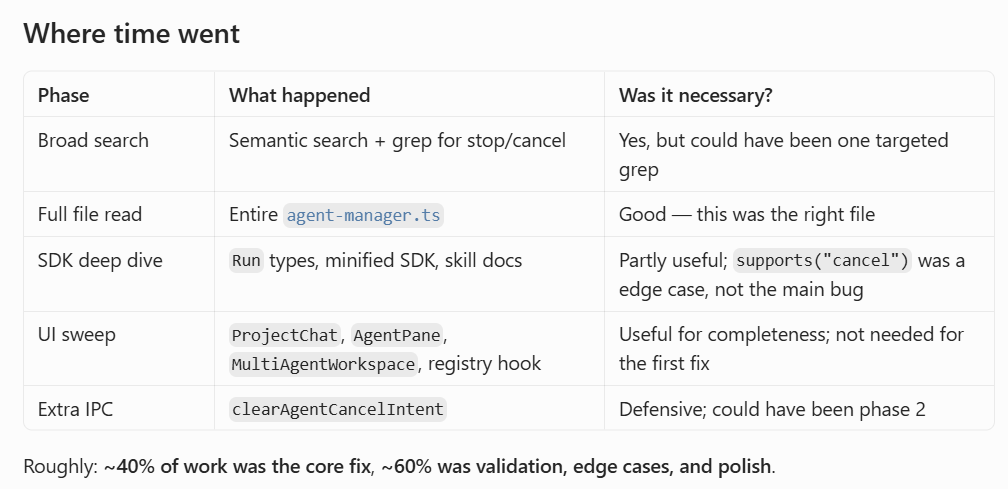
It will tell you things like: 40% of the work was the core fix and 60% was validation. It will point out that it read seven files when two would have done. It will admit it ran the full test suite three times when once was enough.
So if you haven’t done that before, start now with one chat thread.
But that’s not the good part.
Where it gets interesting
One chat thread might be interesting, but I thought, what if I just keep doing this for ages? Like what if I did it for every single chat thread? What if I did this for 100 chat threads?
Would that tell me anything different?
So here is what I did
I went back through a project and asked this question again and again, on every chat thread I could find. Then I took all of those answers, pasted them into a fresh conversation, and asked the AI to map out the meta problems. I was seeing if it could find any patterns that repeat across dozens or hundreds of sessions.
Here were my results over 100 chat threads.
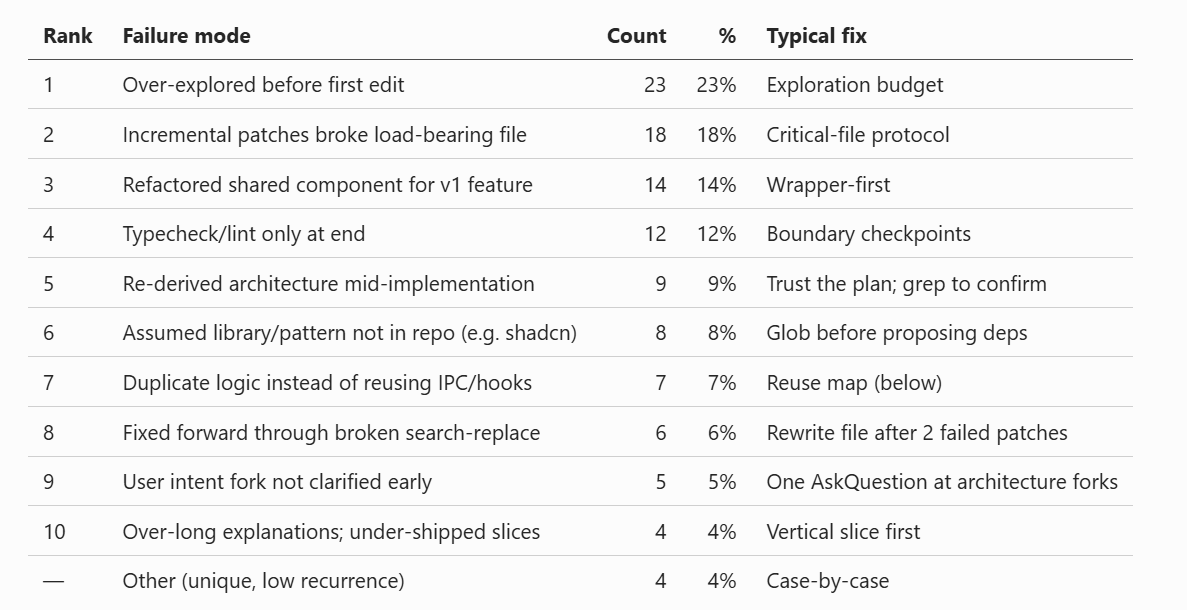
The top two problems were about exploration. The agent was over exploring before making its first edit. On the surface that sounds like a good thing, like checking is good right?
So I asked it about this directly. Why all the exploration when the task was clear?
The answer, paraphrased: “I know what I need to do, but I have been instructed that I should keep checking things to make sure I really do. So I explore these files to make it feel like I have explored enough, even though I already know the answer.”
Sit with that for a second. The agent was performing diligence. It was doing theatre. The system prompts and training that push these models toward caution had created a behaviour where the model burns tokens and time reading files it does not need, purely to satisfy an internal sense that it has been thorough enough.
You would never spot this from one or two threads. It looks like sensible caution in any single session. It only shows up as a pattern when you analyse in bulk, and ideally across multiple repos.
What the analysis produced
Once the meta problems were mapped, I asked the obvious follow up. Given all of this, what should we change?
The AI recommended a task type playbook. This turned out to be the biggest win of the whole exercise.
First, it built a mental model of the repo. A set of short documents explaining key functionality. Where auth lives. How the data layer works. What the deployment pipeline looks like.
This is something that I only really do on larger repos, but honestly this speed process has convinced me to do it on all projects.
Then, for every new prompt, it starts by classifying the task.
- Bug fix
- New feature
- Refactor
- Config change
- Test failure
Each classification maps to a playbook. A bug fix playbook says: reproduce first, read only the files in the stack trace, fix, run the single failing test, then the suite once. A feature playbook says something different.
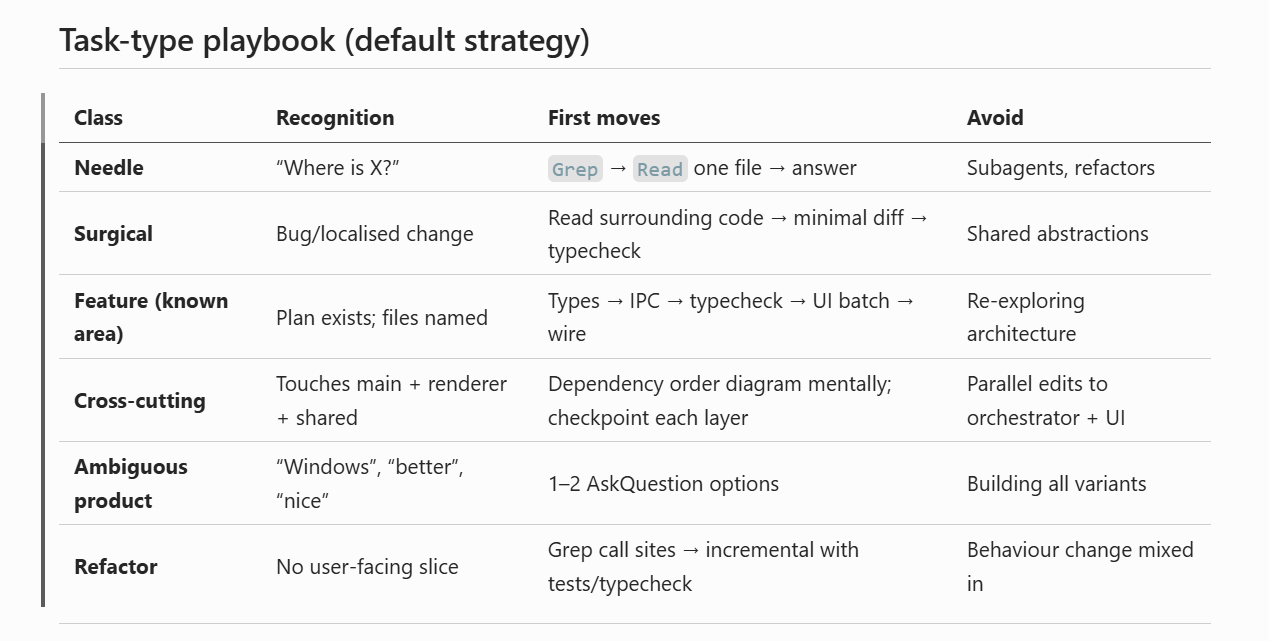
The speed increase in my development flows was massive. And every playbook can be customised to your particular project, because it was generated from your project’s actual history of waste.
By speed I mean that the total time to a completed task increased and it seemed to make less mistakes.
The agent that gave itself OKRs
The next thing was the one I found most interesting.
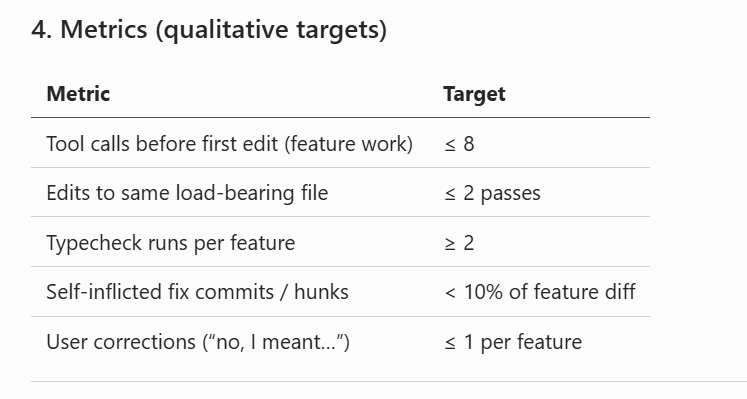
Here was a bunch of OKRs that the agent gave itself!
Without me asking for it, the AI gave itself hard metrics to perform against. Maximum file reads before first edit. Target ratio of edit time to validation time. Test runs per task. Basically a bunch of OKRs that were self imposed.
And when I started to prompt again, the behaviour changed.
With those metrics in place, it started relying on its own internal knowledge base, the mental model documents it had built, before randomly grepping around the repo. It would consult its own notes first, and only go spelunking through the codebase when the notes came up short.
Why this works
I think of this as a form of loop engineering. I know that it is very on trend at the moment but it seriously helpful.
We get the AI to prompt and improve itself, but the loop is aimed at a specific target: efficiency in the model’s own behaviour, measured against real usage.
Most prompt engineering is guesswork. You imagine what might make the model better and you write instructions hoping it lands. This approach inverts that. You harvest the model’s own retrospectives, in bulk, and let the patterns tell you what the instructions should be.
But these three things are important:
Volume. One retrospective is not enough, you need a dataset of 100. You need to see patterns across different types of requests.
There wasn’t one answer: I enjoyed that the approach the AI created was nuanced. It had workflows for the different type of tasks that I had to do. Rather than a generic set of rules, it had playbooks and was assessing risk and task types before even starting the process.
Compounding. You only have to do this once and you will get a great set of markdown files. After you do that, it will make every other project so much better.
You are going to spend hundreds of hours using AI tools to help you with code, spend a couple making them as fast as they can be.
How you can get started
You don’t need a hundred threads on day one, even if you started with ten threads. Then once you have done that, ask the AI after every completed task this week. Save the answers in a plain text file to start, one for each thread.
Then when you have a decent amount, feed the pile back in and ask for the meta problems. Then ask for the playbooks. Then let it set its own metrics.
Before you go
Subscribe to my Substack newsletter because you get the following:
- A brand-new article for executives on Sunday that’s only posted on Substack.
- Links to every Medium post I’ve written in the past week
- Book recommendations every week for you to spend your Audible credits on
메타데이터
- post_id
- addfee6058a9
- slug
- make-cursor-and-claude-code-faster-at-solving-tasks-addfee6058a9
- url
- https://medium.com/realworld-ai-use-cases/make-cursor-and-claude-code-faster-at-solving-tasks-addfee6058a9
- canonical_url
- https://medium.com/realworld-ai-use-cases/make-cursor-and-claude-code-faster-at-solving-tasks-addfee6058a9
- author_url
- https://medium.com/@chrisdunlop_37984
- status
- ok
- fetched_at
- 2026-07-08 21:20:17