Day 4 — Control Flow (How Your Code Makes Decisions)
Day 4 — Control Flow (How Your Code Makes Decisions)
“A program that can’t make decisions isn’t really a program.”
So far, your code has been doing things step by step.
You write a line, JavaScript executes it. Then the next. Then the next.
But real programs don’t work like that.
They react. They decide. They behave differently based on input.
That’s what control flow is all about.
What Is Control Flow?
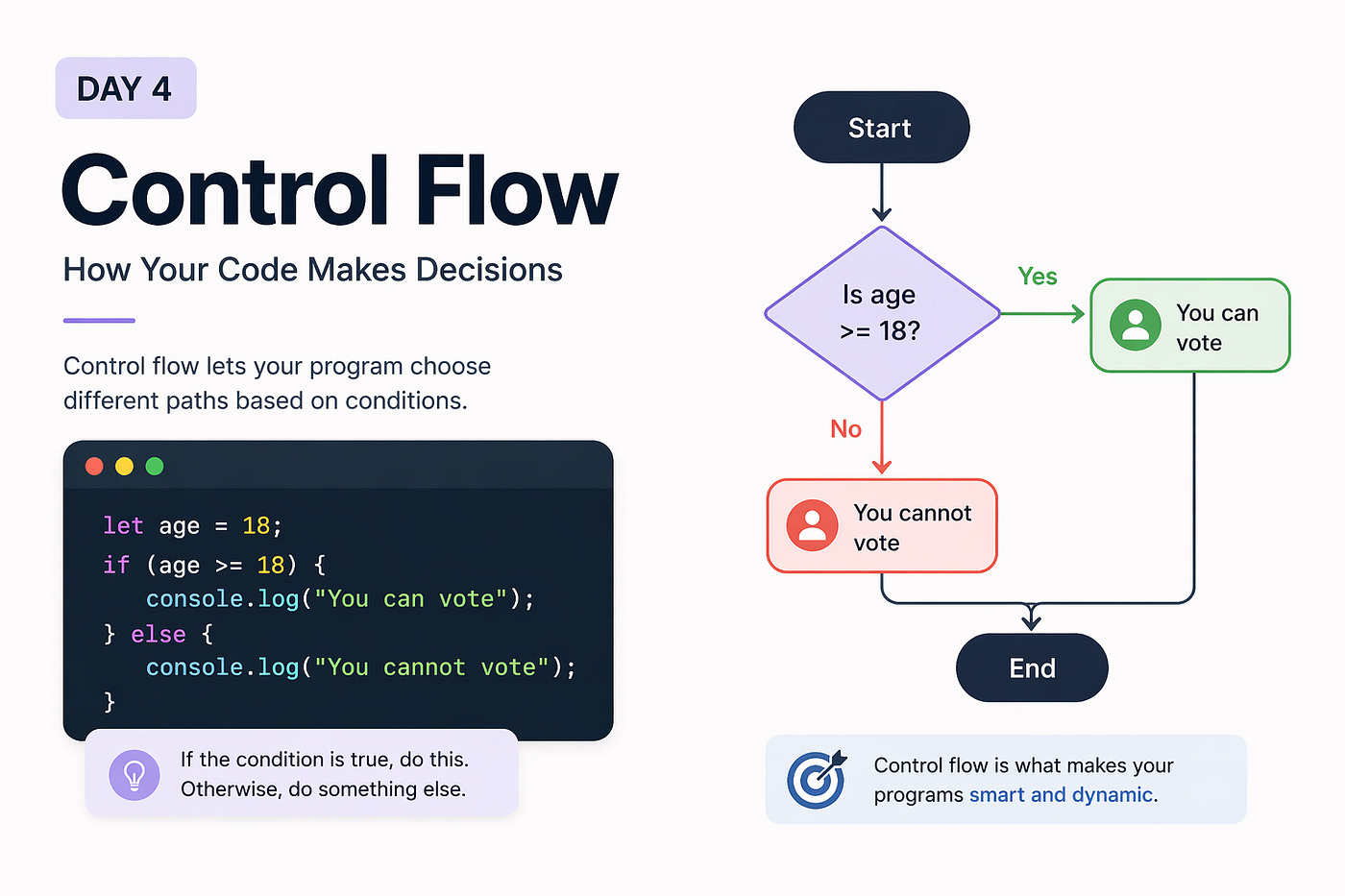
Control flow is how your program decides what to run and when to run it.
Instead of executing every line blindly, your code can now say:
- “If this is true, do this”
- “Otherwise, do something else”
This is what makes your code dynamic.
The if Statement
The simplest way to control flow is using if.
let age = 18;if (age >= 18) {
console.log("You can vote");
}Here, JavaScript checks the condition inside the parentheses.
If it’s true, it runs the code inside the block.
If it’s false, it skips it.
Adding else
What if you want to handle the opposite case?
let age = 16;if (age >= 18) {
console.log("You can vote");
} else {
console.log("You cannot vote");
}Now your program makes a decision in both scenarios.
Multiple Conditions with else if
Sometimes you need more than two outcomes.
let score = 85;if (score >= 90) {
console.log("Grade A");
} else if (score >= 75) {
console.log("Grade B");
} else if (score >= 50) {
console.log("Grade C");
} else {
console.log("Fail");
}JavaScript checks conditions from top to bottom and stops at the first true condition.
Comparison Operators
These are used inside conditions:
>greater than<less than>=greater than or equal<=less than or equal===strict equality!==strict inequality
console.log(5 > 3);    // true
console.log(5 === "5"); // false
Logical Operators
Sometimes one condition is not enough. You can combine conditions using:
AND (&&)
Both conditions must be true
let age = 20;
let hasID = true;
if (age >= 18 && hasID) {
console.log("Entry allowed");
}OR (||)
At least one condition must be true
let isAdmin = false;
let isEditor = true;
if (isAdmin || isEditor) {
console.log("Access granted");
}NOT (!)
Reverses a condition
let isLoggedIn = false;if (!isLoggedIn) {
console.log("Please log in");
}Truthy and Falsy in Conditions
You don’t always need a comparison. JavaScript automatically converts values to true or false.
let username = "user123";if (username) {
console.log("Username exists");
}This works because non-empty strings are truthy.
let username = "";if (username) {
console.log("This won’t run");
}Empty string is falsy.
“JavaScript doesn’t just check conditions. It interprets values.”
The switch Statement
When you have many fixed conditions, switch can be cleaner.
let day = 2;switch (day) {
case 1:
console.log("Monday");
break;
case 2:
console.log("Tuesday");
break;
case 3:
console.log("Wednesday");
break;
default:
console.log("Invalid day");
}Each case is checked, and break stops execution once matched.
A Common Beginner Mistake
One of the most common mistakes is writing conditions that don’t behave as expected.
For example:
let value = "5";if (value == 5) {
console.log("Runs");
}This runs because of type coercion.
But:
if (value === 5) {
  console.log("Won’t run");
}
This does not run.
“Always be aware of what you’re comparing.”
Try This
Open your console and try:
let temperature = 30;if (temperature > 35) {
console.log("Too hot");
} else if (temperature > 25) {
console.log("Warm");
} else {
console.log("Cool");
}Now change the value and observe how the output changes.
Note
There are more advanced patterns for control flow, including ternary operators and short-circuit evaluation. We’ll explore them later once the basics are clear.
Why This Matters
Control flow is what turns your code from a script into a program.
Without it, your code just runs.
With it, your code thinks.
What’s Next?
In the next article, we’ll explore loops, where your code doesn’t just make decisions — it repeats actions efficiently.
“Because writing the same code again and again isn’t the best idea.”
See you in Day 5.
메타데이터
- post_id
- ade36ce2a706
- slug
- day-4-control-flow-how-your-code-makes-decisions-ade36ce2a706
- url
- https://medium.com/@codePeasant/day-4-control-flow-how-your-code-makes-decisions-ade36ce2a706
- canonical_url
- https://medium.com/@codePeasant/day-4-control-flow-how-your-code-makes-decisions-ade36ce2a706
- author_url
- https://medium.com/@codePeasant
- status
- ok
- fetched_at
- 2026-08-20 18:25:04