Fixing Garbled Text When Syncing Oracle to Doris with SeaTunnel 2.3.9
You may encounter garbled characters when using SeaTunnel 2.3.9 to sync data from Oracle to Doris, especially if the Oracle database uses…
Fixing Garbled Text When Syncing Oracle to Doris with SeaTunnel 2.3.9
You may encounter garbled characters when using SeaTunnel 2.3.9 to sync data from Oracle to Doris, especially if the Oracle database uses the ASCII character set. But don’t panic — this article explains why this happens and how to fix it.
🧠 Root Cause
The issue stems from how SeaTunnel reads data from Oracle. If Oracle is using a character set like ASCII, and you’re syncing to Doris (which expects proper UTF-8 or other compatible encodings), Chinese characters can become unreadable.
The key is to intercept and re-encode the data when it is read from the Oracle ResultSet.
🔍 Understanding the SeaTunnel Reading Flow
Let’s look at the SeaTunnel internals that handle JDBC data ingestion:
1. JdbcSourceFactory
This class:
- Loads your source configurations.
- Constructs
JdbcSourceConfigandJdbcDialect. - Creates a
JdbcSourceinstance.
2. JdbcSource
This:
- Initializes a
SourceSplitEnumeratorto split the tasks. - Creates a
JdbcSourceReaderto execute them.
3. JdbcSourceReader
Responsible for:
- Building the
JdbcInputFormat. - Repeatedly calling the
pollNext()method to fetch data.
4. pollNext() Method
This method:
- Calls
open()inJdbcInputFormatto prepare thePreparedStatementandResultSet. - Then calls
nextRecord()to process theResultSetand convert it to aSeaTunnelRow.
5. nextRecord() and the Encoding Problem
In JdbcInputFormat:
- The
nextRecord()method callstoInternal()inJdbcRowConverter. - The default implementation uses
JdbcFieldTypeUtils.getString(rs, resultSetIndex).
💥 Problem: If the ResultSet contains Chinese characters stored as ASCII, this method returns garbled text.
✅ Solution Strategy
We need to detect the source encoding and re-encode the data at the moment it’s retrieved from the ResultSet.
Here’s how to do it:
🛠 Implementation Steps
Step 1: Add Charset Parameters
In JdbcInputFormat, add:
private final Map<String, String> params;In the constructor:
public JdbcInputFormat(JdbcSourceConfig config, Map<TablePath, CatalogTable> tables) {
    this.jdbcDialect = JdbcDialectLoader.load(config.getJdbcConnectionConfig().getUrl(), config.getCompatibleMode());
    this.chunkSplitter = ChunkSplitter.create(config);
    this.jdbcRowConverter = jdbcDialect.getRowConverter();
    this.tables = tables;
    this.params = config.getJdbcConnectionConfig().getProperties(); // <-- get charset info here
}
Step 2: Pass params to the Row Converter
In the nextRecord() method of JdbcInputFormat, and update the method call to:
SeaTunnelRow seaTunnelRow = jdbcRowConverter.toInternal(resultSet, splitTableSchema, params);Step 3: Add Encoding Method
In AbstractJdbcRowConverter, define:
public static String convertCharset(byte[] value, String charSet) {
    if (value == null || value.length == 0) {
        return null;
    }
    log.info("Value bytes: {}", Arrays.toString(value));
    try {
        return new String(value, charSet);
    } catch (UnsupportedEncodingException e) {
        throw new RuntimeException(e);
    }
}
Step 4: Modify toInternal() for String Types
In AbstractJdbcRowConverter, update the STRINGtype handling like so:
case STRING:
    if (params == null || params.isEmpty()) {
        fields[fieldIndex] = JdbcFieldTypeUtils.getString(rs, resultSetIndex);
    } else {
        String sourceCharset = params.get("sourceCharset");
        if ("GBK".equalsIgnoreCase(sourceCharset)) {
            fields[fieldIndex] = convertCharset(JdbcFieldTypeUtils.getBytes(rs, resultSetIndex), sourceCharset);
        } else {
            fields[fieldIndex] = JdbcFieldTypeUtils.getString(rs, resultSetIndex);
        }
    }
    break;
Step 5: Rebuild and Deploy
After making the above changes:
- Rebuild the
connector-jdbcmodule. - Replace the existing
connector-jdbc-2.3.9.jarunder SeaTunnel'sconnectorsdirectory. - Restart the SeaTunnel cluster.
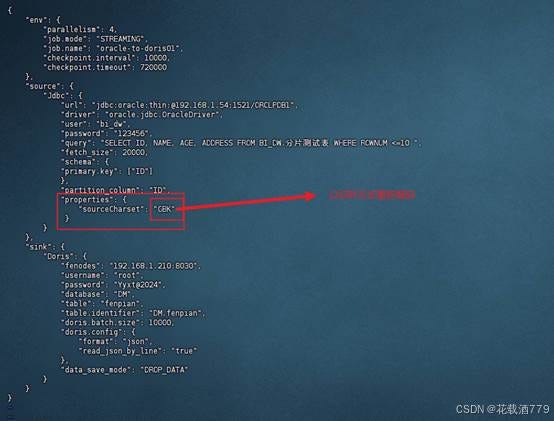
The configuration parameter script:
🧾 Configuration Tips
- If your Oracle database does not have encoding issues, you don’t need to pass the
sourceCharsetproperty. - If needed, pass it like this in your config:
sourceCharset=GBK- To debug logging from
connector-jdbc, check the worker logs in the SeaTunnellogsdirectory.
✅ Summary
By adding a simple charset-switching mechanism and tweaking the JDBC source implementation, you can eliminate garbled characters when syncing Oracle data to Doris using SeaTunnel.
No more broken characters — your data pipeline just got smarter. 🚀
About Apache SeaTunnel
Apache SeaTunnel is an easy-to-use, ultra-high-performance distributed data integration platform that supports real-time synchronization of massive amounts of data and can synchronize hundreds of billions of data per day stably and efficiently.
Welcome to fill out this form to be a speaker of Apache SeaTunnel: https://forms.gle/vtpQS6ZuxqXMt6DT6 :)
Why do we need Apache SeaTunnel?
Apache SeaTunnel does everything it can to solve the problems you may encounter in synchronizing massive amounts of data.
- Data loss and duplication
- Task buildup and latency
- Low throughput
- Long application-to-production cycle time
- Lack of application status monitoring
Apache SeaTunnel Usage Scenarios
- Massive data synchronization
- Massive data integration
- ETL of large volumes of data
- Massive data aggregation
- Multi-source data processing
Features of Apache SeaTunnel
- Rich components
- High scalability
- Easy to use
- Mature and stable
How to get started with Apache SeaTunnel quickly?
Want to experience Apache SeaTunnel quickly? SeaTunnel 2.1.0 takes 10 seconds to get you up and running.
https://seatunnel.apache.org/docs/2.1.0/developement/setup
How can I contribute?
We invite all partners who are interested in making local open-source global to join the Apache SeaTunnel contributors family and foster open-source together!
Submit an issue:
https://github.com/apache/seatunnel/issues
Contribute code to:
https://github.com/apache/seatunnel/pulls
Subscribe to the community development mailing list :
dev-subscribe@seatunnel.apache.org
Development Mailing List :
dev@seatunnel.apache.org
Join Slack:
https://join.slack.com/t/apacheseatunnel/shared_invite/zt-1kcxzyrxz-lKcF3BAyzHEmpcc4OSaCjQ
Follow Twitter:
https://twitter.com/ASFSeaTunnel
Join us now!❤️❤️
메타데이터
- post_id
- ae02e16c6cc5
- slug
- fixing-garbled-text-when-syncing-oracle-to-doris-with-seatunnel-2-3-9-ae02e16c6cc5
- url
- https://medium.com/@apacheseatunnel/fixing-garbled-text-when-syncing-oracle-to-doris-with-seatunnel-2-3-9-ae02e16c6cc5
- canonical_url
- https://medium.com/@apacheseatunnel/fixing-garbled-text-when-syncing-oracle-to-doris-with-seatunnel-2-3-9-ae02e16c6cc5
- author_url
- https://medium.com/@apacheseatunnel
- status
- ok
- fetched_at
- 2026-07-19 21:38:15