10 Essential Software You Must Know as an Interior Designer
Best Platforms to Find Interior Design Products10 Best Interior Design Tools And Their Key FeaturesHow to Prompt Lighting in DALL-E to…
10 Essential Software You Must Know as an Interior Designer

Best Platforms to Find Interior Design Products**10 Best Interior Design Tools And Their Key FeaturesHow to Prompt Lighting in DALL-E to Create a Photorealistic Interior Design: A Comprehensive Guide**
Introduction
In the fast-paced world of interior design, staying updated with the latest software tools is crucial for success. Whether drafting plans, creating 3D models, rendering realistic images, or making polished presentations, the right software can elevate your projects and streamline your workflow. This article highlights ten essential software tools every interior designer must know, covering drafting, modelling, rendering, material specification, and presentation.
Utilizing essential software can significantly enhance your efficiency and creativity as an interior designer. These tools can help you stay organized, especially when working on complex projects like designing hotel guestrooms or creating photorealistic interior designs using AI technologies.
Importance of Software in Interior Design
Software tools are indispensable in modern interior design, enhancing accuracy, efficiency, and creativity. They enable designers to visualize concepts, collaborate with clients and team members, and present professional results. Mastering these tools can significantly boost your design capabilities and career prospects.
Drafting Software
AutoCAD
AutoCAD is a cornerstone of interior design, widely used for its precision and versatility in creating detailed floor plans and technical drawings. Its extensive toolset allows designers to draft intricate designs accurately, making it an industry standard.
Vectorworks
[embed]
Vectorworks is another powerful software that integrates 2D drafting and 3D modelling capabilities. It’s known for its intuitive interface and robust features, making it a favourite among designers for creating detailed plans and visualizations.
Modelling Software
SketchUp
SketchUp is renowned for its user-friendly interface and powerful modelling capabilities. It allows designers to create detailed 3D models quickly, making it an excellent tool for visualizing and experimenting with design concepts.
Rhino
Rhino is a sophisticated modelling software that creates complex and precise 3D models. It’s widely used in architecture and interior design for its advanced features and flexibility, enabling designers to create intricate designs.
Blender
Blender is a versatile open-source modelling software that offers a comprehensive suite of tools for 3D modelling, animation, and rendering. Its robust capabilities and free access make it a popular choice for designers exploring advanced 3D modelling and rendering techniques.
Rendering Software
D5 Render
[embed]
D5 Render is a real-time rendering software known for its high-quality output and user-friendly interface. It allows designers to quickly create stunning, photorealistic renders, enhancing presentations and client proposals.
Enscape
Enscape integrates seamlessly with popular modelling software like SketchUp and Rhino, providing real-time rendering and virtual reality capabilities. It’s a powerful tool for visualizing designs and making immersive presentations.
Material and Furniture Specification
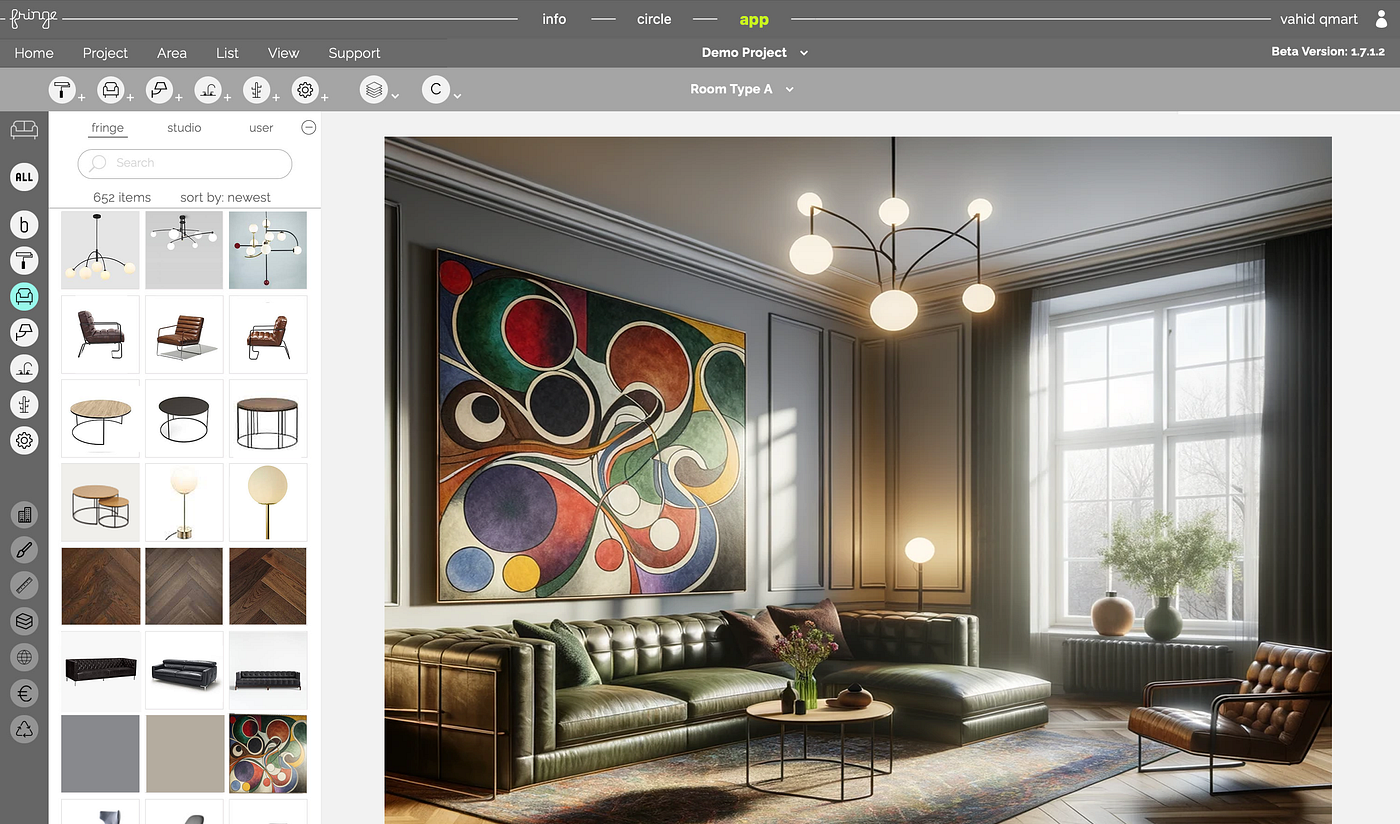
Fringe
[embed]
Fringe is an innovative platform for finding and specifying materials and furniture. It offers a comprehensive library of design elements and seamless integration with other design tools, making it an invaluable resource for interior designers.
Presentation Software
PowerPoint
PowerPoint remains a staple for creating professional presentations. It’s user-friendly interface and robust features allow designers to compile their designs, renderings and plans into cohesive, visually appealing presentations.
InDesign
InDesign is a powerful tool for creating detailed, polished presentations and portfolios. Its advanced layout and design capabilities make it ideal for creating high-quality documents that showcase your work in the best possible light.
How to Integrate These Tools in Your Workflow
Integrating these software tools into your workflow can significantly enhance efficiency and output quality. Start by mastering one tool at a time, focusing on how each can address different aspects of your design process. For example, use AutoCAD or Vectorworks for precise drafting, SketchUp or Rhino for modelling, D5 Render or Enscape for rendering, Fringe for material specification, and PowerPoint or InDesign for presentations.
Benefits of Using Multiple Software Tools
Using a combination of software tools allows you to leverage each of their strengths, resulting in a more comprehensive and polished design process. Drafting software provides precision, modelling software offers creativity, rendering software ensures high-quality visuals, material specification tools streamline selections, and presentation software helps you communicate your ideas effectively.
Conclusion
Mastering the essential software tools for interior design can elevate your projects and enhance your professional capabilities. Each tool plays a vital role in the design process, from drafting and modelling to rendering and presentation. By incorporating AutoCAD, Vectorworks, SketchUp, Rhino, Blender, D5 Render, Enscape, Fringe, PowerPoint, and InDesign into your workflow, you can achieve greater precision, creativity, and professionalism in your designs.
FAQs
What is the best software for drafting in interior design? AutoCAD is highly recommended for its precision and extensive toolset, making it an industry standard for drafting detailed plans.
Which software is ideal for 3D modelling in interior design? SketchUp and Rhino are excellent choices for 3D modelling, offering user-friendly interfaces and powerful capabilities.
What software should I use for rendering realistic images? D5 Render and Enscape are top choices for rendering, providing high-quality, photorealistic visuals and real-time rendering capabilities.
How can I find and specify materials and furniture for my projects? Fringe is an innovative platform that offers a comprehensive library of design elements and seamless integration with other design tools.
What are the best software tools for making presentations? PowerPoint and InDesign are excellent for creating professional, visually appealing presentations and portfolios.
Can I use these software tools on multiple devices? Most of these software tools are compatible with multiple devices and operating systems, but it’s essential to check each software’s specifications to ensure compatibility with your devices.
Further Read:
**15 Key Factors in Choosing Commercial Furniture for Hospitality, Offices, and Public Space Projects21 Affordable Italian Furniture Brands for Commercial and Contract ProjectsHow to Design a Restaurant Booth: Dimensions, Layout, Details, and Mistakes to AvoidBest Platforms to Find Interior Design Products[How to Choose Flooring Tiles for Your Bathroom: A Professional Guide](https://www.fringeinterior.com/blog/How-to-Choose-Flooring-Tiles-for-Bathroom)[Criteria to Choose the Right Sofa: A Professional Guide for Interior Designers](https://www.fringeinterior.com/blog/Criteria-to-Choose-the-Right-Sofa)[12 Most Used Interior Design Websites](https://www.fringeinterior.com/blog/Most-Used-Interior-Design-Websites)[How to Find Furniture from a Photo](https://www.fringeinterior.com/blog/How-to-Find-Furniture-from-a-Photo)**
**10 Best Interior Design Tools And Their Key Features**
**Eco Labels for Furniture: A Comprehensive GuideHow to Prompt Lighting in DALL-E to Create a Photorealistic Interior Design: A Comprehensive Guide**
메타데이터
- post_id
- ae8f40c3654f
- slug
- 10-essential-software-you-must-know-as-an-interior-designer-ae8f40c3654f
- url
- https://medium.com/@v.kiumarsi/10-essential-software-you-must-know-as-an-interior-designer-ae8f40c3654f
- canonical_url
- https://medium.com/@v.kiumarsi/10-essential-software-you-must-know-as-an-interior-designer-ae8f40c3654f
- author_url
- https://medium.com/@v.kiumarsi
- status
- ok
- fetched_at
- 2026-07-18 14:49:35