Kubernetes Operators Explained (PART 2): The Operator Controller — Code Walkthrough & Live Demo
1. Introduction
Kubernetes Operators Explained (PART 2): The Operator Controller — Code Walkthrough & Live Demo
Photo by Luke Miller on Unsplash
1. Introduction
In Part 1 of this series, we explored the fundamentals of Kubernetes Operators — how CustomResourceDefinitions (CRDs) extend the Kubernetes API, and how Custom Resources let us declare intent in a Kubernetes-native way. We designed our StaticWebsite CRD and deployed a sample CR named portfolio.
But at that point, nothing happened. The CR existed in etcd, yet no Deployment, Service, or Gateway was created — because we hadn't built the operator controller responsible for acting on it.
In this part, we fix that. We’ll walk through the operator controller built using Kopf (Kubernetes Operator Pythonic Framework) — covering the project structure, the reconciliation logic that handles create, update, and delete lifecycle events, and a live local demo where we deploy a StaticWebsite CR and watch the operator provision all child resources automatically.
By the end of this article, you’ll have a clear picture of how the controller works under the hood — and see it running against a real cluster.
2. How the Operator works — Reconciliation Loop Refresher
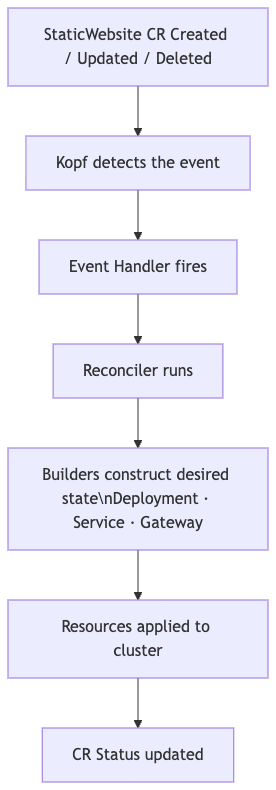
Reconciliation loop
At the heart of every Kubernetes Operator is the reconciliation loop — a control loop that continuously ensures the actual state of the cluster matches the desired state declared in your Custom Resource.
Here’s how it flows for our StaticWebsite operator:
- Event Detection — Whenever a
StaticWebsiteCR is created, updated, or deleted, Kopf detects the event through its watch mechanism on the Kubernetes API server. - Handler Dispatch — Kopf routes the event to the appropriate handler (
on.create,on.update, oron.delete), which acts as the entry point into our operator logic. - Reconciliation — The handler delegates to the reconciler, which is where the core logic lives. The reconciler calls individual builder functions to construct the desired state for each child resource — the
Deployment,Service, andGateway. - Apply & Sync — The reconciler applies these resources to the cluster. Critically, this is idempotent — if a resource already exists, it is patched rather than recreated. This means the reconciler can safely run on every event without side effects.
- Status Update — Once all child resources reflect the desired state, the operator patches the
.statusfield of theStaticWebsiteCR, making the current state visible viakubectl get sw.
💡 Why does idempotency matter? Kubernetes can re-deliver events (e.g., after a controller restart). An idempotent reconciler handles this gracefully — it always drives toward the desired state rather than blindly re-creating resources.
3. sw_operator Project Structure Deep Dive
To keep the operator code modular and maintainable, the project is organised into separate directories, each with a single well-defined responsibility.
sw_operator
├── __init__.py
├── main.py                        # Operator entry point
├── config.py                      # Shared constants and defaults
├── handlers
│   ├── __init__.py
│   └── main.py                    # Kopf event handlers (create, update, resume)
├── reconcilers
│   ├── __init__.py
│   ├── staticwebsite.py           # Orchestrates all child reconcilers
│   ├── deployment.py
│   ├── service.py
│   ├── gateway.py
│   └── status.py                  # Patches CR status subresource
├── builders
│   ├── __init__.py
│   ├── deployment.py
│   ├── service.py
│   ├── gateway.py
│   ├── configmap.py               # Builds ConfigMap holding static HTML content
│   └── owner_reference.py         # Attaches CR as owner of child resources
├── clients
│   ├── __init__.py
│   └── kubernetes.py              # Kubernetes API client initialization
└── utils
    ├── __init__.py
└── main.py # Shared helpers (logging, label generation)main.py— The entry point of thesw_operatorpackage. This is where Kopf is initialised and operator-level settings (logging, namespace scope) are configured. It imports and registers all handlers so Kopf knows which functions to invoke for each event.handlers/— Themain.pyhandler file registers listeners for three events on theStaticWebsiteCR:on.create,on.update, andon.resume. It also registers a field-level watcher onstatus.availableReplicas— this triggers a status update on the CR whenever replica availability changes, keeping the CR's.statusin sync with the real cluster state.reconcilers/— The heart of the operator. Handlers delegate immediately tostaticwebsite.py, which orchestrates the full reconciliation by calling each child reconciler in sequence:deployment.py,service.py,gateway.py, and finallystatus.py. Each child reconciler is responsible for driving one Kubernetes resource to its desired state.builders/— Pure functions that construct raw Kubernetes resource manifests (as Python dicts). Reconcilers call builders to get the desired spec, then apply it to the cluster. Notably,owner_reference.pyinjects theStaticWebsiteCR as the owner of every child resource it creates — this is what allows Kubernetes to automatically garbage-collect Deployments, Services, and Gateways when the CR is deleted.clients/kubernetes.py— Handles authentication and initialization of the Kubernetes Python client. It detects whether the operator is running inside a cluster (service account token) or locally (kubeconfig), and configures the client accordingly.config.py— Stores shared constants and default values (e.g., default replica count, label prefixes) that are reused across the package. Centralizing these avoids magic strings scattered through the codebase.utils/— Shared helper functions used across modules, such as building consistent Kubernetes label selectors and structured logging utilities.
The call chain flows like this:
Kopf Event → handlers/main.py → reconcilers/staticwebsite.py
                                      ├── reconcilers/deployment.py  ← builders/deployment.py
                                      ├── reconcilers/service.py     ← builders/service.py
                                      ├── reconcilers/gateway.py     ← builders/gateway.py + configmap.py
                                      └── reconcilers/status.py
4. Code Walkthrough — The Controller Logic
In this section, I will walk you through the operator code and give you some understanding how the flow works.
4a. The Entry Point — main.py
The main.py is the entry point of the sw_operator package. Its job is minimal but critical — it imports the handlers module (which registers all Kopf decorators as a side effect) and then starts the Kopf operator loop.
import logging
import kopf
import sw_operator.handlers.main  # Importing triggers decorator registration

@kopf.on.startup()
def configure(settings: kopf.OperatorSettings, **kwargs):
    settings.posting.level = logging.WARNING  # only post warnings/errors back to K8s events
if __name__ == '__main__':
    kopf.run()
💡 Importing
sw_operator.handlers.mainis enough to register all `@kopf.on.` decorators — Python executes the module-level decorator calls at import time. You don't need to call anything explicitly.*
4b. Event Handlers — handlers/main.py
This python file use the Kopf decorators to listen on create, update, resume events and invokes the reconcilers/staticwebsite.py. Below is the code of our handlers
# decorator to handle the create, update and resume events for StaticWebsite CustomResource
@kopf.on.resume(group=GROUP, version=VERSION, plural=PLURAL)
@kopf.on.create(group=GROUP, version=VERSION, plural=PLURAL)
@kopf.on.update(group=GROUP, version=VERSION, plural=PLURAL)
def create_staticwebsite(spec, name, namespace, patch, logger, body, **kwargs):
  reconcile_staticwebsite(
        name=name,
        namespace=namespace,
        spec=spec,
        body=body,
        patch=patch,
        logger=logger,
    )

# Decorator to reconcile the status of the StaticWebsite CustomResource
@kopf.on.field(
    group='apps',
    version='v1',
    plural='deployments',
    field='status.availableReplicas',
    labels={'app.kubernetes.io/managed-by': 'staticwebsite-operator'},
)
def status(name, namespace, body, logger, **kwargs):
    reconcile_status(
        name=name,
        namespace=namespace,
        body=body,
        logger=logger,
    )
The label filter on the field watcher is intentional and important:
labels={'app.kubernetes.io/managed-by': 'staticwebsite-operator'}Without this filter, the handler would fire for every Deployment in the cluster. By filtering on our managed-by label — which we stamp on all child resources in the builder — we ensure the watcher only reacts to Deployments that our operator owns.
4c. The Reconciler — reconcilers/staticwebsite.py
The reconciliation logic includes the reconciliation of all our Kubernetes objects that are being deployed like Deployment, Service, Gateway etc.
I have modularised the reconciliation logic into multiple python files each for a Kubernetes resource. The reconcilers/staticwebsite.py will invoke the respective reconcilers of Kubernetes resources and update the status of the CR using the kopf patch object
# function to reconcile the static website CR
def reconcile_staticwebsite(spec, name, namespace, body, patch, logger):
    owner_ref = build_owner_reference(body)
    reconcile_deployment(
        name=name,
        namespace=namespace,
        spec=spec,
        owner=owner_ref,
        logger=logger
    )
    reconcile_service(
        name=name,
        namespace=namespace,
        spec=spec,
        owner=owner_ref,
        logger=logger
    )
    reconcile_gateway(
        name=name,
        namespace=namespace,
        spec=spec,
        owner=owner_ref,
        logger=logger
    )

    # set the initial status
    patch.status['deploymentName'] = name
    patch.status['serviceName'] = name
    patch.status['phase'] = 'Progressing'
Notice the try-create, catch-409, then patch pattern. This is how we achieve idempotency:
- On the first reconciliation (CR just created), the Deployment doesn’t exist —
create_namespaced_deploymentsucceeds. - On subsequent reconciliations (CR updated, or controller restarted), the Deployment already exists — the API returns
409 Conflict, and we fall through topatch_namespaced_deploymentinstead.
This means the reconciler can safely run on every event without risk of duplicate resources or crashes.
The below is the reconciliation logic for reconcilers/deployment.py
# function to handle the reconciliation of deployment
def reconcile_deployment(name, spec, namespace, owner, logger ):
    """
    Always build the desired Deployment from spec and applys it.
    Kubernetes server-side apply will create or update the resources automatically.
    :param name:
    :param spec:
    :param namespace:
    :param owner:
    :param logger:
    :return:
    """

    # Create the staticwebsite deployment manifest by invoking the builder function
    desired=build_deployment(
        name=name,
        spec=spec,
        namespace=namespace,
        owner=owner
    )
    try:
        # try to create the desired deployment
        apps_v1.create_namespaced_deployment(
            namespace=namespace,
            body=desired
        )
        logger.info(f'Deployment: {name} created')
    except ApiException as e:
        # if the resource already exists in cluster patch it
        # Using the strategic merge patch: k8s compute the diff server-side
        if e.status == 409:
            apps_v1.patch_namespaced_deployment(
                name=name,
                namespace=namespace,
                body=desired
            )
            logger.info(f'Deployment: {name} reconciled')
        else:
            raise kopf.TemporaryError(f"Failed to reconcile the deployment: {e}", delay=10)
4d. Builders — builders/*
We have made the builders modular by creating a python file each Kubernetes resource manifests. For example the below is the builder code for builders/deployment.py
# utility function to create the deployment specification

def build_deployment(name: str, spec: dict, namespace: str, owner: V1OwnerReference) -> V1Deployment:
    return client.V1Deployment(
        # defining the metadata for deployment resource
        metadata=client.V1ObjectMeta(
            name=name,
            namespace=namespace,
            owner_references=[owner],
            labels={
                'app.kubernetes.io/name': name,
                'app.kubernetes.io/managed-by': 'staticwebsite-operator',
                'app.kubernetes.io/component' : 'staticwebsite'
            }

        ),
        spec=client.V1DeploymentSpec(
            replicas=spec.get('replicas', 1), # specifying the replica count
            selector=client.V1LabelSelector(  # defining the label selector for pods
                match_labels={
                    'app.kubernetes.io/name': name,
                    'app.kubernetes.io/managed-by': 'staticwebsite-operator',
                }
            ),
            template=client.V1PodTemplateSpec(
                metadata=client.V1ObjectMeta(
                    name=name,
                    labels={
                        'app.kubernetes.io/name': name,
                        'app.kubernetes.io/managed-by': 'staticwebsite-operator',
                        'app.kubernetes.io/component' : 'staticwebsite'
                    },
                ),
                # Building the Pod Specification
                spec=client.V1PodSpec(
                    containers=[
                        client.V1Container(
                            name=name,
                            image=spec.get('image'),
                            ports=[
                                client.V1ContainerPort(
                                    container_port=spec.get('targetPort'),
                                )
                            ],

                            # the resource requests, and limits
                            resources=client.V1ResourceRequirements(
                                requests={
                                    'cpu': spec.get('cpu', '100m'),
                                    'memory': spec.get('memory', '128Mi'),
                                },
                                limits={
                                    'cpu': spec.get('cpu', '200m'),
                                    'memory': spec.get('memory', '256Mi'),
                                }
                            ),
                            # liveness probe to monitor the application endpoint using http
                            liveness_probe=client.V1Probe(
                                http_get=client.V1HTTPGetAction(
                                    path='/',
                                    port=spec.get('port', 80),
                                ),
                                initial_delay_seconds=10,
                                period_seconds=20,
                            )

                        )

                    ]

                )
            )
        )
    )
The most important builder isn’t a resource manifest — it’s owner_reference.py:
def build_owner_reference(body) -> V1OwnerReference:
    return client.V1OwnerReference(
        api_version=body['apiVersion'],
        kind=body['kind'],
        name=body['metadata']['name'],
        uid=body['metadata']['uid'],
        block_owner_deletion=True,
        controller=True,
    )
Every child resource (Deployment, Service, Gateway) has this owner reference injected into its metadata. This tells Kubernetes that the StaticWebsite CR is the owner. When the CR is deleted, Kubernetes automatically garbage-collects all owned child resources — no manual cleanup needed in our operator.
4e. Status Updates — reconcilers/status.py
When a StaticWebsite CR is first reconciled, child resources are created but the pods aren't immediately available — they need to pull images, pass readiness probes, and complete the availability window. Rather than blocking the main reconciler to poll for pod readiness, we handle this asynchronously using a Kopf field watcher on the Deployment's status.availableReplicas field.
Every time Kubernetes updates that field — as pods come up, restart, or go down — our handler fires and re-syncs the CR’s .status block with the latest replica counts and phase.
How does the status reconciler know which StaticWebsite CR to update? Since every child Deployment has an ownerReference pointing back to its parent CR (set by build_owner_reference() in the builders), the reconciler can do a reverse lookup:
owner_refs = body.get('metadata', {}).get('ownerReferences', [])
sw_name = next(ref['name'] for ref in owner_refs if ref.get('kind') == 'StaticWebsite')
Phase derivation is based on the Deployment’s own status conditions rather than raw replica counts — which is more reliable
This means a kubectl get sw will always reflect the true health of the underlying Deployment — not just whether the create call succeeded.
def reconcile_status(name, namespace, body, logger) -> None:
    """
    Function to reconcile the status of the custom resource StaticWebsite by listening on deployment 'status.readyReplicas' field changes

    :param name:
    :param namespace:
    :param body:
    :param logger:
    :return: None
    """

    # fetch the owner_ref and sw_name from the body
    owner_refs = body.get('metadata', {}).get('ownerReferences', [])
    sw_name = next(ref['name'] for ref in owner_refs if ref.get('kind') == 'StaticWebsite' )

    if not sw_name:
        logger.debug(f'Deployment has no StaticWebsite owner, skipping the status reconciliation')
        return

    # fetch the required fields
    deployment_status = body.get('status', {})
    desired_replicas = body.get('spec', {}).get('replicas', 0)
    available_replicas = deployment_status.get('availableReplicas', 0)
    ready_replicas = deployment_status.get('readyReplicas', 0)
    conditions = deployment_status.get('conditions', [])

    # deriving the phase from deployment status conditions
    available_cond = next((c for c in conditions if c.get('type') == 'Available'), None)
    progressing_cond = next((c for c in conditions if c.get('type') == 'Progressing'), None)

    if available_cond and available_cond.get('status') == 'True':
        phase = 'Ready'
    elif progressing_cond and progressing_cond.get('status') == 'True':
        phase = 'Progressing'
    else:
        phase = 'Degraded'

    logger.info(f"Syncing status: phase={phase}, available/desired={available_replicas}/{desired_replicas}, ready={ready_replicas}")

    # Reconcile the CR status
    try:
        custom_objects_api = client.CustomObjectsApi()
        custom_objects_api.patch_namespaced_custom_object(
            group=GROUP,
            version=VERSION,
            plural=PLURAL,
            name=sw_name,
            namespace=namespace,
            body={
                'status': {
                    'phase': phase,
                    'readyReplicas': ready_replicas,
                    'availableReplicas': available_replicas,
                    'desiredReplicas': desired_replicas,
                    'deploymentName': name,
                }
            }
        )
        logger.info(f'CR: {sw_name} Status sync is successfully completed')
    except ApiException as e:
        if e.status == 404:
            # CR was deleted before the status is patched
            logger.warning(f'Staticwebsite/{sw_name} is not found, likely deleted, skipping the status reconciliation')
        else:
            raise kopf.TemporaryError(f'Failed to patch status: {e}', delay=10)
5. Live Demo — Running the Operator Locally
Prerequisites
Before starting, ensure you have the following:
- A local Kubernetes cluster running (minikube or kind)
kubectlinstalled and configured against your local cluster- Python3.8+ and
pipavailable - Clone the source code repository:
git clone https://github.com/eswarmaganti/staticwebsite-operator.git
cd staticwebsite-operator- Setup the python environment:
python3 -m venv venv
source venv/bin/activate
pip install -r requirements.txt
Step 1 — Install the CRD
First, register the StaticWebsite CRD with your cluster. This tells Kubernetes about our new resource type and stores the schema in etcd.
$ kubectl apply -f kubernetes/crd/staticwebsite-crd.yaml
customresourcedefinition.apiextensions.k8s.io/staticwebsites.platform.eswar.dev created

$kubectl get crd | grep static
staticwebsites.platform.eswar.dev                     2026-06-06T02:00:49Z
Step 2 — Run the operator locally
Set the PYTHONPATH and start the operator using the kopf CLI. Running with --all-namespaces allows the operator to watch StaticWebsite CRs in any namespace.
$ export PYTHONPATH=$(pwd)

$ kopf run -m sw_operator.main --all-namespaces
[2026-06-06 07:33:32,814] kopf.activities.star [INFO    ] Activity 'configure' succeeded.
[2026-06-06 07:33:32,815] kopf._core.engines.a [INFO    ] Initial authentication has been initiated.
[2026-06-06 07:33:32,817] kopf.activities.auth [INFO    ] Activity 'login_via_client' succeeded.
[2026-06-06 07:33:32,817] kopf._core.engines.a [INFO    ] Initial authentication has finished.
Kopf has successfully authenticated against the local cluster using your kubeconfig and is now watching for StaticWebsite events. Leave this terminal open — operator logs will stream here as we proceed.
Step 3 — Deploy the Sample CR
Open a second terminal and apply the sample StaticWebsite manifest. This deploys an nginx:1.31-alpine image with 2 replicas, exposed on port 80, accessible via the domain portfolio.eswar.local.
# kubernetes/sample/website.yaml
apiVersion: platform.eswar.dev/v1alpha1
kind: StaticWebsite
metadata:
  name: portfolio
  labels:
    app.kubernetes.io/name: portfolio
spec:
  image: nginx:1.31-alpine
  replicas: 2
  port: 80
  targetPort: 80
  domain: portfolio.eswar.local
$ kubectl apply -f kubernetes/sample/website.yaml
staticwebsite.platform.eswar.dev/portfolio createdStep 5 — Watch the Operator Logs
Switch back to the first terminal. The moment the CR was applied, Kopf detected the create event and fired our handler. Here's what the operator did, annotated:
# Reconciler runs — child resources created in sequence
[2026-06-06 07:40:07,570] kopf.objects         [INFO    ] [test/portfolio] Deployment: portfolio created
[2026-06-06 07:40:07,615] kopf.objects         [INFO    ] [test/portfolio] Service: portfolio created
[2026-06-06 07:40:07,676] kopf.objects         [INFO    ] [test/portfolio] Gateway: portfolio created
[2026-06-06 07:40:07,714] kopf.objects         [INFO    ] [test/portfolio] HTTPRoute: portfolio created

# Main handler completes successfully
[2026-06-06 07:40:07,715] kopf.objects         [INFO    ] [test/portfolio] Handler 'create_staticwebsite' succeeded.
[2026-06-06 07:40:07,716] kopf.objects         [INFO    ] [test/portfolio] Creation is processed: 1 succeeded; 0 failed.

# Field watcher fires as first pod becomes available (1/2 ready)
# Phase is still 'Progressing' - not all replicas are available yet
[2026-06-06 07:40:09,581] kopf.objects         [INFO    ] [test/portfolio] Syncing status: phase=Progressing, available/desired=1/2, ready=1
[2026-06-06 07:40:09,607] kopf.objects         [INFO    ] [test/portfolio] CR: portfolio Status sync is successfully completed
[2026-06-06 07:40:09,607] kopf.objects         [INFO    ] [test/portfolio] Handler 'status/status.availableReplicas' succeeded.
[2026-06-06 07:40:09,607] kopf.objects         [INFO    ] [test/portfolio] Creation is processed: 1 succeeded; 0 failed.

# Field watcher fires again as second pod becomes available (2/2 ready)
# Phase transitions to 'Ready' - desired state fully achieved
[2026-06-06 07:40:09,625] kopf.objects         [INFO    ] [test/portfolio] Syncing status: phase=Ready, available/desired=2/2, ready=2
[2026-06-06 07:40:09,642] kopf.objects         [INFO    ] [test/portfolio] CR: portfolio Status sync is successfully completed
[2026-06-06 07:40:09,643] kopf.objects         [INFO    ] [test/portfolio] Handler 'status/status.availableReplicas' succeeded.
[2026-06-06 07:40:09,644] kopf.objects         [INFO    ] [test/portfolio] Updating is processed: 1 succeeded; 0 failed.
Notice the two-stage status transition: Progressing → Ready. This is the async field watcher from reconcilers/status.py in action — it fires each time status.availableReplicas changes on the Deployment, keeping the CR status in sync without any polling.
Step 6 — Verify the Child Resources
The operator created all child resources automatically. Verify them in the test namespace:
$ kubectl get all -n test -l app.kubernetes.io/managed-by=staticwebsite-operator
NAME                             READY   STATUS    RESTARTS   AGE
pod/portfolio-7bf55f9d76-cq9pq   1/1     Running   0          17m
pod/portfolio-7bf55f9d76-k6kd9   1/1     Running   0          17m

NAME                TYPE       CLUSTER-IP     EXTERNAL-IP   PORT(S)        AGE
service/portfolio   NodePort   10.96.230.79   <none>        80:31321/TCP   17m

NAME                        READY   UP-TO-DATE   AVAILABLE   AGE
deployment.apps/portfolio   2/2     2            2           17m

NAME                                   DESIRED   CURRENT   READY   AGE
replicaset.apps/portfolio-7bf55f9d76   2         2         2       17m
Verify the Gateway API resources separately (these aren’t included in kubectl get all):
$ kubectl get httproute,gateway -n test
NAME                                            HOSTNAMES                   AGE
httproute.gateway.networking.k8s.io/portfolio   ["portfolio.eswar.local"]   18m

NAME                                          CLASS   ADDRESS   PROGRAMMED   AGE
gateway.gateway.networking.k8s.io/portfolio   nginx             True         18m
Every resource was created by the operator — no manual kubectl apply beyond the single CR.
Step 7 — Check the CR Status
When wFinally, query the StaticWebsite CR directly to see the live status the operator has been maintaining:
$kubectl get sw/portfolio -n test
NAME        IMAGE               REPLICAS   DOMAIN                  PHASE   AGE
portfolio   nginx:1.31-alpine   2          portfolio.eswar.local   Ready   15s
PHASE: Ready confirms that all 2 replicas are available and the operator has fully reconciled the desired state. Everything visible here — replica count, domain, phase — is being actively maintained by the operator. If you manually delete the Deployment, the operator will recreate it within seconds.
6. Lifecycle Event Scenarios
The real test of an operator isn’t just creation — it’s how it handles changes and cleanup.
In this section we’ll patch the replica count on our portfolio CR and delete it entirely, observing how the controller responds to each event.
Update Scenario — Scaling Replicas from 2 to 3
Step 1 — Patch the Custom Resource
Scale the portfolio CR from 2 to 3 replicas using kubectl patch:
$ kubectl patch sw/portfolio --type merge -p '{"spec": {"replicas": 3}}' -n test
staticwebsite.platform.eswar.dev/portfolio patched
This triggers an on.update event — Kopf detects the spec change and fires the create_staticwebsite handler, which runs the full reconciliation loop again.
Step 2 — Observe the Controller Logs
# Reconciler runs — all child resources are patched to reflect the new desired state
# Notice "reconciled" instead of "created" — this is the idempotency pattern:
# resources already exist, so the 409 conflict path patches them instead of creating
[2026-06-06 08:08:29,219] kopf.objects         [INFO    ] [test/portfolio] Deployment: portfolio reconciled
[2026-06-06 08:08:29,258] kopf.objects         [INFO    ] [test/portfolio] Service: portfolio reconciled
[2026-06-06 08:08:29,316] kopf.objects         [INFO    ] [test/portfolio] Gateway: portfolio reconciled
[2026-06-06 08:08:29,342] kopf.objects         [INFO    ] [test/portfolio] HTTPRoute: portfolio reconciled

# Main handler completes - reconciliation took under 200ms
[2026-06-06 08:08:29,343] kopf.objects         [INFO    ] [test/portfolio] Handler 'create_staticwebsite' succeeded.
[2026-06-06 08:08:29,343] kopf.objects         [INFO    ] [test/portfolio] Updating is processed: 1 succeeded; 0 failed.

# Field watcher fires again as third pod becomes available (3/3 ready)
# Phase transitions to 'Ready' - desired state fully achieved
[2026-06-06 08:08:30,130] kopf.objects         [INFO    ] [test/portfolio] Syncing status: phase=Ready, available/desired=3/3, ready=3
[2026-06-06 08:08:30,152] kopf.objects         [INFO    ] [test/portfolio] CR: portfolio Status sync is successfully completed
[2026-06-06 08:08:30,153] kopf.objects         [INFO    ] [test/portfolio] Handler 'status/status.availableReplicas' succeeded.
[2026-06-06 08:08:30,153] kopf.objects         [INFO    ] [test/portfolio] Updating is processed: 1 succeeded; 0 failed.
Two things worth noting here. First, all four resources show “reconciled” rather than “created” — this is the idempotency mechanism from reconcilers/deployment.py working exactly as designed. The reconciler attempted to create each resource, received a 409 Conflict (resource already exists), and fell through to patch it with the new desired state.
Second, the status sync fires only once here at 3/3 — because Kubernetes scaled the Deployment smoothly from 2 to 3 without a degraded intermediate state. In a real cluster under resource pressure, you might see a Progressing phase briefly before Ready.
Step 3 — Verify the running pods
$ kubectl get pods -n test -l app.kubernetes.io/managed-by=staticwebsite-operator
NAME                         READY   STATUS    RESTARTS   AGE
portfolio-7bf55f9d76-7drqm   1/1     Running   0          3m44s
portfolio-7bf55f9d76-7jhlz   1/1     Running   0          3m44s
portfolio-7bf55f9d76-jgs95   1/1     Running   0          3m5s
Three pods running — jgs95 is the newest, spun up after the patch. Notice the age difference: the two original pods are ~40 seconds older than the newly scheduled one.
Step 4 — Confirm the CR Status
$ kubectl get sw/portfolio -n test
NAME        IMAGE               REPLICAS   DOMAIN                  PHASE   AGE
portfolio   nginx:1.31-alpine   3          portfolio.eswar.local   Ready   7m
REPLICAS: 3 and PHASE: Ready confirm the operator has fully reconciled the updated desired state. The CR is now the single source of truth — its spec drove every change.
Delete Scenario — Garbage Collection via Owner References
When we delete the StaticWebsite CR, we don't need a @kopf.on.delete handler to clean up child resources. This is handled automatically by Kubernetes through the owner reference mechanism.
Recall from builders/owner_reference.py that every child resource (Deployment, Service, Gateway, HTTPRoute) has the StaticWebsite CR set as its owner, with two critical flags:
block_owner_deletion=True,  # prevents CR deletion until all children are removed
controller=True,            # marks this as the controlling owner
When the CR is deleted, the Kubernetes garbage collector identifies all resources with a matching ownerReference and deletes them automatically — no operator code required.
Step 1 — Delete the CR
$ kubectl delete sw/portfolio -n test
staticwebsite.platform.eswar.dev "portfolio" deleted from test namespace
Step 2 — Verify All Resources Are Cleaned Up
$ kubectl get all -n test -l app.kubernetes.io/managed-by=staticwebsite-operator
No resources found in test namespace.

$ kubectl get httproute,gateway -n test
No resources found in test namespace.
Every resource — Pods, Deployment, Service, Gateway, HTTPRoute — has been removed. No manual cleanup was needed beyond deleting the single CR. This is the power of owner references: the operator only needs to manage creation and updates; Kubernetes handles deletion automatically.
7. Conclusion — What We Built and What’s Next
In this part, we moved from concepts to working code. Here’s a quick recap of what we covered:
- Project Structure — How the operator is organised into handlers, reconcilers, builders, and clients, each with a single well-defined responsibility
- Controller Logic — How Kopf routes events through handlers into the reconciliation loop, and how the try-create/catch-409/patch pattern ensures idempotent reconciliation
- Status Sync — How the async field watcher on
status.availableReplicaskeeps the CR status truthful without polling - Live Demo — A
StaticWebsiteCR going fromkubectl applytoPHASE: Readywith zero manual resource creation - Lifecycle Events — The operator correctly handling scale-up patches and delegating deletion cleanup entirely to Kubernetes via owner references
If you’ve followed along from Part 1, you now have a fully working Kubernetes operator running on your local cluster — one that watches, reconciles, and self-heals a custom resource entirely through code you wrote.
What’s Coming in Part 3 — Containerising and Deploying the Operator
Right now, our operator runs as a local Python process. That’s fine for development, but a production operator needs to run inside the cluster — packaged as a container, deployed as a Kubernetes Deployment, and automatically rebuilt whenever the code changes.
In Part 3, we’ll take the operator from a local script to a fully deployable, CI-driven workload:
Containerising the Operator We’ll write a Dockerfile for the sw_operator package, build the image, and push it to a container registry — so the operator can run as a pod inside the cluster rather than on your laptop.
Kubernetes Deployment Manifests Running the operator in-cluster requires more than just a Deployment. We'll create the full set of Kubernetes resources needed:
ServiceAccount— the identity the operator pod runs asClusterRole+ClusterRoleBinding— granting the operator permission to watch and manage resources cluster-wideDeployment— running the operator container with the correct service account and environment configurationSecret— storing any sensitive configuration the operator needs at runtime
GitHub Actions CI Pipeline
Manually building and pushing images doesn’t scale. We’ll build a GitHub Actions workflow that triggers automatically whenever a PR is merged to main:
PR merged to main
      ↓
GitHub Actions workflow triggered
      ↓
Run tests
      ↓
Build Docker image (tagged with commit SHA)
      ↓
Push to container registry
      ↓
Operator image ready to deploy
By the end of Part 3, the operator will have a production-grade deployment story — versioned images, automated builds, and a clean path from a merged PR to a deployable operator.
The full source code for this project is available on GitHub: *staticwebsite-operator*
If you found this useful, follow along for Part 3 — and feel free to leave a comment if you have questions about any part of the controller logic we covered today.
메타데이터
- post_id
- aed3f264e461
- slug
- kubernetes-operators-explained-part-2-the-operator-controller-code-walkthrough-live-demo-aed3f264e461
- url
- https://medium.com/@maganti.ek/kubernetes-operators-explained-part-2-the-operator-controller-code-walkthrough-live-demo-aed3f264e461
- canonical_url
- https://medium.com/@maganti.ek/kubernetes-operators-explained-part-2-the-operator-controller-code-walkthrough-live-demo-aed3f264e461
- author_url
- https://medium.com/@maganti.ek
- status
- ok
- fetched_at
- 2026-06-29 02:33:43


