Snowflake SnowPro Core Certification Exam Preparation Series with Practice Questions 2025
Chapter 1.3 Outline Snowflake’s catalog and objects.
Snowflake SnowPro Core Certification Exam Preparation Series with Practice Questions 2025
Chapter 1.3 Outline Snowflake’s catalog and objects.
SnowPro Core Roadmap 2025 | Snowflake Certification Preparation Guide | SnowPro Core Dumps + Practice Questions

1. Database
A database in Snowflake is the top-level container for data. It holds one or more schemas, which in turn contain tables, views, and other objects. Data provide flexibility allows you to structure your data environment by subject area, project, or business domain.
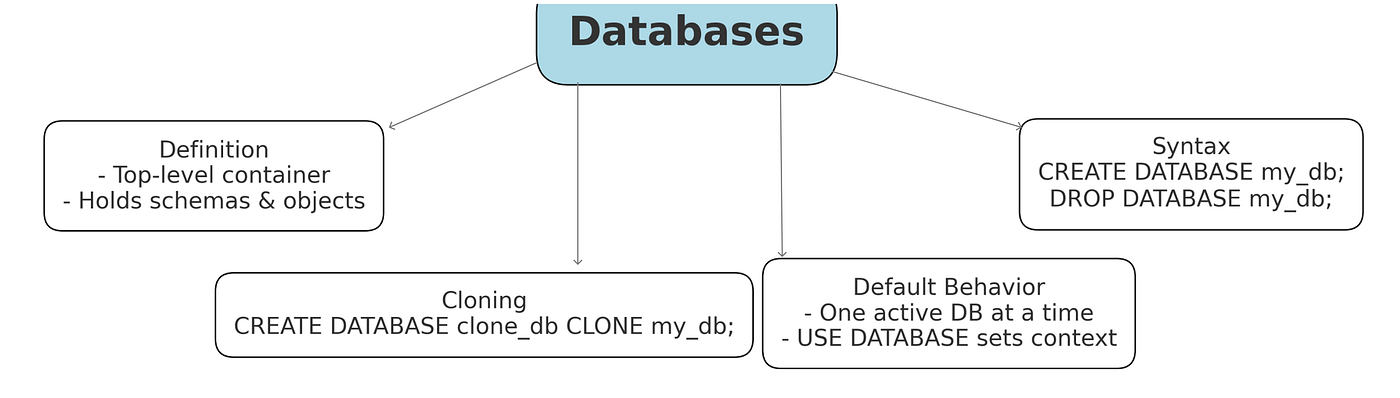
Exam POV: Exam items often phrase questions like “Which statement about Snowflake databases is true/false?” or “Where would you find X in the UI?”. A common theme is that a database is the top-level container for schemas and tables.
- one question might note that in Snowsight, the Databases section lets you manage all databases (each holding schemas/tables).
- Details often tested include operations like cloning (Snowflake lets you clone an entire database, creating a point-in-time copy without duplicating data).
- Time Travel (you can restore a database or its schemas to a previous state).
Tricky options often include objects not in a database (e.g. warehouses or account-level settings).
Snowpro Core Dump:
- Which Snowflake objects can be cloned (zero-copy) using the CLONE command? A. Databases B. Warehouses C. Tables D. Users E. Schemas Answer: A (Databases), C (Tables), E (Schemas)
- What is the highest-level organizational unit in a Snowflake account? A. Database B. Schema C. Warehouse D. Account Answer: D (Account).
- Who has the privilege to create a new database by default? A. ACCOUNTADMIN B. SYSADMIN
C. SECURITYADMIN D. PUBLIC Answer: B
- What happens automatically when a new Snowflake database is created? A. A table named DEFAULT is created. B. PUBLIC and INFORMATION_SCHEMA schemas are created.
C. A virtual warehouse is assigned. D. Time Travel is enabled permanently. Answer: B
- Which of the following is true about a database created from a share? A. It can be cloned. B. It automatically includes a PUBLIC schema. C. Properties like TRANSIENT and custom data retention do not apply
D. It appears read/write to consumers. Answer: C
- True or False: A transient database in Snowflake has no Fail-safe period. A. True
- What happens to a database after a DROP DATABASE statement (assuming Time Travel retention applies)? A. It is permanently removed immediately. B. It is retained in Time Travel and can be undropped. C. Its data is encrypted and archived offsite. D. Only its schemas are kept; tables are dropped. Answer: B
- Which global privilege is required to create a database from a data share? A. CREATE DATABASE B. IMPORT SHARE C. CREATE SHARE D. MODIFY ACCOUNT Answer: B
- Which SQL statement correctly renames a Snowflake database? A. ALTER DATABASE <old_name> RENAME TO <new_name> B. RENAME DATABASE <old_name> TO <new_name> C. CREATE OR REPLACE DATABASE <new_name> D. Databases cannot be renamed. Answer: A
2. Schema
A schema is a logical subdivision within a database that contains tables, views, and other objects. Snowflake offers two schema types: regular schemas and managed access schemas.
- In a regular schema, object owners (the roles that created the tables, etc.) can grant privileges on their objects.
- In a managed access schema, however, privilege management is centralized — only the schema owner (or higher account admin roles) can grant or revoke access to objects in that schema.
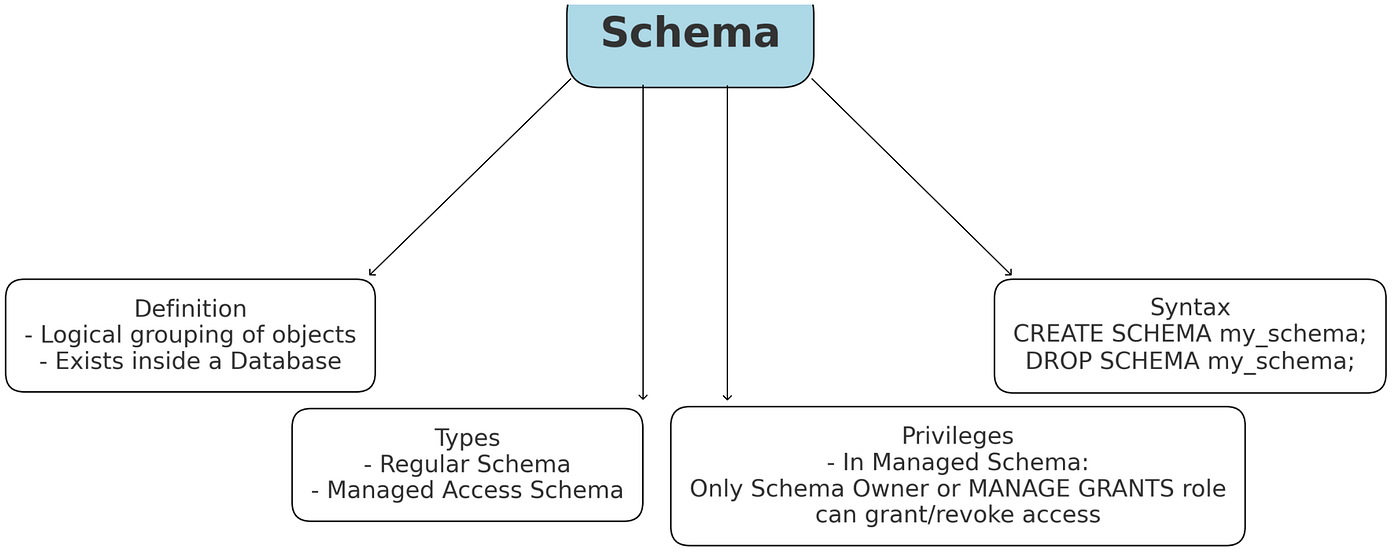
This model is useful for tighter governance, ensuring a consistent access control policy. Aside from access control differences, both types function the same way in organizing objects. Every database comes with a default Public Schema and Information Schema, but you can create multiple schemas to categorize data models within the database.
Exam POV: Exams may ask which objects live in a schema or what a schema can contain,
- In schema common phrasing is like “Which of the following belongs inside a schema?” (Answer: tables, views, UDFs, etc., but not warehouses or other account objects).
- A key point is that schemas can be cloned (cloning a schema replicates its tables/views) and are covered by Time Travel along with databases and tables.
A trap is thinking of “schema stages” or other made-up schema types — Snowflake only has one schema type (no “transient schema,” etc.).
Snowpro Core Dump:
- Which statements about a transient schema are true? **(Choose two.) A. It has no Fail-safe period. B. All tables created in it are transient. C. It automatically expires after one day. D. All grants in it are automatically revoked. Answer:** A, B
- Who can grant privileges on objects within a Managed Access schema? A. Any role with USAGE privilege on the schema. B. The schema owner role. C. Only ACCOUNTADMIN. D. Managed Access schemas have no grants. Answer: B
- Which statement about Snowflake transient schemas is true? A. They have no Fail-safe period (no post-time-travel storage costs) and all tables in them are transient. B. They enforce data retention for auditing. C. They are the default schema type in Snowflake. D. They automatically purge tables after 90 days. Answer: A.
- Which of the following is NOT a Snowflake schema type? A. Transient Schema B. Permanent (default) Schema C. Managed Access Schema (schema with centralized grants) D. Temporary Schema Answer: D (Temporary Schema).
3. Tables
Snowflake supports different table to accommodate various use cases. The primary categories are:
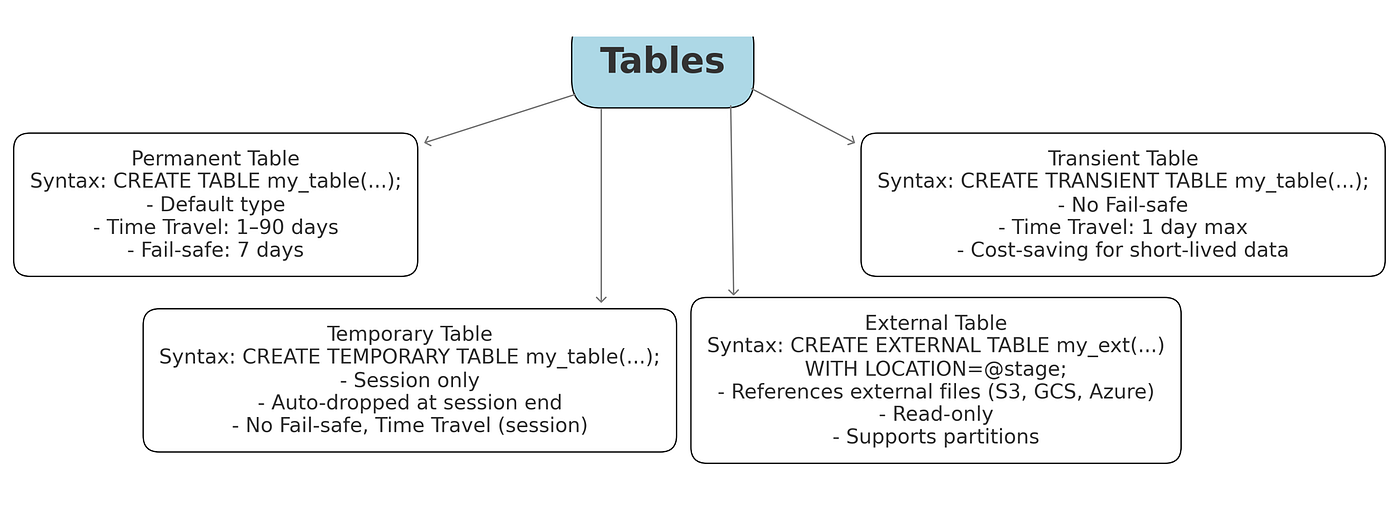
- Permanent tables: The default table type for persistent data and data protection for long-term.
- Transient tables: Transient tables are ideal for intermediate or ephemeral data where you want to avoid the extra storage of data. Table does not drop automatically.
- Temporary tables: Same as Transient Table. A temporary table is visible only to the session that created it and is automatically dropped when the session ends.
- External tables: It isread-only tables that reference data stored in external stages, useful for querying files in external data lakes without loading them.
Newer table types like Iceberg tables (which use the Apache Iceberg format on external storage) and Hybrid tables (designed for transactional workloads). These newer types extend Snowflake’s capabilities but follow specialized use cases. For most purposes, remembering permanent vs transient vs temporary will cover the core differences in data retention and scope.
Snowflake has three official table types: Permanent, Transient, and Temporary questions mostly asked around it.
- A classic exam question is “Which type of table lasts only for a single session?” (Answer: Temporary).
- Another might be “Which tables do not incur Fail-safe storage?” (Answer: Temporary and Transient — only permanent tables have Fail-safe).
- Exams often use distractors like “provisional” tables (not a Snowflake term) or “virtual” tables.
- Transient tables behave like permanent ones but with no Fail-safe, and Temporary tables exist only within the creating session.
Snowpro Core Dump:
- Snowflake supports permanent, transient, and temporary tables. Which table types help reduce storage costs for short-lived data? **(Choose two.) A. Permanent B. Transient C. Temporary D. Variant Answer:** B, C
- When are Snowflake temporary tables dropped? A. Immediately after the query completes. B. When the user session ends. C. At a fixed interval of 24 hours. D. They persist until manually dropped. Answer: B
- Which of these statements about transient tables is true? A. They automatically cluster data. B. They do not have a Fail-safe period. C. They expire after a default of 7 days. D. They are visible across all sessions. Answer: B
- Which Snowflake table type(s) support Time Travel? A. Permanent only B. Transient only C. Temporary only D. Permanent and Transient (not Temporary) Answer: D
- True or False: An external table in Snowflake stores its data in Snowflake’s internal storage. A. True B. False (it references files in an external stage) Answer: B
- Snowflake supports which table types? (Choose all that apply.) A. Permanent (default) Table B. Temporary Table C. Transient Table D. External Table Answer: A (Permanent), B (Temporary), C (Transient)
- Which of the following are NOT table types in Snowflake? A. Transient Table B. Temporary Table C. External Table D. Permanent Table Answer: C (External Table).
4. Stages
Stages are named storage locations used for data loading and unloading.
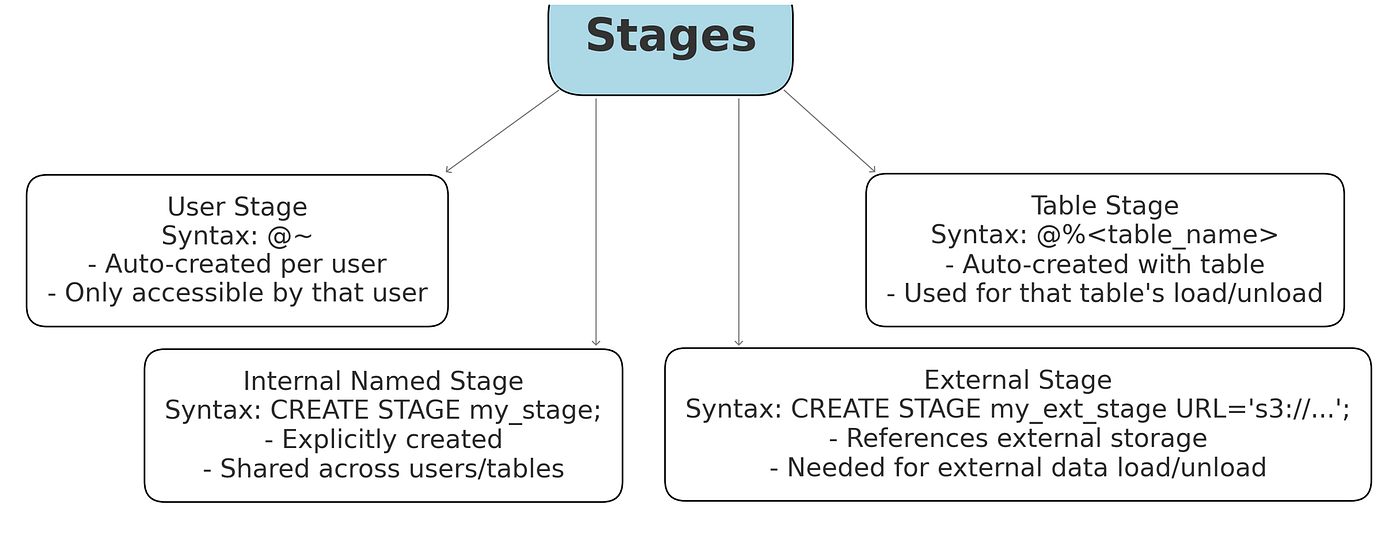
- A stage can be Internal (hosted within Snowflake).
- User Stage: Each user has a personal stage (accessible via @~),
- Table Stage: Each table has a default stage for that table (@%),
- Named Stage: you can create named stages for general use.
- External (pointing to cloud storage like AWS S3, Azure Blob, or GCS).
- External stages reference files in external cloud storage and require storage integration for secure access.
Stages act as “holding areas” for data files — you PUT files into an internal stage or point to files in an external stage, then use COPY INTO commands to load data from the stage into tables, or unload data back to the stage.
Exam POV: Exam questions on stages often ask about types of stages and commands. For instance, a multi-choice might be: “Select the types of internal stages (choose 3)…”, where the correct answers are Named Stage, User Stage, and Table Stage.
- A common distractor is a “schema stage” (which doesn’t exist).
- Another typical question is about Snowpipe and loading data: e.g. “Which command loads files into a Snowflake stage?” — the answer is PUT (used to upload files to a stage).
- Conversely, GET retrieves files from a stage,
- COPY INTO <table> is for loading into tables (not for stages).
- Time Travel does not cover stages themselves (you only time-travel table data) .
Watch out if they try to include “stages” as a covered object.
Snowpro core dump
- Which external storage services can be used for Snowflake external stages? **(Choose three.) A. Amazon S3 B. Azure Blob Storage C. Google Cloud Storage D. Hadoop HDFS E. Snowflake Internal Storage Answer:** A, B, C
- What is a Snowflake directory table? A. A system catalog table of user roles. B. A (virtual) table that stores metadata about files in a stage. C. A special table that replaces a file format. D. A hidden table storing internal logs. Answer: B
- Which SQL command is used to upload files from a local file system to a Snowflake internal stage? A. GET B. COPY INTO C. PUTD. INSERT Answer: C
- True or False: Snowpipe via the REST API can only load data from external stages. A. True B. False Answer: B
- Which of the following are types of internal stages in Snowflake? (Choose all that apply.) A. Named Stage B. User Stage C. Table Stage D. Schema Stage Answer: A (Named Stage), B (User Stage), C (Table Stage). Snowflake has named internal stages, plus per-user and per-table stages. There is no “schema stage” type.
- Snowflake external stages are used to reference data in: A. Amazon S3, Azure Blob Storage, or Google Cloud Storage (external cloud) B. Snowflake’s internal file repository (Snowflake stage) C. An on-premises database D. The Snowflake information schema Answer: A (Amazon S3, Azure Blob, or Google Cloud). External stages point to cloud storage locations. (Named internal stages and table/user stages are the Snowflake-managed ones.)
5. View Types
A view is a saved SQL query that presents results as a virtual table. Snowflake views allow you to simplify complex queries or combine data from multiple tables into one logical table-like object.

- Standard (non-secure) views: When queried, a standard view runs its underlying query each time. Access to data via the view is subject to the reader’s privileges on the underlying tables.
- Secure views: Secure views are designed for controlled data sharing and privacy and protect SQL definition or bypass the view’s filtering. It enforce row/column-level security.
- Materialized views: A materialized view stores the results of its query physically for faster access. Snowflake automatically updates a materialized view as the base data changes (with some latency) and reading pre-computed results, making it much faster for repetitive queries.
Snowflake has also introduced dynamic tables in recent updates, which are similar to materialized views but with continuous refresh semantics, though those are beyond the scope of basic view types.
Exam POV:
Snowflake views come in three flavors: Standard, Secure, and Materialized.
- A typical question is “Which of the following are Snowflake view types? (Select 3)” with choices including standard, secure, materialized, and decoys like “permanent” or “transient” (which apply to tables, not views).
- Another question might be “You want to hide the view’s definition from consumers. Which view type do you use?” (Answer: Secure View).
Tricky options often include “external view” (not a thing) or confusing “permanent view” all views are permanent unless dropped, there’s no separate permanent-view type.
Snowpro core dump
- Which of the following are view types supported by Snowflake? **(Choose two.) A. Standard (non-secure) view B. Secure view C. Materialized view D. Temporary view Answer:** B, C
- What is a Secure View used for? A. Precomputing and storing query results. B. Enhancing data privacy by hiding underlying data definitions. C. Allowing updates through the view. D. Improving query performance automatically. Answer: B
- What is a Materialized View in Snowflake? A. A view that encrypts data. B. A predefined query result stored for fast access. C. A temporary view. D. A cached table in a different schema. Answer: B
- Which statement is true about Materialized Views? A. They are automatically refreshed after every insert. B. They physically store precomputed data and improve query speed. C. They cannot be dropped. D. They do not support joins. Answer: B
- True or False: A standard (non-secure) view can expose its query definition to any user with SELECT privileges. A. True B. False (only secure views hide the query text) Answer: A
- Which view type would you use if you need query results to be automatically stored and refreshed for performance? A. Standard view B. Secure view C. Materialized view D. Data masking view Answer: C
- What is a Semantic View? A. A view optimized for search engines. B. A type of view for managing business-specific logic (new in Snowflake). C. A view that automatically creates dimension tables. D. A synonym for secure view. Answer: B
- Which of the following are Snowflake view types? (Choose all that apply.) A. Standard View B. External View C. Materialized View D. Secure View Answer: A (Standard), C (Materialized), D (Secure).
- Snowflake secure views differ from standard views in that: A. They can be shared outside the account by default. B. They prevent the underlying SQL definition from being exposed to consumers. C. They are populated and stored as tables. D. They automatically refresh like materialized views. Answer: B.
6. Stored Procedures
A stored procedure is a programmatic object that allows you to execute a sequence of SQL statements (and procedural logic) on Snowflake’s server, triggered by a CALL command. SP can perform more elaborate operations, including control flow, loops, conditional logic, and executing multiple SQL statements in one go. Stored procedures are ideal for automating tasks or encapsulating complex logic.

Exam POV: Stored procedures (SPs) are user-written programs (in JavaScript or SQL) for complex logic. Exam questions often test rights and differences from UDFs.
- “A stored procedure runs with which privileges?” The answer is either caller’s or owner’s, depending on how it’s defined. This contrasts with UDFs (owner-only).
- Another possible question: “Which languages are allowed?” (SQL and JavaScript; Python only via Snowpark).
SPs run by using CALL. Note that unlike UDTFs, SPs do not return a result set to a query — they return void or a single value and are invoked via CALL or tasks.
Snowpro core dump
- Originally, what was the primary language for writing Snowflake stored procedures? A. SQL (PL/SQL) B. JavaScript C. Python D. Java Answer: B
- How do you execute (call) a stored procedure in Snowflake? A. EXECUTE PROCEDURE myproc(); B. RUN myproc(); C. SELECT myproc(); D. CALL myproc(); Answer: D
- A Snowflake stored procedure executes with the privileges of which role? A. The role of the user who called it. B. The role that owns the procedure. C. SYSADMIN only. D. PUBLIC. Answer: B
- Which languages are supported for writing Snowflake stored procedures? **(Choose two.) A. JavaScript B. SQL Scripting (Snowflake Scripting) C. Python D. C# Answer:** A, C
- What can a Snowflake stored procedure return? A. Only an INTEGER. B. Only a VARCHAR. C. Either a single value or a result set. D. It cannot return anything. Answer: C
- True or False: A Snowflake stored procedure can contain multiple SQL statements and control-of-flow logic (loops, branches). A. True B. False Answer: A
- Snowflake stored procedures are typically written in which language? A. JavaScript B. Python C. SQL (Snowflake Scripting) D. Java Answer: A (JavaScript).
- Which statement about Snowflake stored procedures is true? A. They can execute multiple SQL statements and include procedural logic (loops, conditionals). B. They automatically generate unique IDs for tables. C. They can run without a warehouse. D. They are invoked by the GRANT command. Answer: A. Stored procedures allow procedural SQL logic (loops, conditionals).
7. Tasks
A task is a Snowflake object that enables scheduling of SQL execution, essentially allowing automated workflows or cron jobs inside Snowflake. You define a task with CREATE TASK by providing a schedule (e.g., every hour, or a cron expression) or setting it to depend on another task (forming a task tree or DAG). The task specifies a piece of work to run at those intervals. This work can be a single SQL statement, a call to a stored procedure, or a block of Snowflake Scripting code.
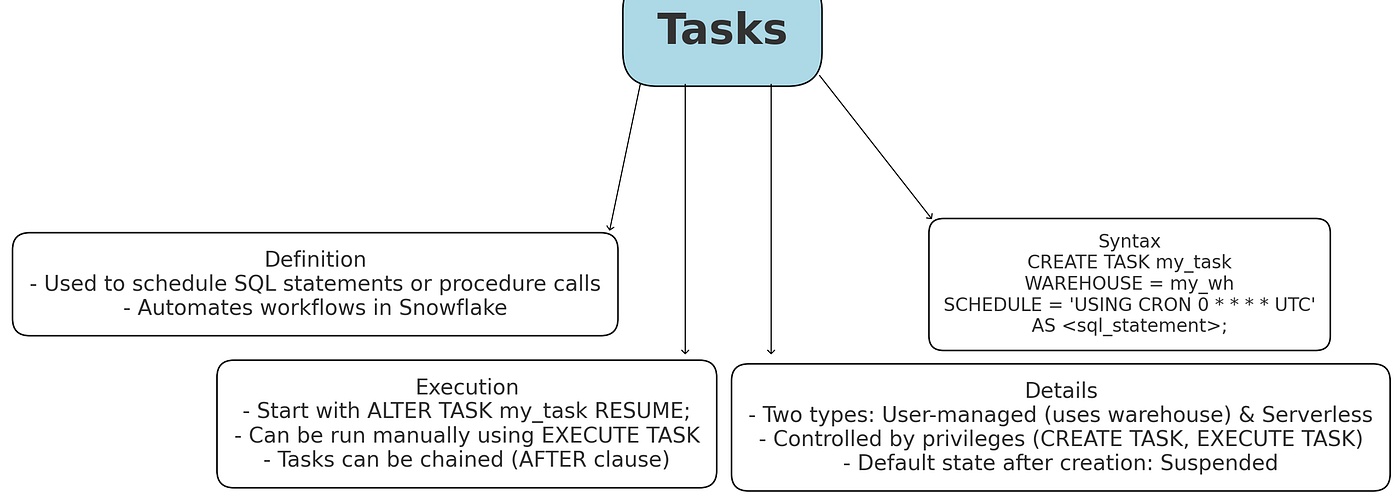
There are two modes:
- Serverless tasks- where Snowflake manages the compute (you are charged per second of execution, and it scales automatically),
- User-managed tasks- where you assign a specific warehouse for the task to use.
Exam POV: Tasks schedule SQL or procedures (using warehouses) or run serverless.
- A key exam pattern: “How many types of tasks are there?” (Answer: 2 — user-managed and serverless).
- They often ask for the names: user-managed (you pick a warehouse and schedule) vs Snowflake-managed (short-running, up to 1 minute, “serverless”).
- Watch for phrasing like “long-running vs short-running”. Questions may also test that tasks live in schemas and require database/schema context.
Common distractors include “stream tasks” (no such thing) or mixing tasks with Snowpipe.
Snowpro core dump
- After a CREATE TASK statement, what is the default state of the new task? A. Running immediately. B. Suspended (must be RESUMEd to run). C. Dropped. D. Completed once and dropped. Answer: B
- How do you specify a recurring schedule for a Snowflake task? A. USING CRON clause or a time interval in the SCHEDULE parameter. B. WHEN clause. C. AFTER clause. D. SUSPEND clause. Answer: A
- Which clause in CREATE TASK is used to specify task dependencies (i.e. run after other tasks)? A. WHEN B. AFTER C. STARTS D. DEPENDS ON Answer: B
- A Snowflake task must run on which compute resource? A. An on-demand serverless service. B. A virtual warehouse (either user-provided or Snowflake-managed). C. A dedicated task cluster. D. Tasks cannot execute SQL. Answer: B
- True or False: A task in Snowflake can be configured to skip runs when a certain condition is false using the WHEN clause. A. True
- When defining a task, what does the ALLOW_OVERLAPPING_EXECUTION parameter do? A. It allows a task to run multiple concurrent instances if the schedule comes again before the prior run finishes. B. It queues task runs until the last finishes. C. It suspends the task after one failure. D. It logs overlap statistics. Answer: A
- What is a Snowflake task used for? A. Continuously loading data from a cloud stage (Snowpipe) B. Scheduling and automating execution of SQL statements or stored procedures C. Tracking data changes in tables (like CDC) D. Managing user permissions Answer: B.
- Which of the following are true about Snowflake tasks? (Choose all that apply.) A. They can run on a cron schedule or be triggered by a stream. B. They require a warehouse (or serverless model) to execute. C. They automatically share data between accounts. D. They can execute JavaScript or Python code directly without SQL. Answer: A and B.
8. Streams
A stream in Snowflake is a change tracking object that enables change data capture (CDC) on a table or view. When a stream is created on a source table (or on an append-only table, or even on a view or external table), it will *record every data modification *(insert, update, delete) applied to that source.
The stream does not store the entire rows of data, but it logs offsets and snapshots of changes since the last time the stream was consumed. Snowflake streams are often used in tandem with tasks to build continuous data pipelines.

There are a few types of streams:
- Standard (tracks all changes)
- Append-only (tracks inserts only)
- Insert-only (special case similar to append-only).
Streams contain metadata columns like METADATA$ACTION (what kind of DML happened) and METADATA$ISUPDATE (to help interpret updates as delete+insert pairs).
Exam POV: Streams implement change-data-capture on tables.
- A frequent question: “What DML operations does a stream capture?” Snowflake streams only record INSERT and DELETE in the METADATA$ACTION column (an UPDATE appears as a DELETE+INSERT with METADATA$ISUPDATE=TRUE).
- So an exam might list INSERT, UPDATE, DELETE as choices and expect INSERT+DELETE.
- Streams can be created on tables and views to see changes since last offset.
Remember, querying (SELECT) a stream alone doesn’t advance it — only DML that reads from the stream advances the offset.
Snowpro core dump:
- What does a Snowflake stream object capture? A. A full copy of a table. B. Change data (inserts, updates, deletes) and metadata for a source table. C. Only insert operations. D. Only delete operations. Answer: B
- What does a Snowflake stream store internally? A. The actual changed rows. B. Only the metadata offset and change markers. C. A cached query plan. D. Nothing (it’s stateless). Answer: B
- True or False: Consuming data from a stream advances its offset so that those changes are not re-read in the next query. A. True (after a DML consumption the offset moves). B. False Answer: A
- Which objects can have a Snowflake stream defined on them? A. Only permanent tables. B. Permanent tables (including shared), secure views, and several others. C. Only external stages. D. Only materialized views. Answer: B
- An append-only stream in Snowflake tracks which changes? A. Inserts only B. Inserts and updates. C. Deletes only. D. All DML operations (insert, update, delete). Answer: A
- What happens to a stream on a table when that table is cloned? A. The clone’s stream has its own copy of historical changes. B. The clone’s stream starts fresh at the clone point (prior changes are not included) C. Cloning a table does not allow stream usage. D. The original stream is transferred to the clone. Answer: B
- True or False: A Snowflake stream can track changes on a materialized view. B. False (streams do not track materialized view changes)
- What does the STALE_AFTER column indicate for a stream? A. The last time the stream was queried. B. The time when the stream is predicted to have no more change data (become stale) C. How long the stream retains data. D. When the stream was created. Answer: B
- *True or False: Simply selecting from a stream table with SELECT FROM stream_name always advances its offset. B. False (only DML operations like INSERT/CTAS or COPY that use the stream advance the offset)Which statement about Snowflake streams is false? A. They track row-level changes between queries. B. They store data changes indefinitely. C. They provide a continuously updating view of table changes. D. They require the source object to exist. Answer:** B
- What does a standard Snowflake stream track? A. Row inserts only B. Row inserts and deletes only C. Row inserts, updates, and deletes (all DML) D. DDL changes to table structure Answer: C. A standard (delta) stream captures all DML changes (INSERT, UPDATE, DELETE, and truncates) on its source table
- True or False: In a Snowflake stream, an update to a row is represented as an insert + delete pair. A. True
9. Sequences
A sequence in Snowflake is a schema object for generating unique sequential numbers, much like sequences in other databases (or auto-increment identities). You create a sequence with a start value and increment, and then you can use NEXTVAL (or seq_name.NEXTVAL) to get the next number in the sequence. Sequences are often used to generate surrogate keys or unique IDs for rows.
CREATE SEQUENCE order_seq START = 1 INCREMENT = 1
Exam POV: Sequences generate unique numeric values, often used for surrogate keys. A likely exam phrasing: “Which object is best for generating sequential IDs?” (Answer: SEQUENCE).
- What does Snowflake guarantee about sequence values? A. They will never have gaps. B. They are unique but may have gaps. C. They reset at each session. D. They are globally unique across the account. Answer: B
- What is the effect of specifying ORDER on a Snowflake sequence? A. Values are guaranteed to be generated in numeric order. B. Values may come out of order for performance. C. It changes the sequence to descending. D. It enables time travel on the sequence. Answer: A
- What is the effect of specifying NOORDER on a Snowflake sequence? A. Values are guaranteed to be in order. B. Values may be out of order (which can improve concurrent performance). C. It randomizes the values. D. It disables caching. Answer: B
- What is the default starting value of a newly created Snowflake sequence (if not specified)? A. 0 B. 1 C. -1 D. NULL Answer: B
- If you roll back a transaction that consumed a sequence value, what happens to that value? A. It is reused on the next NEXTVAL call. B. It is lost (creates a gap). C. The sequence resets to its original value. D. An error is thrown. Answer: B
- True or False: By default, a Snowflake sequence uses NOORDER for better performance under concurrency. A. True
- Which statement correctly alters a sequence’s next value? A. ALTER SEQUENCE … SET NEXTVAL = X; B. ALTER SEQUENCE … RESTART WITH X; (to restart the sequence) C. SET SEQUENCE … TO X; D. Snowflake sequences cannot be altered. Answer: B
- What is the purpose of a Snowflake sequence? A. To schedule regular tasks. B. To generate sequential, unique numeric values (often for surrogate keys) C. To manage session timeouts. D. To partition tables automatically. Answer: B.
- How do you create a sequence in Snowflake that starts at 100 and increments by 10? A. CREATE SEQUENCE seq_100_10 START=100 INCREMENT=10; B. CREATE SEQUENCE seq_100_10 START WITH 100 INCREMENT BY 10; C. CREATE AUTOINCREMENT SEQUENCE seq_100_10 FROM 100 STEP 10; D. ALTER SCHEMA seq_100_10 START=100 NEXT=10; Answer: B.
10. Shares
A share is a Snowflake object that facilitates secure data sharing. With Snowflake’s Secure Data Sharing, a data provider can share access to specific data (a set of tables, views, and UDFs in a database) with another Snowflake account without copying the data.

A share encapsulates all the information needed for this: it specifies which database and specific objects are being shared, and which accounts are the consumers allowed to access it. When you create a share, you add objects to it (e.g., ADD TABLE mydb.public.mytable TO SHARE myshare and so on for views/UDFs), and you then grant the share to another account (by their account identifier). The consumer can then “create database from share” to create a read-only database on their side that references the shared data.
Snowflake also offers Data Exchange and Marketplace features built on shares for broader data sharing across organizations.
Exam POV: Exam questions often test what a consumer can or cannot do.
- For example: “Can a data consumer clone or re-share a share?” (No — a consumer only has read privileges; they cannot clone, modify, or re-share the shared data).
- Another common point: Time Travel is not available on shared data for the consumer, and a share can only be imported into one database per account.
A tricky statement might say “consumer can modify the shared database” — that’s false (they get a read-only database copy).
- Which of the following object types can be included in a Snowflake secure share? **(Choose three.) A. Databases (the share encapsulates database objects) B. Tables C. Secure Views D. Roles E. User-Defined Functions (secure UDFs) Answer:** A, B, C
- True or False: When consuming shared data, the consumer account incurs no storage costs for that data. A. True (storage costs remain with the provider)
- Which of these Snowflake objects cannot be shared? A. Warehouse B. External Stage C. Sequence D. Stream Answer: C (Sequences cannot be shared)
- Who pays for the storage cost of data in a Snowflake share? A. The data provider account (original owner)
B. The data consumer account C. Snowflake (waived) D. Both split equally Answer: A
- What is a Snowflake “Reader account”? A. A consumer account created by a provider for sharing data to external users (free of charge) B. A role with only SELECT privileges C. A special worksheet mode for shared data D. The old name for a data share Answer: A
- What is a Snowflake data share? A. A read/write replica of a database in another account. B. A permission system for sharing data. C. A mechanism to share live data with other accounts without copying it D. A network pipeline for data transfer. Answer: C.
- Which of the following is true about Snowflake shares? (Choose all that apply.) A. Data in a share is always copied to the consumer’s account. B. Shares can include tables and secure views as shared objects. C. Consumers query the data in place; no physical data transfer is required D. Shares are the same as Snowflake roles for access control. Answer: B and C.
11. Pipes
A pipe in Snowflake is a object used for continuous data loading, specifically as part of the Snowpipe feature (Snowflake’s automated ingestion service). A pipe ties together a stage (where data files arrive) with a target table and a COPY INTO statement. When new data files land in the stage, the pipe (if auto-ingest is enabled) will trigger Snowpipe to load those files into the table using the defined COPY command.
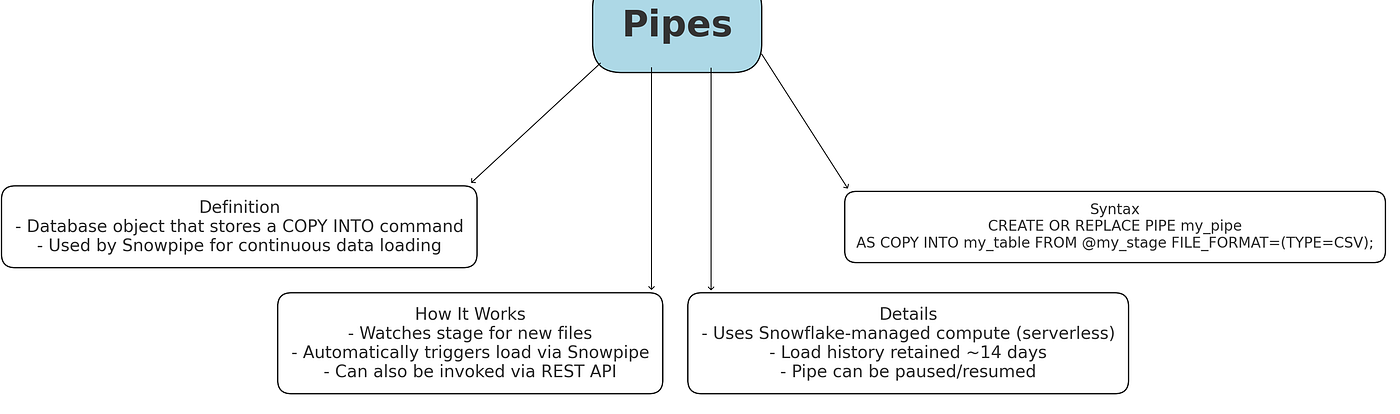
For example, you might create a pipe like:
CREATE OR REPLACE PIPE my_pipe
AUTO_INGEST=TRUE
AS COPY INTO MyTable FROM @MyStage FILE_FORMAT=(…).
Exam POV: Pipes are Snowflake’s object for continuous data loads via Snowpipe.
- Exam items might ask “What happens if you CREATE OR REPLACE a pipe?” — the load history resets (the new pipe doesn’t remember old loads).
- Another angle: “Can you use Snowpipe with internal vs external stages?” (Yes — Snowpipe can load from either, even via REST API, not just external stages).
- A common confusion is that a pipe itself doesn’t move data until Snowpipe or manual COPY runs; it just defines the load rules.
Distractors often include “table” or “stream” as choices for auto-load setup — remember it’s specifically called a PIPE.
- In Snowflake, what is a PIPE object? A. A reference to an external table. B. A named object containing a COPY statement for Snowpipe continuous loading C. A task that runs SQL. D. A function for HTTP integration. Answer: B
- Which mechanisms can trigger Snowpipe to load new data files? **(Choose two.) A. Cloud messaging event notifications (e.g. AWS SQS/SNS) B. Calling the Snowpipe REST API with a pipe name and file list C. Scheduled CRON tasks (not directly) D. Manual file uploads only Answer:** A, B
- Where is Snowpipe load history stored? A. In the target table’s metadata. B. In a separate HISTORY table. C. In the PIPE’s metadata for 14 days D. It is not stored. Answer: C
- What type of compute resources does Snowpipe use to load data? A. The user’s specified virtual warehouse. B. Snowflake-managed serverless compute instances C. The storage service itself. D. It runs entirely on the client. Answer: B
- True or False: You can pause and resume a Snowpipe pipe (thus stopping and restarting the automatic loading). A. True (pipes can be paused and resumed like tasks) B. False Answer: A
- What is a Snowflake pipe used for? A. Scheduling SQL jobs. B. Providing OLAP querying. C. Defining the COPY INTO statement for Snowpipe to load data continuously. D. Encrypting data in transit. Answer: C.
- Which of the following statements about Snowflake pipes is correct? A. A pipe automatically executes every SQL statement in a schema. B. A pipe contains the SQL to load data from a stage into a table (used by Snowpipe). C. A pipe shares data across regions. D. A pipe is used to capture table change data. Answer: B.
12. User Defined Functions (UDFs)
A User Defined Function (UDF) is a custom function that you define and then call within SQL queries, similar to built-in functions. UDFs allow you to extend Snowflake’s capabilities by encapsulating logic you might need to reuse or logic that SQL doesn’t do natively. It returns Scalar Value.
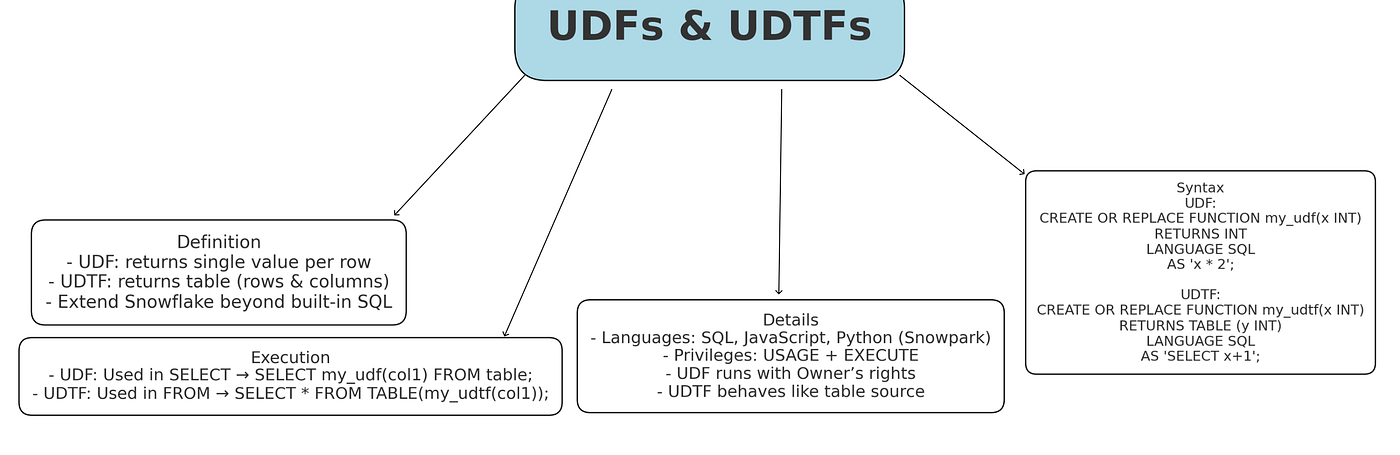
UDFs in Snowflake are scalar functions you write in SQL or JavaScript.
- Exam questions might ask “Which languages can implement a Snowflake UDF?” (Answer: SQL or JavaScript; note Python UDFs require Snowpark, not the basic Core exam).
- Another common question: “Does a UDF run with the caller’s or owner’s privileges?” — the answer is owner’s privileges only (UDFs execute under the function owner’s role).
A tricky option might confuse UDFs with table functions or stored procedures. UDFs return a single value per input row and can’t emit a table of rows.
- What does a scalar UDF return for each input row? A. A table of values B. Multiple rows C. A single value D. A JSON object Answer: C
- In Snowflake, a UDF can be implemented in which languages? **(Choose two.) A. JavaScript B. Python C. Go D. Ruby Answer:** A, B
- Which of the following is NOT true about a Snowflake scalar UDF? A. It returns a single output value per row. B. It can be called in a SELECT clause. C. It can be defined with the SECURE keyword for data privacy. D. It can return a table of rows. Answer: D (UDFs cannot return tables)
- How is a Snowflake UDF invoked in a SQL query? A. CALL function(…) B. SELECT function(…) C. SELECT * FROM function(…) D. Using the function name in an expression, e.g. SELECT my_udf(col1) FROM table; Answer: D
- Snowflake natively supports UDFs written in which languages? (Choose two.) A. SQL (SQL UDF) B. JavaScript (JS UDF) C. Python (through external function only) D. Java Answer: A (SQL) and B (JavaScript). Snowflake’s native UDFs can be written as SQL UDFs or JavaScript UDFs. (Other languages like Python or Java can be used via external function integrations, not as native UDFs.)
- Which of these is true about Snowflake SQL UDFs? A. They can perform multi-row operations and return tables. B. They allow use of control-flow logic (loops/branches). C. They encapsulate SQL expressions and return a single value. D. They require JavaScript syntax. Answer: C.
13. User Defined Table Functions (UDTFs)
A UDTF is a special kind of UDF that returns a table (multiple rows) instead of a single value. In Snowflake, UDTFs are useful when one input value or one row needs to explode into multiple output rows. For example, a UDTF could take a string of comma-separated values and return each value as a separate row (acting like a custom splitter), or generate a series of numbers based on an input.
UDTFs are like UDFs but return a set of rows (a table).
A typical exam phrasing: “Which Snowflake object can be used in the FROM clause returning rows?” The answer is a UDTF.
- What does a Snowflake table function (UDTF) return? A. A single integer value. B. A scalar string. C. A table (multiple rows and columns) D. Nothing. Answer: C
- Which of the following is true about using a UDTF in a query? A. It is called with the CALL command. B. It is used in the FROM clause with the TABLE() function. C. It can only be used in the WHERE clause. D. It must return a VARIANT type. Answer: B
메타데이터
- post_id
- aed7b63a2af2
- slug
- chapter-1-3-aed7b63a2af2
- url
- https://medium.com/@chitreshrahamatkar/chapter-1-3-aed7b63a2af2
- canonical_url
- https://medium.com/@chitreshrahamatkar/chapter-1-3-aed7b63a2af2
- author_url
- https://medium.com/@chitreshrahamatkar
- status
- ok
- fetched_at
- 2026-08-01 15:25:15