Lessons Learned Productionizing Airflow - Achieving Reliability Without Wasting Time
Written By: James Matanle
Lessons Learned Productionizing Airflow - Achieving Reliability Without Wasting Time
Written By: James Matanle

Timely and reliable delivery of DoubleVerify data is crucial to protecting advertisers from fraud. In this effort, we recently rewrote a key internal system for scheduling, processing and delivering fraud data to customers. The previous system operated on legacy infrastructure and involved manual processes, which posed challenges in streamlining scheduling and maintaining consistent uptime. Given our past success with Apache Airflow and its rich features and flexibility, we chose to leverage Airflow for scheduling in this project. The reliability of the system is essential, as any delays or failures in data delivery could compromise the effectiveness of fraud prevention measures.
In this post, I will explore our continued use of Airflow at DoubleVerify and the unique requirements we encountered in this project. I will focus on the common challenges of productionizing Airflow in a critical, customer-facing environment, followed by valuable lessons we learned along the way.
Project Overview
This project involved creating and delivering files containing snapshots and changes in Internet traffic classification datasets. Customers configure the destination, datasets and delivery frequencies, expecting a fresh view of the data. To meet these expectations, we frequently send data and adhere to strict SLAs to ensure timely and high-quality delivery. Currently, we deliver approximately 3,000 files per day, with the volume expected to grow as we develop new products and acquire more customers.
The previous system, built on cron jobs and a self-hosted Rundeck instance, was sufficient for many years. However, as the product grew, we encountered issues such as outages, delays and support challenges. After years of operation, we identified opportunities for improvement. The primary goals of the rewrite were to deliver better datasets, provide fresher data, enhance the customer experience and simplify operation and support. Specifically, we aimed to improve the robustness of our scheduling system by enhancing self-healing capabilities and facilitating support and Site Reliability Engineering (SRE) through a transition to the cloud.
Given the critical importance of reliability and customer satisfaction, could we achieve these goals with Airflow? Let’s explore the ease or difficulty of this task, especially considering the commonly cited challenges in configuring and productionizing Airflow.
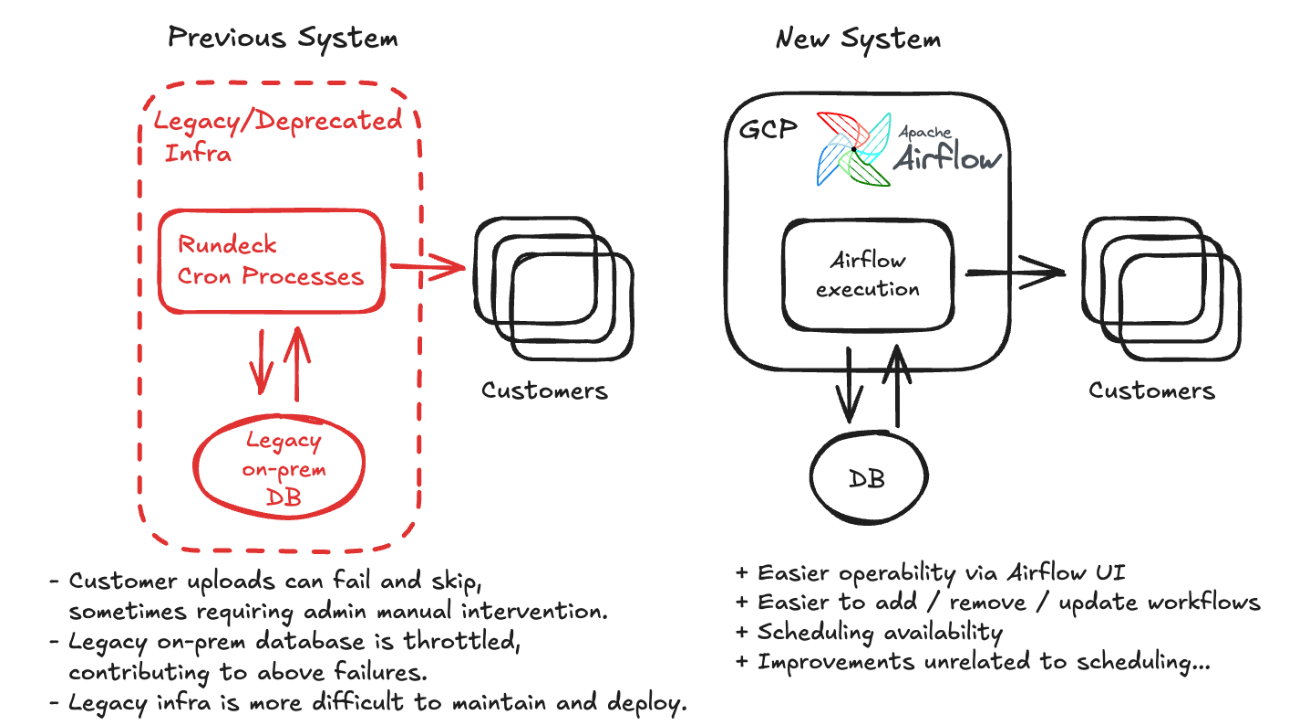
Choosing GCP Composer
We decided to use GCP Composer as a cloud provider for Airflow. This was an easy decision because our existing Airflow projects used Composer. It is important to note that this allowed us to get up and running quickly compared with setting up an Airflow environment ourselves. Composer gives us a reasonable expectation that Airflow will work, be reliable and relieve the initial DevOps burden. By choosing Composer, we reduced the initial setup time and established a solid foundation to build upon, aligning perfectly with our goal to minimize operational complexity.
Implementing Airflow DAGs
Our Airflow workflows (DAGs) are simple and have a few features that help achieve reliability. We create a DAG for each scheduled file to easily track and trigger any individual file. There are around 200 DAGs in the Airflow environment.
The workflow tasks offload their work to Kubernetes via Airflow’s KubernetesPodOperator. Compared with simpler Airflow operators, the KubernetesPodOperator helps decouple the tasks’ Python environment and resources from Airflow’s Python environment. We can upgrade Python dependencies without affecting the Airflow environment, and running task pods can continue to run independently when the Airflow environment restarts for upgrades or configuration changes.
Additionally, we utilize a few techniques and Airflow features:
- Timeouts and retries on the task and DAG level allow the workflows to self-heal.
- Database transactions ensure atomicity when generating data files and updating metadata inside the workflow tasks.
- Airflow Pools isolate DAGs that would interfere with each other over backend resources.
- We created a customer onboarding script that generates the workflow DAGs and Pools.
Configuring Airflow environment and settings
Before going live, we needed to ensure the environment could handle our workload reliably. To do this, we loaded mock workflows and started fine-tuning the system. There were many configurations to consider, especially when accounting for Composer’s Celery execution model and the Kubernetes pod tasks. Composer’s built-in monitoring tools make tuning easier, but there was still much to consider, as seen in the extensive documentation. Let’s take a look at some of our changes:
- We added a second scheduler to avoid scheduling delays and provide some redundancy. Composer and Astronomer recommend this to improve availability.
- We increased the size of our Composer environment to Medium, as recommended for our workload, which is expected to grow to include 200 DAGs and 50 concurrent DAG Runs.
- We added an Airflow cleanup process to purge old metadata.
- We increased the minimum number of Airflow workers from 1 to 4 and adjusted the CPU and memory sizes according to our utilization.
Although Composer made this process easier, there was still much to consider and try. Even after establishing sufficient resources, we experienced scheduling failures, which we will examine in the next section.
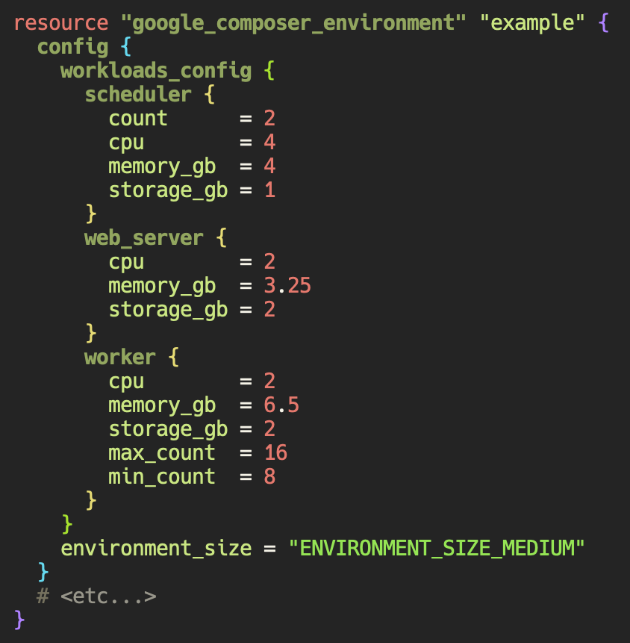
Composer resource upgrades, as specified in Terraform
Fixing DAG failures
After sizing our resources, we noticed uncommon, intermittent failures in our mock DAGs that were unrelated to the workflows themselves. We identified the failures to achieve an error-free baseline:
- Tasks intermittently failed or became stuck, with task logs showing some variation of “((psycopg2.OperationalError) server closed the connection unexpectedly”. The issue had limited visibility beyond these logs, and GCP Composer Support acknowledged and fixed the issue.
- Tasks intermittently became “stuck” in Airflow’s Celery queue. It appears that Airflow 2.6.0 has addressed this by adding and repairing internal timeouts inside Celery.
Intermittent infrastructure-related failures underscore the importance of self-healing within the workflows. The failures also highlight the importance of monitoring and alerting. We use Prometheus, Grafana, and PagerDuty. The team is notified promptly when certain thresholds or failures are reached.
Generally, we aim to keep our workflows reasonably decoupled from Airflow, allowing us to easily restart and resume workflows without losing data if Airflow becomes unhealthy. If necessary, we can move workflows to another Airflow environment or run them manually elsewhere. To achieve this decoupling, we pass data between tasks inside our own database rather than using Airflow’s “XCOM” feature to pass data between tasks.
Scaling to handle new products and customers
Once the project was live, scaling to support new customers and features became the next challenge. Our monitoring revealed increasing DAG execution times, indicating a bottleneck in our system. This led us to find an increase in the scheduling delay (Airflow metric “airflow.scheduler.tasks.scheduling_delay”). It appeared that the Airflow schedulers were not resource-constrained, and the Airflow workers were available to accept new tasks, so the culprit for the delay was ultimately the Airflow Celery setting “worker_concurrency” (related documentation). Scheduling performance returned to normal after we increased this parameter and correspondingly increased worker memory. We further increased the minimum number of workers to accommodate future workload growth.

Airflow UI showing a Gantt chart for the DAG Run. The scheduling delay is observed with gaps between tasks.
Delivering the project, our learnings
In this project, we enhanced our scheduling system by migrating the workflows to Airflow and productionizing the environment. Despite the common challenges associated with Airflow configuration and productionization, Airflow played a crucial role in the project’s success. While Google Cloud Composer provided valuable support, it also introduced its own set of challenges. After necessary tuning, the new system offered improved flexibility, availability and scalability compared to our previous setup. Since the migration, we have not experienced delays or outages related to scheduling. Overall, we observe an 80% reduction in incidents, and customers receive fresh and improved data. Going forward, we are excited to build on this foundation and confidently tackle even larger challenges as the Airflow ecosystem continues to evolve.
메타데이터
- post_id
- aed8d35f055b
- slug
- lessons-learned-productionizing-airflow-achieving-reliability-without-wasting-time-aed8d35f055b
- url
- https://medium.com/doubleverify-engineering/lessons-learned-productionizing-airflow-achieving-reliability-without-wasting-time-aed8d35f055b
- canonical_url
- https://medium.com/doubleverify-engineering/lessons-learned-productionizing-airflow-achieving-reliability-without-wasting-time-aed8d35f055b
- author_url
- https://medium.com/@dv-engineering
- status
- ok
- fetched_at
- 2026-06-15 20:49:13