The Difference Between a Stable API and a Crashed API? Rate Limiting
Imagine you’ve just launched a successful SaaS platform.
The Difference Between a Stable API and a Crashed API? Rate Limiting
Imagine you’ve just launched a successful SaaS platform.
Your APIs power:
- Mobile applications
- Web applications
- Third-party integrations
- Internal microservices
Initially, traffic is low and everything runs smoothly.
Then your product starts gaining traction.
Why we need rate limiting?
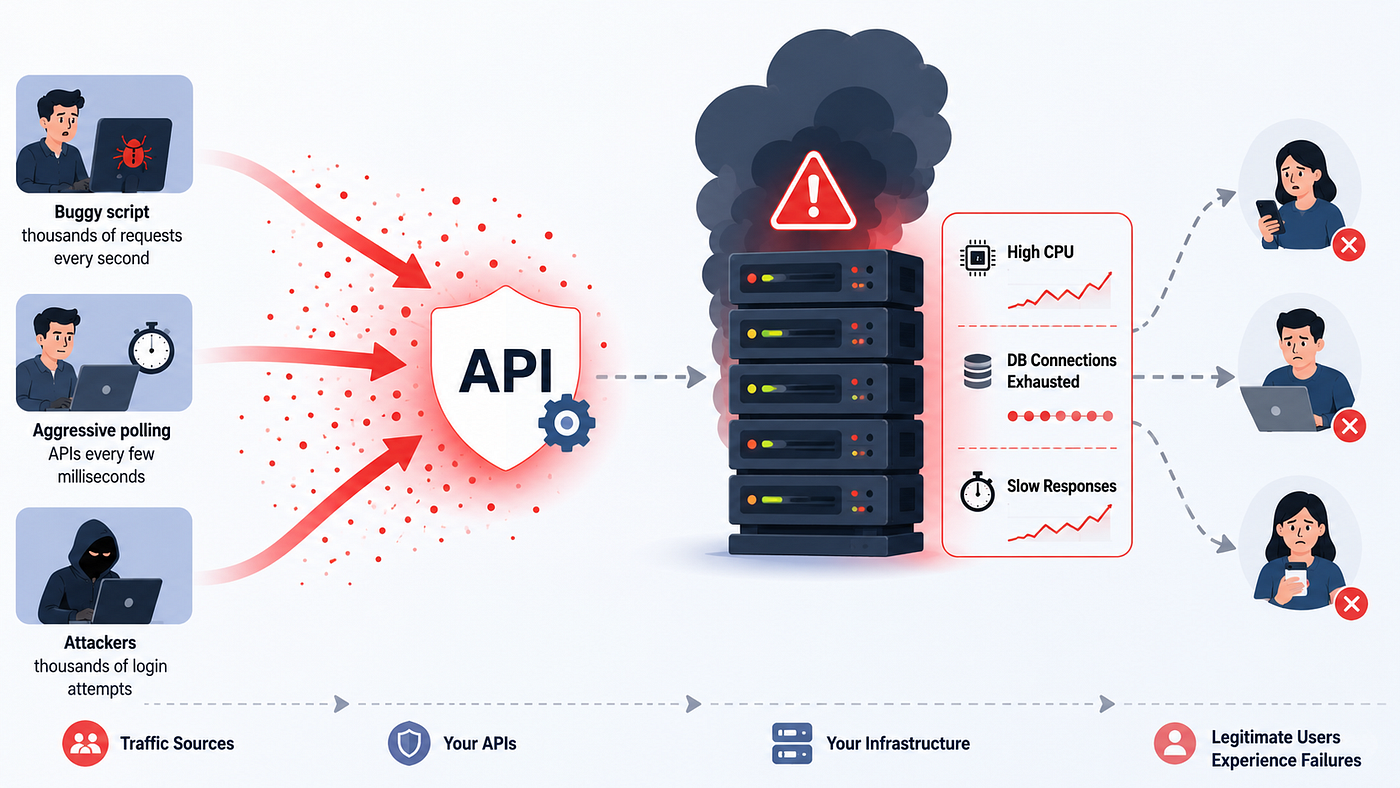
One day, a customer accidentally deploys a buggy script that sends thousands of requests every second.
Another customer aggressively polls your APIs every few milliseconds.
Meanwhile, attackers begin trying thousands of login attempts against your authentication endpoints.
[🫡 If you don’t have a Medium membership, feel free to access the article through this **link**.]
Suddenly:
- CPU usage spikes
- Database connections become exhausted
- Response times increase
- Legitimate users experience failures
The problem isn’t your code. The problem is that your system has no way to control how much traffic each client can generate.
This is where rate limiting becomes essential.
The System Design Secret Behind Stable APIs: Rate Limiting
What is Rate Limiting?
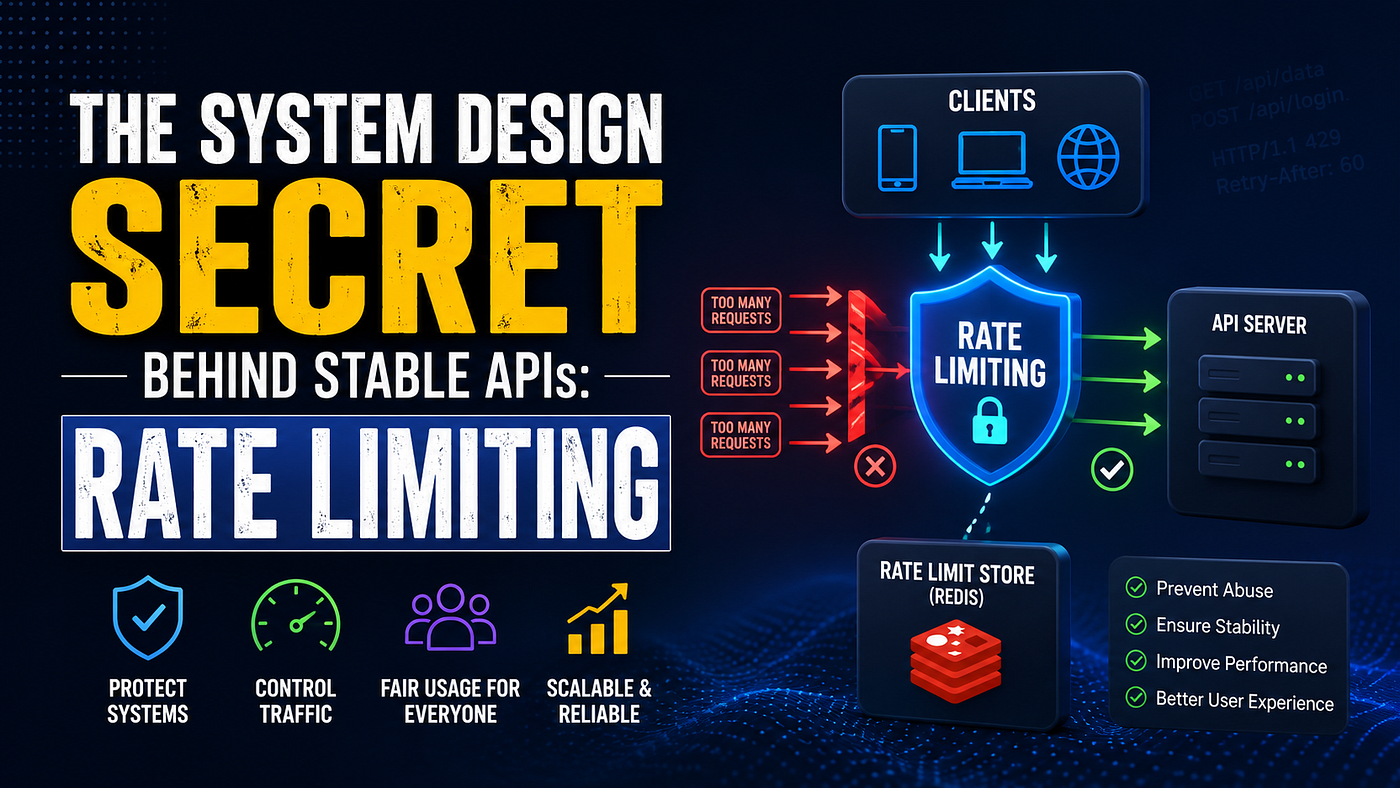
Rate limiting is the practice of controlling how many requests a client can make during a specific period of time.
Examples:
- 100 requests per minute
- 1000 requests per hour
- 10 login attempts per minute
- 5 password reset requests per hour
When a client exceeds the allowed limit, the server may:
- Reject the request
- Delay the request
- Queue the request
- Temporarily block the client
The most common response is:
HTTP/1.1 429 Too Many RequestsRate limiting protects systems from abuse while ensuring fair access for legitimate users.
📉 Why Rate Limiting Matters
Without rate limiting:
1. Resource Exhaustion
- A single user could consume most available CPU, memory, or database connections.
2. Denial of Service Protection
- Attackers often flood APIs with excessive requests.
- Rate limiting helps mitigate these attacks.
3. Fair Usage
- One customer shouldn’t be able to consume resources intended for thousands of others.
4. Cost Control
For cloud-hosted systems:
- More requests
- More CPU usage
- More database queries
- Higher infrastructure costs
Rate limiting helps control operational expenses.
Different Types of API Rate Limiting
Not all APIs should have the same limits.
Different endpoints require different strategies.
Authentication APIs
Examples:
POST /login
POST /signup
POST /forgot-password
POST /verify-otp
These endpoints are common attack targets.
Recommended limits:
- Per IP Address
- Per User Account
- Per Device
Example:
5 login attempts per minutePublic APIs
Examples:
GET /weather
GET /exchange-rates
GET /public-data
Since anyone can access them, they typically require strict limits.
Example:
100 requests per minute per API keySearch APIs
Examples:
GET /search
GET /products
Search endpoints can generate expensive database queries. A slightly higher limit is usually acceptable.
Example:
500 requests per minuteInternal Microservice APIs
Examples:
Order Service → Payment Service
Order Service → Inventory Service
These APIs operate within trusted networks.
Higher limits are common.
However, rate limiting still helps prevent cascading failures.
Popular Rate Limiting Algorithms
Now let’s look at how rate limiting is actually implemented.
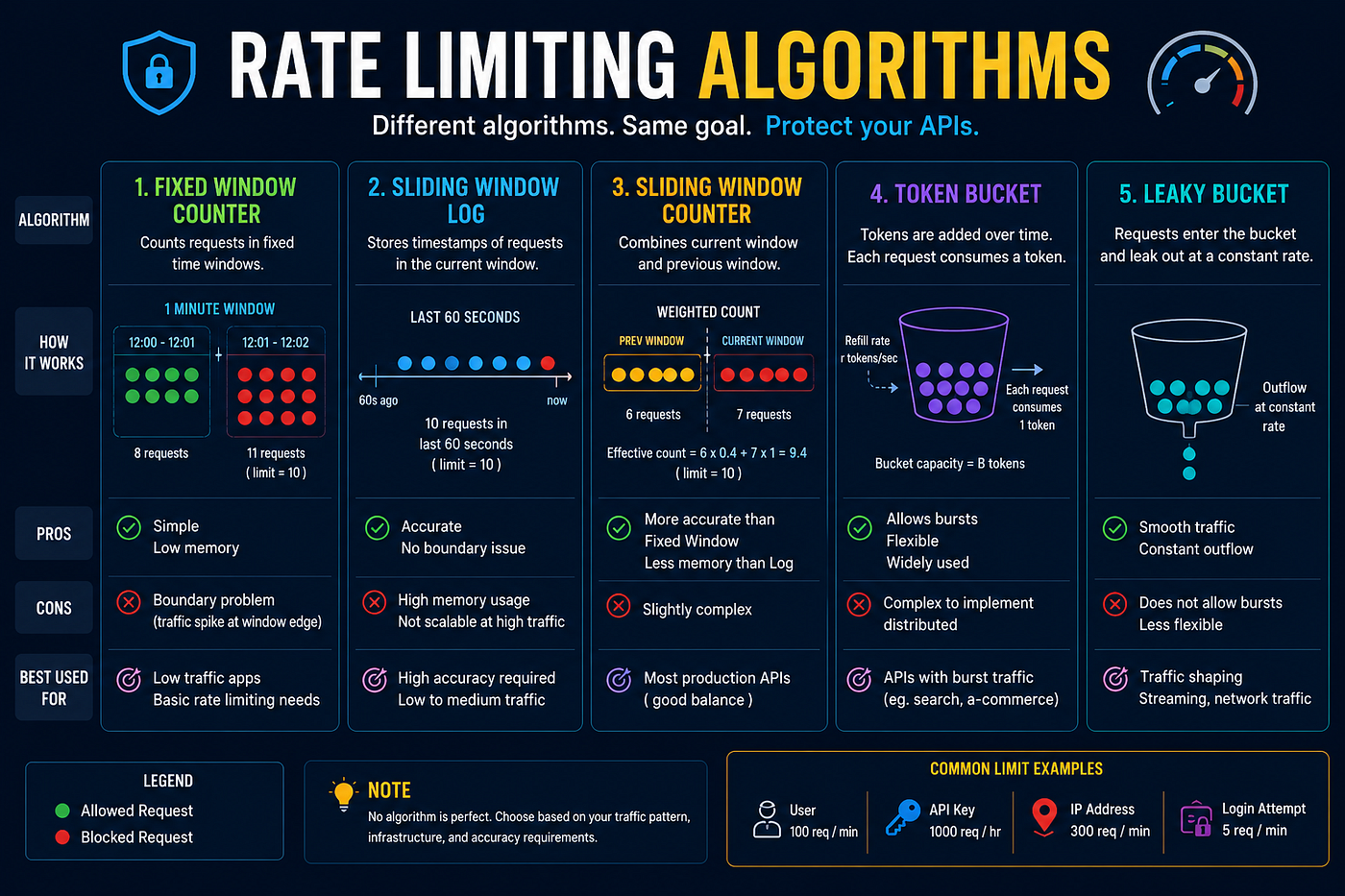
Popular Rate Limiting Algorithms
🪣 1. Fixed Window Counter
The simplest approach.
Imagine a counter that resets every minute.
Rule:
100 requests per minuteThe system stores:
Current Minute
Request Count
If the count exceeds 100, requests are rejected.
Example
12:00 → Counter starts
User sends:
100 requestsAllowed.
101st request:
RejectedProblem
At:
12:00:59User sends:
100 requestsImmediately after:
12:01:00Another:
100 requestsThe user effectively made 200 requests in one second.
This is called the boundary problem.
🪣 2. Sliding Window Log
Instead of fixed windows, the system stores timestamps for requests.
Example:
Last 60 SecondsEvery new request checks:
How many requests occurred during the previous 60 seconds?Benefits:
- Accurate
- No boundary issue
Drawbacks:
- More memory usage
- More processing overhead
🪣 3. Sliding Window Counter
A hybrid approach.
Combines:
- Fixed Window
- Sliding Window
Benefits:
- More accurate
- Less memory usage
This is common in production systems.
🪙 4. Token Bucket (Most Popular)
Imagine a bucket containing tokens.
Each request consumes one token.
Example:
Bucket Capacity = 100Every request:
Consume 1 TokenMeanwhile:
1 Token Added Every SecondIf tokens are available:
✅ Request allowed
If bucket is empty:
❌ Request rejected
Why It's Popular
Token Bucket supports bursts.
Example:
A user remains idle for 30 minutes.
Their bucket becomes full.
Now they can make a short burst of requests.
This behavior works well for most APIs.
💧 5. Leaky Bucket
Imagine a bucket with a hole.
Water enters quickly.
Water exits at a constant rate.
Requests enter the bucket.
The system processes them at a fixed speed.
Benefits:
- Smooth traffic
- Predictable throughput
Drawbacks:
- Less burst-friendly
Common in networking systems.
⚙️ Where Rate Limiting Should Be Implemented
Modern systems often use multiple layers.
🌐 API Gateway Layer
Examples:
- NGINX
- Kong
- Traefik
- AWS API Gateway
Advantages:
- Protects backend services
- Centralized configuration
🧠 Application Layer
Implemented directly inside backend code.
Advantages:
- Full control
- Business-specific rules
Example:
Free User → 100 Requests/Hour
Premium User → 1000 Requests/Hour
🚪CDN and Edge Layer
Examples:
- Cloudflare
- Fastly
Traffic can be blocked before it even reaches your infrastructure.
This significantly reduces attack impact.
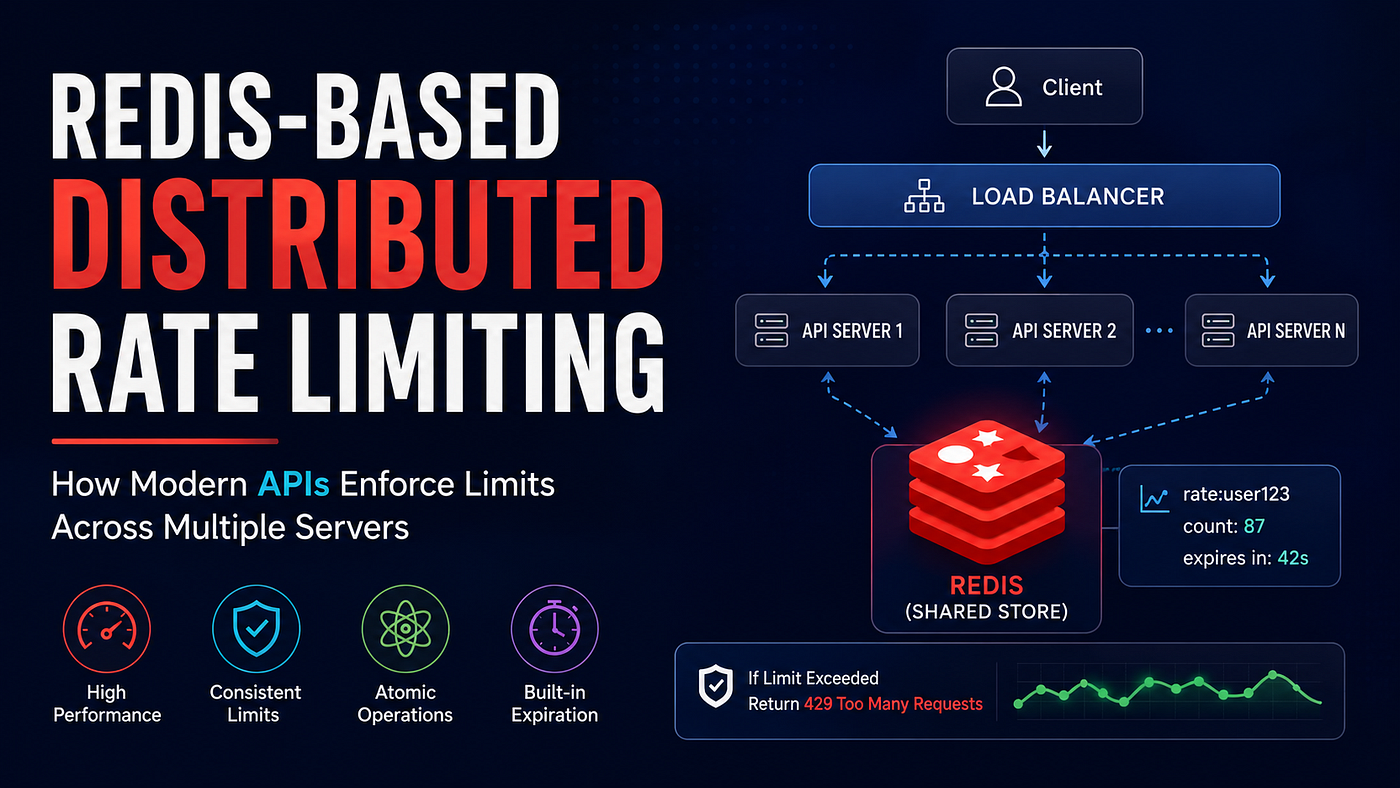
⚡ Why Redis is Common for Rate Limiting
Redis is perfect because:
- Fast (in-memory)
- Atomic operations
- Shared across servers
I’ve covered this topic in a separate article with more detailed explanations and illustrations. Feel free to **check it out here**.
⚠️ Production Considerations
Real-world rate limiting often includes:
- Redis-backed counters
- Lua scripts for atomic updates
- Per-user limits
- Per-IP limits
- Per-API-key limits
- Dynamic rate limits
- Premium tier limits
- Retry-After headers
Production systems rarely rely on a simple in-memory limiter alone.
🧠 Rate Limiting vs Throttling
These terms are often confused.
Rate Limiting:
You have exceeded your limit.
Request rejected.
Throttling:
You exceeded the limit.
Request delayed.
Rate limiting blocks.
Throttling slows down.
🧾 Final Thoughts
Whether you’re building a small REST API or a large-scale distributed platform, understanding rate limiting is an essential skill for every backend engineer.
In practice, the most commonly used approach today is the Token Bucket algorithm, often backed by Redis for distributed environments and enforced at the API Gateway layer before requests reach application servers.
Thanks for reading ❤️.
Follow me to learn more about system design.
메타데이터
- post_id
- aedff7bec070
- slug
- the-difference-between-a-stable-api-and-a-crashed-api-rate-limiting-aedff7bec070
- url
- https://blog.devgenius.io/the-difference-between-a-stable-api-and-a-crashed-api-rate-limiting-aedff7bec070
- canonical_url
- https://blog.devgenius.io/the-difference-between-a-stable-api-and-a-crashed-api-rate-limiting-aedff7bec070
- author_url
- https://medium.com/@wanuja18
- status
- ok
- fetched_at
- 2026-06-26 03:39:16