Scaling Qwen2.5‑VL Fine‑Tuning with DeepSpeed ZeRO‑3 Across Two DGX Sparks (Docker, Detached)
Fine‑tuning a 32B‑parameter vision‑language model is where “it works on my laptop” stops being a joke and starts being an outage risk. In…
Scaling Qwen2.5‑VL Fine‑Tuning with DeepSpeed ZeRO‑3 Across Two DGX Sparks (Docker, Detached)
Fine‑tuning a 32B‑parameter vision‑language model is where “it works on my laptop” stops being a joke and starts being an outage risk. In our case, we needed to fine‑tune Qwen2.5‑VL‑32B with LLaMA‑Factory on a leaflet-extraction dataset and run it reliably across two DGX Spark nodes using DeepSpeed ZeRO‑3, all within a Dockerized training environment we could detach from and walk away from.
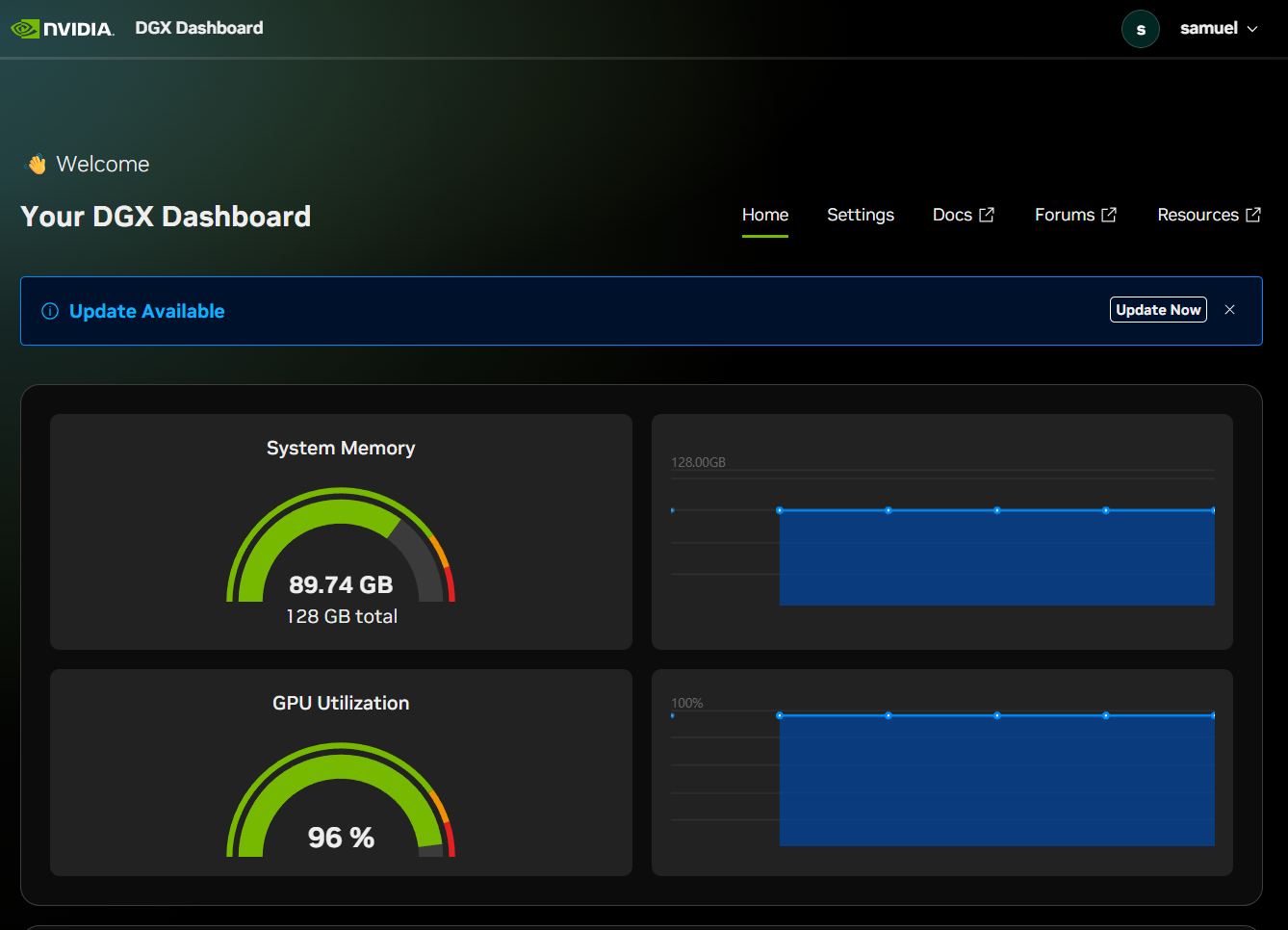
DGX Spark showing active system memory and GPU utilization during the model fine-tuning
This article documents, end‑to‑end, how we wired this up:
- LLaMA‑Factory + DeepSpeed ZeRO‑3 for sharded training
- Two DGX Spark nodes joined via PyTorch distributed (torchrun)
- Docker containers, GPU‑enabled, — network host, and detached mode
- The exact environment variables and commands we used
- The main gotchas and how we debugged them
Everything below is written so you can adapt it to your own cluster.
Hardware, Software, and Goal
Hardware:
- 2× DGX Spark nodes
- Each node has multiple NVIDIA GPUs (cluster config currently exposes 1 GPU per training container; more on that later)
- Nodes are connected on a private network (e.g. 192.168.xxx.xx / 192.168.xxx.xx)
Software stack:
- Qwen2.5‑VL‑32B‑Instruct as the base model
- LLaMA‑Factory as the training frontend (llamafactory-cli)
- DeepSpeed ZeRO‑3 Offload for sharded parameters/optimizer states
- PyTorch 2.10 (NVIDIA build) inside the container
- Docker with — gpus all and — ipc=host
Goal:
- Fine‑tune Qwen2.5‑VL‑32B with LoRA on our leaflet dataset
- Use ZeRO‑3 across two nodes to keep memory pressure manageable
- Run training inside Docker in detached mode so power/network blips, or terminal disconnects, don’t kill the run.
Step 1: LLaMA‑Factory + DeepSpeed ZeRO‑3 Config
We defined a LLaMA‑Factory training YAML (simplified here) at:
# model-training/configs/llamafactory/qwen2vl_leaflet_lora_sft.yaml

deepspeed: model-training/configs/llamafactory/ds_z3_offload_config.json

### Model
model_name_or_path: /workspace/models/qwen2.5-vl-32b-instruct
trust_remote_code: true
template: qwen2_vl
cutoff_len: 12288   # trade-off between context and throughput

### Stage and dataset
stage: sft
do_train: true
finetuning_type: lora
lora_target: all
lora_rank: 16
lora_alpha: 32
lora_dropout: 0.05

dataset: leaflet_sft
eval_dataset: leaflet_sft_val
dataset_dir: model-training/data/processed/llamafactory_mllm
overwrite_cache: true
preprocessing_num_workers: 16

### Output and logging
output_dir: ./artifacts/llamafactory_sft_qwen2vl_leaflet
overwrite_output_dir: true
logging_steps: 10
save_steps: 500
plot_loss: true
max_grad_norm: 1.0

### Training
per_device_train_batch_size: 1
gradient_accumulation_steps: 8
learning_rate: 1.0e-4
num_train_epochs: 1
lr_scheduler_type: cosine
warmup_ratio: 0.1
bf16: true
ddp_timeout: 180000000
gradient_checkpointing: true

### Validation
per_device_eval_batch_size: 1
eval_strategy: steps
eval_steps: 500
Key points:
- deepspeed: points to a ZeRO‑3 config (ds_z3_offload_config.json) that we keep under model-training/configs/llamafactory/.
- output_dir: is a relative path (./artifacts/…), which under the container’s working directory /workspace resolves to /workspace/artifacts/llamafactory_sft_qwen2vl_leaflet. Because we mount the repo, it persists on the host.
- LoRA: only ~134M trainable parameters, even though the base model has ~33.45B total parameters.
Step 2: Making Sure CUDA + bf16 Work Inside Docker
We built a Docker image data-entry-ai-pytorch-llamafactory that already has:
- PyTorch + CUDA
- LLaMA‑Factory installed (llamafactory-cli available on PATH)
We then verified inside the image that CUDA and bf16 work:
docker run --gpus all --rm -it \
  -v /workspace/data-entry-ai:/workspace \
  -w /workspace \
  data-entry-ai-pytorch-llamafactory \
  python model-training/scripts/training/infra_check.py
Expected output (and what we saw):
- CUDA Available: True
- BF16 Support: True
- Large free GPU memory per device
If this script says CUDA Available: False, fix that before touching anything distributed:
- Make sure you are using — gpus all
- Make sure PyTorch inside the image is a CUDA build (not CPU‑only)
Step 3: Installing DeepSpeed in the Training Environment
Because we’re using ZeRO‑3, DeepSpeed must be importable in the environment that runs llamafactory-cli.
We used a per‑run install inside the container:
pip install "deepspeed>=0.10.0,<=0.16.4"In practice, we folded this into the bash -lc ‘…’ block we pass to docker run:
bash -lc '
  pip install "deepspeed>=0.10.0,<=0.16.4" && \
  # ... then exports and llamafactory-cli train
'
Later, you can bake this into your Dockerfile:
RUN pip install "deepspeed>=0.10.0,<=0.16.4"This avoids reinstalling on every run.
Step 4: Single‑Node Dry Run
Before going multi‑node, we did a single‑node dry run (1 step) to confirm:
- The model can be loaded with ZeRO‑3 / offload
- Host RAM doesn’t spike into OOM territory
- Checkpoints and logs are written correctly
We temporarily added to the YAML:
# In the Training section
max_steps: 1
Then ran:
docker run --gpus all --ipc=host --ulimit memlock=-1 --ulimit stack=67108864 \
  --network host \
  -it --rm \
  -v /workspace/data-entry-ai:/workspace \
  -v /workspace/models:/workspace/models \
  -v /advImages:/advImages \
  -w /workspace \
  -e HF_HUB_OFFLINE=1 -e TRANSFORMERS_OFFLINE=1 \
  data-entry-ai-pytorch-llamafactory \
  bash -lc '
    pip install "deepspeed>=0.10.0,<=0.16.4" && \
    FORCE_TORCHRUN=1 llamafactory-cli train \
      model-training/configs/llamafactory/qwen2vl_leaflet_lora_sft.yaml
  '
This validated:
- ZeRO‑3 initialization (Detected DeepSpeed ZeRO-3: activating zero.init()…)
- Model load from /workspace/models/qwen2.5-vl-32b-instruct/…
- Logs and checkpoint metadata under ./artifacts/llamafactory_sft_qwen2vl_leaflet
Step 5: Wiring Two DGX Sparks Together
DeepSpeed itself doesn’t know about nodes; it uses PyTorch distributed (torchrun), configured via environment variables.
We needed both nodes to agree on:
- MASTER_ADDR: IP of the rank‑0 node (we used 192.168.xxx.xx)
- MASTER_PORT: any free TCP port (we used 29500)
- NNODES: total number of nodes (2)
- NODE_RANK: 0 on Node 0, 1 on Node 1
- NPROC_PER_NODE: number of ranks per node (we ended up with 1 GPU per node, so NPROC_PER_NODE=1)
At the LLaMA‑Factory launcher level, this is all driven by env vars:
export MASTER_ADDR=192.168.xxx.xx
export MASTER_PORT=29500
export NNODES=2
export NODE_RANK=0  # or 1 on the second node
export NPROC_PER_NODE=1
FORCE_TORCHRUN=1 llamafactory-cli train ...
LLaMA‑Factory’s launcher then builds the torchrun command:
torchrun --nnodes 2 --node_rank $NODE_RANK --nproc_per_node $NPROC_PER_NODE \
  --master_addr $MASTER_ADDR --master_port $MASTER_PORT \
  /workspace/LLaMA-Factory/src/llamafactory/launcher.py \
  model-training/configs/llamafactory/qwen2vl_leaflet_lora_sft.yaml
Step 6: Multi‑Node Training Inside Docker (Foreground Mode)
We wanted each DGX Spark to run training inside the same image and see the same repo + models:
- Host repo root: /workspace/data-entry-ai
- Container workspace: /workspace (bind‑mounted)
- Host models: /workspace/models (bind‑mounted)
The critical trick was “— network host”, so the container shares the host’s IP address space and can bind/listen on MASTER_ADDR:MASTER_PORT.
Node 0 (rank 0, foreground)
On the Node 0 host:
docker run --gpus all --ipc=host --ulimit memlock=-1 --ulimit stack=67108864 \
  --network host \
  -it --rm \
  --name leaflet-train-node0 \
  -v /workspace/data-entry-ai:/workspace \
  -v /workspace/models:/workspace/models \
  -v /advImages:/advImages \
  -w /workspace \
  -e HF_HUB_OFFLINE=1 -e TRANSFORMERS_OFFLINE=1 \
  data-entry-ai-pytorch-llamafactory \
  bash -lc '
    pip install "deepspeed>=0.10.0,<=0.16.4" && \
    export MASTER_ADDR=192.168.xxx.xx   # Node 0 host IP
    export MASTER_PORT=29500
    export NNODES=2
    export NODE_RANK=0
    export NPROC_PER_NODE=1           # one GPU visible per container
    FORCE_TORCHRUN=1 llamafactory-cli train \
      model-training/configs/llamafactory/qwen2vl_leaflet_lora_sft.yaml
  '
Node 1 (rank 1, foreground)
On the Node 1 host:
docker run --gpus all --ipc=host --ulimit memlock=-1 --ulimit stack=67108864 \
  --network host \
  -it --rm \
  --name leaflet-train-node1 \
  -v /workspace/data-entry-ai:/workspace \
  -v /workspace/models:/workspace/models \
  -v /advImages:/advImages \
  -w /workspace \
  -e HF_HUB_OFFLINE=1 -e TRANSFORMERS_OFFLINE=1 \
  data-entry-ai-pytorch-llamafactory \
  bash -lc '
    pip install "deepspeed>=0.10.0,<=0.16.4" && \
    export MASTER_ADDR=192.168.xxx.xx   # still Node 0 host IP
    export MASTER_PORT=29500
    export NNODES=2
    export NODE_RANK=1
    export NPROC_PER_NODE=1
    FORCE_TORCHRUN=1 llamafactory-cli train \
      model-training/configs/llamafactory/qwen2vl_leaflet_lora_sft.yaml
  '
Sequence:
- Start Node 0 container first (rank 0).
- Start Node 1 container second (rank 1).
- Logs quickly showed:
- Initializing 1 distributed task at: 192.168.xxx.xx:29500
- Multi-node training enabled: num nodes: 2, node rank: …
- Detected DeepSpeed ZeRO-3: activating zero.init()…
- finished initializing model — num_params = 1161, num_elems = 33.45B
- Running training with 84,348 examples and 5,272 steps.
Step 7: Detached Mode for Long‑Running Training
We don’t want to keep SSH terminals open for multi‑day training, especially in environments with unstable power. Docker’s detached mode is the right tool.
The only changes:
- Use -d instead of -it
- Typically drop “— rm” so the container persists after exit (for log inspection)
- Keep “— name” for easy log access
Node 0 (rank 0, detached)
docker run --gpus all --ipc=host --ulimit memlock=-1 --ulimit stack=67108864 \
  --network host \
  -d \
  --name leaflet-train-node0 \
  -v /workspace/data-entry-ai:/workspace \
  -v /workspace/models:/workspace/models \
  -v /advImages:/advImages \
  -w /workspace \
  -e HF_HUB_OFFLINE=1 -e TRANSFORMERS_OFFLINE=1 \
  data-entry-ai-pytorch-llamafactory \
  bash -lc '
    pip install "deepspeed>=0.10.0,<=0.16.4" && \
    export MASTER_ADDR=192.168.xxx.xx
    export MASTER_PORT=29500
    export NNODES=2
    export NODE_RANK=0
    export NPROC_PER_NODE=1
    FORCE_TORCHRUN=1 llamafactory-cli train \
      model-training/configs/llamafactory/qwen2vl_leaflet_lora_sft.yaml
  '
Node 1 (rank 1, detached)
docker run --gpus all --ipc=host --ulimit memlock=-1 --ulimit stack=67108864 \
  --network host \
  -d \
  --name leaflet-train-node1 \
  -v /workspace/data-entry-ai:/workspace \
  -v /workspace/models:/workspace/models \
  -v /advImages:/advImages \
  -w /workspace \
  -e HF_HUB_OFFLINE=1 -e TRANSFORMERS_OFFLINE=1 \
  data-entry-ai-pytorch-llamafactory \
  bash -lc '
    pip install "deepspeed>=0.10.0,<=0.16.4" && \
    export MASTER_ADDR=192.168.xxx.xx
    export MASTER_PORT=29500
    export NNODES=2
    export NODE_RANK=1
    export NPROC_PER_NODE=1
    FORCE_TORCHRUN=1 llamafactory-cli train \
      model-training/configs/llamafactory/qwen2vl_leaflet_lora_sft.yaml
  '
Inspecting Logs from a New Terminal
Anytime later, on Node 0 host:
docker logs -f leaflet-train-node0On Node 1 host:
docker logs -f leaflet-train-node1To check that containers are still running:
docker psTo stop them cleanly:
docker stop leaflet-train-node1
docker stop leaflet-train-node0
If you need to reuse the same names later:
docker rm leaflet-train-node0 leaflet-train-node1When you rerun with the same command, LLaMA‑Factory will resume from the latest checkpoint in ./artifacts/llamafactory_sft_qwen2vl_leaflet as long as that directory is still mounted and overwrite_output_dir is not wiping it.
Step 8: Checkpointing and Evaluation
Because output_dir is relative to /workspace, and /workspace is a bind mount of /workspace/data-entry-ai:
- Checkpoints and logs live under:
/workspace/data-entry-ai/artifacts/llamafactory_sft_qwen2vl_leafletEach multi‑node run writes into the same logical directory, so:
- You can resume from the latest checkpoint after a power event or manual stop.
- You can run offline evaluation scripts against those checkpoints.
We also maintain a centralized evaluation config at model-training/configs/eval/metrics.yaml that specifies:
- IoU thresholds (0.5 primary, 0.8 strict)
- Price accuracy rules
- Model output adaptation (bbox scale, JSON wrapping)
- Regression criteria (max drop vs baseline, minimum precision/recall)
This file is consumed by our scripts/eval/ tooling and gives us consistent metrics across runs, regardless of whether training was single‑ or multi‑node.
Step 9: What Went Wrong (and How We Fixed It)
A few key missteps taught us the most:
- torch.cuda.is_available() == False inside the venv
Fix: run inside the Docker image with CUDA and PyTorch wired, and confirm with infra_check.py.
- Your setup doesn’t support bf16/gpu
Cause: same as above — wrong environment. Once we used the container and confirmed CUDA + bf16, this disappeared.
- ImportError: DeepSpeed is not available
Fix: install DeepSpeed inside the training environment (pip install “deepspeed>=0.10.0,<=0.16.4”), either per run or in the Dockerfile.
- Duplicate GPU detected NCCL errors
We initially combined:
- NPROC_PER_NODE=8 and
- A container that only exposed 1 GPU (GPUs: 1 in nvidia-smi inside the container).

NVIDIA-SMI showing 96% GPU utilization on the first DGX Spark during model fine-tuning
NCCL detected multiple ranks on the same GPU and aborted. We fixed it by:
- Matching NPROC_PER_NODE to the number of visible GPUs per container (1 in this environment), or
- Ensuring the container actually sees all GPUs if we want 8 ranks per node.
- Node timeouts connecting to the rendezvous
Running without — network host or without publishing the rendezvous port (MASTER_PORT) meant the second node couldn’t reach MASTER_ADDR:MASTER_PORT.
Fix: — network host on both nodes, and a fixed MASTER_PORT.
Each of these failures came with explicit stack traces; systematically reading and addressing them got us to a stable multi‑node ZeRO‑3 setup.
Closing Thoughts
Putting this together, the core pattern is simple but easy to trip over:
- Let LLaMA‑Factory orchestrate torchrun, but you must give it the correct distributed env vars.
- Let Docker handle isolation, but you must ensure:
- GPUs are actually visible inside the container,
- The container shares the host’s network when you’re doing multi‑node ( — network host),
- Volumes are mounted so checkpoints persist across runs.
- Let DeepSpeed ZeRO‑3 handle sharding, but you must ensure:
- DeepSpeed is installed,
- The ZeRO‑3 config is correct and referenced in your YAML,
- The world size matches the hardware you truly have.
The end result: a training setup where two DGX Sparks cooperate to fine‑tune a 32B Qwen2.5‑VL model using DeepSpeed ZeRO‑3, all running inside Docker containers that we can start in detached mode, monitor with docker logs, and safely resume after power or network interruptions.
First 10 trainer logs:
{"current_steps": 10, "total_steps": 5272, "loss": 0.9166384696960449, "lr": 1.7045454545454546e-06, "epoch": 0.0018969033053540096, "percentage": 0.19, "elapsed_time": "1:10:02", "remaining_time": "25 days, 14:17:11"}
{"current_steps": 20, "total_steps": 5272, "loss": 0.9236824035644531, "lr": 3.598484848484849e-06, "epoch": 0.003793806610708019, "percentage": 0.38, "elapsed_time": "2:19:51", "remaining_time": "25 days, 12:08:29"}
{"current_steps": 30, "total_steps": 5272, "loss": 0.9063264846801757, "lr": 5.492424242424243e-06, "epoch": 0.005690709916062029, "percentage": 0.57, "elapsed_time": "3:40:23", "remaining_time": "26 days, 17:49:49"}
{"current_steps": 40, "total_steps": 5272, "loss": 0.8509568214416504, "lr": 7.386363636363637e-06, "epoch": 0.007587613221416038, "percentage": 0.76, "elapsed_time": "4:58:40", "remaining_time": "27 days, 3:07:14"}
{"current_steps": 50, "total_steps": 5272, "loss": 0.8464757919311523, "lr": 9.28030303030303e-06, "epoch": 0.009484516526770048, "percentage": 0.95, "elapsed_time": "6:11:16", "remaining_time": "26 days, 22:15:59"}
{"current_steps": 60, "total_steps": 5272, "loss": 0.7878476142883301, "lr": 1.1174242424242425e-05, "epoch": 0.011381419832124057, "percentage": 1.14, "elapsed_time": "7:25:00", "remaining_time": "26 days, 20:16:46"}
{"current_steps": 70, "total_steps": 5272, "loss": 0.7291595458984375, "lr": 1.3068181818181819e-05, "epoch": 0.013278323137478067, "percentage": 1.33, "elapsed_time": "8:38:05", "remaining_time": "26 days, 17:41:08"}
{"current_steps": 80, "total_steps": 5272, "loss": 0.6975052356719971, "lr": 1.4962121212121214e-05, "epoch": 0.015175226442832077, "percentage": 1.52, "elapsed_time": "10:02:15", "remaining_time": "27 days, 3:26:45"}
{"current_steps": 90, "total_steps": 5272, "loss": 0.6537275314331055, "lr": 1.6856060606060605e-05, "epoch": 0.017072129748186088, "percentage": 1.71, "elapsed_time": "11:16:01", "remaining_time": "27 days, 0:44:06"}
{"current_steps": 100, "total_steps": 5272, "loss": 0.6124566555023193, "lr": 1.8750000000000002e-05, "epoch": 0.018969033053540096, "percentage": 1.9, "elapsed_time": "12:38:03", "remaining_time": "27 days, 5:26:21"}
Training in progress:

Dashboard showing healthy training loss decrease which means the model is learning from our data
메타데이터
- post_id
- aefcf09e754d
- slug
- scaling-qwen2-5-vl-fine-tuning-with-deepspeed-zero-3-across-two-dgx-sparks-docker-detached-aefcf09e754d
- url
- https://medium.com/@samueladeyeye2012/scaling-qwen2-5-vl-fine-tuning-with-deepspeed-zero-3-across-two-dgx-sparks-docker-detached-aefcf09e754d
- canonical_url
- https://medium.com/@samueladeyeye2012/scaling-qwen2-5-vl-fine-tuning-with-deepspeed-zero-3-across-two-dgx-sparks-docker-detached-aefcf09e754d
- author_url
- https://medium.com/@samueladeyeye2012
- status
- ok
- fetched_at
- 2026-06-09 15:37:30