Set Up B2B Wholesale Discounts and Pricing in Shopify Using Customer Tags [App Guide Included]
A step-by-step guide to automating your B2B wholesales strategy using customer tags in Shopify.
How to Set Up B2B Wholesale Discounts and Pricing in Shopify Using Customer Tags [App Guide Included]
Who This Article is For
- You already run a B2C Shopify store and want to start offering wholesale to B2B customers in the same store
- You’re planning to build a new, B2B-only Shopify store
- You want to offer wholesale pricing to specific customers only
- You want to automate and streamline B2B pricing and discounts
How to Set Up Automatic B2B Wholesale Discounts in Shopify
The most common way to handle B2B wholesale pricing on Shopify is using customer tags and Shopify apps.
For example, you can use tag like "wholesale" to show special pricing or apply automatic discounts only for tagged customers. Shopify’s default features do not support automatic discounts based on customer tags—so using an app is essential.
In this article, we’ll show you how to use the Howdy Customer Tag Discount | B2B, VIP app to manage B2B wholesale pricing.
This app lets you flexibly set discount rates or special pricing based on both customer tags and product collections. You can also display discounted prices only to logged-in users.
One great feature of this app is that it displays actual discounted prices directly on the theme, allowing for a smooth shopping experience.
For example, regular customers will see normal pricing:
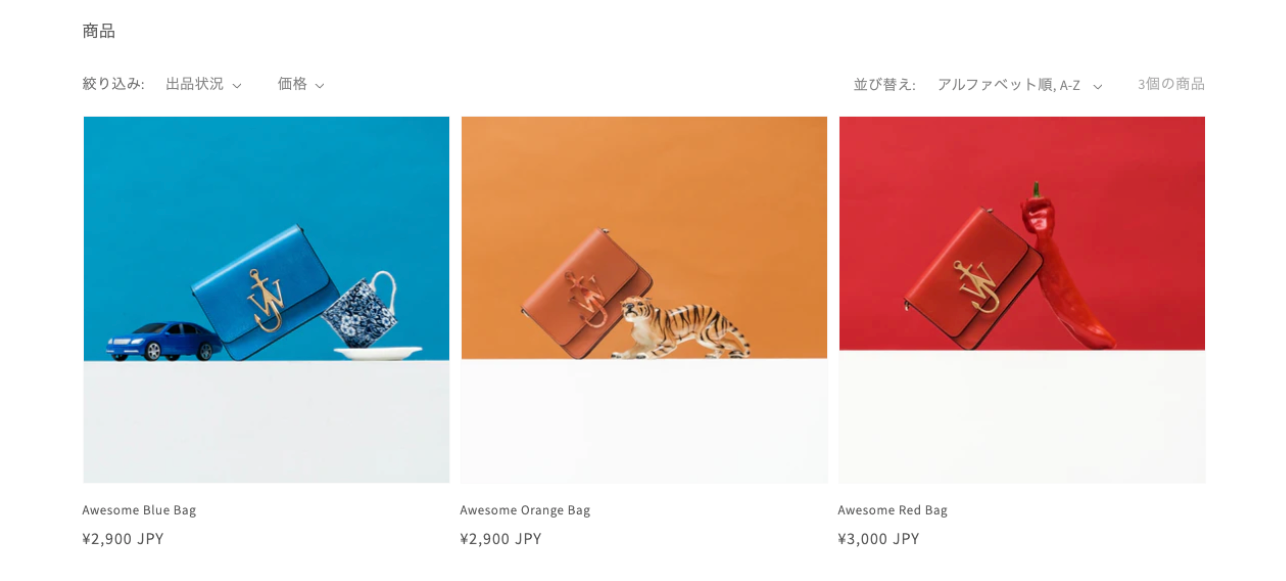
But when a wholesale customer logs in, they will see discounted prices (e.g., 30% off):

This helps increase purchase motivation by clearly showing the discounted price that users will actually pay.
B2B Wholesale Discount Examples
Here are some real-world setups using the Howdy Customer Tag Discount app:
① Apply Discounts Based on a Specific Customer Tag (Simple)
This is the most basic setup:
- Customers with the tag
"Wholesale Customer"→ 20% off all products
② Change Discount Rates Based on Customer Tags
You can create different discount levels depending on the customer’s tag:
- Customers with the tag
"B2B-Tier-10"→ 10% off for all products - Customers with the tag
"B2B-Tier-20"→ 20% off for all products - Customers with the tag
"B2B-Tier-30"→ 30% off for all products (Of course, tag names and discount percentages can be customized freely.)
③ Apply Discounts Only to Specific Products
Let’s say you want to offer discounts only on certain collections:
- Customers with the tag
"Wholesale Customer"+ products in the"B2B Collection"→ 10% off - Customers with the tag
"Wholesale Customer"+ products not in the"B2B Collection"→ No discount
This allows partial wholesale pricing while keeping other products at full retail price.
④ Change Discount Rates by Product (Slightly Complex)
You can apply different discount rates depending on the product collection:
- Customers with the tag
"Wholesale Customer"+ products in"T-Shirts Collection"→ 20% off - Customers with the tag
"Wholesale Customer"+ products in"Sweaters Collection"→ 50% off
This is useful if, for example, you want Product A to be discounted by 10% but Product B by 50%.
⑤ Combine Customer Tags and Products for Discount Rates (Most Complex)
This is a more advanced setup, combining customer tags with product collections:
Customers with the tag "B2B-VIP"
"T-Shirts Collection"→ 20% off"Sweaters Collection"→ 25% off
Customers with the tag "B2B-SuperVIP"
"T-Shirts Collection"→ 30% off"Sweaters Collection"→ 50% off
This setup gives you maximum flexibility.
⑥ Shipping Discounts for Wholesale Customers
You can also offer discounted (or free) shipping to wholesale buyers:
- Customers with the tag
"Wholesale VIP"→ Free shipping (100% off) - Customers with the tag
"Wholesale Customer"→ 50% off shipping
Benefits of the Howdy Customer Tag Discount App
- Offers discounts based on a wide variety of options using customer tags
- Allows different discount rates for each product collection
- Enables discounted prices to be displayed on the storefront (setup can be delegated to the app developer)
- Discounts are applied at the cart and checkout pages, so the “Buy Now” button can still be used
- Shipping discounts can also be applied
Points to Note About Other B2B Apps We’ve tried various other B2B apps, and here are some points to be aware of. Hopefully, they’ll be helpful for your reference.
Caution #1 When Using Other Apps: “Buy Now” Button May Not Work A common issue with older apps is that they apply automatic discounts only when transitioning from the cart page to the checkout page. In such cases, using the “Buy Now” button — which takes customers straight from the product page to the checkout — can result in discounts not being applied.
Caution #2 When Using Other Apps: Discounted Prices Are Not Displayed In many cases, regular prices are still shown on the product and collection pages, and the discounted price only appears at checkout. This can be inconvenient for customers.
Benefits of B2B Wholesale Sales on a Shopify Store
● Expand into New Sales Channels By starting business with retailers and select shops, you can increase the number of stores carrying your products, thereby expanding your distribution network. Having your products displayed in physical stores is also effective for boosting brand awareness.
● Build Long-Term Business Relationships B2B customers often make regular bulk purchases. By building trust, they can become long-term business partners. Flexibly accommodating their needs and providing tailored services helps maintain a strong relationship.
● Generate Stable Revenue B2B orders are typically large in quantity and recurring, making sales more stable compared to B2C. Even with fewer transactions, the higher order value means greater potential for profit.
Setting Up the Howdy Customer Tag Discount App Here’s a quick overview of how to set up the app. The admin interface is very simple and allows you to set different rules for each customer tag.
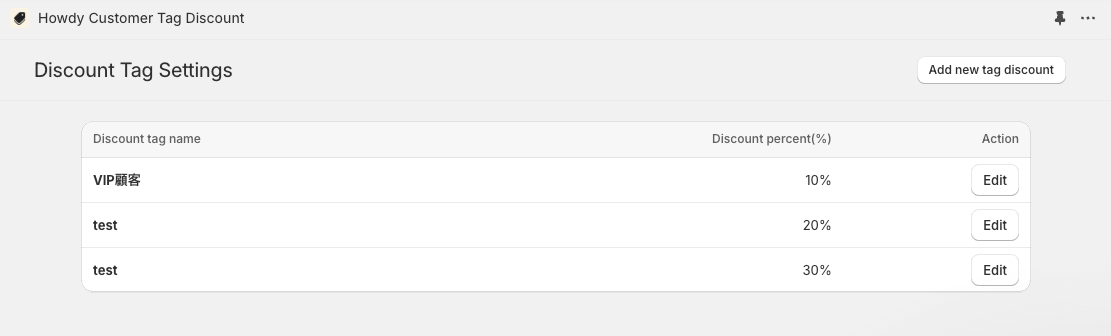
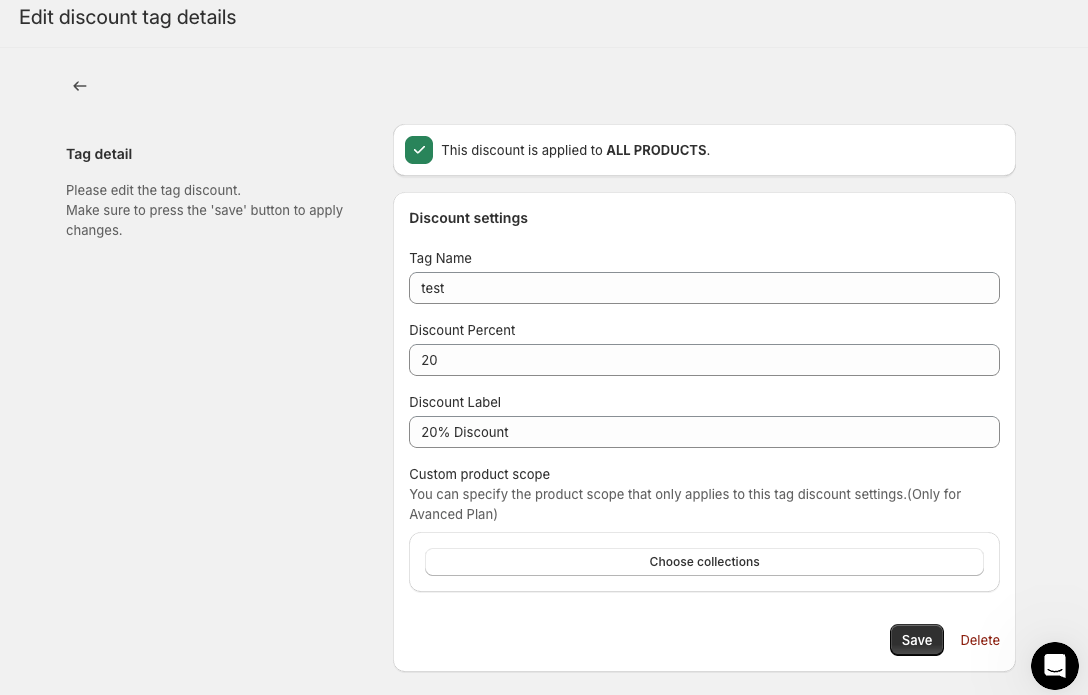
For each automatic discount rule, you can set the discount percentage, discount message, and applicable collections.
How to Automate B2B Wholesale Discounts Using a Shopify App — Summary That concludes our guide on how to use a Shopify app for B2B wholesale sales. By selling wholesale through your Shopify store, you can tap into new distribution channels and attract high-volume customers, which contributes to more stable sales. There are also many advantages unique to B2B, such as selling to physical store operators and offering special pricing to corporate clients.
In particular, Shopify apps can help you flexibly meet specific B2B needs — like managing discounts via customer tags or switching displayed prices.
The “Howdy Customer Tag Discount” app introduced in this article offers powerful features for real-world operations. You can configure detailed discounts per customer and product, display post-discount prices, and even set shipping discounts.
If you’re already selling D2C on Shopify, you can also start B2B sales within the same store, or you could consider building a dedicated B2B store. In either case, setting up a B2B sales structure is a highly effective way to build long-term relationships with your target corporate customers and retail partners.
We hope this helps you find the right B2B sales model for your business — now’s a great time to get started with wholesale on Shopify!
메타데이터
- post_id
- aefdbe3516cb
- slug
- set-up-b2b-wholesale-discounts-and-pricing-in-shopify-using-customer-tags-app-guide-included-aefdbe3516cb
- url
- https://medium.com/@guin_takahashi/set-up-b2b-wholesale-discounts-and-pricing-in-shopify-using-customer-tags-app-guide-included-aefdbe3516cb
- canonical_url
- https://medium.com/@guin_takahashi/set-up-b2b-wholesale-discounts-and-pricing-in-shopify-using-customer-tags-app-guide-included-aefdbe3516cb
- author_url
- https://medium.com/@guin_takahashi
- status
- ok
- fetched_at
- 2026-06-26 03:39:16