Linux File Permissions Explained: Decode rwxr-xr — with Real Examples & chmod (2026 Guide)
Understand rwx, user/group/others, numeric permissions, and real-world DevOps use cases — without confusion.
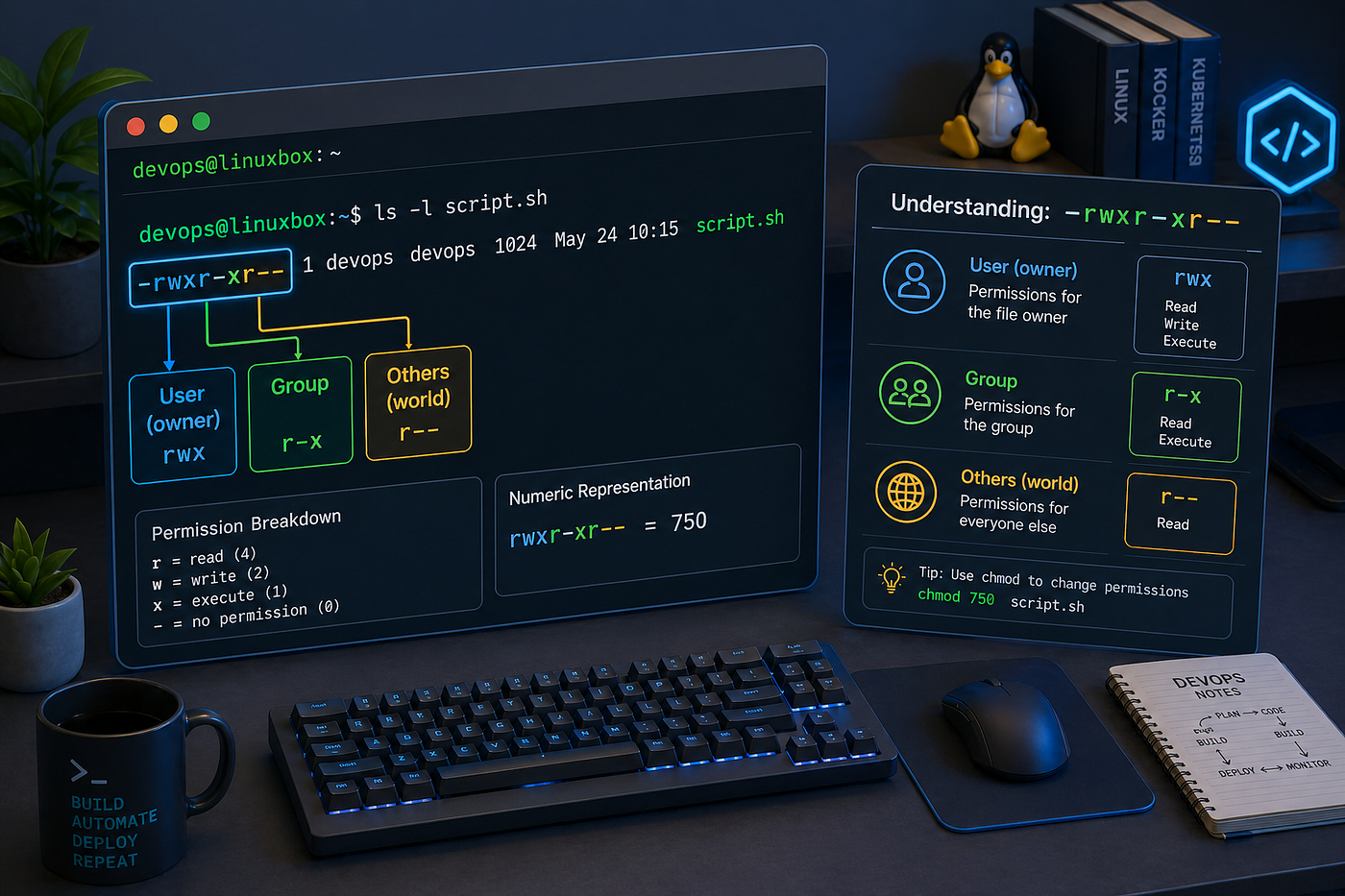
Understanding Linux permissions at a glance — breaking down -rwxr-xr-- into user, group, and others in a clean, visual way.
Linux File Permissions Explained: Decode rwxr-xr — with Real Examples & chmod (2026 Guide)
Understand rwx, user/group/others, numeric permissions, and real-world DevOps use cases — without confusion.
Linux file permissions are one of the most fundamental concepts in system administration, DevOps, and cybersecurity. They define who can access a file and what actions they can perform, making them critical for both security and system stability.
If you’ve ever seen something like:
-rwxr-xr--and felt confused, this guide will give you a complete, intuitive understanding — not just what it means, but how everything connects: rwx, ownership, numeric values, and real-world behavior.
What Are Linux File Permissions?
Linux permissions define three core actions:
- Read → view content
- Write → modify content
- Execute → run or access
These permissions ensure that only authorized users can access or modify files, forming the base of Linux security.
Understanding rwx (The Core Concept)
At the heart of Linux permissions are three letters:
r→ readw→ writex→ execute
These are always grouped together in sets of three.
Think of rwx as a permission bundle:
rwx→ full controlrw-→ read + write onlyr--→ read-only---→ no access
Each letter directly maps to a capability:
- Read allows viewing file contents
- Write allows modifying or deleting
- Execute allows running a script or entering a directory
The Most Important Concept: Ownership (User, Group, Others)
Permissions are not global. They are applied to three different types of users:
User (Owner) The person who owns the file.
Group A set of users who share access.
Others Everyone else on the system.
How rwx Belongs to Each Category
When you see:
-rwxr-xr--It is divided like this:
-   rwx   r-x   r--
    |     |     |
   user  group others
Breakdown:
rwx→ permissions for the user (owner)r-x→ permissions for the groupr--→ permissions for others
Structure is always:
- First 3 → user
- Next 3 → group
- Last 3 → others
Visual Understanding (Use This as Your Medium Image)
File: script.shPermission String:
-rwxr-xr--[File Type] [ USER ] [ GROUP ] [ OTHERS ]
- rwx r-x r--USER → read, write, execute
GROUP → read, execute
OTHERS → read onlyReal-Life Analogy
Think of a file like a house:
- Owner → full control
- Group → family members
- Others → strangers
Permissions:
- Read → look inside
- Write → modify things
- Execute → enter
File vs Directory Behavior
Permissions behave differently depending on context.
For files:
r→ read contentw→ modify contentx→ execute file
For directories:
r→ list filesw→ create/delete filesx→ enter directory
Without x, you cannot access a directory—even if you have read permission.
Numeric Permissions (Octal System)
Linux represents permissions using numbers:
- Read = 4
- Write = 2
- Execute = 1
Add them together:
rwx= 7rw-= 6r-x= 5r--= 4
Example:
chmod 755 script.shThis means:
- User → 7 → rwx
- Group → 5 → r-x
- Others → 5 → r-x
Symbolic Permissions (Using rwx Directly)
Instead of numbers, you can use letters.
Format:
chmod [who][operator][permissions] fileWhere:
u→ userg→ groupo→ othersa→ all
Operators:
+→ add-→ remove=→ set exactly
Practical Symbolic Examples
Add Execute Permission to User
chmod u+x script.shAdd Read and Write to User
chmod u+rw file.txtRemove Write from Group
chmod g-w file.txtAdd Execute to Everyone
chmod a+x script.shSet Exact Permissions Using rwx
chmod u=rwx,g=rx,o=r file.txtMeaning:
- User → rwx
- Group → r-x
- Others → r —
Remove All Permissions from Others
chmod o= file.txtMultiple Changes Together
chmod u+r,g+w,o-x file.txtCombining Numeric and Symbolic Understanding
Both approaches represent the same thing.
Example:
chmod 755 script.shis equivalent to:
chmod u=rwx,g=rx,o=rx script.shAnd also similar to:
chmod u+rwx,g+rx,o+rx script.shNumeric sets everything at once. Symbolic gives you control over specific changes.
Real-World Examples
Make a Script Executable
chmod +x deploy.shSecure a Private File
chmod 600 secrets.txtPublic Web File
chmod 644 index.htmlTeam Collaboration Directory
chmod 775 project/Common Beginner Mistakes
Using 777
chmod 777 fileThis gives full access to everyone and breaks security.
Ignoring Ownership
Wrong owner can block access even if permissions look correct.
Misunderstanding Directory Execute
Without x, directory access fails—even with read permission.
Pro Tips for DevOps Engineers
- Follow the least privilege principle
- Avoid 777 in production
- Use groups for collaboration
- Debug using:
ls -l
whoami
groups- Understand permissions in:
- Docker volumes
- CI/CD pipelines
- Nginx and Apache
Final Thoughts
Once you understand:
rwx→ what actions are allowed- user / group / others → who gets those actions
- numeric → shorthand representation
- symbolic → flexible control
Linux permissions become simple and predictable.
💡 Like & Share if you found this useful! 🔔 Follow to stay updated. 🌟 Enjoyed this article? Give it claps!
A message from our Founder
Hey, Sunil here. I wanted to take a moment to thank you for reading until the end and for being a part of this community. Did you know that our team run these publications as a volunteer effort to over 3.5m monthly readers? We don’t receive any funding, we do this to support the community.
If you want to show some love, please take a moment to follow me on LinkedIn, TikTok, Instagram. You can also subscribe to our weekly newsletter. And before you go, don’t forget to clap and follow the writer️!
메타데이터
- post_id
- af10c070bfb6
- slug
- linux-file-permissions-explained-decode-rwxr-xr-with-real-examples-chmod-2026-guide-af10c070bfb6
- url
- https://blog.stackademic.com/linux-file-permissions-explained-decode-rwxr-xr-with-real-examples-chmod-2026-guide-af10c070bfb6
- canonical_url
- https://blog.stackademic.com/linux-file-permissions-explained-decode-rwxr-xr-with-real-examples-chmod-2026-guide-af10c070bfb6
- author_url
- https://medium.com/@harleenkour9164
- status
- ok
- fetched_at
- 2026-07-29 15:55:37