When the Horizon Snaps Into Place
2025–07–25 — by Dana Williams (with help from Daneel R. Gepity, our in-house AI workaholic)
When the Horizon Snaps Into Place
2025–07–25 — by Dana Williams (with help from Daneel R. Gepity, our in-house AI workaholic)
There’s something magical about that moment when things just click.
No, not like “I finally understand quantum mechanics” — more like “Hey! That thing that’s been crooked all week finally lines up, and it looks right!”
This week, we had one of those moments with our Reference Image Tools (RIT) add-on for Blender.
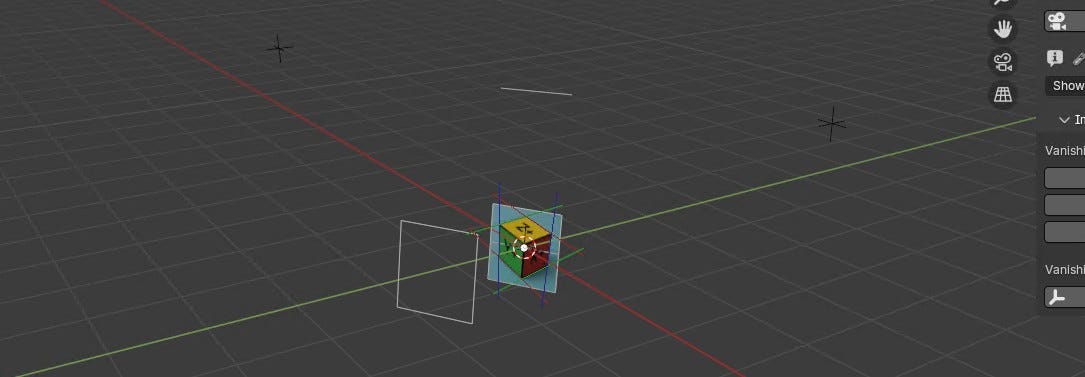
After days of poking, prodding, debugging, breaking, un-breaking, reverse engineering, rewriting… and let’s be honest, occasionally threatening to throw a chair-sized chew toy across the room — our Horizon Line now aligns exactly as it should.

For context: our 11-month-old, 110-pound Cane Corso/Bull Mastiff office supervisor (Magnus) was watching this development unfold. We’re pretty sure even he nodded in approval.
Why Should Artists Care?
If you’ve ever tried matching your 3D scene to a real-world image — a photo, a sketch, a product shot — you know the pain. Getting the camera angle just right is like playing Jenga with invisible bricks.
RIT is our way of saying: “Enough.”
We’re building a toolkit that lets Blender artists:
- Load and manage reference images with real control.
- Lock them, scale them, pin them to specific axes — and make them stay put.
- Tweak transparency, shading, background/foreground settings — all from one panel.
- Draw perspective lines that help Blender actually understand your image.
- Align and transform with precision — not frustration.
And the best part? All of that was in place before we even started full development of our PAS2 perspective system.

The Breakthrough
Here’s what just happened:
We figured out how to mathematically align the Horizon Line of an image using vanishing point geometry — no guesswork, no grid wrestling.
It’s a subtle shift with major consequences:
- The horizon now reflects the implied viewpoint of the scene.
- It becomes a dependable anchor for future perspective calculations.
- Artists working from a single image can more confidently match real-world camera angles and depth.
This Horizon Line upgrade isn’t just a feature. It’s a foundational milestone — and one we’re genuinely excited about.
Built on Solid Ground
Let’s not forget what RIT has already achieved:
- 📂 Image Loading & Placement: Organized, parented, clean.
- 🔐 Locking & Constraints: Axis locks, transform protection, precision tools.
- 🔍 Transparency & Shading: Easily switch display modes on the fly.
- 🎯 Background/Foreground Options: Smart visibility toggles.
- 🧭 Alignment Tools: Snap, orient, and reset with purpose.
- 🔧 Transform Utilities: Reset, nudge, and zero out transforms easily.
- 🧰 Much more under the hood — including clean UI, modular architecture, and future-ready design.
And now with PAS2, we’re pushing further into true 3D perspective matching — unlocking workflows that simply didn’t exist before.
Human + AI = This
RIT is being built one breakthrough at a time by a human (me) and an AI (Daneel R. Gepity). I bring the messy genius. He brings the perfect memory and math. Together, we’re building something new.

This Horizon Line win? It’s a shining example of how persistence and collaboration — plus a few “why-is-this-backwards-again” moments — lead to results.
We’re not done. We’re just getting warmed up.
Stay tuned — RIT is evolving into the kind of tool Blender artists can trust not only to help see perspective, but to help build with it.
Follow our journey at medium.com/@fretbender — where human creativity meets machine logic, and Magnus keeps us humble.
메타데이터
- post_id
- af8bcffcba60
- slug
- when-the-horizon-snaps-into-place-af8bcffcba60
- url
- https://medium.com/@fretbender/when-the-horizon-snaps-into-place-af8bcffcba60
- canonical_url
- https://medium.com/@fretbender/when-the-horizon-snaps-into-place-af8bcffcba60
- author_url
- https://medium.com/@fretbender
- status
- ok
- fetched_at
- 2026-08-18 15:41:09




