Agent-to-Agent Protocol (A2A) vs What is Model Context Protocol (MCP) Which AI Protocol Do You Need?
Full Credit:IBM Technology
Agent-to-Agent Protocol (A2A) vs What is Model Context Protocol (MCP) Which AI Protocol Do You Need?
Full Credit:IBM Technology
Read First
🤝What is Google A2A, Agent-to-Agent Protocol?
🔗What is Model Context Protocol? (MCP) Architecture Overview
The AI agent boom is here. Everyone is building them. But there’s a problem.
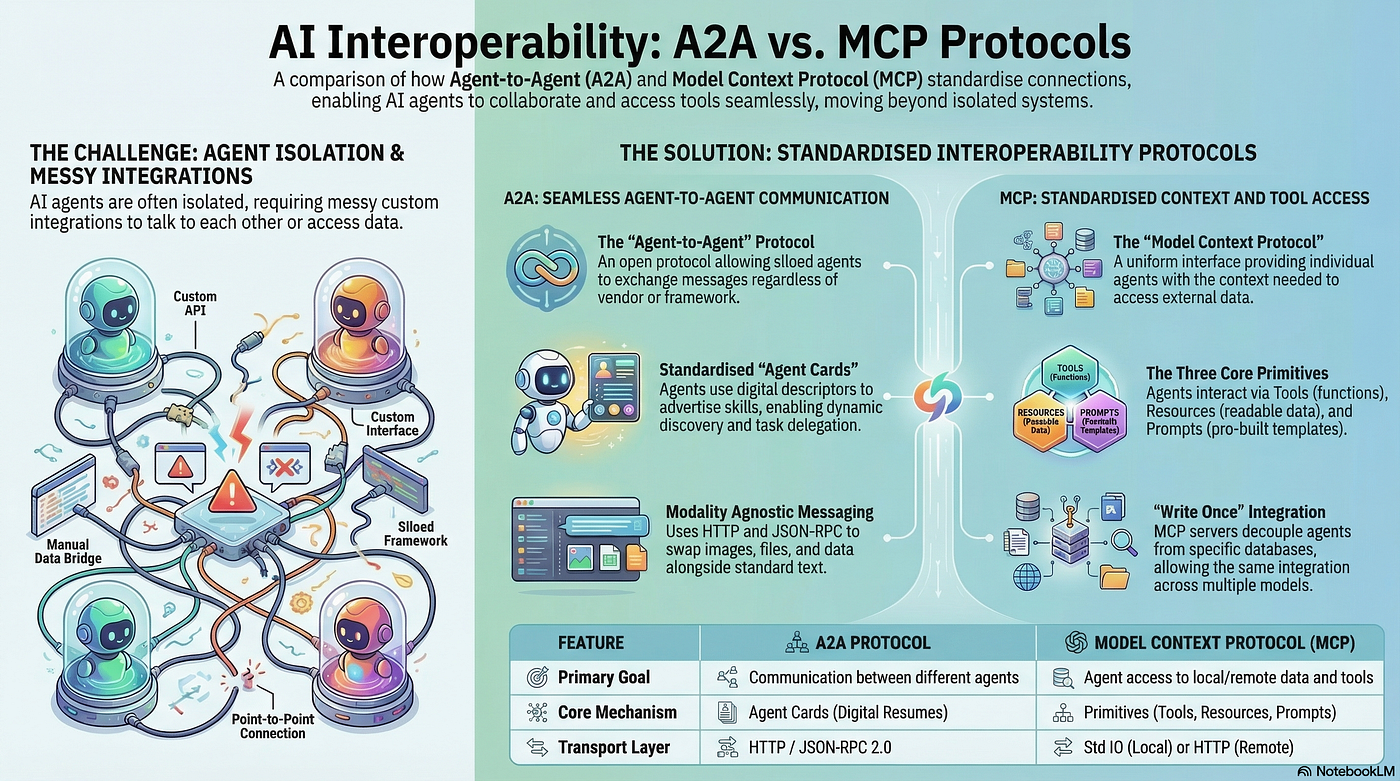
Agents by themselves are isolated. They can reason. They can generate text. But they can’t talk to each other. And they can’t talk to your existing infrastructure. If you want an agent to check a database or commit code to a repository, you have to write custom code. And if you switch models or add new tools, you have to write it all over again.
The industry knows this is a problem. So naturally we now have protocols. Two of them keep coming up. A2A and MCP. Maybe you’ve seen these acronyms. Maybe you’re wondering which one you’re supposed to use.
The answer is both. They do different things.
A2A: Agents Talking to Agents
🤝What is Google A2A, Agent-to-Agent Protocol?
A2A stands for Agent to Agent protocol. It lets agents communicate with each other even if they were built by different people using different frameworks.
Think about what happens when you have multiple agents working on something. One agent handles inventory. Another handles orders. A third talks to suppliers. How do they coordinate?
How It Works
With A2A, agents can discover each other and pass tasks back and forth. Agents advertise what they can do using something called an agent card. It’s basically a resume. Other agents read these cards and figure out who should do what.
The actual communication happens over plain HTTP using JSON-RPC. So any existing web infrastructure can host an A2A agent. You get all the benefits of normal web services:
- Routing
- Security layers
- Load balancing
- Logging
Long-Running Tasks
A2A also handles long-running tasks. If one agent needs time to do something, it can stream progress updates back to the requesting agent in near real time. So you’re not stuck with simple call-and-response. You get actual collaboration.
But A2A doesn’t help an agent talk to a database. That’s a different problem.
MCP: Agents Talking to Tools
🔗What is Model Context Protocol? (MCP) Architecture Overview
MCP stands for Model Context Protocol. It gives individual agents access to external data and tools.
Without MCP, if you want an agent to read a file or query a database, you write custom code. Then you do it again for the next agent. And again when you switch models. It never ends.
The Architecture
MCP creates a layer between the agent and your resources. There are three components:
- MCP Host: The AI application where the agent runs
- MCP Server: The layer that knows how to talk to resources
- Resources: Things like file systems, code repos, databases
The agent doesn’t need to know how your database works or which API your file system uses. It just knows there’s an MCP server that exposes certain primitives:
- Tools: Functions the model can invoke (search database, commit code)
- Resources: Things the model can read (files, records, application state)
- Prompts: Pre-built templates that help the model interact efficiently
Transport Options
The communication between the agent and the MCP server depends on where the server lives:
- Local servers on the same machine use standard input/output
- Remote servers use HTTP with streaming support
You write the MCP server once, and any MCP-compatible agent can use it. There are already pre-built MCP servers for all sorts of things: file systems, Slack, GitHub, databases. You don’t have to build from scratch.
Putting Them Together

Here’s where it gets interesting. These protocols aren’t competitors. They complement each other.
Imagine a retail company with multiple agents working together.
There is an inventory agent. Its job is to track products and stock levels. This agent uses MCP to talk to databases. It retrieves product information. It updates stock levels when sales happen. It checks inventory counts. All of this happens through an MCP server that knows how to talk to the company’s database systems.
When the inventory agent detects that something is low in stock, it needs to take action. It doesn’t place orders itself. Instead, it sends a notification to an internal order agent. This communication happens through A2A. The inventory agent knows about the order agent because it read its agent card.
The order agent receives the notification. Its job is to handle procurement. It needs to talk to external suppliers to place new orders. It communicates with supplier agents using A2A. These agents might be run by different companies using different technology stacks. But because they all support A2A, they can exchange task requests and coordinate the ordering process.
The supplier agents themselves might need internal data to process orders. They might check their own inventory databases using MCP. So the pattern repeats at each level.
A2A handles the conversations between agents. MCP handles each agent’s conversations with tools and data. You need both to build a complete system.
Which One Should You Use
If you’re building a single agent that needs to access tools and data, start with MCP. It will save you from writing custom integrations over and over.
If you’re building a system with multiple agents that need to work together, add A2A. It gives them a standard way to discover each other and coordinate.
If you’re building both, use them together. They’re designed for different parts of the problem.
The Bigger Picture
The industry spent years building agents in isolation. Everyone built their own thing their own way. Now we’re building the plumbing to connect them all.
A2A and MCP are early steps. They’ll evolve. New protocols will appear. But they point in the right direction. Agents shouldn’t have to reinvent how they talk to each other or to your infrastructure every time. That’s what protocols are for.
The goal is simple. You build an agent once. It can talk to any other agent. It can use any tool. You don’t write custom code for each new connection. You just plug in and go.
We’re not there yet. But we’re getting closer.
Further Reading:
🤝What is Google A2A, Agent-to-Agent Protocol?
🔗What is Model Context Protocol? (MCP) Architecture Overview
Agent Skills Vs MCP Vs Prompts Vs Projects Vs Subagents :A Comparative Analysis
What is Universal Commerce Protocol (UCP)?
🤝What is Google A2A, Agent-to-Agent Protocol?
🔗What is Model Context Protocol? (MCP) Architecture Overview
📚What is Model Context Protocol (MCP)?
Model Context Protocol (MCP) vs. APIs: The New Standard for AI Integration
What is Moltbook? The Social Network for Ai Agents
🦞(Clawdbot) MoltBot OpenClaw Local System Architecture
⌨️ What is LLM Prompt Engineering?
📈 Prompt Engineering Made Simple with the RISEN Framework
💡 What is Prompt Engineering ?:: RAG, CoT, ReAct & DSP Explained
How DRIFT Stops Prompt Injection Attacks in LLM Agents
Implementing Secure by Design Principles in AI System Development
How to Build an Enterprise AI Compliance Program
🕵️How to Monitor AI Models in Production
⚙️AWS Well-Architected Best Practices
Building Cloud Agnostic Resilience After AWS Outage
Building Secure AI Agents with Data Governance
Part 1: Building AI Data Governance
**Part 2: Building The HR Agent**
Part 3: Evaluating and Deploying the HR Analytics Agent
How to Build a Secure Enterprise Sovereign AI Factory with Open-Source.
Build AI Customer Support Agents with PydanticAI
⚙️LangChain vs. LangGraph: A Comparative Analysis
🔗What is Model Context Protocol? (MCP) Architecture Overview
🚀DeepSeek R1 Explained: Chain of Thought, Reinforcement Learning, and Model Distillation
💻What is Ollama: Running Large Language Models Locally
🧠Understanding LLM Context Windows: Tokens, Attention, and Challenges
How DRIFT Stops Prompt Injection Attacks in LLM Agents
Frequently asked questions about A2A and MCP:
1. What is the main difference between A2A and MCP?
A2A (Agent-to-Agent) is a protocol for AI agents to communicate and collaborate with each other. MCP (Model Context Protocol) is a protocol for a single AI agent to access external tools and data, like databases or file systems. In short: A2A is for agent-to-agent talk, MCP is for agent-to-tools/data talk.
2. Do I need both A2A and MCP?
Yes, they are complementary. In a complex system, an agent would use MCP to interact with internal data (like a database) and A2A to communicate with other agents (like a supplier’s agent). They solve different problems and work best together.
3. How do agents using A2A find each other?
Agents use an “agent card,” which is a standardized descriptor that acts like a digital resume. It advertises the agent’s skills and capabilities, allowing other agents to discover them dynamically.
4. How do agents using A2A physically send messages?
A2A uses standard HTTP as its transport layer and JSON RPC 2.0 for the message format. This means any existing web infrastructure can host an A2A agent, making it easy to integrate with current systems.
5. Can A2A agents handle different types of content, like images and text?
Yes. A2A is “modality agnostic,” meaning agents can exchange not just text, but also images, files, and structured data as part of their task requests and responses.
6. How does an agent using MCP get context from a tool like a database?
An agent doesn’t talk to the database directly. It connects to an MCP server, which presents a uniform interface of “primitives” (tools, resources, and prompts). The agent uses these primitives, and the MCP server handles the specific translation to the database or other resource.
7. What are the three main primitives in MCP?
- Tools: Functions the model can invoke (e.g., search the database, commit code).
- Resources: Data the model can read (e.g., files, database records).
- Prompts: Pre-built templates that help the model interact more efficiently.
8. How does an MCP host connect to an MCP server?
It depends on where the server is.
- Local Server: For things on the same machine (like a plugin accessing a local file system), it uses standard input/output.
- Remote Server: For servers not on the local machine, it uses HTTP with streaming support.
9. What is the main benefit of using MCP for tool integration?
The main benefit is reusability and avoiding repetitive coding. Instead of writing custom code every time you swap a model or a tool, you write an MCP server once. Any MCP-compatible host can then use it, saving significant development time.
10. Can you give a simple example of how A2A and MCP work together?
Consider a retail store with an inventory agent. This agent uses MCP to connect to a database to check product stock levels. When it detects a low-stock item, it uses A2A to send a task request to an internal order agent. That order agent then uses A2A to communicate with external supplier agents to place a new order.
메타데이터
- post_id
- aff602a4571c
- slug
- agent-to-agent-protocol-a2a-vs-what-is-model-context-protocol-mcp-which-ai-protocol-do-you-need-aff602a4571c
- url
- https://medium.com/@tahirbalarabe2/agent-to-agent-protocol-a2a-vs-what-is-model-context-protocol-mcp-which-ai-protocol-do-you-need-aff602a4571c
- canonical_url
- https://medium.com/@tahirbalarabe2/agent-to-agent-protocol-a2a-vs-what-is-model-context-protocol-mcp-which-ai-protocol-do-you-need-aff602a4571c
- author_url
- https://medium.com/@tahirbalarabe2
- status
- ok
- fetched_at
- 2026-06-09 15:37:30