Everything You Need to Know About Checksums, SHA-256, MD5, & More.
Where Are Checksums and Hashes Used in iOS Development? In iOS development, checksums and cryptographic hash functions are employed in…
Everything You Need to Know About Checksums, SHA-256, MD5, & More.
Where Are Checksums and Hashes Used in iOS Development? In iOS development, checksums and cryptographic hash functions are employed in several critical areas:
- App Integrity Verification: When submitting apps to the App Store, Apple verifies the integrity of the IPA using cryptographic signatures that internally rely on hashing (e.g., SHA-256).
- Code Signing and Provisioning Profiles: Every iOS app is signed with a certificate. The signing process uses a hash of the binary to ensure the app hasn’t been tampered with. The provisioning profile also includes hashed metadata to tie it to specific devices and Bundle IDs.
- **Firebase and Other SDK Config Files:** Files like GoogleService-Info.plist are hashed(SHA-256) to confirm they have not been altered. Firebase rejects configurations with invalid checksums.
- Local File Validation and Caching: Apps often cache downloaded resources (images, JSON, etc.) and validate their integrity using checksums to ensure they haven’t been corrupted.
- App Updates and OTA Distribution: Enterprise apps distributed over-the-air include checksum verification to validate the authenticity of the app bundle.
- Security Features like Password Storage: Developers use hashing (with salting and stretching) to store user passwords securely in local databases or Keychain.
- **Bundle ID Integrity:** While not hashed directly, the Bundle ID is part of signed metadata and embedded within the provisioning profile. Changing it breaks integrity checks.
Note: Salting is adding process of adding random data when converting data using hashing. Stretching is a security technique that intentionally increases the computational cost of generating a password hash
Table of Contents
- What is a Checksum?
- Why Do We Use Checksums?
- What is a Cryptographic Hash Function?
- Understanding MD5
- Understanding SHA-256
- Differences Between SHA-256 and MD5
- What is a Checksum File?
- How Date and Checksum Work Together in Configs
- Using Checksums in Real-World Applications
- Best Practices
- Conclusion
What is a Checksum?
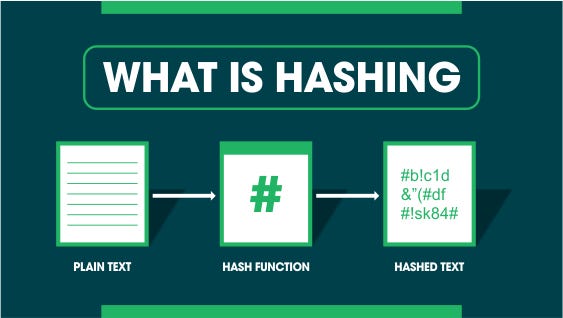
A checksum is a short string of letters and numbers derived from a longer string of data using a mathematical algorithm. It acts as a digital fingerprint for a file.
- A checksum helps verify that the content of a file has not been changed accidentally or maliciously.
- It is generated by applying a hash function to the file data, which converts the entire contents into a fixed-size output. Checksums are highly sensitive to changes. Altering even a single character in a file results in a completely different checksum.
- Typically represented in hexadecimal format, checksums can be generated using various hash algorithms like MD5, SHA-1, or SHA-256.
- Used widely to ensure file integrity, especially when transferring data over the internet.
Why Do We Use Checksums?
Checksums play an essential role in ensuring the integrity and authenticity of data across different systems:
- File Transfer Validation: They verify that a file downloaded from the internet is complete and unaltered.
- Software Authenticity: Developers include checksums with software releases so users can confirm the download hasn’t been tampered with.
- Malware Prevention: Checksums can detect if malicious code has been inserted into an app or file.
- Duplicate File Detection: Tools use hash values to identify duplicate files or data blocks.
- App Store and OTA Updates: Apple and enterprise systems use hashes to verify software updates.
- Blockchain Verification: Blockchain technologies use cryptographic hashes to link blocks and ensure immutability.
What is a Cryptographic Hash Function?
A cryptographic hash function is a mathematical algorithm that transforms any arbitrary-size data input into a fixed-length hash value.
- Deterministic Output: The same input always produces the same output.
- Non-Reversible: It’s practically impossible to reconstruct the original data from the hash.
- Collision-Resistant: Two different inputs will not produce the same hash value.
- Avalanche Effect: A small change in input causes a massive change in output.
- Fixed Length Output: Regardless of input size, the hash will always be a specific number of bits (e.g., 256 bits for SHA-256).
Popular hash functions:
- **MD5:** 128-bit hash, fast but insecure.
- **SHA-1: **160-bit hash, deprecated due to vulnerabilities.
- **SHA-2 Family:** Includes SHA-224, SHA-256, SHA-384, SHA-512.
- **SHA-3:** The latest family designed for resilience against future vulnerabilities
Understanding MD5
MD5 (Message Digest Algorithm 5) was once a widely-used cryptographic hash function but is now considered insecure.
- Output Length: Produces a 128-bit hash (32 hexadecimal characters).
- Speed: Extremely fast and resource-light, suitable for basic checks.
- Use Cases: Previously used in checksums, file verification, and digital signatures.
- Vulnerabilities: Researchers discovered it’s possible to generate two files with the same MD5 hash (known as a collision).
- Security Status: Not safe for authentication or secure communication; avoid in any context requiring trust.
Though still acceptable for: 1. Quick, non-critical hash comparisons (e.g., caching) 2. Legacy system support
Understanding SHA-256
SHA-256 (Secure Hash Algorithm 256-bit) is part of the SHA-2 family and is widely trusted for secure applications.
- Output Length: 256-bit hash (64 hexadecimal characters).
- Security Strength: Resistant to known collision and preimage attacks.
- Designed By: The NSA, standardized by NIST.
- Usage: Used in secure messaging, Bitcoin, SSL/TLS, and iOS app signing.
- High Avalanche Effect: Even a tiny change in input causes a completely different hash.
- Performance: Slower than MD5, but far more secure.
Common use cases:
1 .Blockchain mining and transaction verification. 2. Secure config file integrity checks. 3. TLS/SSL certificates and HTTPS. 4. Code signing and digital signatures.
Differences Between SHA-256 and MD5
[embed]
What is a Checksum File?
A checksum file is a text file that contains one or more precomputed hash values. These files usually accompany downloads and contain hash values for associated files. Common extensions: .md5 , .sha1 , .sha256 Users run a checksum utility on the downloaded file and compare it with the value in the checksum file.
Example content of a .sha256 file:
5d41402abc4b2a76b9719d911017c592 hello.txt
Verification command (on macOS/Linux):
shasum -a 256 hello.txt
If the result matches the checksum, the file is valid.
How Date and Checksum Work Together in Configs
In mobile development and automated systems, it’s common to store both a date and a checksum. Why?
- Timestamp: Indicates when a file or configuration was last updated.
- Checksum: Ensures the file’s contents have not changed.
- Configuration Management: Prevents using outdated or modified settings.
- Triggering Updates: Systems compare current and stored checksums to decide if an update is needed.
- Fallbacks: If the checksum doesn’t match, systems may revert to defaults or cached versions.
Example in Firebase: Firebase SDKs verify the SHA-256 hash of GoogleService-Info.plist . If the file has been tampered with or is outdated, Firebase may refuse to initialize certain services.
Using Checksums in Real-World Applications
1 .Firebase Config Validation: Uses SHA-256 hash to verify the integrity of configuration files. 2. APK Signing: Google Play uses SHA-1 and SHA-256 to ensure APKs haven’t been modified. 3. Blockchain: Bitcoin and other cryptocurrencies rely on SHA-256 for block linking, mining, and verifying transactions. 4. Password Storage: Never store passwords directly. Use a salted hash for protection. 5. Secure App Updates: iOS enterprise apps often verify checksums before installing updates. 6. CI/CD Pipelines: Configuration scripts and artifacts are often hashed to detect changes before deployment.
Terminal Commands: 1. MD5: md5 file.txt 2. SHA-256 (macOS): shasum -a 256 file.txt 3. SHA-256 (Linux): sha256sum file.txt
Best Practices
- Use SHA-256 or better for all security-sensitive use cases.
- Avoid MD5 and SHA-1 for anything requiring integrity, trust, or security.
- Use salted and stretched hashes when storing passwords to resist rainbow table attacks.
- Always verify checksums when downloading or deploying files.
- Include both a date and checksum when tracking config files or updates.
- Hash sensitive configuration files during runtime to detect unauthorized modifications.
- Use version control systems and CI/CD checks that incorporate checksum validation.
Conclusion
Checksums and cryptographic hashes are critical tools in securing the digital systems we use every day. From verifying a downloaded app to protecting user credentials, these tiny strings of text can save you from major security breaches.
While MD5 might still have a role in fast, non-secure operations, SHA-256 stands as the industry standard for trusted environments. If you are working on an iOS project, Firebase integration, app update mechanism, or a custom configuration management solution — understanding and implementing checksums correctly is non-negotiable.
If you need help hashing data, verifying checksums, or securing configuration in your iOS or backend project, feel free to reach out!
메타데이터
- post_id
- b01c4e8b83ab
- slug
- everything-you-need-to-know-about-checksums-sha-256-md5-more-b01c4e8b83ab
- url
- https://medium.com/@rishabhkochar27/everything-you-need-to-know-about-checksums-sha-256-md5-more-b01c4e8b83ab
- canonical_url
- https://medium.com/@rishabhkochar27/everything-you-need-to-know-about-checksums-sha-256-md5-more-b01c4e8b83ab
- author_url
- https://medium.com/@rishabhkochar27
- status
- ok
- fetched_at
- 2026-06-26 21:52:29