Key Differences Between SysML v1 and SysML v2
Diagram and View Mapping
Key Differences Between SysML v1 and SysML v2
Diagram and View Mapping
- In SysML v1, diagrams are the primary representation mechanism.
- In SysML v2, diagrams are mapped to views for a more flexible and structured approach.
Pillars and Capabilities
- SysML v1 relies on pillars as foundational modeling elements.
- SysML v2 maps these pillars to capabilities, enhancing the extensibility and modularity of the modeling framework.
Notations
SysML v2 introduces textual notation alongside traditional graphical notation, providing greater flexibility in model representation.
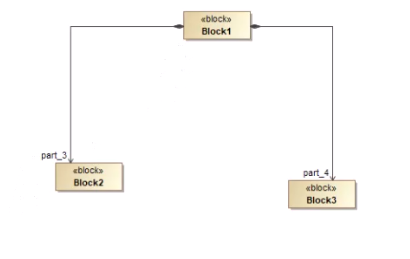
- SysML v1 BDD (Block Definition Diagram) → SysML v2 General View
- SysML v1 IBD (Internal Block Diagram) → SysML v2 Interconnection View
New Capabilities in SysML v2
SysML v2 expands its feature set with two significant new capabilities:
- View and Viewpoint Capability — Allows customization of system representations based on stakeholder perspectives.
- Verification — Adds formal verification to ensure system correctness and compliance with requirements.
Terminology Changes
- SysML v1 Block → Part Definition in SysML v2
- SysML v1 Part Property → Part in SysML v2
- SysML v1 Connector → Connection in SysML v2
- SysML v1 Port → Port/Interface in SysML v2
Key Additions in SysML v2
1. Removal of Plain UML Ports (Untyped or Structural Ports)
In SysML v1, ports could either be:
- Standard (Plain) UML Ports — Allowing general connections without strict typing.
- Flow/Full Ports — More specialized for flows or interfaces.
A port in SysML v2 corresponds to a proxy port in SysML v1. A port is a part of a part. Ports can also be created with Connections but also with Interfaces. An interface is initially a specialization of a connection for ports: Every interface is therefore also a connection.
interface def ApplicanceConnection {
end port outlet : HouseholdOutlet;
end port device : HouseholdDevice;
}
2. Item Flows Integration with Connectors
SysML v1: In SysML v1, item flows are defined separately from the connector. You first create a connector between two blocks and then apply an item flow to specify what kind of data, material, or signal passes through that connector.
Example (SysML v1):
- Block A and Block B are connected by a connector.
- You separately define an item flow called “Fuel” that moves from A to B through that connector.
SysML v2: In SysML v2, item flows are directly part of the connection definition. This reduces steps and ensures the flow is integral to the connection itself.
Example (SysML v2):
- When defining a connection between two parts, you can immediately specify that “Fuel” flows through it, making the model more intuitive and streamlined.
3. Explicit Inheritance and Specialization
SysML v1: Inheritance exists in SysML v1, but it’s primarily implicit, relying on generalization relationships in block definition diagrams.
Example (SysML v1):
- Block “Car” generalizes Block “ElectricCar” and Block “Truck.”
SysML v2: SysML v2 makes generalization and specialization more explicit by providing direct constructs for inheritance relationships.
Example (SysML v2):
- Part Definition “Vehicle” can explicitly specialize “ElectricVehicle” or “HybridVehicle” with clearer syntax and traceability.
Why it Matters: Explicit inheritance leads to clearer, more maintainable models, reducing ambiguity and ensuring better reuse of part definitions.
4. Native Requirement Modeling
SysML v1: Requirements in SysML v1 are modeled using stereotypes applied to blocks or classes. This often requires custom profiles, which can lead to inconsistencies.
Example (SysML v1):
- A block might have the stereotype «Requirement», which adds requirement-specific attributes.
SysML v2: In SysML v2, requirements are a native part of the language, reducing the need for stereotypes. Requirement relationships like «satisfy» or «verify» are directly supported.
Example (SysML v2):
- Requirements are modeled as first-class entities, linked directly to parts or behaviors through formal relationships.
Why it Matters: This enhances traceability and simplifies requirement management, leading to models that better align with systems engineering standards.
Block Definition Diagrams (BDD) vs. General Views
- SysML v1: BDDs can only contain blocks.
- SysML v2: General Views can contain both part definitions (blocks) and parts for a more integrated modeling approach.
Internal Block Diagrams (IBD) vs. Interconnection Views
- SysML v1: IBDs model internal structures and relationships between parts.
- SysML v2: Interconnection Views provide a more granular representation, supporting better visualization of connections and interfaces.
Enhanced Instance Features in SysML v2
SysML v2 introduces richer modeling options for instances, including:
- Individual Occurrence Definition — Tracks the serial number of an instance throughout its lifecycle.
- Snapshot Definition — Represents a specific point in time within the system’s lifecycle.
- Time Slice Definition — Models a time range within the system’s lifecycle.
These features provide deeper insights into system behaviour over time, improving traceability and analysis.
메타데이터
- post_id
- b035d4e3faad
- slug
- key-differences-between-sysml-v1-and-sysml-v2-b035d4e3faad
- url
- https://medium.com/@dinesh-kumar-rajamani/key-differences-between-sysml-v1-and-sysml-v2-b035d4e3faad
- canonical_url
- https://medium.com/@dinesh-kumar-rajamani/key-differences-between-sysml-v1-and-sysml-v2-b035d4e3faad
- author_url
- https://medium.com/@dinesh-kumar-rajamani
- status
- ok
- fetched_at
- 2026-06-27 18:20:27