🥨 SPSS Snacks #1 | Bulk-Editing Variable Properties
Because life is too short to click ‘Center’ fifty times.
🥨 SPSS Snacks #1 | Bulk-Editing Variable Properties
Because life is too short to click ‘Center’ fifty times.
Prelude: As I do analysis in SPSS, I stumble upon these tips that make my work (and life) easier. So I thought, why not share them?
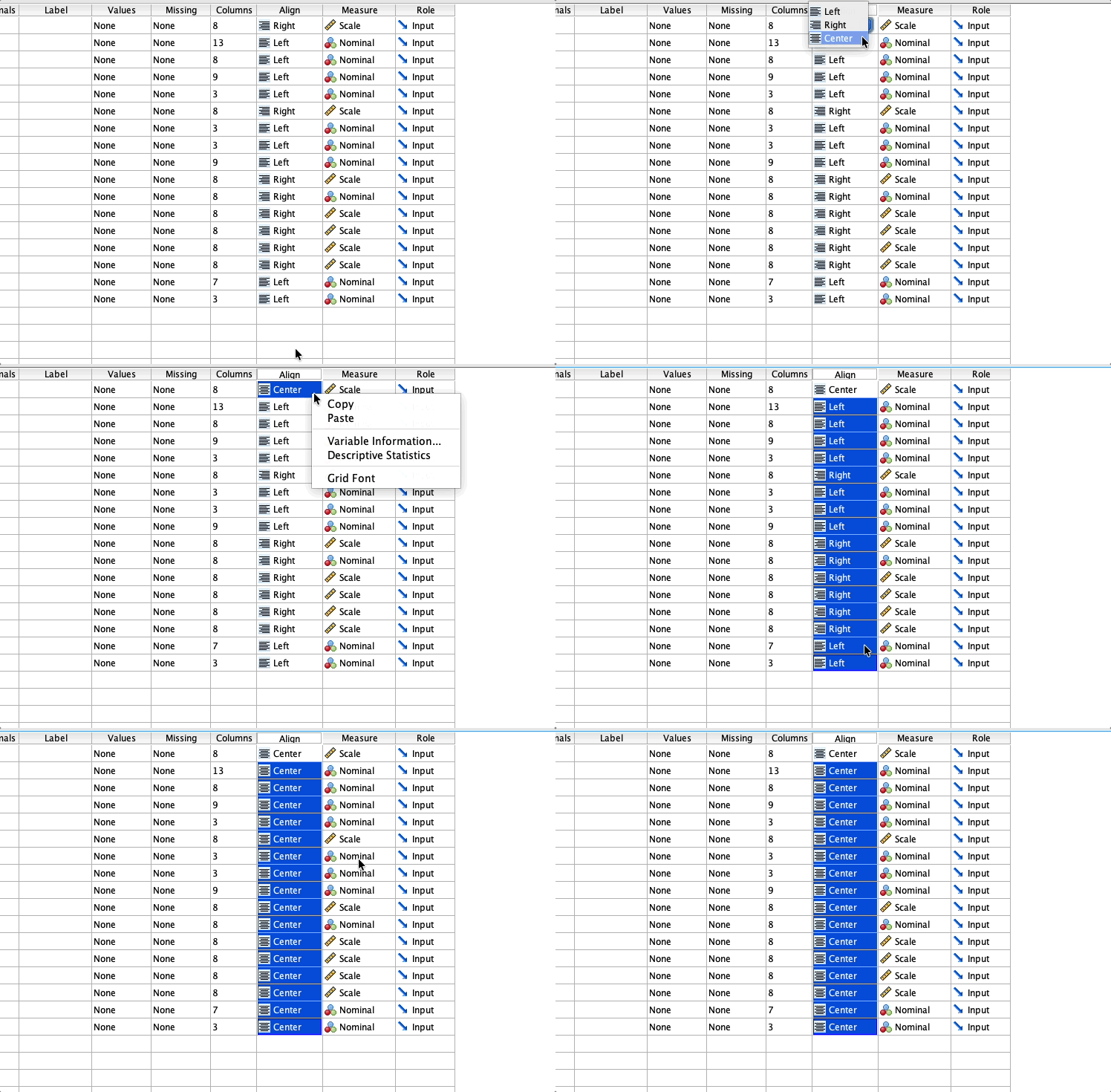
One centered, copied-pasted, all centered!
The OCD part of my brain hates seeing SPSS columns all aligned left and right! Beautifully centered, my data should be!
But manually switching 20 or 100 columns to ‘Center’ is simply absurd.
Fortunately for us, SPSS treats properties as values that can be copied and pasted! Just change one (you can press Enter to set it), right-click > Copy, drag to select all the other columns, and Paste!
Needless to say, this applies to every property. You want to set the decimals for all columns to 0? Change one, copy-paste. The widths of all need to be 10? Change one, copy-paste.
Syntax
For those of you who prefer syntax, this is for alignment:
VARIABLE ALIGNMENT ALL (CENTER).You might think: for other properties, I just change ALIGNMENT to the name of that property, right? Not for all, unfortunately. For measure (LEVEL) and width, similar to ALIGHMENT:
VARIABLE LEVEL ALL (NOMINAL).
VARIABLE WIDTH ALL (12).
For decimal, however, you set it like this (note, it’s a global setting):
SET DECIMALS = 0.Pro Tip
What if you want to change the alignment of certain columns? Simply use the syntax with the names of the columns:
VARIABLE ALIGNMENT Age Gender Education (CENTER).메타데이터
- post_id
- b04e2c0627e3
- slug
- spss-snacks-1-bulk-editing-variable-properties-b04e2c0627e3
- url
- https://medium.com/@mhmxd/spss-snacks-1-bulk-editing-variable-properties-b04e2c0627e3
- canonical_url
- https://medium.com/@mhmxd/spss-snacks-1-bulk-editing-variable-properties-b04e2c0627e3
- author_url
- https://medium.com/@mhmxd
- status
- ok
- fetched_at
- 2026-06-14 11:28:49