What Can You Build with 56 Iterations and 4,950 Credits in Figma Make?
The Figma Professional plan comes with 3,000 credits by default. I was curious whether that would be enough to finish a product in Figma…
What Can You Build with 56 Iterations and 4,950 Credits in Figma Make?
The Figma Professional plan comes with 3,000 credits by default. I was curious whether that would be enough to finish a product in Figma Make — and how many iterations it would actually take.
The short answer: workflow matters more than anything. Getting the background to look the way I imagined burned through over 700 credits in iterative revisions alone. To avoid that kind of waste, you need a solid understanding of how Make handles the features you’re trying to use.
The product I built is called Space Log — a reflection app set in a space theme. It took 4,950 credits and 56 iterations to complete. This is a retrospective on that process.
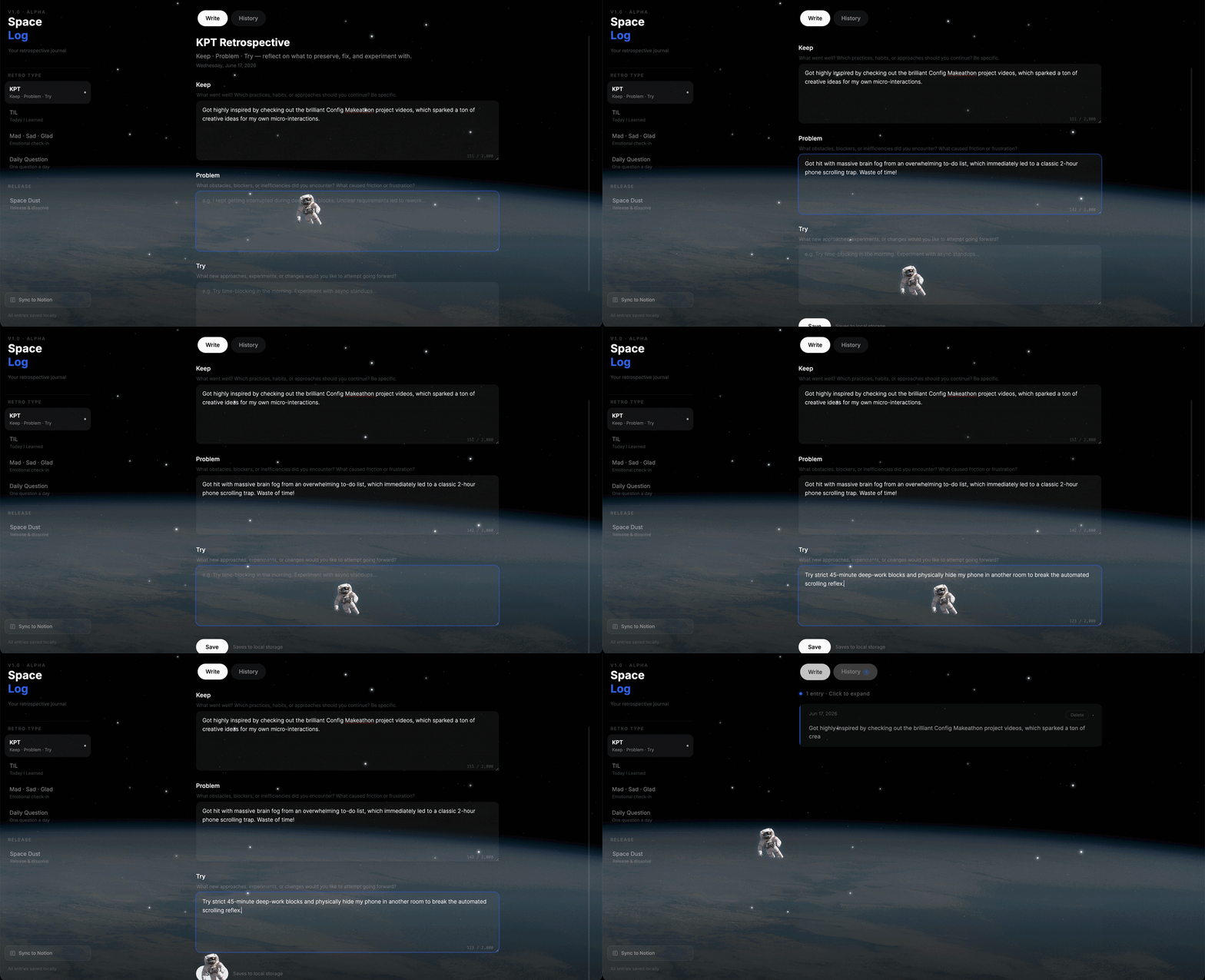
Space Log
A Reflection App Set in Space: Space Log
I’ve always been drawn to the vastness and grandeur of space. I once heard someone say, “A person who never reflects is no different from a chimpanzee,” and I think there’s real truth to that. I wanted to create a quiet corner of the universe — a place to clear your head and encourage yourself at the end of each day. Somewhere you’d actually want to return to, and where reflection could gradually become a habit.
When designing the app, there were a few things I knew I wanted to include:
- A fully responsive app
- Reflection entries stored locally
- Sync with a Notion page
- Multiple reflection formats to choose from
- Micro-interactions to create an immersive, rich UX
Step 1: Establishing the Foundation with a Design System (Credit-Saving Strategy)
With those goals in mind, I started building in Figma Make. The first thing I did was apply a design system. My reasoning was simple: a consistent foundation would reduce the number of revisions and save credits down the line.
From the start, I had Uber’s design system in mind for Space Log. The highly legible sans-serif typeface, black-and-white color tokens, and clean grid and layout felt like the right fit for a space aesthetic.

First result
That said, the initial output still had a distinctly AI-generated feel. The color tokens and button sizes didn’t quite match what I had in mind, and I wanted to fix everything in one go.
So instead of using the Uber Design System md file downloaded from the web, I had Manus analyze the Uber website directly and generate a JSON file, which I then applied in Make. This approach cost about 100 more credits than the md file method. It left me wondering: would sticking with an md file and requesting edits have been the more credit-efficient path?

Uh-oh! What happend?!
After updating the design system, the button specs, color tokens, and component structure all came together the way I wanted. But a new obstacle appeared: the background.
Step 2: Working Around Figma Make’s Limits with Manus (Background Animation)

Background and image handling turned out to be one of Figma Make’s weaker points. Every time I provided a reference image and asked Make to apply it, I’d end up in a loop of revisions — burning through credits and patience. Getting the background to look the way I imagined cost over 700 credits in revisions alone, and across all related work, the iteration count exceeded 30. Eventually, I took a different approach.
I used Manus to generate a JavaScript Canvas animation (JS/Canvas) via prompt, creating a real-time animated background. Since I wanted to incorporate a subtle meteor shower micro-interaction in Space Log, I figured this approach could solve everything at once.

Interaction sample Manus produced
The interaction sample Manus produced through iteration is remarkably close to the final result in Space Log.
I then created a JSON technical specification that combined all the code and hyperrealistic images (Base64-encoded) into a single file, so it could be applied directly in Make’s prompt input. But applying it in Figma Make came with its own limitations.


Relentless iteration
The interaction itself was implemented, but the background and custom mouse cursor assets didn’t carry over. I ended up having to manually supply the background image and revise it again.
At this point, I found myself wondering whether there was a way to use the React component I had already built in Manus preview. It seems like the more efficient path would have been to finalize the background image and custom cursor separately, then ask Make to apply them, and only then fine-tune the physical parameters of the meteor interaction. Or could connecting Claude have resolved all of this? It was a moment where I acutely felt that the human is the bottleneck when it comes to leveraging technology.
Step 3: Unexpected Credit Drain (Inline Edits and DB Integration)
In hindsight, 3,000 credits would have been enough to finish the app. The extra 1,950 credits were largely spent on connecting Notion and making minor text edits. Text edits, in particular, can normally be done inline directly on the canvas. But in Space Log, the cursor was customized with an astronaut image, so activating inline edit mode only enabled editing that image — making the feature unusable. As a result, even small text changes ended up consuming a disproportionate number of credits.

Supabase integration
I also implemented Supabase integration to sync entries with a Notion page. But to publish the file to the community, I had to remove the Supabase connection for security reasons — which made all the credits spent on that feature feel like a waste.
Retrospective: It All Comes Down to Understanding the Tool
Looking back after finishing the product, credits were everything. The way you build and the way you spend credits are deeply intertwined. Someone who has already internalized a structured workflow for turning ideas into products quickly probably doesn’t spend much time during the build phase worrying about how to implement things. They’re focused on credit efficiency instead.
That constant question — “how do I use credits more efficiently?” — ultimately comes down to how well you understand what the tool can do. Keeping up with the new features Figma continues to roll out is what enables you to design products structurally in Figma Make, without wasting credits.
My conclusion is that staying on top of Figma’s evolving feature set is the most reliable way to reduce credit consumption while still delivering what you want. If you understand the full range of options available to you, you can make faster, better decisions about which approach to use when problems arise.
Space Log is a relatively straightforward app, built entirely within Figma Make using only prompts — no external design tools, no complex integrations. Even so, a deeper understanding of how Make processes tasks would have made the whole process more efficient. As Andrej Karpathy put it, “the human is the biggest bottleneck” in the age of AI. Going forward, I believe that understanding and fluency with the tools you use will be the single biggest factor determining how fast, how cost-effectively, and how efficiently you can build.
메타데이터
- post_id
- b08d64a37f31
- slug
- what-can-you-build-with-56-iterations-and-4-950-credits-in-figma-make-b08d64a37f31
- url
- https://medium.com/@i_wish/what-can-you-build-with-56-iterations-and-4-950-credits-in-figma-make-b08d64a37f31
- canonical_url
- https://medium.com/@i_wish/what-can-you-build-with-56-iterations-and-4-950-credits-in-figma-make-b08d64a37f31
- author_url
- https://medium.com/@i_wish
- status
- ok
- fetched_at
- 2026-06-20 20:29:01




