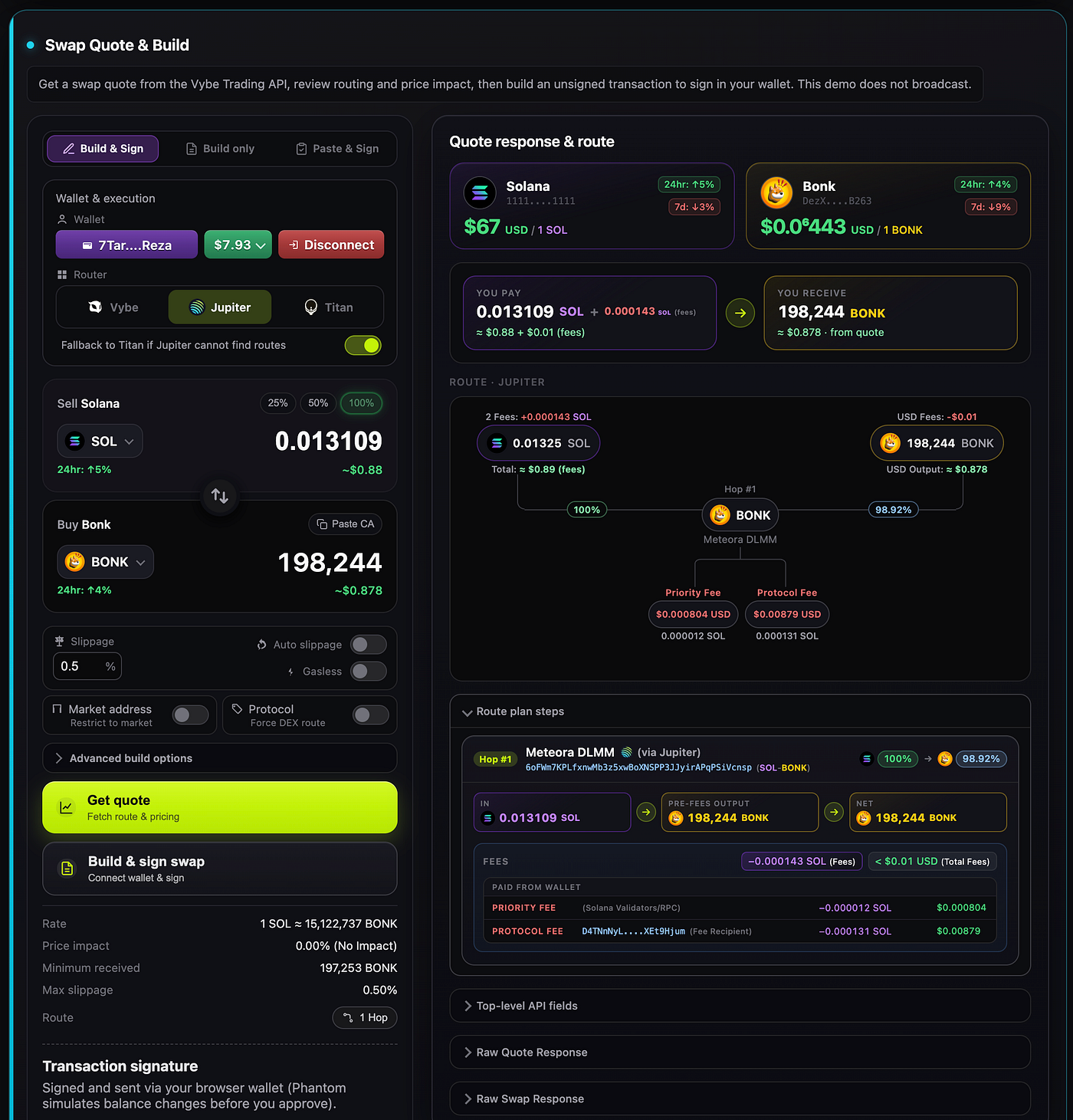
Solana Historical Trades & Swaps API
Fetch historical trades and swap data by token, market, program, wallet, or time range using Vybe’s Solana API for analytics and more.
Solana Historical Trades & Swaps API
Fetch historical trades and swap data by token, market, program, wallet, or time range using Vybe’s Solana API for analytics, dashboards and backtesting.

Fetch historical trades and swap data across Solana DEXs and AMMs using Vybe’s Solana API. Filter by token, market, program, wallet, or time range for analytics, dashboards, and backtesting.
Most onchain analytics products do not struggle because they lack data.
They struggle because the data gets messy fast.
Trade history is one of the best examples. A simple request for “show me historical trades for this token” quickly turns into harder product questions. Which venues matter most? Which quote tokens dominate flow? Which wallets are actually trading? How much of the dataset is noise? What should be filtered out locally versus remotely? How do you export something analysts can actually use?
That is exactly what this project is built to solve.
The solana-trades-api repo is our reference implementation for building Solana trade explorers and flow analytics products on top of Vybe. It combines /v4/trades with token metadata, top holders, labeled programs, local filters, per-quote rules, and CSV export in a production-style Node.js backend and frontend app.
Try the live demo: https://solana-trades-api.vybenetwork.com
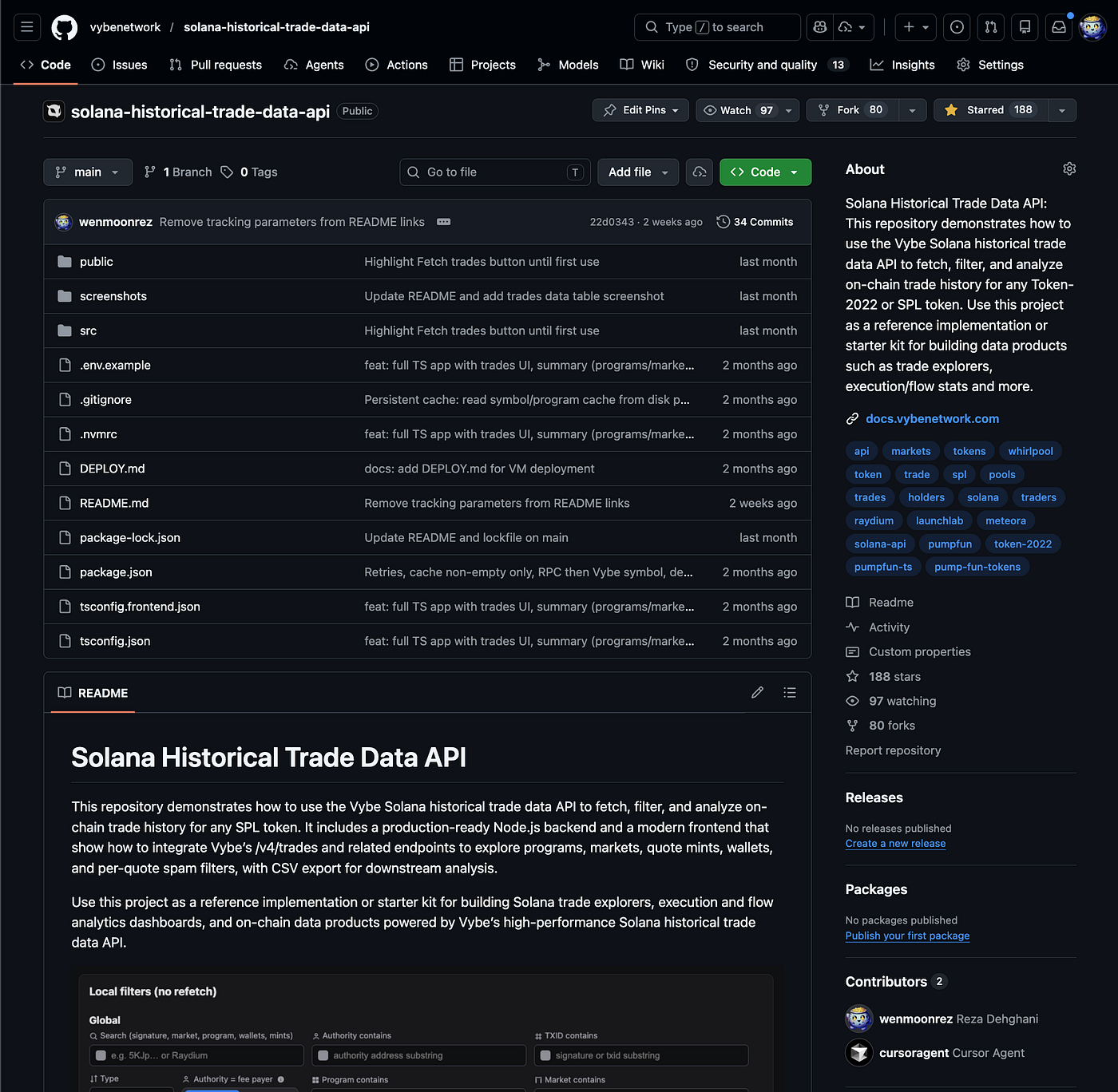
It also maps directly to the relevant Vybe docs and endpoint pages:
- Historical trades docs and endpoint
- Token details docs and endpoint
- Top holders docs and endpoint
- Labeled program docs and endpoint
Why historical trades matter
Historical trade data is one of the clearest ways to understand what is actually happening around a token.
It is useful for flow analysis, execution debugging, spam filtering, venue monitoring, and market-level analytics. It helps answer questions like:
- which programs are actually handling the flow
- which markets dominate execution
- which quote mints matter most
- which wallets are repeatedly involved
- which parts of the dataset are signal versus noise
That is why this repo is built as a practical trade explorer, not just a single API call.
Instead of stopping at raw trade rows, it shows how to turn Vybe’s historical trades endpoint into a usable analytics interface with summaries, filters, wallet context, and export workflows.
What this repo provides
At the core is a small but useful stack:
- a historical trades endpoint proxy
- a single-page historical trades UI
- local filters that do not require refetching
- per-quote mint rules for spam and noise reduction
- CSV export for current page and paginated exports
- integrations with related Vybe endpoints for token metadata, top holders, and program labels
That combination matters because historical trades rarely stand alone in a real product. Once users start exploring flow, they immediately want more context: token info, program names, holder labels, quote token breakdowns, and cleaner filtering controls.
This repo is designed to show that full workflow.
What the API call actually looks like
Under the hood, the historical trades flow is built around Vybe’s GET /v4/trades endpoint, which is documented in both the Fetch Historical Trades guide and the endpoint reference. The guide positions it as a flexible trade and swap history API across Solana DEXs and AMMs, with filtering by token, market, program, wallet, and time range.
A minimal request looks like this:
curl "https://api.vybenetwork.com/v4/trades?mintAddress=So11111111111111111111111111111111111111112&limit=5&sortByDesc=blockTime" \
  -H "X-API-Key: YOUR_API_KEY"
And if you want a more targeted query, the docs also show combining base mint, quote mint, program, and time window in the same call:
curl "https://api.vybenetwork.com/v4/trades?baseMintAddress=So11111111111111111111111111111111111111112"eMintAddress=EPjFWdd5AufqSSqeM2qN1xzybapC8G4wEGGkZwyTDt1v&programAddress=whirLbMiicVdio4qvUfM5KAg6Ct8VwpYzGff3uctyCc&timeStart=1700000000&timeEnd=1700086400&limit=10" \
-H "X-API-Key: YOUR_API_KEY"That is one of the strongest things about this endpoint: you can start broad with a token mint, then narrow down by venue, pool, wallet, or time range as the analysis gets more specific.
The parameters that matter most
The Fetch Historical Trades guide makes it clear that all parameters are optional, but the real value comes from how they can be combined. The most important ones are:
- mintAddress when you want trades for a token, regardless of whether it appears as base or quote
- baseMintAddress and quoteMintAddress when you want a specific pair
- marketAddress when you want one exact pool or market
- programAddress when you want venue-specific flow
- authorityAddress and feePayerAddress when you want wallet-level analysis
- timeStart and timeEnd when you want a defined historical window
- page and limit when you need to paginate large result sets
- sortByAsc or sortByDesc when you want chronological or price sorting
The docs also call out one important behavior: if marketAddress is provided, base and quote mint filters are ignored. And only one of sortByAsc or sortByDesc can be used at a time. The maximum page size is 1,000 trades per request.
That parameter model is what makes the endpoint useful for both simple token trade lookups and much more advanced flow analysis.
What the response gives you
The response is built around a data array where each object represents one trade. Vybe’s example response includes fields like:
- signature
- blockTime
- slot
- marketAddress
- programAddress
- baseMintAddress
- quoteMintAddress
- baseSize
- quoteSize
- price
- fee
- authorityAddress
- feePayerAddress
- txIndex
- ixOrdinal
- iixOrdinal
- interIxOrdinal
That is a strong response shape for analytics because it gives you both the economic side of the trade size, price, fee, pair and the onchain context signature, slot, instruction position, signer, and fee payer. The docs explicitly describe these fields and frame the endpoint as useful for trade history tables, DEX flow dashboards, backtesting pipelines, and wallet activity views.
In practice, that is why the endpoint works so well as the backbone of a trade explorer: the rows are rich enough to inspect directly, but structured enough to summarize into top programs, top markets, and top quote mints.
The interface starts with token context
One of the most useful choices in the UI is that it starts with token context instead of throwing users straight into a raw trade table.
The token metadata header shows the token name, symbol, mint, decimals, price, market cap, 24-hour volume, and holder count where available. If token details are unavailable, the app falls back to symbol resolution through Metaplex or the token symbol endpoint.
That makes the rest of the page much easier to read. Before a user looks at programs, markets, quote mints, or wallet activity, they already know what asset they are looking at.
The summary view makes trade flow readable
A raw trades table is useful, but a summary makes it understandable.
That is why the app includes a “Last 1000 trades summary” section built directly from the latest fetched trades. It highlights the top programs, top pools or markets, and top quote mints without requiring extra calls just to build those aggregates.
This is where the product becomes much more readable. Instead of scanning hundreds of rows and trying to infer what matters, the user immediately sees where the token is actually trading and which venues and quote assets dominate the flow.
The program list becomes even more useful when raw program addresses are decorated with known labels and Vybe’s labeled program accounts endpoint. That turns a block of opaque addresses into something people can interpret at a glance.

The trades table is the core product surface
The main table is still the center of the experience.
Each row represents one trade from /api/trades, with timestamp, price, base size, quote size, market, program, authority, fee payer, and transaction linkouts. This is the view analysts, traders, and product teams will spend the most time in.
What makes it strong is not just the number of fields. It is how those fields work together. You can inspect venue behavior, compare execution across markets, trace wallet activity, and move out to Solscan when you want to inspect the transaction itself.
It is a trade explorer, not just a data dump.
Pagination controls make it workable for larger result sets, and the export actions make it practical for research and downstream workflows.
Remote filters handle the API query
The top of the UI controls the actual request sent to Vybe.
This is where users define the token mint, time range, sort order, pagination window, and optional advanced filters like base mint, quote mint, market address, program address, authority, and fee payer.
That matters because remote filters shape the dataset before it ever reaches the browser. If the goal is to fetch specific markets, isolate a DEX, or inspect activity by wallet, this is the right place to do it.
In product terms, the remote filter layer answers the question: what data should we pull from Vybe in the first place?
And because the repo maps directly to Vybe’s trade params, it is also a good reference for how to build a thin, clean proxy around /v4/trades.
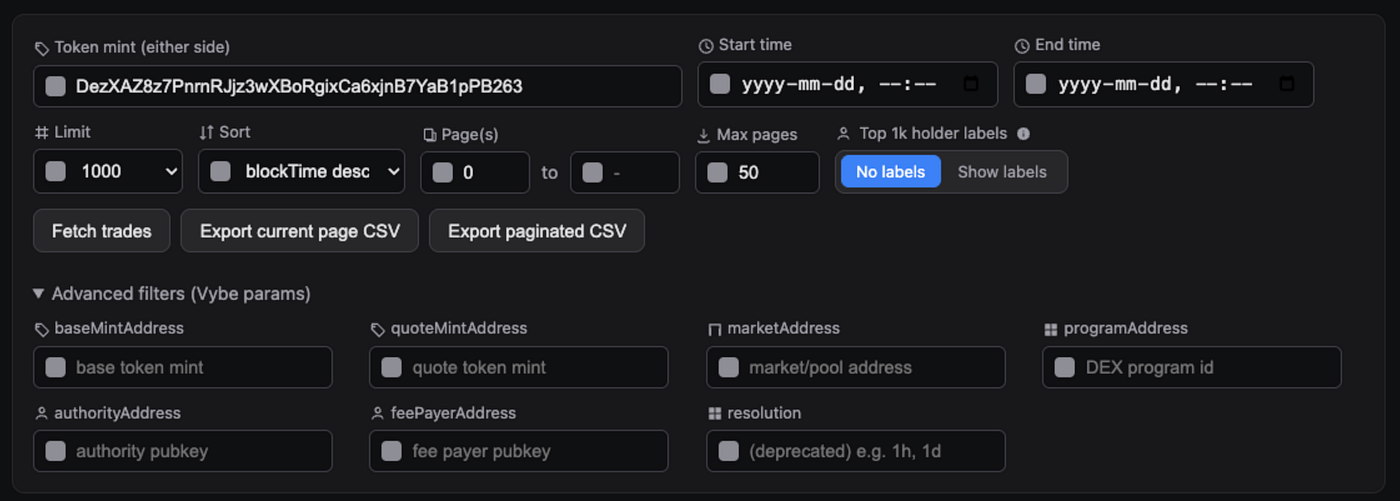
Local filters clean the dataset without a refetch
Once trades are loaded, the local filter layer takes over.
This is where the app becomes especially useful for real analysis. Instead of forcing a refetch for every refinement, it lets users filter the loaded dataset in-browser using search, type filters, authority equals fee payer, and substring matching for market, program, signature, authority, and fee payer.
That makes exploration much faster.
A user can fetch a broad dataset, then narrow it down interactively without waiting on another roundtrip. The trades table updates, the quote mint breakdown updates, and the filtered counts update with it.
This is the difference between an API demo and an actually usable analysis workflow.
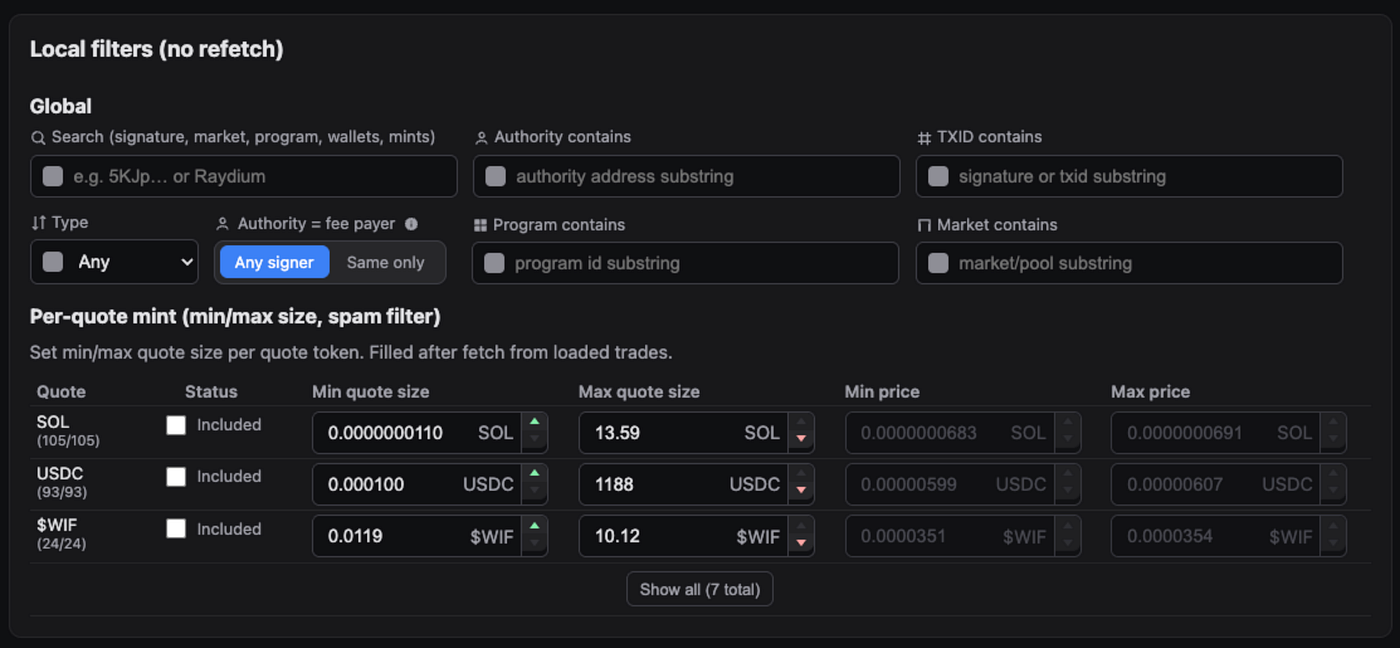
Per-quote rules are where noise control gets practical
One of the strongest parts of the app is the per-quote mint rules table.
This is built entirely from the currently loaded, locally filtered trades. Each row represents a quote mint and includes inclusion status, min and max price, min and max quote size, and spam filter controls. The UI only shows the top rows by default, then expands when needed.
This is a smart product decision.
Not every quote mint should be treated the same way. Tiny trades in one quote asset may be noise, while the same size in another may be meaningful. By letting users apply min and max rules per quote mint, the interface becomes much better at separating real flow from junk.
The excluded state is also useful because it keeps the quote mint visible in the table while removing it from the filtered trade set. That makes the filtering behavior easier to reason about.
This is where the repo moves beyond “fetch trades” and into “help people work with messy onchain data.”
CSV export turns the interface into a workflow tool
Export matters more than people think.
Once users have filtered and refined a trade dataset, they usually want to take it somewhere else: a spreadsheet, an internal tool, a notebook, or a monitoring workflow.
That is why the app includes two export paths:
- export the current page
- export all pages up to a configured maximum
The second option is especially useful because it handles pagination and retries automatically. That turns the interface from a simple browser tool into something that can support real research and operational workflows.
The backend is intentionally small and practical
The Express backend is designed as a clean proxy around the Vybe API.
Try the live demo: https://solana-trades-api.vybenetwork.com
It handles:
- /api/trades
- /api/programs/labeled-program-account
- /api/programs/labeled-program-accounts
- /api/tokens/:mint
- /api/tokens/:mint/top-holders
- /api/tokens/:mint/holder-labels
- /api/token-symbol/:mint
That set is small, but it covers the key needs of the interface: trade data, token context, wallet label enrichment, and readable program names.
It is also a good example of how to structure a lightweight backend for an analytics UI without overcomplicating the system.
Why this makes a strong reference implementation
The biggest value of this repo is that it shows the full product shape around historical trades.
It is not just “here is how to call /v4/trades.”
It is:
- how to query it
- how to enrich it
- how to summarize it
- how to filter it remotely
- how to filter it locally
- how to apply quote-specific rules
- how to export it
- how to present it in a useful UI
That makes it a strong starting point for teams building trade explorers, venue analysis dashboards, execution monitoring tools, wallet activity products, or internal research workflows on top of Solana.
How this fits into the wider Vybe docs
The repo is strongest when read alongside the relevant docs.
The historical trades docs explain the core endpoint and filtering model. Token details adds metadata context. Top holders helps with wallet labeling and ownership context. Labeled programs makes raw program IDs easier to interpret.
Together, those pieces form the actual product stack behind the UI.
That is also why this project works well as a starter kit. It is not a disconnected frontend. It is a concrete implementation of how several Vybe endpoints work together inside one analytics product.
Final takeaway
Historical trade data is valuable on its own.
But it becomes much more useful when it is packaged as a product: token context at the top, flow summaries up front, a detailed table in the middle, local filters for speed, per-quote rules for noise reduction, and export paths for downstream analysis.
That is what this repo demonstrates.
The solana-trades-api repo shows how to turn Vybe’s historical trades API into a practical Solana trade explorer. It is a reference implementation for people building real analytics tools, not just testing an endpoint once and moving on.
Further reading
메타데이터
- post_id
- b0a6c5f158ba
- slug
- solana-historical-trades-and-swaps-api-b0a6c5f158ba
- url
- https://medium.com/vybenetwork/solana-historical-trades-and-swaps-api-b0a6c5f158ba
- canonical_url
- https://medium.com/vybenetwork/solana-historical-trades-and-swaps-api-b0a6c5f158ba
- author_url
- https://medium.com/@vybenetwork
- status
- ok
- fetched_at
- 2026-07-24 09:03:45