Why Your NFS Server Is a Time Bomb — And How Ceph Fixes It
A practical guide to scalable, fault-tolerant shared file storage
Why Your NFS Server Is a Time Bomb — And How Ceph Fixes It
A practical guide to scalable, fault-tolerant shared file storage
Picture this: it’s 2 AM, your application is down, and dozens of servers can’t access their shared files. The culprit? A single NFS server that crashed. Sound familiar?
Traditional NFS has served us well for decades. But modern infrastructure demands more than what a single server can deliver. That’s where Ceph NFS comes in, giving you the familiar NFS interface, backed by a distributed storage system that doesn’t have a single point of failure.
Let’s dive into building shared file storage that scales seamlessly and survives failures.
What is NFS, and what’s the problem?
NFS (Network File System) lets one server share its filesystem with other machines over a network. Clients mount the remote storage and treat it like a local drive. Simple, widely supported, and battle-tested.
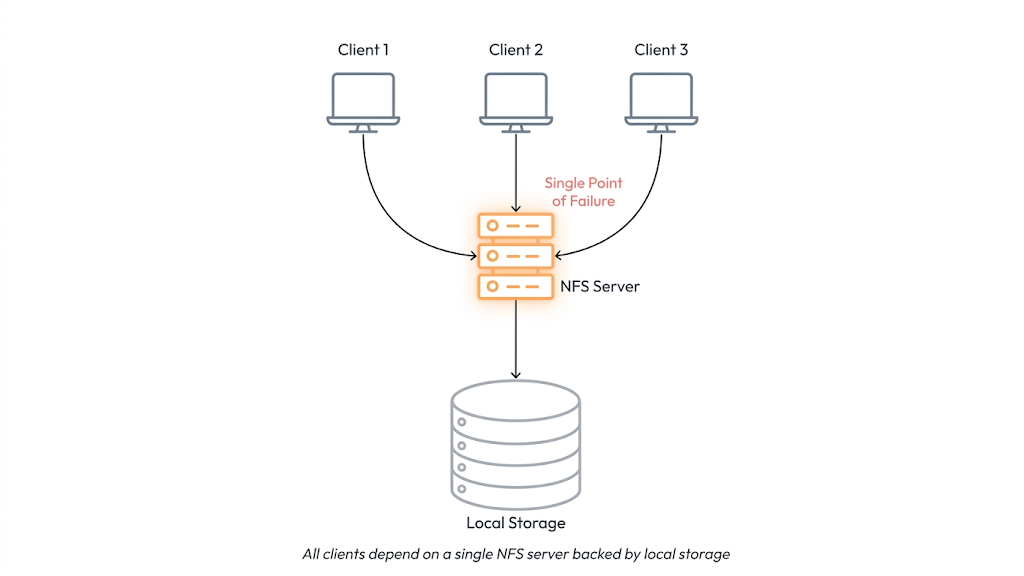
But here’s the catch all of that simplicity rests on a single server. And that single server is a liability.
The core problem: traditional NFS ties your storage capacity, availability, and performance to one machine. If it goes down, everything that depends on it goes down with it.
- Server crashes → applications lose access to storage
- Traffic spikes → one server becomes the bottleneck
- Need more capacity → you’re stuck with one machine’s limits
- Failover → requires manual intervention and downtime
For small setups, these trade-offs are acceptable. For modern distributed systems running dozens or hundreds of workloads? They’re unacceptable.
Enter Ceph: storage that doesn’t break when things break
Ceph is a distributed storage system built from the ground up to handle failures gracefully. Instead of relying on one server, Ceph spreads data across many nodes in a cluster.

Each component in the system is designed to handle a specific part of the workload:
Monitors (MON)
Think of these as the cluster’s nervous system; they track the overall state and health of every node.
OSDs (Object Storage Daemons)
These do the heavy lifting. OSDs store the actual data and handle replication recovery, rebalancing, and ensure data durability across the cluster.
Managers (MGR)
Managers provide operational visibility and control. They expose metrics, support monitoring integrations, and enable administrative and orchestration capabilities across the cluster.
When a failure occurs — such as a disk or node outage — Ceph automatically initiates recovery workflows. Data is replicated, placement groups are rebalanced, and the system converges back to a healthy state without manual intervention.
CephFS: a filesystem on top of Ceph
CephFS is Ceph’s built-in distributed filesystem. It gives applications a familiar, POSIX-compliant interface for reading and writing files, while the data itself is spread across your entire Ceph cluster.
CephFS Architecture

The clever bit is how CephFS separates two very different concerns:
- Metadata (filenames, directories, permissions) → handled by the Metadata Server (MDS)
- File data (the actual bytes) → stored directly in Ceph OSDs
By splitting these responsibilities, CephFS avoids the classic bottleneck where a single server handles both and scales much more efficiently as a result.
NFS-Ganesha: the translator in the middle
Here’s where it all comes together. NFS-Ganesha is a user-space NFS server that sits between your NFS clients and the Ceph cluster. Think of it as a translator.
Key point: NFS-Ganesha doesn’t store any data. It receives NFS requests from clients, translates them into CephFS operations, and forwards them to the cluster.
This means your clients Linux servers, Kubernetes workloads, Windows machines, even macOS don’t need any special software. They just speak standard NFS, and Ganesha handles the rest.
And because you can run multiple Ganesha instances simultaneously, there’s no single gateway that can take everything down.

How Ceph NFS Handles File Operations
Write Flow
- Client sends an NFS write request
- Ganesha receives it and contacts the MDS for metadata
- File data is written directly to the Ceph OSDs
- Ceph automatically replicates the data across nodes

Read Flow
- Client sends an NFS read request
- Ganesha queries the MDS for the file location
- Data is read directly from the relevant OSDs
- Data is returned to the client

Notice that data always goes directly to and from the OSDs — the metadata server never becomes a bottleneck for actual file content.
Traditional NFS vs. Ceph NFS
Let’s make the comparison concrete. Imagine a Kubernetes cluster with dozens of pods that need shared storage for logs, configuration files, and uploaded media.

Ceph NFS eliminates the single point of failure and allows storage to grow simply by adding nodes.
When should you use Ceph NFS?
Ceph NFS shines in environments where availability and scale matter:

If your workload is small and lives comfortably on a single server, traditional NFS may be perfectly fine. But if you’re running distributed systems or expect growth, Ceph NFS is worth the investment.
The takeaway
Traditional NFS is simple, and that simplicity is both its strength and its weakness. Ceph NFS takes everything you already know about NFS and removes the underlying fragility.
By combining Ceph’s distributed storage, CephFS’s scalable filesystem, and NFS-Ganesha’s familiar interface, you get shared file storage that survives failures, grows with your needs, and doesn’t wake you up at 2 AM.
메타데이터
- post_id
- b0c3a020b105
- slug
- why-your-nfs-server-is-a-time-bomb-and-how-ceph-fixes-it-b0c3a020b105
- url
- https://medium.com/@prathamyadav0402/why-your-nfs-server-is-a-time-bomb-and-how-ceph-fixes-it-b0c3a020b105
- canonical_url
- https://medium.com/@prathamyadav0402/why-your-nfs-server-is-a-time-bomb-and-how-ceph-fixes-it-b0c3a020b105
- author_url
- https://medium.com/@prathamyadav0402
- status
- ok
- fetched_at
- 2026-06-10 22:22:12


