Self-Hosted vs Cloud Smart Home: Which Architecture Is More Secure?
Smart homes are no longer a niche hobby. From smart lights and thermostats to security cameras and energy monitoring systems, modern…
Self-Hosted vs Cloud Smart Home: Which Architecture Is More Secure?
Smart homes are no longer a niche hobby. From smart lights and thermostats to security cameras and energy monitoring systems, modern households are becoming miniature data centers. Every new IoT device adds convenience — and another potential entry point for attackers.
As automation grows more advanced, so does the question of architecture. Where does the logic run? Where is the data stored? Who controls remote access?
For many users, the default path is cloud-based platforms. Others move toward fully self-hosted solutions like Home Assistant running on a Raspberry Pi or mini-PC. More advanced users experiment with hybrid models that combine local control with external infrastructure.
But which of these architectures is actually more secure?
The answer isn’t about brand names or marketing claims. It’s about how your system is designed — where trust boundaries are drawn, how remote access is handled, and who ultimately controls the data flow.
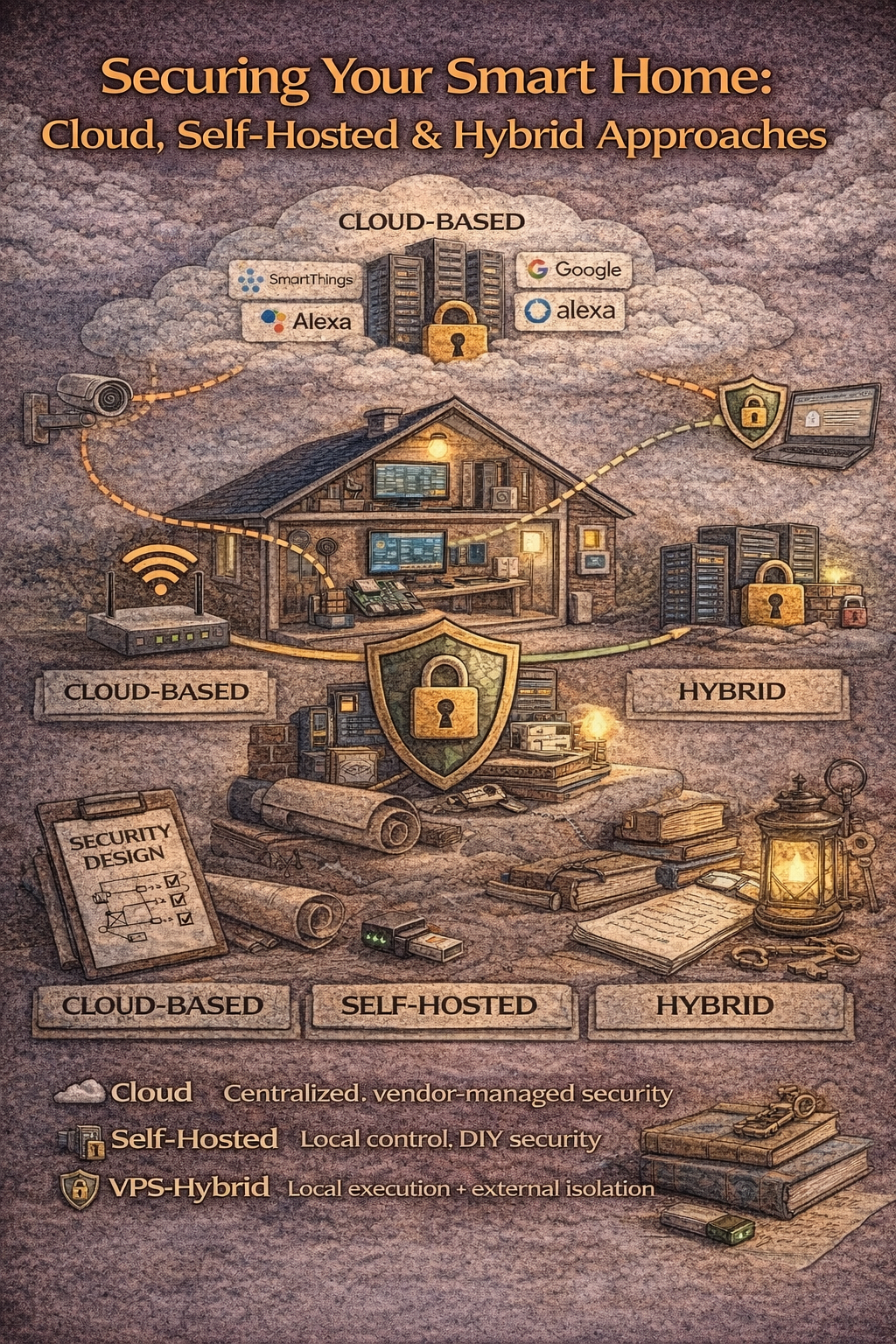
In this article, we’ll compare three core smart home architectures — cloud-based, fully self-hosted, and VPS-powered hybrid setups — and analyze their real security implications.
What “Cloud-Based Smart Home” Really Means

When people say they have a “smart home,” they usually mean a cloud-based ecosystem. Devices connect to the manufacturer’s servers, and automation logic runs somewhere in a remote data center. Apps like Google Home, Alexa, SmartThings, or Tuya act as user interfaces, but the real coordination happens outside your house.
From a convenience perspective, this model is extremely attractive. There’s no need to manage servers, configure networks, or think about infrastructure. You plug in a device, connect it to Wi-Fi, log into an app, and everything works. Remote access is automatic. Updates are handled for you. Integrations are often seamless.
But this simplicity comes at a cost.
In a cloud-based architecture, your smart home depends entirely on a third party. If their servers go down, your automation may stop working. If their business model changes, features can disappear behind paywalls. If their security is compromised, your data may be exposed.
There is also the question of data ownership. Device telemetry, usage patterns, and sometimes even camera feeds are processed and stored externally. While major providers invest heavily in security, you are ultimately trusting their infrastructure, policies, and long-term stability.
From a security standpoint, cloud systems reduce the risk of misconfiguring your own network — since you usually don’t open ports on your router — but they increase dependence on external trust. The attack surface shifts from your home network to the provider’s cloud environment.
Cloud-based smart homes are not inherently insecure. In fact, for non-technical users, they are often safer than poorly configured self-hosted setups. But they trade control for convenience, and privacy for simplicity.
To understand whether that trade-off is acceptable, we need to compare it with the fully self-hosted model.
Fully Self-Hosted Smart Home (Local Server Model)

A fully self-hosted smart home moves the logic back into your house. Instead of relying on external cloud servers, automation runs locally — typically on a Raspberry Pi, mini-PC, NAS, or dedicated home server. Platforms like Home Assistant are commonly used to centralize device control and automation.
In this model, your devices communicate with your local hub, and all automation rules execute inside your own network. If your internet connection drops, your lights, sensors, and routines can continue working. Data stays within your infrastructure unless you explicitly choose to expose it.
From a privacy perspective, this is a major advantage. Telemetry, usage patterns, and device interactions remain local. You are no longer dependent on a vendor’s cloud infrastructure to keep your home functioning.
However, greater control brings greater responsibility.
Remote access becomes the main challenge. If you want to control your system while away from home, you must either:
- Open ports on your router
- Set up a VPN
- Use a reverse proxy
- Or rely on a third-party relay service
Opening ports directly can introduce serious security risks if misconfigured. Weak authentication, outdated software, or exposed services can become entry points for attackers. Even experienced users sometimes underestimate how quickly automated scanners find open ports on residential IP addresses.
Maintenance is another factor. With a self-hosted system, you are responsible for:
- Software updates
- Backups
- Certificate management
- Monitoring
When done correctly, a local smart home architecture can be extremely secure and private. When done carelessly, it can be less secure than a well-managed cloud solution.
That tension is what leads many advanced users toward a hybrid approach — one that preserves local control while reducing exposure at the network edge.
VPS as a Middle Layer: The Hybrid Security Model

For advanced users, the real dilemma is this: how do you keep local control without exposing your home network to the internet?
Opening ports directly on your router is the most common solution for remote access to a self-hosted Home Assistant setup — but it’s also the riskiest. Residential IP addresses are constantly scanned. Even a single misconfiguration, weak password, or outdated service can turn into an entry point.
This is where a VPS-based hybrid architecture becomes attractive.
Instead of exposing your home server directly, you introduce a virtual private server as an intermediary layer. Your local smart home system establishes an outbound encrypted connection to the VPS. Remote access happens through that VPS, which acts as a relay, reverse proxy, or secure tunnel endpoint.
The key security difference is architectural:
- Your router does not need open inbound ports.
- Your home network is not directly exposed to the public internet.
- Access control, firewall rules, and monitoring can be centralized on the VPS.
In this model, automation logic still runs locally. Devices still communicate within your LAN. But remote access is handled through a controlled external node that you manage.
This approach reduces attack surface at the home network edge while maintaining independence from consumer cloud platforms.
If you’re considering this architecture, here’s a detailed breakdown of when a VPS for smart homes makes sense, what hardware and software you need, and how to implement it safely: https://volodymyrzh.medium.com/vps-for-smart-homes-when-it-makes-sense-what-you-need-and-how-to-implement-it-safely-37e9d3089ba1
The hybrid model is not automatically “more secure” — it still requires proper configuration, strong authentication, and regular updates. But architecturally, it separates exposure from execution.
Your home stays local. Your access point becomes controlled.
That separation is often the difference between convenience and real security design.
Security Comparison: Cloud vs Self-Hosted vs VPS Hybrid

When comparing smart home architectures, security is less about which model is “best” and more about where risk is concentrated.
In a cloud-based system, the main trust boundary sits outside your home. Your router usually does not expose inbound ports, which reduces the risk of direct attacks on your local network. However, you are fully dependent on the provider’s infrastructure. A breach at the vendor level, compromised credentials, or policy changes are outside your control. Security is centralized — but not owned by you.
In a fully self-hosted system, the trust boundary moves inward. You control the hardware, the automation logic, and the data storage. Privacy is significantly improved because data remains inside your LAN. However, remote access becomes the critical point of exposure. If you open ports on your router or misconfigure a reverse proxy, your home network can become directly reachable from the internet. The system can be extremely secure — but only if configured carefully and maintained consistently.
The **VPS hybrid model** shifts exposure away from your home router while preserving local execution. Instead of allowing inbound traffic into your residential network, your system establishes outbound encrypted connections to a VPS. The VPS becomes the public-facing layer. Firewall rules, authentication, and monitoring are centralized there, while your internal network remains isolated. This does not eliminate risk — misconfigured VPS security can still create vulnerabilities — but it introduces architectural separation between “public access” and “private automation.”
From a threat perspective:
- Cloud concentrates risk at the provider level.
- Self-hosted concentrates risk at your router and configuration layer.
- VPS hybrid distributes risk by isolating public access from your home network.
Scalability also differs. Cloud platforms scale automatically but limit customization. Self-hosted systems scale according to your hardware. VPS-based systems allow you to offload certain services externally while keeping core automation local.
Ultimately, security depends on how well each model is implemented. A poorly configured self-hosted system may be less secure than a reputable cloud provider. A poorly secured VPS can become an unnecessary exposure point. But when designed correctly, hybrid architecture often offers the best balance between control, privacy, and reduced attack surface.
Security is not about choosing a brand. It is about choosing where trust begins — and where exposure ends.
Threat Scenarios: Where Each Model Can Fail
Understanding architecture is only half the equation. The real test of security is how each model behaves under realistic threat scenarios.
In a cloud-based setup, the biggest risks are outside your physical home. A data breach at the provider level can expose user credentials or device metadata. If account security is weak — for example, no two-factor authentication — attackers may gain remote control through compromised passwords. Service outages can also disable automations entirely, leaving your home dependent on external infrastructure.
In a fully self-hosted model, threats shift closer to home. The most common risks involve router misconfiguration, exposed ports, weak TLS certificates, or outdated services. Automated bots continuously scan residential IP ranges for open services. A misconfigured reverse proxy or unsecured login page can be discovered quickly. The attack surface is smaller in scope but more personal in consequence.
In a VPS hybrid architecture, exposure moves outward again — but in a controlled way. Instead of exposing your router, you expose a hardened VPS. The main risks here involve misconfigured firewalls, weak SSH credentials, improper reverse proxy settings, or poor key management. If the VPS is compromised, the attacker may attempt lateral movement through the tunnel, which is why strict outbound-only tunnel design and authentication separation are critical.
Each model has risk. The difference lies in where that risk is concentrated and how easily it can be managed.
When Each Architecture Makes Sense
There is no universally “correct” choice. The right architecture depends on technical skill level, tolerance for maintenance, and privacy expectations.
Cloud-based systems make sense for users who prioritize simplicity and minimal configuration. When properly secured with strong passwords and multi-factor authentication, they can provide acceptable security for everyday smart home use.
Fully self-hosted systems are ideal for users who value privacy and want complete control over automation logic and data storage. They require ongoing maintenance but remove reliance on third-party cloud providers.
VPS hybrid models are best suited for technically comfortable users who want both local execution and controlled remote access without exposing their router. This model introduces more components but creates architectural separation between private infrastructure and public entry points.
Security maturity grows with architectural awareness.
Practical Security Recommendations
Regardless of the chosen model, certain principles apply universally.
Strong authentication should always be enabled, especially for remote access. Multi-factor authentication significantly reduces the risk of credential compromise.
Software must be updated regularly. Many real-world breaches exploit known vulnerabilities that were never patched.
Backups are essential. Automation systems often store configuration data that is difficult to reconstruct manually. Regular encrypted backups prevent catastrophic data loss.
Network segmentation improves resilience. Isolating IoT devices on separate VLANs or subnets limits the blast radius if a single device becomes compromised.
Monitoring and logging provide visibility. Whether using cloud dashboards, local logs, or VPS monitoring tools, visibility into access attempts and unusual activity helps detect issues early.
Architecture reduces risk, but discipline maintains security.
Final Verdict: Security Is About Design, Not Brand
It’s tempting to search for a definitive answer — cloud or self-hosted, simple or advanced. In reality, security is not defined by which platform you choose. It is defined by how thoughtfully your system is designed.
Cloud platforms centralize responsibility but reduce local complexity. Self-hosted systems maximize control but increase configuration responsibility. VPS hybrid setups balance isolation and independence but require architectural awareness.
The safest smart home is not the one with the most features. It is the one where exposure is minimized, trust boundaries are clearly defined, and access is intentionally controlled.
Security is not a checkbox. It is an architectural decision.
Affiliate Disclosure
Some links in this article, including references to VPS providers, hosting platforms, or related development tools, may be affiliate links. This means that if you choose to purchase a service through those links, I may earn a small commission at no additional cost to you.
Affiliate partnerships do not influence the technical analysis, architectural explanations, or installation guidance provided in this article.
Always evaluate hosting and infrastructure providers based on your specific system requirements, performance needs, and security considerations.
메타데이터
- post_id
- b0ca0bb5a7c8
- slug
- self-hosted-vs-cloud-smart-home-which-architecture-is-more-secure-b0ca0bb5a7c8
- url
- https://medium.com/@volodymyrzh/self-hosted-vs-cloud-smart-home-which-architecture-is-more-secure-b0ca0bb5a7c8
- canonical_url
- https://medium.com/@volodymyrzh/self-hosted-vs-cloud-smart-home-which-architecture-is-more-secure-b0ca0bb5a7c8
- author_url
- https://medium.com/@volodymyrzh
- status
- ok
- fetched_at
- 2026-06-17 10:21:25