A look inside a responsive AI chat prototype with projects, attachments, local persistence…
AI chat interfaces look simple from the outside: a text box, a send button, and a stream of responses.
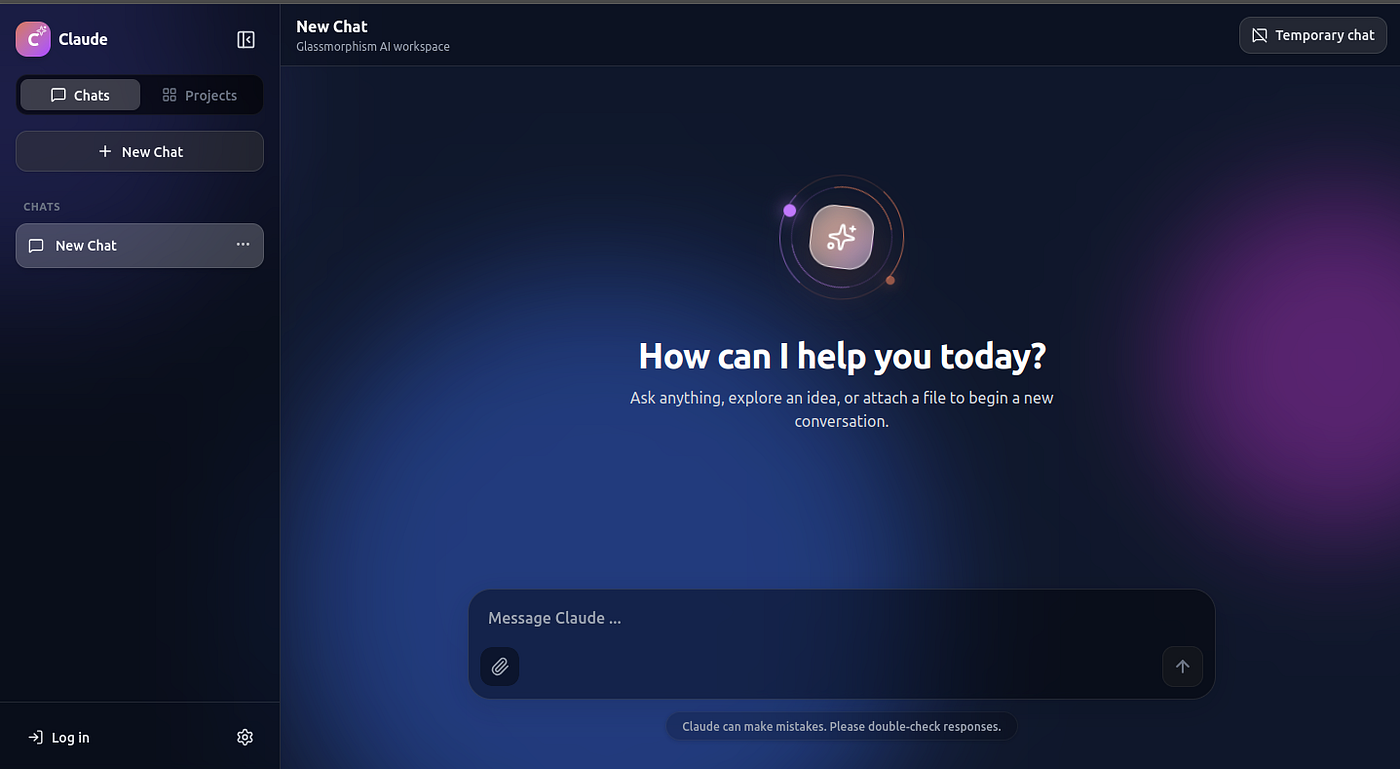
A look inside a responsive AI chat prototype with projects, attachments, local persistence, sharing, and a polished glassmorphism interface
AI chat interfaces look simple from the outside: a text box, a send button, and a stream of responses.
But once you start building one seriously, the complexity shows up quickly.
How do you manage multiple conversations? How do you persist chat history? How do you handle file attachments safely? How do you support temporary chats, public sharing, project workspaces, response regeneration, and mobile layouts without the codebase becoming chaotic?
I recently built a Claude-inspired AI chat workspace to explore these questions using a modern frontend stack:
- Next.js 16 App Router
- React 19
- TypeScript
- Tailwind CSS 4
- Google Gemini REST API
- Vitest and React Testing Library
- Browser localStorage for persistence
The result is a polished demonstration project that combines AI-powered conversations, project-based workspaces, file attachments, local chat history, public share links, and responsive desktop/mobile UI.
This is an independent demo project and is not affiliated with Anthropic or Claude.
Why I Built This
AI chat apps are becoming a new kind of workspace.
People no longer use them only for single prompts. They use them for writing, coding, planning, research, reviewing files, debugging, and managing long-running ideas.
That means the interface needs more than a chat box.
It needs:
- Conversation management
- Persistent history
- Project-level context
- Attachment support
- Sharing
- Mobile responsiveness
- Good loading and empty states
- Safe server-side API handling
- A scalable architecture
This project was built as a prototype to explore what that experience could look like in a browser-first application.
Core Features
Gemini-Powered Chat
The app sends messages through a server-side Next.js API route that proxies requests to Google Gemini.
This keeps the API key on the server and avoids exposing provider credentials to the browser.
The chat experience includes:
- Multiple conversations
- Stable unique chat IDs
- Automatic chat titles
- Regenerate response support
- Response version switching
- Copy, share, like, and dislike actions
- Parsed thinking sections
- Formatted text and code blocks
- Temporary chats excluded from persistence
The goal was to make the chat experience feel closer to a real AI workspace than a basic API demo.
Chat Management
A major part of the app is conversation organization.
Users can:
- Rename chats
- Delete chats
- Pin and unpin chats
- Archive and restore chats
- Move chats into projects
- Restore the selected chat after reload
- View files attached to the active chat
This is powered by a reducer-based state architecture, making the chat behavior easier to test and reason about.
Project Workspaces
Projects allow users to create focused workspaces with their own context and message history.
Each project can store:
- A title
- A description
- Dedicated messages
- Project-specific AI context
When a chat belongs to a project, that project context is included in the AI system instruction.
This makes the app more useful for longer-running tasks where context matters.
File Attachments
The app supports a wide range of attachments, including:
- Images such as PNG, JPG, and JPEG
- PDFs
- DICOM medical imaging files
- Code files
- Markdown
- JSON
- YAML
- SQL
- HTML
- CSS
- JavaScript
- TypeScript
- Python
- PHP
- Java
- C/C++
- Go
- Rust
There are also clear upload limits:
- Up to 50 attachments at a time
- Up to 1 MB per normal file
- One DICOM file at a time
- DICOM files up to 2 GB
Large DICOM files are handled carefully. They are managed locally and are not converted to Base64 or embedded directly into the Gemini request. Only metadata is included in the AI prompt.
This prevents huge browser memory usage and keeps the prototype safer and more realistic.
Local Persistence
Chats, projects, messages, metadata, and the selected workspace are stored in browser localStorage.
Temporary chats are intentionally excluded.
Attachment binary data and object URLs are also removed before persistence to avoid exceeding browser storage limits.
After a reload, the app preserves attachment names and metadata, but the original file must be attached again if it needs to be sent to the AI provider.
This design keeps the prototype lightweight while still giving users a persistent local workspace.
Public Sharing
The app includes public text-only share links.
Instead of using a backend database, the share action creates a self-contained URL containing a conversation snapshot.
This means:
- The shared conversation can be opened in another browser
- Attachment binary data is excluded
- Large conversations may exceed browser URL limits
- Shared links are not revocable
- Anyone with the URL can read the embedded conversation
For a production system, this would need to be replaced with database-backed share records, random public tokens, expiration, permissions, and revocation.
But for a prototype, URL-based sharing is a useful way to explore the feature without adding backend infrastructure.
UI and Experience
The interface includes:
- Responsive desktop and mobile layouts
- Expandable sidebar
- Compact desktop icon rail
- Recent chats
- Projects
- Login modal
- Theme controls
- Light, dark, and system themes
- Animated glassmorphism background
- Reduced-motion accessibility support
- Toast notifications
- Accessible control labels
The goal was to make the product feel polished, not just functional.
A good AI interface should feel calm, fast, and organized, especially when users are working with long conversations or many files.
Tech Stack
The project uses:
AreaTechnologyFrameworkNext.js 16 App RouterUIReact 19, TypeScriptStylingTailwind CSS 4IconsLucide ReactAI ProviderGoogle Gemini REST APIStateReact reducer and localStorageTestingVitest, React Testing Library, jsdomDeploymentVercel or any Node.js-compatible platform
Request Flow
The basic request flow looks like this:
- The user sends a message from the composer.
- The app creates a user message and pending assistant message.
- The browser builds provider history from the active chat or project.
- The client sends the request to
/api/chat. - The API route validates the payload and attachments.
- The server calls Gemini using the server-side API key.
- The response parser separates optional thinking content from the final response.
- The reducer resolves the pending assistant message and stores the response version.
This separation keeps provider logic, UI state, parsing, and persistence easier to maintain.
Testing
The test suite covers several important parts of the application:
- Chat reducer behavior
- Chat creation and deletion
- Pinning and archiving
- Moving chats into projects
- Persistence restoration
- Temporary chat exclusion
- Attachment validation
- Composer behavior
- Message parsing
- Formatted response rendering
Before deployment, the recommended checks are:
npm run typecheck
npm run lint
npm run test:run
npm run build
This helps catch issues before shipping.
Deployment
The app can be deployed to Vercel or any Node.js-compatible hosting platform.
For Vercel, the main requirement is setting the server-side environment variable:
GOOGLE_GENERATIVE_AI_API_KEYOptionally, you can also configure:
GOOGLE_GENERATIVE_MODELThe app requires server-side routes, so a purely static host is not enough.
Production Considerations
This project is a polished prototype, but a real production AI workspace would need additional infrastructure.
Important areas include:
- Real authentication
- Server-side authorization
- Durable database storage
- Cross-device sync
- Rate limiting
- Request size limits
- Secure file storage
- Signed URLs
- Structured logging
- Error monitoring
- Usage tracking
- Content safety policies
- Revocable public links
- Secret rotation
- Compliance review for sensitive data
The current login modal is only a client-side demonstration. It does not create a secure session.
Similarly, chats and projects are browser-local and do not have server-side ownership checks.
What I Learned
Building this project made one thing clear:
An AI chat product is not just an AI integration.
The model call is only one part of the system.
The surrounding product experience matters just as much:
- How conversations are organized
- How users recover work after reloads
- How files are validated
- How context is managed
- How sharing works
- How the UI behaves on mobile
- How failure states are communicated
- How the app protects secrets and user data
A useful AI workspace needs strong frontend architecture, careful state management, thoughtful UX, and realistic security boundaries.
Final Thoughts
This project started as a Claude-inspired interface experiment, but it became a broader exploration of how modern AI workspaces are built.
Using Next.js, React, TypeScript, Tailwind CSS, and Gemini, I was able to create a responsive AI chat prototype with projects, attachments, persistence, sharing, and a polished interface.
There is still plenty that would need to change before production use, especially around authentication, databases, secure file handling, and revocable sharing.
But as a prototype, it demonstrates how much can be built with a focused architecture and a modern frontend stack.
AI chat interfaces are quickly becoming full workspaces.
This project was my attempt to understand what goes into building one.
메타데이터
- post_id
- b0dced696e9b
- slug
- a-look-inside-a-responsive-ai-chat-prototype-with-projects-attachments-local-persistence-b0dced696e9b
- url
- https://medium.com/@gupta.surender.1990/a-look-inside-a-responsive-ai-chat-prototype-with-projects-attachments-local-persistence-b0dced696e9b
- canonical_url
- https://medium.com/@gupta.surender.1990/a-look-inside-a-responsive-ai-chat-prototype-with-projects-attachments-local-persistence-b0dced696e9b
- author_url
- https://medium.com/@gupta.surender.1990
- status
- ok
- fetched_at
- 2026-06-18 07:02:39




