Debugging Go on Docker in GoLand
We all know how difficult it is to debug code on a docker container, in the beginning we don’t have any idea where the problem even is and…
Debugging Go on Docker in GoLand
We all know how difficult it is to debug code on a docker container, in the beginning we don’t have any idea where the problem even is and once we get an idea(if any) then adding print statements all over the code and even for just one new print statement build the container again…
All of this is very tiresome and takes a lot of time (depending on the container build time), won’t it be better if can Debug our code in container like it’s running locally?
No worries there is a way………. DELVE. So without wasting more time let’s get started…
Where are we right now?
This is what our folder structure is like,
│   Dockerfile
│   go.mod
│
├───cmd
│       main.go
│
├───controllers
│       books.go
│       routes.go
│
├───database
│       db.go
│       models.go
│
└───helpers
        constants.go
        registerRoute.go
And our Dockerfile is probably something like this,
FROM golang:1.24-alpine AS base

WORKDIR /build

# Copy the go dependency files and download the dependencies
COPY go.* ./
RUN go mod download

# Copy the full application source
COPY . .
RUN go build -o app ./cmd

# Port for the application
EXPOSE 8080

# Start the application
CMD ["/build/app"]
So, let’s modify our Dockerfile so that we can utilize the power of delve,
FROM golang:1.24-alpine AS base

RUN apk add --no-cache git bash libc6-compat

WORKDIR /build

# Copy the go dependency files and download the dependencies
COPY go.* ./
RUN go mod download

# Install Delve for debugging
RUN go install github.com/go-delve/delve/cmd/dlv@latest

# Copy the full application source
COPY . .

# Build the Go app with debugging flags
RUN go build -gcflags "all=-N -l" -o app ./cmd

# App and debugger ports
EXPOSE 8080
EXPOSE 40000

# Start the app with Delve in headless mode
CMD ["dlv", "--listen=:40000", "--headless=true", "--log=true", "--accept-multiclient", "--api-version=2", "exec", "./app"]
With the changes when you’ll check the containers log after starting it you will see something like this,
Now build the image and then run an instance of it,
$ docker build -t dlv-image .
[+] Building 36.6s (12/12) FINISHED                                                                                                                                  docker:default
 => [internal] load build definition from Dockerfile                                                                                                                           0.0s
 => => transferring dockerfile: 404B                                                                                                                                           0.0s
 => [internal] load metadata for docker.io/library/golang:1.24-alpine                                                                                                          2.5s
 => [internal] load .dockerignore                                                                                                                                              0.0s
 => => transferring context: 2B                                                                                                                                                0.0s
 => CACHED [1/7] FROM docker.io/library/golang:1.24-alpine@sha256:ddf52008bce1be455fe2b22d780b6693259aaf97b16383b6372f4b22dd33ad66                                             0.0s
 => [internal] load build context                                                                                                                                              0.1s
 => => transferring context: 6.63kB                                                                                                                                            0.1s
 => [2/7] WORKDIR /build                                                                                                                                                       0.1s
 => [3/7] COPY go.* ./                                                                                                                                                         0.1s
 => [4/7] RUN go mod download                                                                                                                                                  0.4s
 => [5/7] RUN go install github.com/go-delve/delve/cmd/dlv@latest                                                                                                             27.5s
 => [6/7] COPY . .                                                                                                                                                             0.1s
 => [7/7] RUN go build -gcflags "all=-N -l" -o app ./cmd                                                                                                                       4.9s
 => exporting to image                                                                                                                                                         0.8s
 => => exporting layers                                                                                                                                                        0.7s
 => => writing image sha256:8d7d07d0a657346e6aa62334657a461d6fc87667a7932c82902fc25caf12e788                                                                                   0.0s
 => => naming to docker.io/library/dlv-image                                                                                                      0.0s                                                                                                                            0.0s
$ docker run -p 8080:8080 -p 40000:40000 dlv-image
API server listening at: [::]:40000
2025-07-10T05:06:03Z warn layer=rpc Listening for remote connections (connections are not authenticated nor encrypted)
2025-07-10T05:06:03Z info layer=debugger launching process with args: [./app]
2025-07-10T05:06:03Z debug layer=debugger Adding target 18 "/build/app"The Delve server is waiting for us to connect and then our application will start, so let’s add a debugging configuration so that we can debug our code,
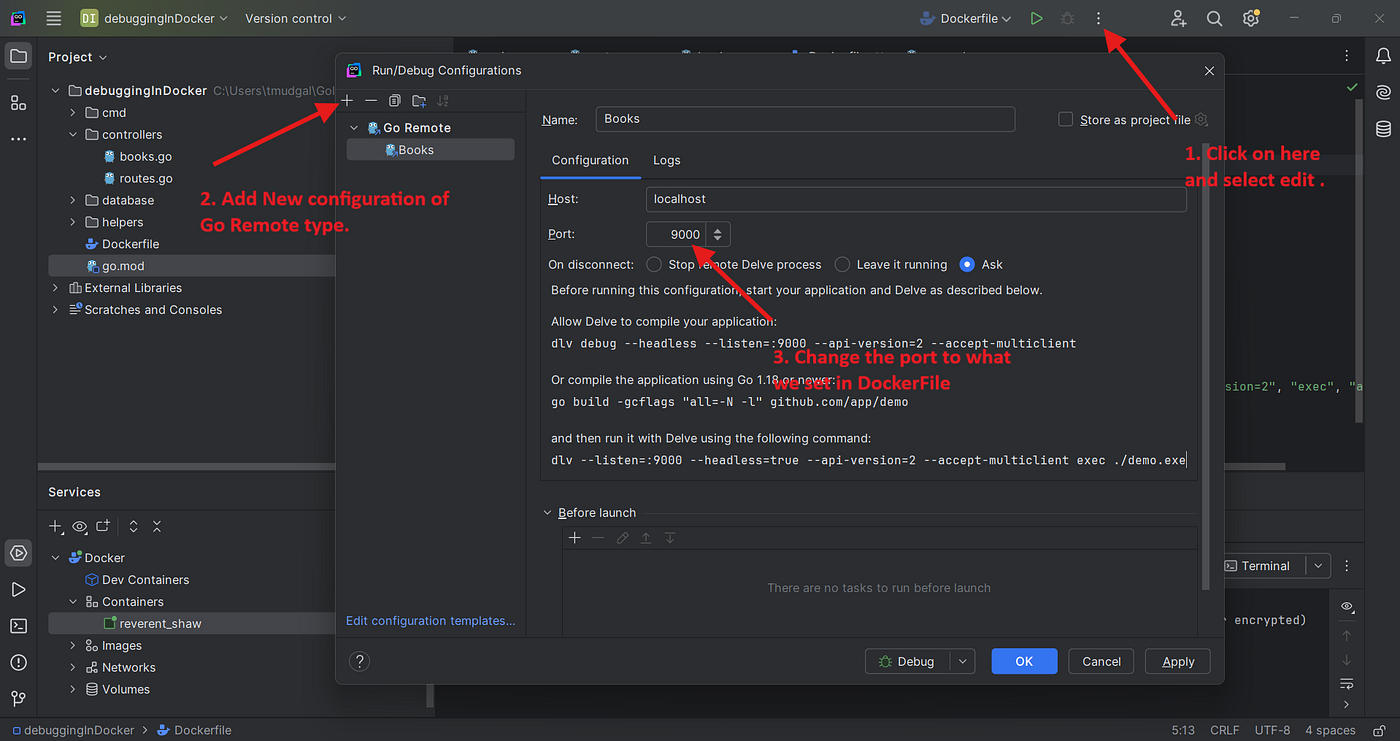
Go Remote Configuration
Let’s set some breakpoints and start debugging,

Breakpoints and debugging
And just like that you can now debug your go code on a container or any server…

Debugging working on Docker Container
And that’s it, now you can easily debug every request without wasting time in adding print statements and rebuilding the container again and again!!
Also, Delve can be used for other IDEs as well even with terminal, but try that on your own.
메타데이터
- post_id
- b0fde4d64145
- slug
- debugging-go-on-docker-in-goland-b0fde4d64145
- url
- https://medium.com/@tanmayjobs619/debugging-go-on-docker-in-goland-b0fde4d64145
- canonical_url
- https://medium.com/@tanmayjobs619/debugging-go-on-docker-in-goland-b0fde4d64145
- author_url
- https://medium.com/@tanmayjobs619
- status
- ok
- fetched_at
- 2026-06-25 12:15:08



