How to use different tools to do Terraform Checks in Github Actions
Terraform is an IAC tool, used to automate various infrastructure tasks. It can manage existing and popular cloud service providers as well…
How to use different tools to do Terraform Checks in Github Actions

Terraform is an IAC tool, used to automate various infrastructure tasks. It can manage existing and popular cloud service providers as well as custom in-house solutions. It is the popular Infrastructure as a Code tool which many DevOps engineers use. Here, in this article we will list a few tools (Tflint , Tfsec, Checkov) and practices that will assist you in making your Terraform code clean. We will be integrating these checks in GitHub Actions workflow where our terraform code is present.
Tools
**Terraform TfLint — **It is a linter that checks possible errors (like invalid instance types) for Major Cloud providers (AWS/Azure/GCP). It also help identify provider-specific issues before errors occur during a Terraform run. It warns you about deprecated syntax, unused declarations and enforce best practices, naming conventions. For example : If you want to create an ec2 instance of instance type as “t2.micro” but accidentally reference an invalid instance type like “t2.micrro” , Tflint will show an error.
To use in AWS Cloud , first create a .tflint.hcl file and install the plugin
plugin "aws" {
    enabled = true
    version = "0.21.1"
    source  = "github.com/terraform-linters/tflint-ruleset-aws"
}
To use in Github Actions — create a workflow
name: Tflint Checks on Terraform Code

on:
  push:
    branches:
      - main

permissions: read-all

jobs:
  tflint-checks:
    runs-on: ubuntu-latest
    steps:

# Checkout Repository
    - name : Check out Git Repository
      uses: actions/checkout@v3

# TFLint - Terraform Check
    - uses: actions/cache@v2
      name: Cache plugin dir
      with:
        path: ~/.tflint.d/plugins
        key: ${{ matrix.os }}-tflint-${{ hashFiles('.tflint.hcl') }}

    - uses: terraform-linters/setup-tflint@v2
      name: Setup TFLint
      with:
        github_token: ${{ secrets.CI_GITHUB_TOKEN }}

# Print TFLint version
    - name: Show version
      run: tflint --version

# Install plugins
    - name: Init TFLint
      run: tflint --init

# Run tflint command in each directory recursively # use --force if you want to continue with workflow although errors are there
    - name: Run TFLint
      run: tflint -f compact --recursive
In this the first step is for cloning the repository and second step we are caching plugin directory for Tflint and setting up the Tflint and in the third step we are seeing the Tflint version and fourth step we are installing the plugins using “tflint — init” and fifth step we are running Tflint commands and giving as a compact output.
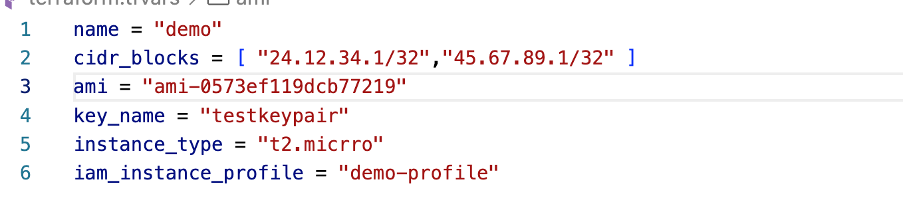
We have deliberately added some errors to see the tflint checks. Here we have added wrong instance_type . Instead of “t2.micro” added “t2.micrro”.

**Terraform Tfsec — **This tool uses static analysis of your terraform code to spot potential security issues. It checks for different misconfigurations across all major (and some minor) cloud providers( GCP,AWS,Azure ) based on hundreds of built-in-rules. It evaluates relationships between Terraform resources and is compatible with the Terraform CDK and supports multiple output formats like lovely (default), JSON, SARIF, CSV, CheckStyle, JUnit, text, Gif. Example: If you are creating security group and if it is open to whole world (0.0.0.0/0) . It will show an error.
To use in Github Actions — create a workflow
name: Tfsec Checks on Terraform Code

# Only trigger, when the build workflow succeeded
on:
  workflow_run:
    workflows: ["Tflint Checks on Terraform Code"]
    types:
      - completed

permissions: read-all

jobs:
  tfsec-checks:
      runs-on: ubuntu-latest
      steps:

# Checkout Repository
      - name : Check out Git Repository
        uses: actions/checkout@v2

# Tfsec - Security scanner for your Terraform code
      - name: Run Tfsec
        uses: aquasecurity/tfsec-action@v1.0.0
Here, we are first cloning the repository and then in the second step we are using aquasecurity/tfsec-action@v1.0.0 action to run the Tfsec security checks on Terraform Code.

Added “0.0.0.0/0” in security group

To ignore this error we need to add a syntax in the terraform code :
tfsec:ignore:<rule>
Like in the above error we will be adding this line in terraform code(Security Group) :
tfsec:ignore:aws-vpc-no-public-ingress-sgr
tfsec:ignore:aws-ec2-no-public-egress-sgr
resource "aws_security_group" "allow_sg" {
  name        = "${var.name}-SG"
  description = "Allow tls inbound traffic"

  ingress {
    description      = "SSH from VPC"
    from_port        = 22
    to_port          = 22
    protocol         = "tcp"
    cidr_blocks      = var.cidr_blocks #tfsec:ignore:aws-vpc-no-public-ingress-sgr
  }

  egress {
    description      = "TLS from VPC"
    from_port        = 0
    to_port          = 0
    protocol         = "-1"
    cidr_blocks      = ["0.0.0.0/0"]  #tfsec:ignore:aws-ec2-no-public-egress-sgr
    ipv6_cidr_blocks = ["::/0"]
  }

  tags = {
    Name = "${var.name}-SG"
  }
}**Checkov** : It is a static code analysis tool for scanning infrastructure as code (IaC) files for misconfigurations that may lead to security or compliance problems. Checkov includes more than 750 predefined policies to check for common misconfiguration issues. It has wide ranging use-cases like Terraform, Terraform plan, Cloudformation, Kubernetes, Dockerfile, Serverless or ARM Templates and GitHub Actions
To use in Github Actions — create a workflow
name: Checkov Checks on Terraform Code

# Only trigger, when the build workflow succeeded
on:
  workflow_run:
    workflows: ["Tfsec Checks on Terraform Code"]
    types:
      - completed

permissions: read-all

jobs:
  checkov-checks:
      runs-on: ubuntu-latest
      steps:

 # Checkout Repository
      - name : Check out Git Repository
        uses: actions/checkout@v2

# Checkov - Prevent cloud misconfigurations and find vulnerabilities during build-time in infrastructure as code
      - name: Run Checkov
        run: |
           docker run -t -v ${{ github.workspace }}:/tf --workdir /tf bridgecrew/checkov --directory /tf --skip-check CKV2_GHA_1
Here, we are first cloning the repository and then in the second step we are using docker image to run the Checkov security checks on Terraform Code.
Added “0.0.0.0/0” in security group

To ignore this error we need to add a syntax in the terraform code :
checkov:skip=<check_id>:<suppression_comment>
Like in the above error we will be adding this line in terraform code(Security Group) :
checkov:skip=CKV_AWS_79:Metadata of EC2 Instance not required
resource "aws_instance" "web" {

  #checkov:skip=CKV_AWS_79:Metadata of EC2 Instance not required
  ami                    = var.ami
  instance_type          = var.instance_type
  key_name               = var.key_name
  vpc_security_group_ids = [aws_security_group.allow_sg.id]
  iam_instance_profile   = var.iam_instance_profile

  #tfsec:ignore:aws-ec2-enforce-http-token-imds
  metadata_options {

  }
}
To get the whole code — Checkout GitHub Repo
Buy me a coffee :) ← — — If you like my articles

메타데이터
- post_id
- b16e9fa73c42
- slug
- how-to-use-different-tools-to-do-terraform-checks-in-github-actions-b16e9fa73c42
- url
- https://medium.com/@nanditasahu031/how-to-use-different-tools-to-do-terraform-checks-in-github-actions-b16e9fa73c42
- canonical_url
- https://medium.com/@nanditasahu031/how-to-use-different-tools-to-do-terraform-checks-in-github-actions-b16e9fa73c42
- author_url
- https://medium.com/@nanditasahu031
- status
- ok
- fetched_at
- 2026-07-26 07:10:32




