SAP Cloud Integration — Basics
SAP Cloud Integration — Basics
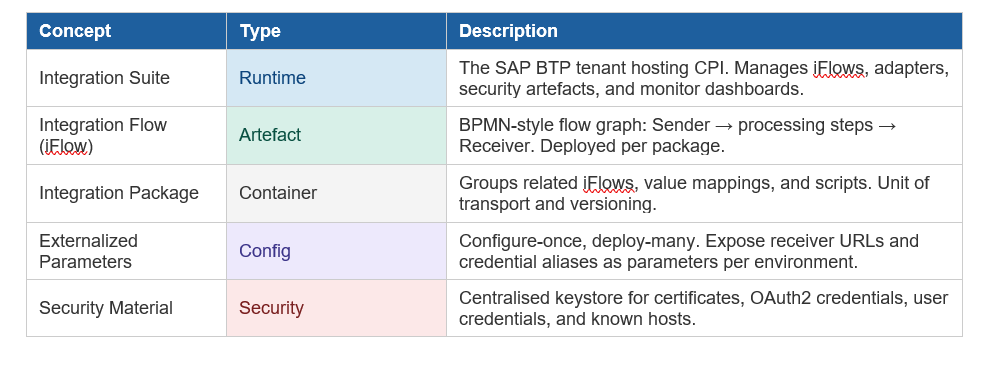
SAP Cloud Integration (CPI) is the integration runtime component of SAP Integration Suite on SAP BTP. It hosts integration flows, adapters, and security artefacts.
Message Processing Flow
Every iFlow follows a canonical sender-to-receiver pattern. Steps are executed sequentially unless routed.

Adapter Cheatsheet
Inbound (Senders)
• HTTPS — synchronous REST/SOAP trigger
• SFTP — scheduled file pickup
• AMQP / JMS — async message queue
- S/4 HANA — IDoc / OData inbound
- AS2 — EDI B2B partner
Outbound (Receivers)
• HTTP / OData — REST API calls
• SFTP — file drop
• Mail — SMTP notification
- JDBC — direct database write
- RFC / IDoc — SAP backend
Development Lifecycle
Follow these five steps for every iFlow from design to production.
-
Step 1 — Design — Model the iFlow in the Web UI. Use externalized parameters for environment-specific values (URLs, credential aliases). Prefer XSLT for complex XML transforms; Message Mapping for simpler field-level maps.
-
Step 2 — Test locally — Use the Simulate function in the Web IDE. Inspect headers and body payloads via the Content Modifier trace. Validate all edge-case routing paths.
-
Step 3 — Deploy to DEV — Save & deploy. Verify in Monitor → Integration Content that adapter status = Started. Send test messages and check Message Processing Log (MPL).
-
Step 4 — Promote to QA / PROD — Export the package as a .zip, import and redeploy in the target tenant. For automated pipelines, use the CPI REST Deploy API with Jenkins or Azure DevOps.
-
Step 5 — Monitor — Navigate to Monitor → Message Processing Logs. Filter by status: Completed / Failed / Retry. Download trace payloads for debugging. Set log level to Info in production (never Trace).
Security Essentials
Credential Management
- Store all secrets in Security Material keystore
- Reference secrets by alias — never hardcode in iFlow
- Use OAuth2 Client Credentials for API targets
- Use Basic Credentials for legacy system auth
- Rotate certificates before expiry alert triggers
- Use Known Hosts file for SFTP key-based auth
Access Control
- Assign roles via SAP BTP cockpit, not iFlow config
- ESBMessaging.send role for all inbound callers
- Create service instance + binding for API access
- Restrict PI_Integration_Developer to non-prod tenants
- Review audit logs in Security → Audit Log Viewer
- Enable CSRF token for HTTPS inbound if required
Mapping Patterns
- Message Mapping Complexity : Low–Medium Best For : Graphical drag-drop field mapping; use built-in functions or Groovy for complex nodes Notes : Easiest to maintain; no code files
- XSLT Mapping Complexity : Medium–High Best For : Large, complex XML transformations; structured namespaces; version-controlled XSLT files Notes : Keep XSLT in Git for history
- Groovy / JS Script Complexity : Medium–High Best For : Dynamic headers, conditional logic, external lookups, response parsing, JSON manipulation Notes : Avoid heavy computation in script step
- Value Mapping Complexity : Low Best For : Code list translations (e.g. country codes, UoM conversions) maintained as lookup tables Notes : Centralised; reuse across iFlows
Error Handling Strategy
Design Patterns
- Wrap risky integration steps in an Exception Subprocess
- Set retry on JMS / AMQP adapters: 3 retries with exponential backoff recommended
- Route failed messages to a Dead-Letter JMS queue after max retries are exhausted
- Use Escalation End Events to notify operations teams of critical failures
- Set custom header properties (e.g. SAP_ApplicationID) for traceable MPL search.
Alerting & Monitoring
- Configure SAP Alert Notification Service for failure events per scenario
- Route alerts to email, Slack webhook, or ServiceNow as required
- Retain Message Processing Logs 30–90 days (check tenant log quota)
- Use log level Info in production; switch to Debug/Trace only for active troubleshooting
- Never leave Trace mode enabled in production — it retains full payloads and exhausts log quota
Exception Subprocess Structure
- Catch exception in Exception Subprocess at iFlow level
- Log error context: message ID, source system, error category
- Send alert via SAP Alert Notification or Mail adapter
- Route to dead-letter JMS queue or persist to Data Store for replay
- Return fault response to sender if synchronous (HTTP 500 with structured body)
Performance & Scalability
Design Rules
- Avoid storing large payloads in message headers
- Use Splitter + parallel multicast for bulk processing
- Keep each iFlow single-responsibility; avoid super-flows
- Prefer async (JMS) for fire-and-forget scenarios
- Minimise script step complexity; offload to mapping
- Use Content Enricher sparingly — it holds payload in memory
Tenant Limits (defaults)
Max message size: 40 MB (default)
JMS queues: 30 per tenant
Data store entries: 1 million per tenant
MPL retention: Configurable (30–90 days typical)
Concurrent processes: Varies by BTP plan
CI/CD & Transport
Use the CPI REST API (/api/v1) with OAuth2 client credentials to automate deployments. Key operations:
- Upload package : POST /IntegrationPackages — upload .zip artefact to tenant.
- Deploy iFlow : POST /DeployIntegrationDesigntimeArtifact — triggers deployment
- Undeploy : DELETE /IntegrationRuntimeArtifacts(‘{id}’) — remove from runtime.
- Trigger test : POST to iFlow endpoint — send test message via pipeline.
- Check status:GET /IntegrationRuntimeArtifacts(‘{id}’) — poll until STARTED.
Transport & Versioning
• Use CTS+ / MTAR transport for managed landscapes: export as MTAR, import via SAP BTP Transport Management
• Store iFlow artefacts in Git using Eclipse plugin or manual export/import; tag releases
• Peer-review mapping changes before promoting to QA
• Lock production packages to prevent accidental edits; use Read-Only flag on packages
• Align transport lanes: DEV → QA → PROD with approval gates between each
Common Gotchas
- Header size limit: HTTP headers over 8 KB cause 413 errors. Clear or compress large headers before outbound calls using a Content Modifier.
- Certificate expiry : Set a calendar reminder 60 days before certificate expiry. Expired certificates silently fail TLS handshakes with no clear error in MPL.
- JMS queue capacity : Queues fill up if receiver systems go down. Always wire a dead-letter branch. Monitor queue depth via Operations → JMS Resources.
- Trace mode in production : Never leave log level = Trace in production. It retains full message payloads, exhausts the log storage quota rapidly, and creates data exposure risk.
- Externalized parameter drift : If a parameter is removed from the iFlow but still referenced in configure-only mode, deployment silently ignores it. Always validate after parameter changes.
- Concurrent deploy conflict : Deploying the same iFlow from two sources simultaneously causes one to silently overwrite the other. Serialize deployments in your CI/CD pipeline.
Quick Reference — Key Terms
- BTP : SAP Business Technology Platform — the cloud platform hosting Integration Suite.
- iFlow : Integration Flow — the BPMN-style artefact defining message processing logic.
- MPL : Message Processing Log — the audit record of every message processed.
- JMS : Java Message Service — async messaging used for decoupled, reliable delivery.
- XSLT : Extensible Stylesheet Language Transformations — XML-to-XML mapping language.
- IDoc : Intermediate Document — SAP’s proprietary EDI format for ERP message exchange.
- OData : Open Data Protocol — REST-based API standard used widely in SAP systems.
- ESBMessaging :The BTP role required by caller systems to invoke inbound HTTPS iFlows.
- CTS+ : Change and Transport System — SAP’s managed transport framework for BTP.
- MTAR : Multitarget Application Archive — the deployment unit for BTP Transport Management.
- Data Store: Persistent key-value store within CPI for message state and retry payloads.
- Exception Subprocess : A special subprocess step that catches runtime errors in an iFlow.
메타데이터
- post_id
- b19f08fb6cfb
- slug
- sap-cloud-integration-basics-b19f08fb6cfb
- url
- https://medium.com/sap-innovation-hub/sap-cloud-integration-basics-b19f08fb6cfb
- canonical_url
- https://medium.com/sap-innovation-hub/sap-cloud-integration-basics-b19f08fb6cfb
- author_url
- https://medium.com/@garg.ruhani19
- status
- ok
- fetched_at
- 2026-06-10 18:44:10