Progress on Metal backend for Cemu
Progress on Metal backend for Cemu

Hello everyone!
For the past 2 months, I have been working on a Metal rendering backend for the Cemu Nintendo Wii U emulator. Cemu enables you to play your Nintendo Wii U games on a variety of platforms (Windows, Linux and macOS for now). Needless to say, the library of Wii U games isn’t that big, since it didn’t sell well, but there are some amazing first party Nintendo titles, like Super Mario 3D World, Super Mario Maker, Splatoon, and The Legend of Zelda: Breath of the Wild.
Why Metal backend?
Cemu already runs on macOS using Vulkan through a compatibility layer called MoltenVK, so why implement a Metal backend? There are 2 main reasons for it; better performance and better game compatibility.
Performance
Vulkan is a low-level graphics API, but unfortunately, Apple doesn’t support it natively. This means that it has to run on a compatibility layer called MoltenVK, which translates Vulkan calls to native Metal. This comes at a not so small CPU performance cost, as well as lower GPU performance due to not being able to harvest the power of Apple Silicon GPUs to its fullest.
Game compatibility
As of writing, MoltenVK doesn’t support one of the Wii U’s GPU feature: geometry shaders. This causes small graphical issues in some games (for example the minimap being cut in half in The Legend of Zelda: Twilight Princess), but also makes other games completely unplayable (for example Super Mario Maker and Mario Tennis: Ultra Smash).
While Metal doesn’t support geometry shaders either, it gives us the tools to emulate them with relative ease.
The Status of the Metal backend
So how’s the Metal backend doing so far? Well, it’s certainly not finished yet, but it can play most of the popular games without any issues. It also already outperforms Vulkan in performance tests. I don’t have any specific numbers, but from the tests I did the Metal backend seems to be roughly 20–25% faster. This of course highly depends on the game and machine being played on.
Regarding the game compatibility, below is a comparison of Metal vs Vulkan in some popular games that require geometry shaders (up is Vulkan, down is Metal):
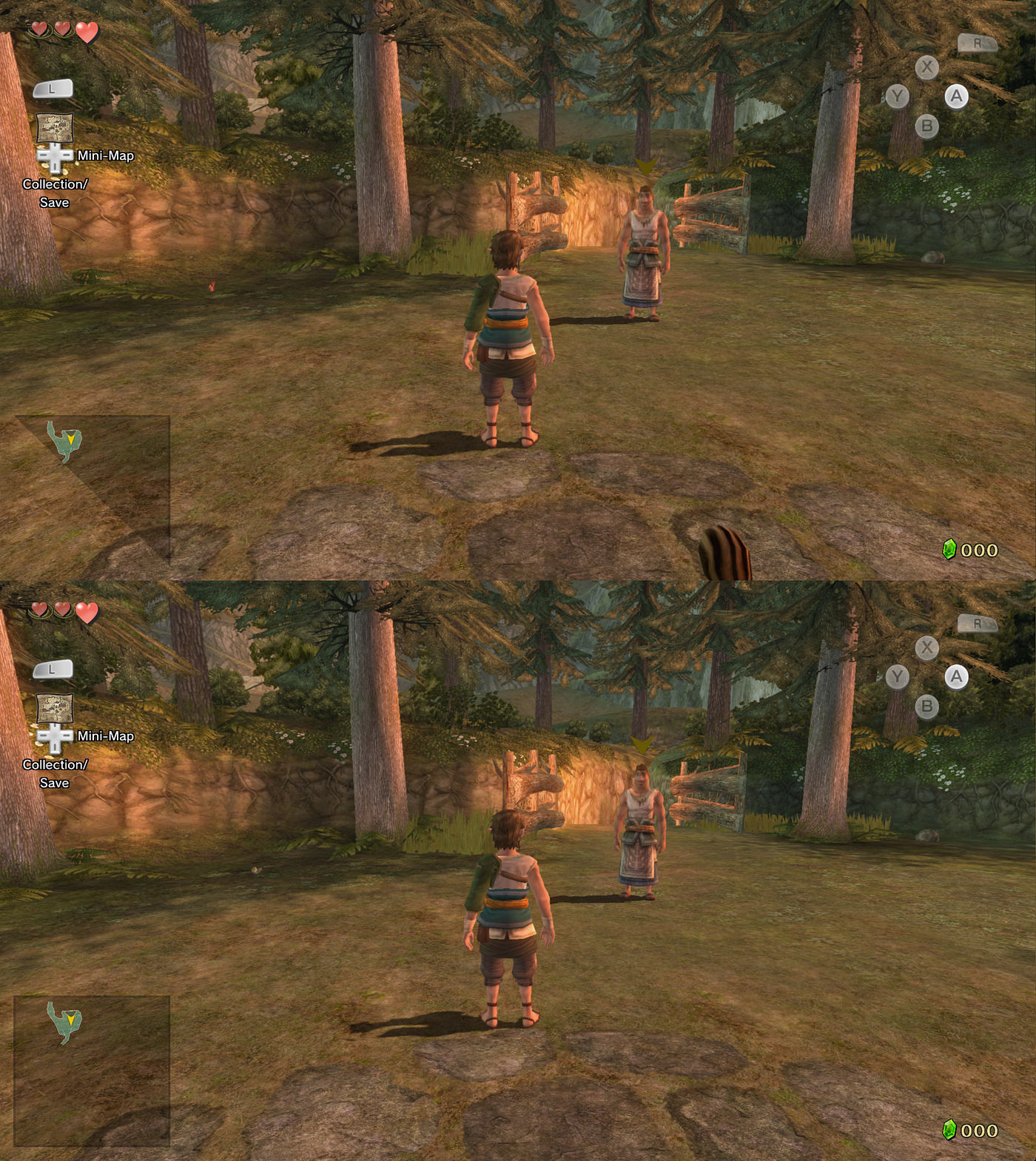
The Legend of Zelda: Twilight Princess. The minimap doesn't render properly on Vulkan.

Super Mario Maker. The tiles don't render on Vulkan and the screen is cut in half. Completely unplayable.

Mario Tennis: Ultra Smash. The screen is cut diagonally on Vulkan again (the upper half has contents from previous frames). The rest of the screen is full of dark triangles, making it unplayable.
The challenges of implementing the Metal backend
Cemu already has 2 rendering backends: Vulkan and OpenGL. However, writing a Metal backend poses lots of new challenges simply due to the fact that Metal lacks a lot of features of the other 2 APIs. That’s because it is designed specifically for Apple Silicon GPUs as opposed to something like Vulkan, which is meant to support every modern GPU out there. Let’s take a look at some of the difficulties that had to be overcome.
Don’t split the render pass!
Apple Silicon GPUs are Tile-based deferred renderers (TBDR). Other TBDR GPU examples include for most mobile GPUs, but most desktop GPUs (from Nvidia and AMD) are immediate mode (IM). There are a lot of differences between these 2, but the most notable one is the fact that memory loads and stores are very expensive on TBDRs. Textures always need to be loaded at the beginning of a render pass and stored at its end (render pass is just a sequence of draws that renders to a particular texture/s).
The problem is that not all operations can be done inside a render pass. The most notable example is memory copying. This is solved by doing memory copying in a shader instead of using Metal’s native commands.
Accurate barriers
Certain games read and write from the same textures at the same time, to create effects like transparency. This is fine on the Wii U's GPU, since it's sequential, meaning all operations are guarantied to finish in the order they have been submitted to the GPU. However, this is a problem on TBDR GPUs which are highly parallel and only write to the textures at the end of the render pass. This means that we have to end and begin a new render pass after every draw call. This can get extremely expensive, but fortunately, there is a pretty easy fix to this. The user has the option to turn off “Accurate barriers”, causing Cemu to not end the render pass between draw calls. This can cause slight texture flickering in some cases, therefore accurate barriers are always enabled for a few known problematic shaders.
Disabling accurate barriers can lead to almost a 2x performance improvement in certain games, with the most notable one being The Legend of Zelda: Breath of the Wild. Just note that accurate barriers are only expensive on TBDR GPUs, so there is no need to turn them off on Intel Macs.
Geometry shaders
Geometry shaders are a way to generate procedural geometry. If a geometry shader is used, the graphics pipeline changes from vertex -> fragment to vertex -> geometry -> fragment. However, geometry shaders are an old concept and are pretty inefficient on most of the modern hardware. Luckily, there is a more efficient and flexible alternative: mesh shaders. The pipeline for mesh shaders looks like this: object -> mesh -> fragment. Since mesh shaders are way more flexible than geometry shaders, geometry shaders can be emulated on top of them.
Of course not all features of geometry shaders map nicely to mesh shaders. The most difficult feature to emulate is vertex fetching. In a traditional pipeline, vertices are fetched using a specialized hardware. However, that’s not the case with mesh shaders. All the vertex data needs to be retrieved manually inside the shader, which proved to be quite challenging, especially when accounting for all the edge-case scenarios.
Vertex buffer restrictions
Metal has a seemingly strange restriction on vertex buffers: the data of the individual vertices needs to be aligned to 4 bytes. This is most likely a restriction present in the vertex fetching hardware in Apple Silicon GPUs. The GPU found in the Wii U doesn’t have this restriction, and so we need to find a workaround for this.
This initial solution was to dispatch a compute shader before a draw to align the vertex data properly. However, this required the draw to wait for the compute shader to finish and therefore led to a small performance drop. Luckily, there is a much better solution which was already implemented for geometry shaders: retrieving the vertex data manually in the shader. This has the disadvantage of not using the built-in hardware for vertex fetching, but it’s still much faster than aligning the vertex buffer in a compute shader.

Mario Kart 8 without the vertex alignment workaround.
Future improvements
The Metal backend is still not complete. There are small improvements that need to be made, and here are the most important ones:
- Accurate occlusion queries — right now, the implementation of occlusion queries doesn’t fully match the way they work on the real hardware, but it’s enough to make games that require them (like Splatoon) work well
- Better binary archives — the Metal backend uses binary archives to save compiled pipelines and loads them the next time the game is run. However, binary archives can consume a lot of memory, which could be solved by loading all the pipelines on startup instead of runtime
What about iOS?
Cemu isn’t available on iOS yet. And while the Metal backend wouldn’t make porting Cemu to iOS easier, it would certainly make it perform better. The major fact preventing Cemu from being ported to iOS is the lack of ARM recompiler. The Wii U had a PowerPC processor, and its instructions need to be translated to ARM at runtime. Cemu currently has an x86_64 recompiler which can run on Apple Silicon Macs through Rosetta, but that isn’t available on iOS.
Luckily, there is an Android port being worked on which has an ARM recompiler. It’s still not finished, but once it is it could open the path for a potential iOS port.
Conclusion
Anyway, this was a bit different article from my usual Metal tutorials, but I hope you enjoyed it anyway. If you have any questions regarding the Metal backend or would like to contribute to it, feel free to reach out in the official Cemu discord server. Have a great day!
And lastly, here are some funny graphical bugs I have encountered during the development:

Mario Kart 8. Everything is yellow due to incorrect pixel format.
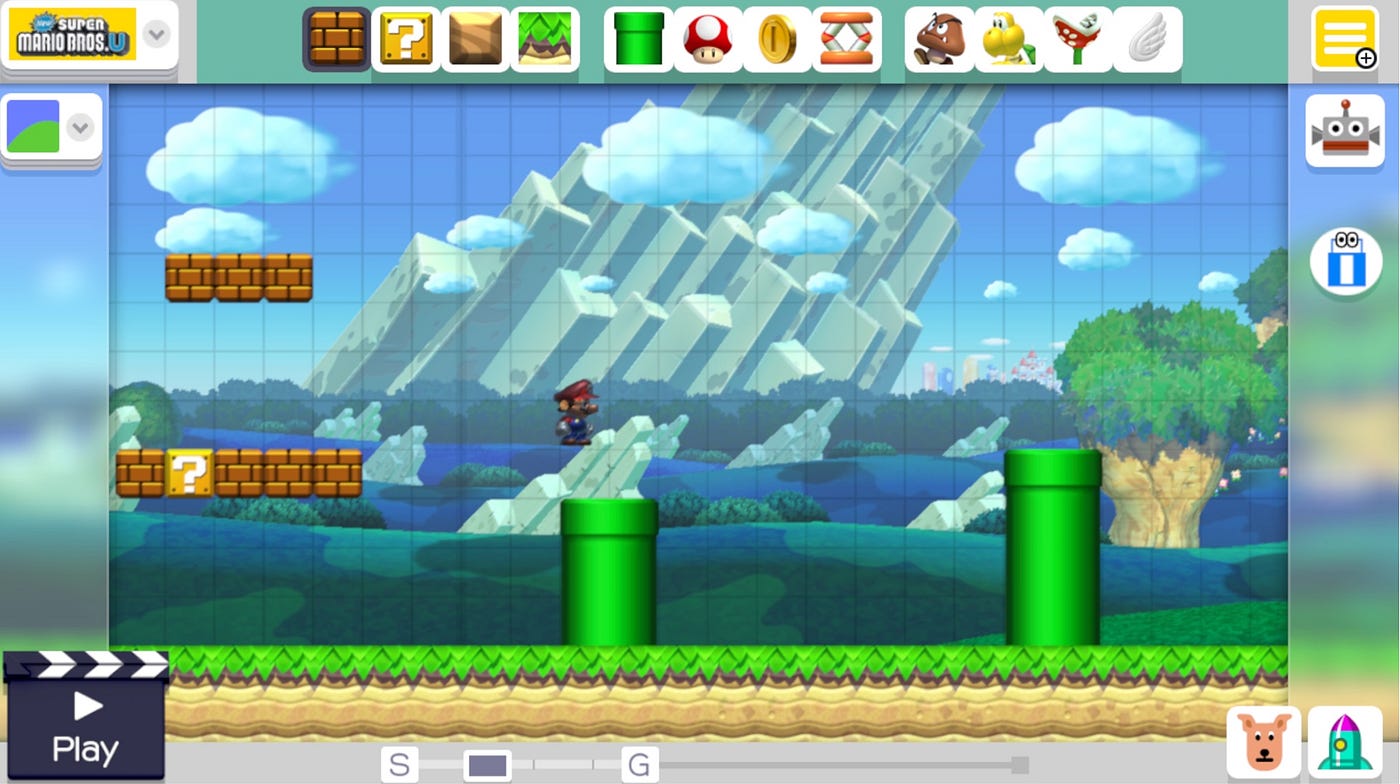
Super Mario Maker. Mario appears like he’s from metal due to invalid texture LOD.

Super Mario 3D World. The ground is black and the water has a cyan tint.
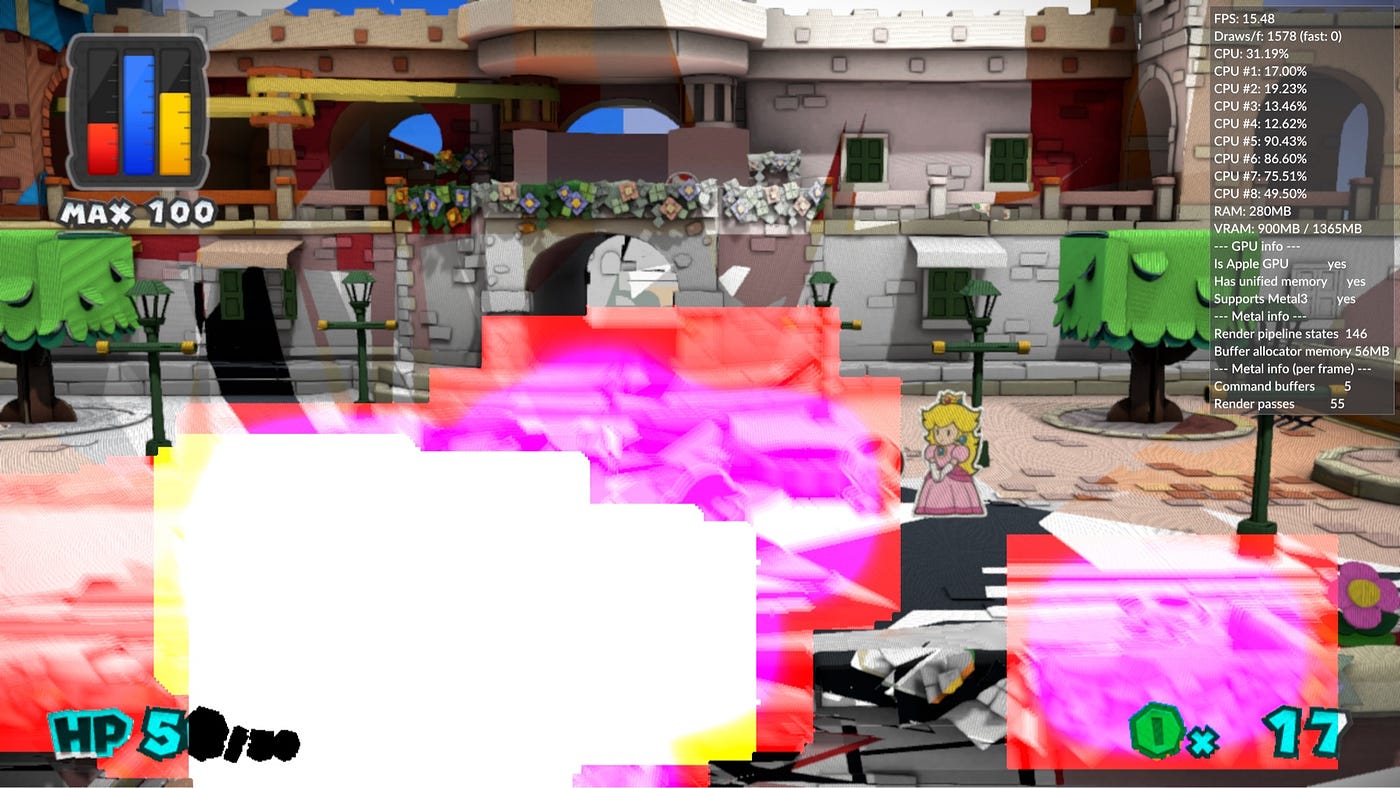
Paper Mario: Color Splash. Weird colorful squares due to incorrect geometry.

An early render of Captain Toad: Treasure Tracker. Literally everything is broken.

The menu in Super Mario Maker. It somehow turned into a drawing app.
메타데이터
- post_id
- b22dc18e7cbc
- slug
- progress-on-metal-backend-for-cemu-b22dc18e7cbc
- url
- https://medium.com/@samuliak/progress-on-metal-backend-for-cemu-b22dc18e7cbc
- canonical_url
- https://medium.com/@samuliak/progress-on-metal-backend-for-cemu-b22dc18e7cbc
- author_url
- https://medium.com/@samuliak
- status
- ok
- fetched_at
- 2026-07-22 11:36:17