Don’t remember your passwords. Still, stay secured🤔: My Journey with Proton Pass
Hello there, this is Bharath here. Hope you are having a great day.
Don’t remember your passwords. Still, stay secured🤔: My Journey with Proton Pass
Hello there, this is Bharath here. Hope you are having a great day.
Out of curiosity, about what is being offered by a product, I use many software products that can make my life. easier. A few months ago, I came across the product “Proton Pass” by “Proton”, a Password Management Solution. I know how tiresome it would be to log in to a website or an app, try to remember the password, fail to authenticate yourself, click on forgot password, change your password again, and the next time you visit, the roller coaster repeats. I also know some of you would be old-school intelligent enough to write your passwords on a paper or in a notepad, but it is not secure. So, today, I want to share my experience about how Proton Pass made my life a lot easier, without remembering my passwords. That’s right. I am not kidding.
Proton Pass
Proton Pass is a password manager developed by the Swiss software company Proton AG. It stores login credentials, email aliases, credit card data, passkeys, 2FA secret keys, and notes in virtual vaults that are encrypted using 256-bit AES-GCM. It’s a 1 stop solution for securely forgetting your passwords.
The features of Proton Pass include:
Storing your passwords securely: You can securely store your passwords using 256-bit AES-GCM encryption standard in a virtual vault, so that, no one can crack your password easily even though they find the masked password. It also prompts you to change your password if it’s not strong enough or if the same password was found in a data breach.
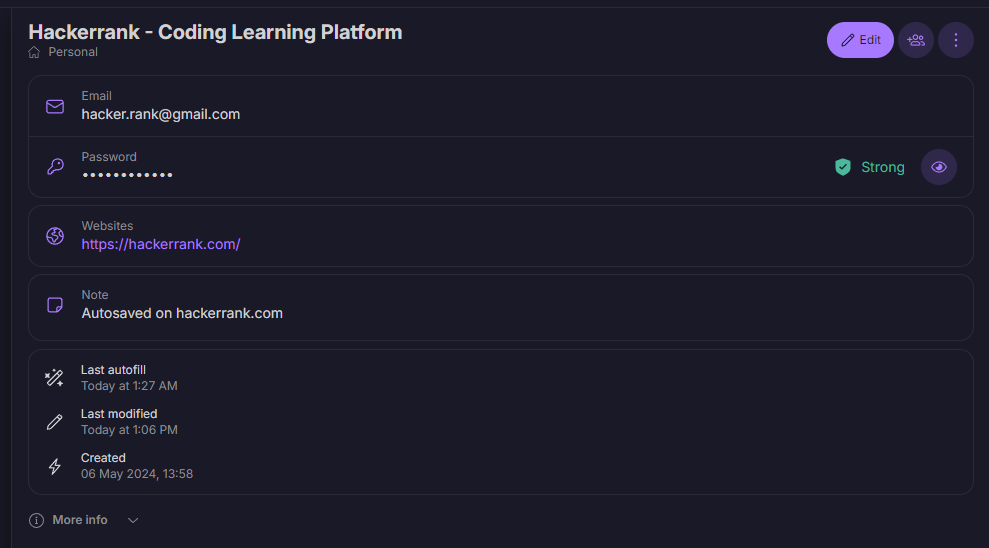
Storing passwords in Proton Pass
Auto-Login on Websites: Instead of trying to enter your login details on a website every time, you can save your details directly using the Proton Pass extension on a PC or the Proton Pass app on a mobile. It auto-saves your login and gives you a hassle-free experience every time you want to log in.
Auto-login feature on Proton Pass
Generate random passwords with great security: Instead of giving the same passwords to multiple websites, you can generate a new password including characters of large length (25 characters is a huge layer of security). You can use this feature while signing up or resetting a password. After logging in, Proton Pass automatically replaces the previous password with the updated password. I like this feature. It helps me to keep different passwords for different sites, with variable-length passwords that I might not even know or remember 😂.
Generate variable-length secured passwords
Adding Multi-Factor Authentication(MFA): There could be instances where you need to add MFA for a particular website or an app, where financial things are involved. Proton Pass also has MFA, which supports Microsoft Authenticator and Google Authenticator. You can get your MFA key from these third parties and you can give the One Time Password from Proton Pass itself.
Integrated Multi-Factor Authentication
Built-in encrypted notes: With encrypted notes, you can easily save private notes, credit card numbers, and other personal information that only you can access on all your devices.
Built-in encrypted notes
Securely share passwords: Securely share your login information, credit card details, and notes with anyone, even if they don’t use Proton Pass. Choose whether you want to share individual items or your entire vault.
Securely share passwords
Pass Monitor: Pass Monitor keeps you safe by checking for security threats to your accounts. If there is any data breach with your email or username, or if the same password you use has been breached on the Dark web, it prompts you to change your password before someone can steal your data.
Pass Monitor keeps track of your passwords
Available anywhere you need it: Proton Pass has apps for Android and iPhone and a Windows app. It is available through web-app and browser extensions, including Chrome, Edge, Firefox, and Brave.
Availability of Proton Pass on different platforms
And there’s so much more. For me, it had been a great and hassle-free experience as there are too many sites and applications and each has its login credentials. I highly recommend you to use Proton Pass once. You will love it. Proton also has many products like Proton Mail (which comes with a ton of security features), and Proton VPN, and many products are being rolled out. Go and check them out by yourself.
And if you have read to the end, a big THANK YOU from my side. I try to come up with articles that I feel will have an impact on your life whenever you read them. Follow me for more content like this here Bharath’s LinkedIn HAVE A GOOD DAY!
“Slow down and take the time to really see. Take a moment to see what is going on around you right now, right where you are. You may be missing something wonderful. Jeffrey Michael Thomas”
메타데이터
- post_id
- b270e09056cf
- slug
- dont-remember-your-passwords-still-stay-secured-my-journey-with-proton-pass-b270e09056cf
- url
- https://medium.com/@bharathkumar18/dont-remember-your-passwords-still-stay-secured-my-journey-with-proton-pass-b270e09056cf
- canonical_url
- https://medium.com/@bharathkumar18/dont-remember-your-passwords-still-stay-secured-my-journey-with-proton-pass-b270e09056cf
- author_url
- https://medium.com/@bharathkumar18
- status
- ok
- fetched_at
- 2026-07-06 19:56:14