How Professional Producers Make MIDI Drums Sound Human (It’s Not Just Randomization)
3 Techniques Professional Producers Use to Humanize MIDI Drums
How Professional Producers Make MIDI Drums Sound Human (It’s Not Just Randomization)
3 Techniques Professional Producers Use to Humanize MIDI Drums
You can spend hundreds of dollars on premium drum libraries and still end up with drum tracks that sound programmed. The secret to professional-sounding MIDI drums isn’t just better samples, but how they’re performed. In this article, we’ll explore the techniques used by professional producers and session programmers to transform rigid MIDI into performances that feel like a real drummer played them.
In this article, we’ll explore the techniques used by professional producers and session programmers to humanize MIDI drum tracks. Starting with a robotic, fully quantized drum pattern, we’ll apply these techniques one by one to show how each contributes to a more natural and convincing performance.
We’ll begin with a drum pattern that sounds like this:
[embed]
By the end of the article, that same pattern will sound like this:
[embed]
Technique #1 — Velocity Accents
One of the quickest ways to make MIDI drums sound more realistic is to vary the velocity of each hit. Professional drummers rarely strike every note with the same force. When every MIDI note has an identical velocity, the result is an unnaturally rigid performance often referred to as the machine-gun effect.
In a real performance, drummers naturally emphasize certain beats while playing others more softly. The strongest accent is often placed on the first beat of the measure, giving the groove a clear sense of direction. Weaker beats and off-beats are typically played with less intensity, while the final beat of the measure is often lighter to create a natural lead-in to the next bar. The exact pattern varies depending on the musical style and groove, but the principle remains the same: not every hit should have the same energy.
Consider the following MIDI drum pattern:
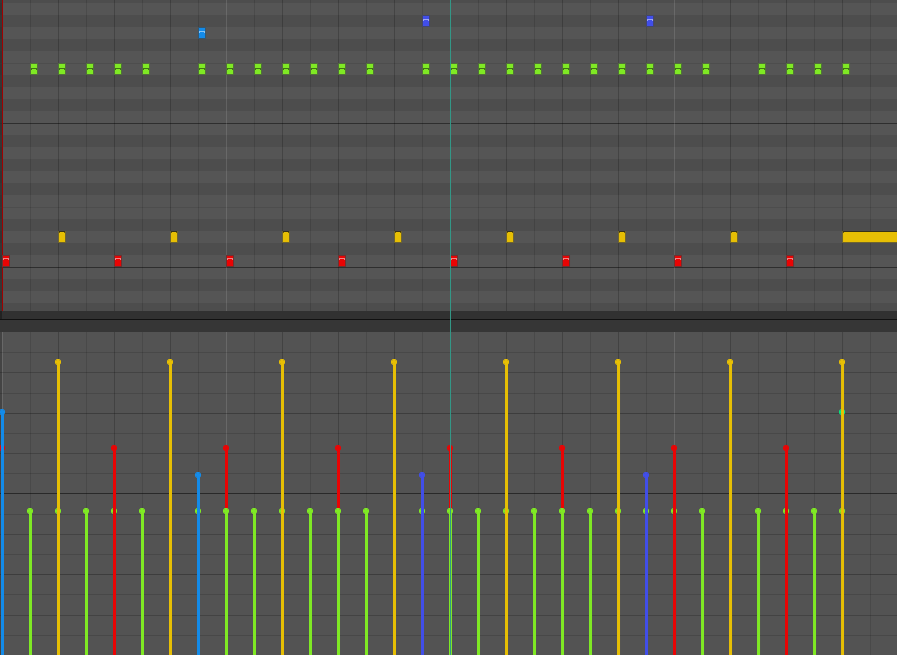
Drum Velocity Same
Although the rhythm is correct, every note is played with the same velocity, making the performance sound mechanical.
Now compare it with the same pattern after applying velocity accents:

Drum Velocity Realistic
Notice how the first beat is played with the greatest intensity, the off-beats are slightly softer, and the remaining beats follow a more natural dynamic contour. These subtle changes don’t alter the rhythm, but they significantly improve the groove, making the drum track feel much more like a real performance.
Technique #2 — Microtiming
Just as drummers don’t strike every note with the same intensity, they also don’t play every note at the exact same moment. Even exceptionally precise drummers like Neil Peart and Mike Portnoy (showing my progressive rock influences 😉) exhibit subtle timing variations in their performances. To most listeners, they may sound almost machine-like, but a closer look at the MIDI reveals a different story.
These tiny deviations, often measured in just a few milliseconds, are known as microtiming. They are one of the key ingredients that give a performance its feel and groove.
An important misconception is that these variations are not purely random. Skilled drummers tend to develop consistent timing habits that complement the groove. In many styles, stronger beats are played slightly ahead of the grid to add energy and momentum, while weaker beats may fall slightly behind, creating a more relaxed feel. The exact timing depends on the drummer, the genre, and the musical context, but the variations almost always follow a recognizable pattern rather than occurring at random.
Consider the following drum pattern, where every note is perfectly quantized:

Drum No Timing Variation
Now compare it with the same pattern after applying subtle microtiming:

Drum Realistic Timing Variation
Notice the notes have been shifted, and only by a very small amount. The rhythm itself hasn’t changed, yet the groove feels noticeably more natural. These subtle timing adjustments are often imperceptible when viewed individually, but together they help transform a rigid sequence into a performance that feels genuinely played rather than programmed.
Technique #3 — Controlled Randomness
Once you’ve established natural velocity accents and microtiming, the final ingredient is controlled randomness.
No drummer is perfectly consistent. Even when playing the same groove repeatedly, every performance contains tiny, unavoidable variations in timing and dynamics. Most digital audio workstations include a Humanize function that attempts to recreate this by applying random changes to note velocity and timing.
While this can be an improvement over a perfectly quantized performance, pure randomness rarely produces convincing results. Real drummers don’t make arbitrary mistakes. The groove influences their natural variations, the beat they’re playing, and the amount of force they’re using.
For example, if a drummer consistently accents the first beat of a measure, each repetition of that accent will vary slightly in strength, but it will almost always remain one of the strongest hits. Likewise, weaker beats may fluctuate from one measure to the next, but they generally remain softer than the accented beats. The same principle applies to timing: stronger beats may consistently lean slightly ahead of the grid, while weaker beats may sit a little behind, with only subtle variation from one repetition to the next.
Consider the following example:

Drum Controlled Randomness
Notice that notes occurring on the same beat are no longer identical. Their timing differs by only a few milliseconds, and their velocities vary by just a small amount. These changes are subtle enough that they preserve the groove while preventing the repetitive “copy-and-paste” feel of perfectly identical MIDI events.
The key takeaway is that randomness should enhance an existing human performance. The most convincing MIDI tracks first establish intentional dynamics and groove, then introduce just enough variation to keep the performance feeling natural.
Implementing theses technics — The Hidden Cost
Understanding how professional producers humanize MIDI drums is one thing; applying these techniques consistently across an entire song is another.
Humanizing a drum track isn’t simply a matter of moving a few notes around. Every velocity adjustment and every timing change should serve the groove. You need to decide which beats deserve stronger accents, which notes should be played more softly, how much each note should lead or lag the grid, and where subtle variations should be introduced. All while maintaining a coherent feel throughout the performance.
The process is both meticulous and time-consuming. After applying one round of edits, it’s common to listen back, identify passages that don’t feel quite right, and make further refinements. A change that improves one section may need to be carried through the rest of the song to preserve consistency.
Having programmed and humanized MIDI drums for numerous projects, I’ve found that a typical four-minute song can easily require one to two hours of manual editing before I’m satisfied with the result. And that’s assuming I don’t introduce inconsistencies or have to revisit sections later in the production process.
The techniques themselves aren’t difficult to understand. They’re simply repetitive to execute. That’s exactly the problem I set out to solve.
Automating the Process with MidiHumanizer
After spending countless hours manually editing MIDI drum performances, I began wondering if this process could be automated without sacrificing musicality. Most existing humanization tools rely on simple randomization, which, as we’ve seen, only captures a small part of what makes a performance feel human.
That question led me to develop **MidiHumanizer**.
Instead of simply applying random timing and velocity offsets, MidiHumanizer is built around the same principles we’ve explored throughout this article. It analyzes the musical context of your MIDI performance to generate natural velocity accents, subtle microtiming variations, and controlled randomness that work together to create a more convincing groove.
The goal isn’t to replace the creative decisions of the producer. Rather, it’s to automate the repetitive editing that would otherwise take hours, allowing you to focus on writing and producing music instead of adjusting hundreds of individual MIDI notes.
The result is a drum performance that retains the character of your original groove while sounding significantly more natural and expressive.
Below is a video demonstrating how the plugin works and how it transforms MIDI drum patterns by applying the principles discussed in this article:
[embed]
If you’re interested in trying it for yourself, you can download a free trial of MidiHumanizer and hear the difference on your own productions. I’d love to hear your feedback and see what you create with it. You can download it here: https://kafkastudios.com/midi-humanizer.html
Conclusion
Making MIDI drums sound professional isn’t about making them less precise; it’s about adding the same subtle decisions that a real drummer naturally makes during a performance.
Small changes in velocity, microtiming, and variation can completely transform a rigid MIDI pattern into something that feels alive and musical. The challenge is not understanding these techniques; it’s applying them consistently across an entire track while preserving the groove and musical intent.
Whether you choose to apply these techniques manually or use a tool like MidiHumanizer to speed up the process, the most important thing is understanding what makes a performance feel human.
메타데이터
- post_id
- b274c8f1c9ca
- slug
- how-professional-producers-make-midi-drums-sound-human-its-not-just-randomization-b274c8f1c9ca
- url
- https://medium.com/@arsenaultk9/how-professional-producers-make-midi-drums-sound-human-its-not-just-randomization-b274c8f1c9ca
- canonical_url
- https://medium.com/@arsenaultk9/how-professional-producers-make-midi-drums-sound-human-its-not-just-randomization-b274c8f1c9ca
- author_url
- https://medium.com/@arsenaultk9
- status
- ok
- fetched_at
- 2026-08-09 20:41:40




