The Patent Bar Exam Answer Sheet Template: The Exam-Day System Most Candidates Never Think to Build
Most people treat the Patent Bar as a knowledge test.
The Patent Bar Exam Answer Sheet Template: The Exam-Day System Most Candidates Never Think to Build
Most people treat the Patent Bar as a knowledge test.
It is. But it’s also a six-hour endurance event that stress-tests your attention, your time management, your ability to navigate 3,000 pages of the MPEP under pressure, and your capacity to make good decisions when your brain is tired, fatigued, and wanting to be done (and passed the exam).
You have 100 questions across two three-hour sessions. Five answer choices per question. Ten of those questions are unscored beta items — you won’t know which ten. You need 63 of the 90 scored questions correct to pass.
That’s a 70% threshold with almost no margin for sloppiness, and even less margin for wasting time. You basically have 3 and a half minutes per question. When you factor in lagging software, this constricts your time even more.
Here’s what I’ve seen trip up even well-prepared candidates: not the hard questions they didn’t know — but the easy points they gave away through disorganization. An answer accidentally changed during navigation. A question they meant to revisit but lost track of. A MPEP section they found for question 12 that would have answered question 31, except they didn’t write it down.
That’s what a Patent Bar answer sheet template is designed to prevent.
What It Actually Is
At the start of each exam session, you are alloted a 15 minute “demo” (a prometric walkthrough of the software). Don’t even bother reviewing it on the exam day because you can do it directly on the prometric website. Now, before you touch question one, you draw a grid on your scratch paper. One row per question (1–50). A few columns.
That’s it.
The grid becomes your external brain for the next three hours. You’re not trying to hold everything in your head — you’re offloading it onto the page so your working memory can stay focused on the question in front of you.
The simplest version looks like this:
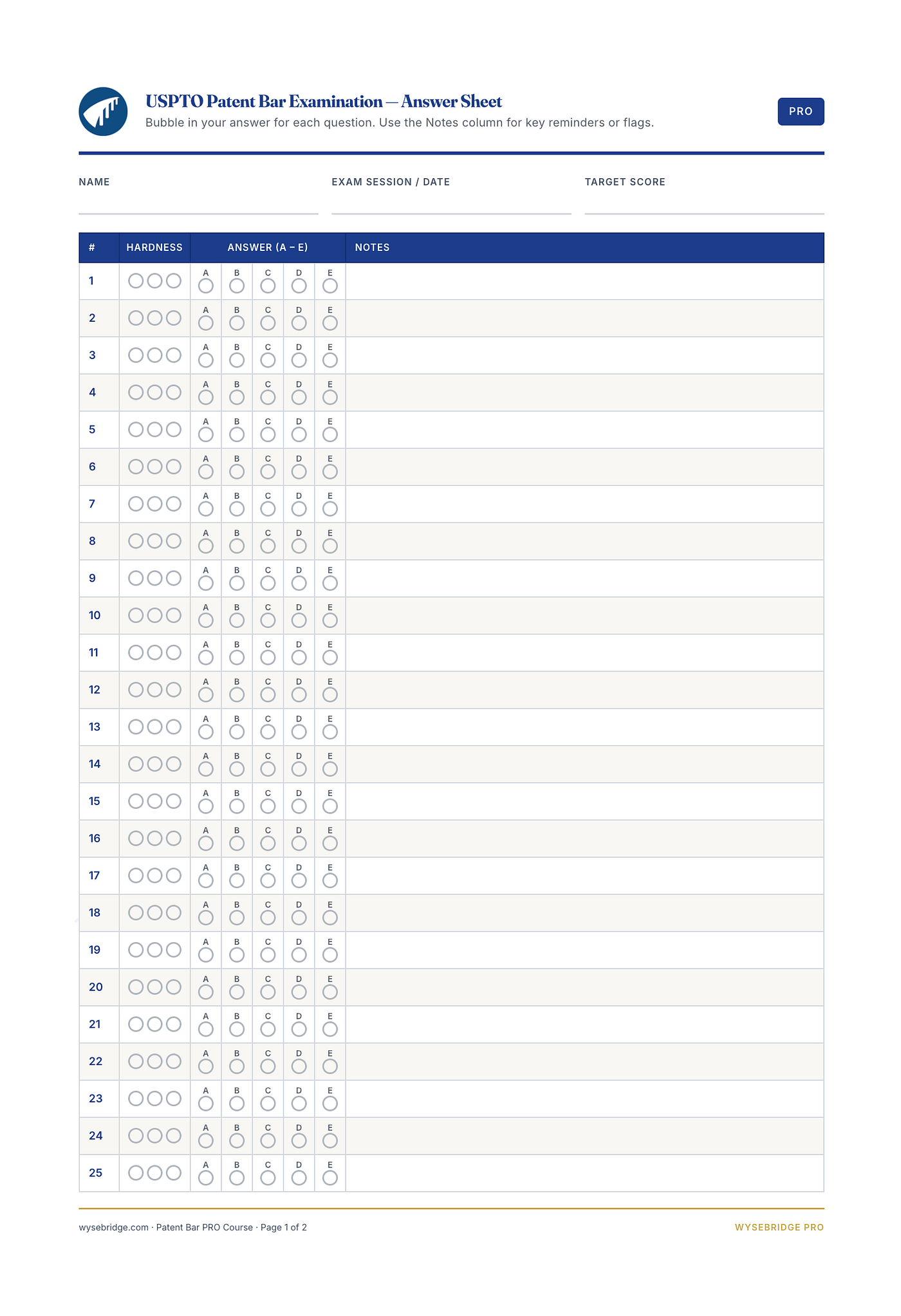
Wysebridge Patent Bar Review — Answer Sheet Template
Simple. But every column is doing work.
Why This Matters More Than It Sounds
The Patent Bar puts unusual pressure on working memory because individual questions are dense. A single question can involve multiple filing dates, a priority claim, a response deadline, a procedural exception, and five answer choices that are all plausible if you’re not careful.
You might open the MPEP, search through a chapter, locate the controlling language, cross-reference an exception, close the reference panel, and return to the question. By then, you’ve probably forgotten which two choices you’d narrowed it to.
That’s not a preparation failure. That’s just what happens when you ask your brain to juggle too many things at once.
Writing it down isn’t a crutch. Researchers call it cognitive offloading — reducing the mental load of a task by transferring information into the physical environment instead of trying to hold it in memory. Your scratch paper becomes an external working memory system, and it lets you show up more fully for each question as you move through the exam.
The Three-Tier System
Not all questions are equal, and treating them as if they are is one of the most common ways candidates lose time.
I recommend classifying questions into three tiers as you work through them:
Tier 1 — You know it. You recognize the issue, understand the rule, you don’t need the MPEP. Answer it and keep moving.
Tier 2 — You have a probable answer, but want to verify. Maybe it’s a deadline you’re 90% sure about, or an exception you want to confirm. Record your best answer, mark it for review, note the MPEP chapter you’ll search on the second pass. This tier is even the “ok, I am somewhat unsure what the answer is, but kinda know it’s a chapter 2100 or a EFS question so I can. batch lookup this with others.” That framing will help you SO much, as the bulk of your questions will proabably fall in this category.
Tier 3 — This one is for the brutal questions. Long fact pattern, lots of dates, multiple layers of analysis required. Record what you know, park it, and come back when you’ve locked down the more accessible points.
The goal of the first pass is to accumulate the points you can earn quickly. Don’t let a Tier 3 question eat 15 minutes while 5 Tier 1s are waiting behind it. Why? Domapine hits of “ok, I got this” payoff for the long haul. Front loading those little anchor points matter congnitaively and impact your ability to stay focused later.
Your MPEP Research Doesn’t Have to Die With Each Question
Here’s something most candidates miss: the MPEP lookup you did for question 7 might answer question 24.
The exam repeatedly tests related rules from different angles. Appeal deadlines, PCT time limits, IDS timing, inventorship requirements — these cluster. If you found the relevant section for one question and wrote it down, you might not have to search again.
Your answer sheet creates a running index of useful discoveries:
A three-word note can save a three-minute search. Over a 50-question session, that adds up.
Use It to Extract and Externalize Fact Patterns
Patent Bar questions often hide the key facts inside a paragraph of narrative. Dates buried mid-sentence. Parties mentioned in passing. A procedural event described two clauses after the one that matters.
Before you answer, pull the controlling facts out of the question and onto the page:
File: 3/15 | Notice: 6/2 | Response: 8/5 | No extension | Assignee unsigned
Or:
A disclosed | B derived from A | Publication before filing | Check §102 exception
Once the facts are on paper, you can apply the law to them instead of burning memory just trying to remember them. You’ve converted a narrative into a structured problem. That shift alone helps you think more clearly.
Keep a Paper Record of the Answer You Intended to Select
The computer records whatever is currently selected on your screen. Your answer sheet records what you consciously decided.
Those two things can diverge. On Prometric’s computer-based testing environment, it’s possible to misclick, accidentally advance past a question, or navigate in a way that deselects an answer.
A paper record gives you a second source of truth. At the end of the session, compare your answer sheet against the review screen. Any discrepancy is a question worth checking before you submit.
You won’t catch a mismatch if you don’t have a record to compare against. And yes, the software has it’s own “answer recorder” version, but you might as well keep your own notes about each question along with the answers for faster cross correlation.
On Changing Answers
You’ve probably heard some version of “never change your first answer.” I want to push back on that directly.
Research doesn’t support it. A well-known 2005 study by Kruger, Wirtz, and Miller — published in the Journal of Personality and Social Psychology — looked at what they called the “first instinct fallacy.” What they found: most answer changes go from wrong to right, and people who change answers tend to improve their scores. The reason the myth persists is that changing a right answer to a wrong one feels worse and sticks in memory longer. The more common scenario — changing a wrong answer to a right one — doesn’t carry that emotional weight, so it doesn’t get remembered.
That doesn’t mean changing answers impulsively is a good idea. It means you shouldn’t protect an answer just because it was first.
The right questions to ask during review:
- Did I misread the question?
- Did I overlook “not,” “except,” or another limiting word?
- Does the MPEP section I found change the analysis?
- Did I select a different choice than the one I actually intended?
- Can I articulate a specific reason the new answer is stronger?
Change it if you have a real reason. Don’t change it because you’re anxious and second-guessing yourself.
Your answer sheet helps here too — because it preserved your original reasoning. You can evaluate new information against what you actually thought, not what you half-remember thinking.
The Template Pays Off Most When the Exam Gets Hard
Every candidate hits a stretch of difficult questions. A cluster of Tier 3s in a row, or a mid-session moment where nothing feels certain.
Without a system, that’s where things unravel. You start second-guessing questions you already answered. You lose track of what you’ve reviewed. You run out of time on the questions that needed the most attention.
With a system, difficult questions have somewhere to go. You’ve parked them with instructions. You know your provisional answer, you know what you need to look up, you know you’ll return. That psychological clarity — “I haven’t abandoned this, I’ve scheduled it” — keeps you moving without the anxiety of feeling like you’re leaving things unfinished.
Your Recommended Layout
For each 50-question session, here’s what I suggest:
Question number (1–50) — One row per question, numbered before you start.
Selected answer — A, B, C, D, or E. Use a question mark for provisional: C?
Tier — 1, 2, or 3. This is your triage system.
Review marker — A checkmark or circle for any question you need to return to.
Notes — Short retrieval cues only. “A/D” (the two choices still in play), “date math,” “check extension,” “possible old law.” Not essays.
MPEP reference — The section or chapter where you found something useful. “1208.03,” “2100,” “700,” “37 CFR 1.56.”
Keep it fast and legible. A complicated template that takes longer to maintain than it saves isn’t a system — it’s a liability.
How to Run the Three Hours
First pass: Move through all 50 questions. Answer what you can resolve quickly (Tier 1). Record provisional answers and mark Tier 2 and 3 questions. Don’t stop the clock for any single question.
Second pass: Return to Tier 2 questions. You know what you need to look up — do targeted MPEP searches. Add references to your sheet.
Third pass: Work the Tier 3 questions with whatever time remains. By now you’ve secured the accessible points, so you can give these your final attention without the rest of the exam piling pressure on them.
Final cross-check: Before you submit, confirm every question has an answer. Compare the review screen against your paper. Resolve every discrepancy. Revisit marked questions only if you now have a concrete reason to change. Don’t make random changes because time is running out.
How Much Can This Actually Recover?
I’m not going to tell you this template will save you exactly <x> amount of questions. No one can honestly make that claim.
What I can do is walk through how avoidable losses tend to accumulate across an exam:
- One answer accidentally changed or misclicked during navigation
- One question unintentionally left blank
- Two questions answered wrong because a key date or fact disappeared in the fact pattern
- Two redundant MPEP lookups that ate time you needed elsewhere
- One marked question forgotten during final review
- One answer left unchanged despite a lookup that showed it was wrong
That’s eight points. Some candidates lose fewer. Some lose more. The point isn’t that the template magically hands you eight answers — it’s that it creates multiple checkpoints where avoidable losses can be caught before they cost you.
Near the passing line, that’s not a small thing. You need 63 correct out of 90 scored. If you’re at 60 without a system, simply catching 3 recovered points get you over the bar. So why wouldn’t you implement a system that can do that for you?
Practice the System Before You Need It
Don’t introduce this at Prometric for the first time on exam day.
The template only saves time once using it has become automatic. That means building it into every timed practice session — your 50-question blocks, your full simulated exams, your MPEP lookup drills.
By exam day you should already know: how large to draw the grid, what abbreviations you use, how you mark each tier, where you write eliminated choices, how you record section numbers, how you run the final cross-check.
None of that should require a decision under pressure. You should be reproducing a familiar tool, not inventing a process in real time.
At Wysebridge, we build exam-day process into the preparation itself — not just the content. The exam simulator and MPEP simulator are built to train the environment and the workflow, not just the law.
For a broader preparation framework: Passing the Patent Bar in 30 Days in 2026
The Points You Stop Giving Away
Most candidates spend their entire prep cycle focused on gaining more knowledge. That matters — you can’t template your way past not knowing the law.
But near the passing line, the difference between passing and retaking often isn’t knowledge. It’s execution. It’s the questions you were capable of answering correctly that slipped through because of disorganization, time pressure, or a moment of inattention.
The answer sheet template is how you protect those questions.
It costs you nothing. You draw a grid on scratch paper. And on an exam where the margin between passing and failing might be two or three questions, that grid is one of the highest-leverage things you can bring into that room.
Bryan Doreian is a co-founder of Wysebridge Patent Bar Review(https://wysebridge.com), a patent bar exam prep platform serving students preparing for the USPTO registration examination.
Sources: USPTO Registration Examination · Prometric Testing Tutorial · Risko & Gilbert: Cognitive Offloading · Kruger, Wirtz & Miller: First Instinct Fallacy · Wieber et al: Implementation Intentions
메타데이터
- post_id
- b2a8e41cabdc
- slug
- the-patent-bar-exam-answer-sheet-template-the-exam-day-system-most-candidates-never-think-to-build-b2a8e41cabdc
- url
- https://medium.com/@bryan_20162/the-patent-bar-exam-answer-sheet-template-the-exam-day-system-most-candidates-never-think-to-build-b2a8e41cabdc
- canonical_url
- https://medium.com/@bryan_20162/the-patent-bar-exam-answer-sheet-template-the-exam-day-system-most-candidates-never-think-to-build-b2a8e41cabdc
- author_url
- https://medium.com/@bryan_20162
- status
- ok
- fetched_at
- 2026-07-09 17:36:58


