OpenStack Barbican — Secure Secret & Key Management
Centralized Key Management Service (KMS) for Secure Cloud Applications
OpenStack Barbican — Secure Secret & Key Management
Centralized Key Management Service (KMS) for Secure Cloud Applications
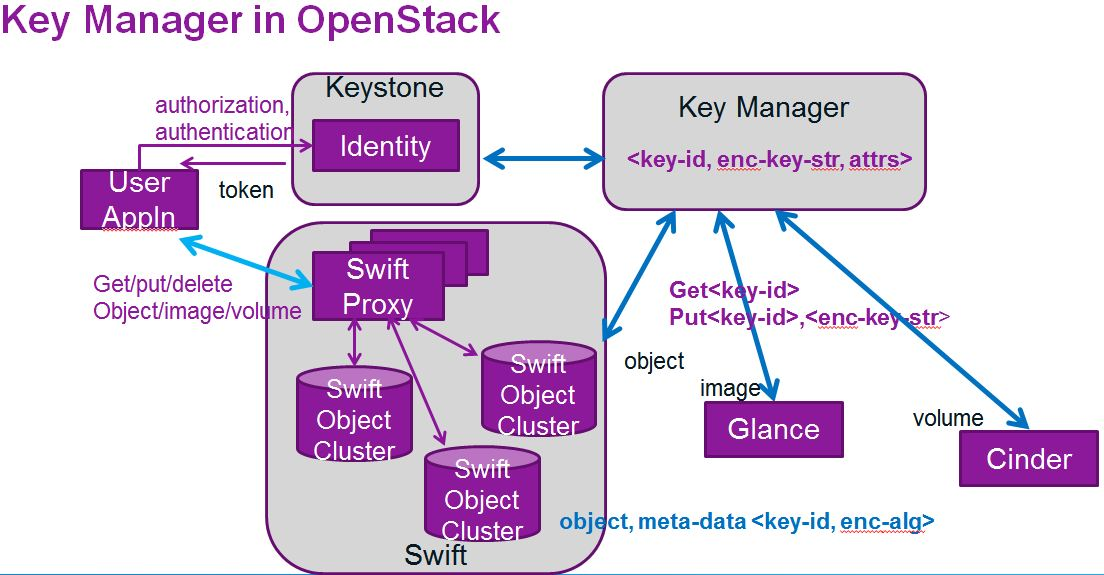
Image from ChatGPT

Image created using ChatGPT
What Is OpenStack Barbican?
OpenStack Barbican is the Key Management Service (KMS) of OpenStack. It provides a secure, centralized vault to store, manage, and control access to:
- Encryption keys
- Passwords
- API tokens
- Certificates (SSL/TLS)
- Application secrets
Barbican integrates tightly with OpenStack services and can also be used by external applications.
Why Barbican Is Needed (Problem It Solves)
Common Security Problems
❌ Secrets hardcoded in config files ❌ Plain-text passwords in repositories ❌ No key rotation or auditing ❌ Poor tenant isolation ❌ Compliance and audit failures
How Barbican Solves This
✅ Centralized secret storage ✅ Strong access control via Keystone ✅ Per-project (tenant) isolation ✅ Audit logs for compliance ✅ Backend support for HSMs & Vault
Barbican brings enterprise-grade secrets management to OpenStack environments.
Core Use Cases of Barbican
1️⃣ Secure Secret Storage
Store sensitive values securely instead of config files.
Examples
- Database root password
- Jenkins API token
- Application API keys
2️⃣ Encryption Key Management
Manage encryption keys for OpenStack services.
Examples
- Cinder volume encryption
- Swift object encryption
3️⃣ Certificate Lifecycle Management
Store and retrieve:
- SSL/TLS certificates
- Private keys
- Certificate bundles
4️⃣ Secure Application Configuration
Applications dynamically fetch secrets from Barbican at runtime.
✔ No secrets on disk ✔ Easy rotation
5️⃣ Native OpenStack Integration
Barbican integrates with:
- Keystone (authentication)
- Cinder (block storage)
- Nova (compute)
- Glance (images)
- Swift (object storage)
- Octavia (load balancer)
6️⃣ Multi-Tenant Isolation
Each OpenStack project has isolated access to its own secrets.
7️⃣ Centralized Policy & Auditing
- Track who accessed which secret
- Support compliance (PCI-DSS, ISO, SOC2)
Barbican Architecture Overview

Image created using ChatGPT
Key Components
- Barbican API
- Keystone Authentication
- Secret Store Backend (Database, HSM, Vault)
- Policy Engine
Practical Examples (CLI & Code)
Example 1: Store and Retrieve a Secret
openstack secret store \
  --name "app_api_token" \
  --payload "abcd1234xyz"
Retrieve it:
openstack secret get <secret-id> --payloadExample 2: Store an Encryption Key
openstack secret store \
  --name "db_encryption_key" \
  --payload "MyStrongEncKey"
Example 3: Store SSL Certificate & Private Key
openstack secret store --name "my_cert" --payload "$(cat cert.pem)"
openstack secret store --name "my_key" --payload "$(cat private.key)"
Create a container:
openstack container create --name "tls_bundle"
openstack container secret add tls_bundle my_cert
openstack container secret add tls_bundle my_key
Example 4: Application Integration (Python)
import requests

BARBICAN_URL = "https://barbican.example.com/v1/secrets/abcd-uuid"
TOKEN = "keystone-auth-token"

headers = {"X-Auth-Token": TOKEN}
resp = requests.get(f"{BARBICAN_URL}/payload", headers=headers)

db_password = resp.text.strip()
print("Using secure password:", db_password)
✔ Secrets never stored locally ✔ Fetched securely at runtime
Example 5: Cinder Volume Encryption with Barbican
[cinder.conf]
[barbican]
auth_endpoint = https://keystone.example.com/v3
barbican_endpoint = https://barbican.example.com/v1
Create encrypted volume type:
openstack volume type create encrypted-volume

openstack volume type set encrypted-volume \
  --encryption-type \
  provider=LuksEncryptor \
  cipher=aes-xts-plain64 \
  key_size=256 \
  control_location=front-end
Advanced Use Cases
- Automatic key rotation
- Integration with HSM / KMIP
- Multi-region key federation
- Using Barbican for non-OpenStack applications
- Secrets-as-a-Service platform
Benefits of Using Barbican
✔ Centralized secrets management ✔ Keystone-integrated access control ✔ Tenant isolation ✔ Compliance & auditing ✔ Backend extensibility (HSM, Vault, Dogtag)
How to Set Up OpenStack Barbican (Step-by-Step)
Prerequisites
- Working OpenStack environment
- Keystone installed
- MySQL / MariaDB
- RabbitMQ
- Python 3
Step 1: Install Barbican
sudo dnf install -y openstack-barbican-api \
openstack-barbican-worker \
openstack-barbican-keystone-listener
Step 2: Configure Database
mysql -u root -p
CREATE DATABASE barbican;
GRANT ALL PRIVILEGES ON barbican.* TO 'barbican'@'localhost' IDENTIFIED BY 'password';
Edit config:
/etc/barbican/barbican.conf

[database]
connection = mysql+pymysql://barbican:password@controller/barbican
Step 3: Configure Keystone Authentication
[keystone_authtoken]
www_authenticate_uri = http://controller:5000
auth_url = http://controller:5000
memcached_servers = controller:11211
project_domain_name = Default
user_domain_name = Default
project_name = service
username = barbican
password = password
Step 4: Initialize Database
su -s /bin/sh -c "barbican-manage db upgrade" barbicanStep 5: Start Services
systemctl enable --now openstack-barbican-api
systemctl enable --now openstack-barbican-worker
systemctl enable --now openstack-barbican-keystone-listener
Step 6: Verify Installation
openstack secret list✔ Barbican is ready for use
Real-World Use Cases
✔ Secure CI/CD pipelines ✔ Encrypted storage backends ✔ Enterprise OpenStack clouds ✔ Financial & healthcare workloads ✔ Compliance-driven environments
Key Points
- Barbican is OpenStack’s enterprise secrets manager
- Eliminates insecure secret handling
- Enables encryption, compliance, and auditing
- Integrates seamlessly with OpenStack services
- Suitable for cloud-native and legacy applications
Final Thoughts
OpenStack Barbican is a critical security component for any serious OpenStack deployment. Mastering it proves expertise in cloud security, key management, and enterprise architecture.
Thank you..! 😊👏
If you found this article helpful, click the clap button and drop a comment. 😊 Follow for more DevOps, Linux & Cloud tutorials.
Edited by: Wandering Mind & Ume Zainab
메타데이터
- post_id
- b2aed0bad1b2
- slug
- openstack-barbican-secure-secret-key-management-b2aed0bad1b2
- url
- https://medium.com/write-a-catalyst/openstack-barbican-secure-secret-key-management-b2aed0bad1b2
- canonical_url
- https://medium.com/write-a-catalyst/openstack-barbican-secure-secret-key-management-b2aed0bad1b2
- author_url
- https://medium.com/@tushar.jadhav29
- status
- ok
- fetched_at
- 2026-07-07 22:27:43