Scaling Temporal Workers to Process 10,000 Requests in 7 Minutes
Problem Statement
Scaling Temporal Workers to Process 10,000 Requests in 7 Minutes
Problem Statement
Suppose we need to process 10,000 RSS/XML requests within 7 minutes.
Each request goes through three activities:
- Fetch RSS/XML
- Parse XML
- Generate Summary
The challenge is determining:
- How many workers are needed?
- How should workers be organized?
- When should we use async, threads, or processes?
- How many instances are required?
- How can the workflow scale without hitting Temporal limitations?
Solution
Temporal Architecture
Temporal allows:
- Multiple Task Queues
- Multiple Workers per queue
- Multiple Worker instances for horizontal scaling
Example:
Fetch Queue      -> 5 workers
Parse Queue      -> 5 workers
Summary Queue    -> 5 workers
CPU vs IO
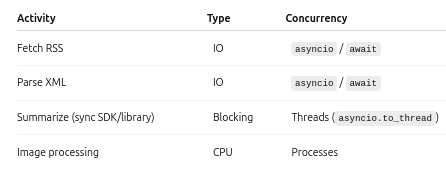
So:
- IO-bound tasks →
asyncio(await,asyncio.gather) - Blocking synchronous libraries → Threads
- Heavy CPU-bound tasks → Processes
Threads
If the summarizer uses a blocking library:
await asyncio.to_thread(summarize)A worker can execute many thread jobs concurrently.
Python’s default thread pool size is approximately:
min(32, os.cpu_count() + 4)(or it can be configured manually.)
Worker Deployment
A single machine can run multiple workers.
Example:
Instance 1
 ├── Fetch Worker
 ├── Parser Worker
 └── Summary Worker

Instance 2
 ├── Fetch Worker
 ├── Parser Worker
 └── Summary Worker
or
Instance 1
 └── Fetch Workers

Instance 2
 └── Parser Workers

Instance 3
 └── Summary Workers
Additional instances are added when one machine cannot provide enough CPU, memory, or network throughput.
Throughput Calculation
Requirement:
- Process 10,000 requests
- Within 7 minutes
7 minutes = 420 seconds

10000 / 420
≈ 23.8 req/sec
≈ 24 req/sec
If each fetch or parse takes 4 seconds on average:
Using Little’s Law:
Concurrency
= Arrival Rate × Service Time
= 24 × 4
= 96
So approximately 96 concurrent fetches are required.
Worker Count
If one worker can handle:
20 concurrent fetchesThen:
96 / 20
≈ 4.8
Provisioning 5 workers provides approximately 100 concurrent fetches, satisfying the required concurrency.
CPU Cores
For CPU-bound activities:
Worker 1 -> CPU intensive
Worker 2 -> CPU intensive
Worker 3 -> CPU intensive
Worker 4 -> CPU intensive
Then:
4 workers
≈ 4 CPU cores
For IO-bound workers (HTTP requests, databases, S3, etc.), one CPU core is not required per concurrent job because workers spend most of their time waiting for I/O. A few CPU cores can support hundreds or even thousands of concurrent async operations depending on the workload.
Final Architecture
Temporal

                  ┌────────────────────┐
                  │     Main Workflow  │
                  └─────────┬──────────┘
                            │
               ┌────────────┴────────────┐
               │                         │
         Child Workflow 1          Child Workflow 2
               │                         │
        ┌──────┼────────┐         ┌──────┼────────┐
        │      │        │         │      │        │
       Fetch   Parse   Summary   Fetch   Parse   Summary
      Queue   Queue    Queue     Queue   Queue    Queue
        │       │        │         │       │        │
     Async   Async   Threads    Async   Async   Threads
Fetch Queue
- 5 async workers
- 20 concurrent activities each
- ≈100 concurrent fetches
Parser Queue
- 5 async workers
- 20 concurrent activities each
- ≈100 concurrent parses
Summary Queue
- 5 workers
- Blocking summarizer executed using
asyncio.to_thread() - Thread pool ≈32 threads per worker
- ≈160 concurrent summaries
Deploy workers across one or more instances based on CPU, memory, and network usage, and scale instances horizontally as resource utilization increases.
Improvements for Production
1. Child Workflows
Instead of processing all 10,000 requests in a single workflow, split them into batches using Child Workflows.
Example:
Main Workflow
├── Child Workflow (1-1000)
├── Child Workflow (1001-2000)
├── Child Workflow (2001-3000)
...
├── Child Workflow (9001-10000)
Benefits:
- Better parallelism
- Smaller workflow histories
- Easier retries
- Better fault isolation
2. Continue-As-New
Long-running workflows continuously accumulate history events.
Use Continue-As-New after processing a batch to start a fresh workflow execution while preserving progress.
Benefits:
- Prevents oversized workflow histories
- Faster workflow replay
- Lower Temporal server overhead
- Improved long-running workflow performance
3. Store Large XML Payloads in Amazon S3
RSS/XML documents can become large, and sending entire payloads through Temporal increases workflow history size.
Instead:
- Fetch the XML
- Upload the XML to Amazon S3
- Pass only the S3 object key or URL through the workflow
- Download the XML inside activities when required
Benefits:
- Keeps Temporal payloads small
- Reduces workflow history growth
- Avoids payload size limitations
- Improves replay performance
- Supports much larger datasets efficiently
Summary
By combining:
- Multiple Task Queues
- Dedicated Workers
- Async IO for network-bound activities
- Threads for blocking libraries
- Processes for CPU-intensive work
- Child Workflows
- Continue-As-New
- Amazon S3 for large payload storage
Temporal workflows can efficiently scale to process 10,000+ requests within minutes while remaining reliable, fault-tolerant, and production-ready.
메타데이터
- post_id
- b2c29c22b0cb
- slug
- scaling-temporal-workers-to-process-10-000-requests-in-7-minutes-b2c29c22b0cb
- url
- https://towardsdev.com/scaling-temporal-workers-to-process-10-000-requests-in-7-minutes-b2c29c22b0cb
- canonical_url
- https://towardsdev.com/scaling-temporal-workers-to-process-10-000-requests-in-7-minutes-b2c29c22b0cb
- author_url
- https://medium.com/@coderraj07
- status
- ok
- fetched_at
- 2026-07-10 22:02:13


